
Water does not need a dramatic entrance to ruin a house. It can come in sideways during a storm, rise through a basement drain, or drip from a supply line while everyone is at work. The weak point in many smart home storm plans is that they stop at a phone alert: a sensor gets wet, a notification appears, and the house keeps leaking until someone sees the message, gets home, and reaches the shutoff valve.
That is too thin a defense for a common loss. Water damage and freezing is the second leading cause of property damage claims, and one in 67 insured homes files a water or freezing damage claim in a year, according to the Insurance Information Institute claim-frequency data.[1] Basement risk is similarly ordinary, though the often-cited figures deserve a caveat: Basement Defender cites an ipropertymanagement statistic that 98% of basements have experienced some water damage and gives an average restoration cost of $4,250, but that is a single-source chain rather than a broad independent benchmark.[2]
The useful question, then, is not which single smart device is best. It is how to make smart home devices for storm and flood preparedness behave like a small protection system: detect water, stop water when possible, watch the sump pump, read local weather conditions, keep the critical pieces powered, and leave a record of what happened.
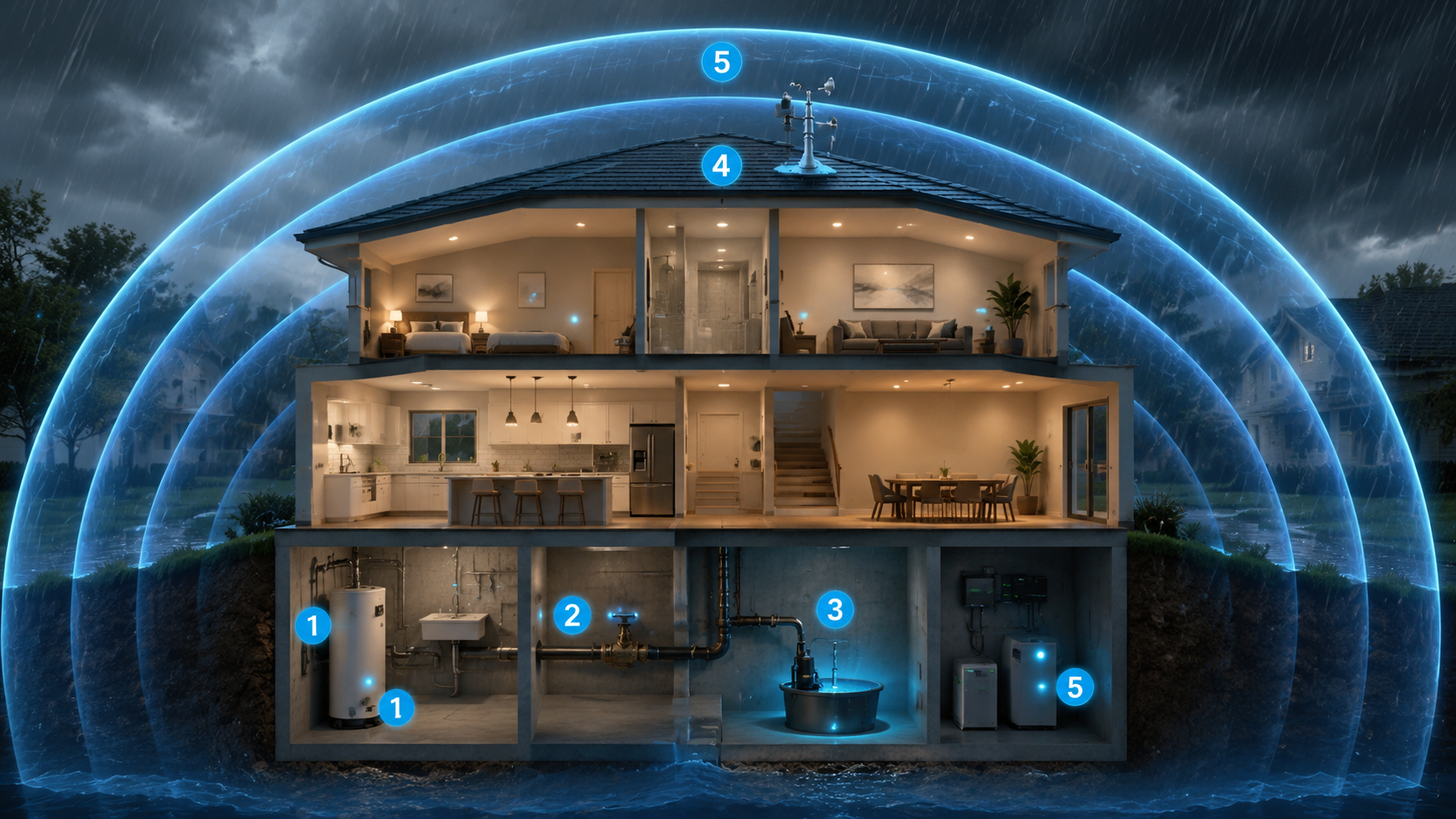
Start With the Whole System, Not the Gadget List
A storm-ready smart home has several jobs, and they should not all depend on the same internet connection. The leak sensor’s job is to notice water where water should not be. The valve’s job is to close the main line before a supply leak keeps feeding itself. The sump monitor’s job is to report whether the basement’s last line of defense has power, is cycling normally, or is seeing high water. The weather station’s job is to give a nearer view of rain, wind, and pressure than a regional forecast can. Backup power’s job is to keep the most important pieces alive after the easy conditions are gone.
| Layer | What it must do | What not to rely on |
|---|---|---|
| Leak sensors | Detect water fast in the places most likely to fail | One sensor in a hallway as a whole-home plan |
| Automatic shutoff | Close the main water supply when a trusted leak signal appears | A phone alert that waits for a person |
| Sump pump monitor | Report power loss, high water, and abnormal pump behavior | Assuming the pump works because it worked last season |
| Weather station | Track local rainfall, wind, and pressure trends | Treating every weather trigger as a command to shut systems down |
| Backup power | Keep hubs, valves, routers where needed, and monitors running | Battery assumptions that ignore cold garages and basements |
| Notifications | Tell people what happened and when | Calling notifications the protection itself |
If the budget has to be staged, install in the order that reduces the most avoidable damage first: leak sensors in the highest-risk locations, then an automatic shutoff valve, then sump pump monitoring, then local weather monitoring and power hardening. Weather data is useful, but it does not close a valve under a leaking water heater. A shutoff valve can.
Put Leak Sensors Where Water Starts, Not Where It Becomes Obvious
The first sensors belong where a small failure can become a long leak: under sinks, behind toilets, beside the water heater, near the washing machine, by the dishwasher, under the refrigerator water line, near the main shutoff, and at low basement points. In a finished basement, add sensors near the sump pit, floor drain, and any wall that has shown seepage before. The best location is often not the prettiest one. It is the spot that gets wet before the drywall does.
The current leak-detector market splits into convenience, range, and cost. Wirecutter’s 2026 testing names the D-Link SW-A11KT as its top pick at about $80, with water detection in less than one second, a 73 dB alarm, and support for Google Home and IFTTT. Its runner-up, the YoLink Water Leak Sensor 4 kit, is about $50, uses LoRa for a quoted quarter-mile range, and has a 105 dB alarm. Its budget pick, the Kidde Water Leak + Freeze Detector, is about $30, needs no hub, and has a 94 dB alarm.[3]
Those differences matter in a storm setup. A loud standalone alarm can be enough for a laundry closet if someone is usually home. A long-range sensor makes more sense in a detached garage, far basement corner, or outbuilding. A Wi-Fi sensor is easy to add, but Wi-Fi is not the strongest foundation for the action that closes the water main during an outage. That does not make Wi-Fi sensors useless; it means they fit better as alert devices unless they are part of a system with local control.
- Use rope-style probes or remote probes where the sensor body should stay dry but the floor should be watched.
- Keep at least one sensor near the water heater and one near the washing machine before adding lower-risk rooms.
- Label each sensor in the app by the exact location, such as “Basement sump left side,” not “Leak Sensor 4.”
- Test sensors on the floor material where they will live; tile, concrete, and uneven utility-room floors do not always wet contacts the same way.
The Valve Is the Difference Between an Alert and an Intervention
A leak sensor can tell the truth and still fail to protect the house if nobody can act on it. The automatic shutoff valve is the part of the system that changes the physical condition of the home. For storm and flood preparedness, that matters most for plumbing leaks: burst lines, failed appliance hoses, water heaters, toilet supply lines, and other pressurized failures. It will not stop creek water, storm surge, or groundwater coming through a foundation, but it can stop the house from feeding its own loss.
The main choices are not just expensive versus cheap. They change installation, learning time, offline behavior, and how much plumbing intelligence the system claims to provide. Prices here are mid-2026 figures and can shift.
| Device | Best fit | Important trade-off |
|---|---|---|
| Phyn Plus 2nd Gen | Premium whole-home monitoring with ultrasonic flow sensing and carrier recognition | About $580 and a 1,000-hour learning phase before its pattern recognition is mature |
| Moen Flo | Homeowners who want a simpler app, robocall alerts, and a shorter learning period | About $549–649 and uses a turbine sensor |
| Zooz Titan Valve Actuator | Lower-cost shutoff actuation and stronger local/offline potential when paired correctly | About $130, but the broader system design matters more because it is an actuator, not a full premium monitor |
Master Plumbers’ June 2026 comparison describes Phyn Plus 2nd Gen as using ultrasonic flow sensors with no moving parts, being recognized by 15 insurance carriers, and requiring a 1,000-hour learning phase. The same comparison describes Moen Flo as using a turbine sensor, offering a simpler app and robocall alerts, and needing a 7–10 day learning period. It describes the Zooz Titan Valve Actuator as a roughly two-minute install on ball valves up to 1.25 inches, with Z-Wave Long Range support over 1,000 feet and the ability to function offline when paired with a wired leak detector and backup battery pack.[4]
That learning-period detail is not fine print. A monitor that “learns your plumbing” is not instantly wise on day one. During the learning period, treat automatic shutoff rules conservatively, keep alerts on, and review any false positives before trusting the device with unattended shutoff decisions. The simpler actuator path has a different caution: it can be very effective, but only if the sensor, hub, automation, valve motor, and power source are designed as one loop.
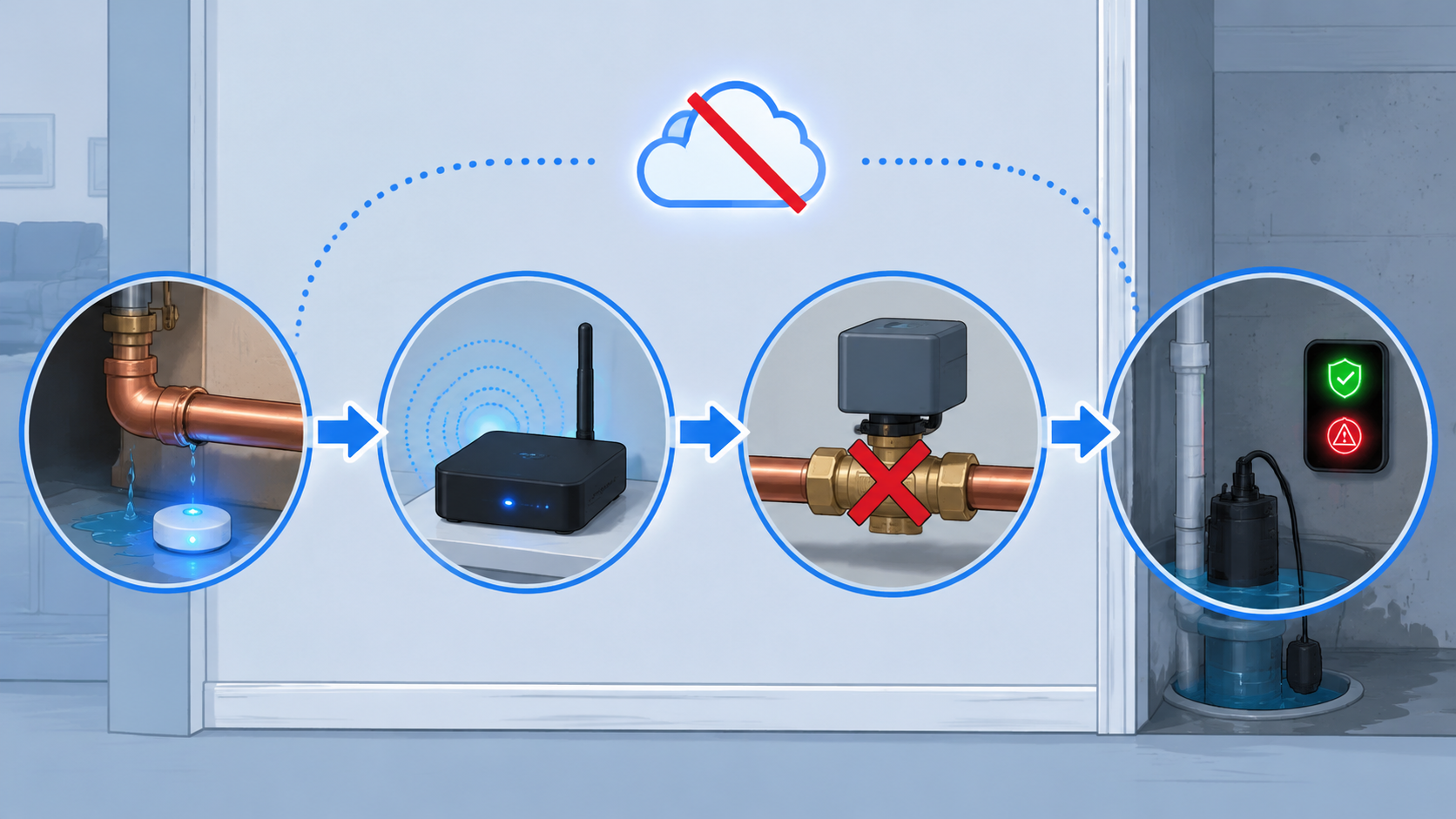
Build the Leak-to-Shutoff Rule Locally if You Can
The cleanest version of the protection loop is simple: sensor detects water, local hub receives the signal, valve closes, notification goes out. The Z-Wave Alliance describes this kind of Z-Wave leak-sensor and valve-actuator setup as able to work independently of Wi-Fi and cloud services, so the shutoff can still happen when the homeowner is away, asleep, or the internet is down.[5]
That does not mean every homeowner should casually build a local Z-Wave or Home Assistant system on a Saturday afternoon. SmartThings, Home Assistant, and Hubitat can support local processing for critical automations, while Alexa and Google routines are cloud-dependent and can fail when the internet is down, according to smart home platform reporting and winter-storm IoT guidance.[6][7] The distinction is not about hobbyist purity. It is about whether the valve closes when the broadband line is already out.
A beginner-friendly setup can still be worthwhile: put Wi-Fi leak sensors in the right places, turn on every audible alarm, and use app notifications to catch small leaks early. Just do not call that the final layer. When you add an automatic shutoff, make the shutoff rule as local as your skill level and equipment allow, and document which parts still depend on the cloud.
- Name the triggering sensors: water heater, washer, dishwasher, refrigerator line, sump-area floor, and main shutoff area.
- Set those sensors to close the main valve immediately when wet, unless the manufacturer recommends a different safety sequence.
- Send notifications after the valve command, not instead of it.
- Add a manual override that every adult in the home can find during a false alarm or repair.
- Keep a written note near the valve explaining how to reopen it and what to check first.
Do Not Leave the Sump Pump as a Silent Assumption
The sump pump is easy to trust until the hour it matters. Basement Defender, Moen, and Ring materials frame sump pump failure as a leading cause of basement flooding, and smart sump pump monitors are designed to report conditions such as high water, power loss, and pump cycle activity.[2] The practical value is not that the monitor makes the pump stronger. It makes failure harder to miss.
A monitor belongs where it can identify the problem before the basement floor becomes the sensor. Look for power-outage alerts, water-level monitoring, and pump-cycle tracking. A pump that cycles constantly during rain, fails to cycle during rising water, or loses outlet power during a storm is telling you something different in each case. The monitor should preserve those distinctions instead of reducing all of them to “basement alert.”
If you already have a battery backup sump system, the smart monitor still has a job: report when the backup takes over, when the battery needs service, or when water is rising faster than the pump can handle. If you do not have battery backup, the monitor is warning you about a gap, not filling it.
Use Weather Data as Early Warning, Not as a Magic Trigger
A home weather station can give a storm plan more local timing. AcuRite’s July 2026 severe-weather guidance says stations such as Ambient Weather WS-2000, AcuRite Atlas, and Tempest track barometric pressure drops, wind speeds, and rainfall accumulation that general forecasts can miss, giving roughly 10–30 minutes of additional preparation time.[8] That is useful time for checking drains, moving items off a basement floor, confirming the sump backup, or making sure someone saw the alert.
It is not a promise that every storm becomes predictable. Rainfall at your roof is not the same as creek behavior upstream, municipal drainage capacity, or storm surge. Weather-station automations should mostly be advisory: increase alert urgency when rain accumulation rises quickly, remind you to check the sump pit during sustained rainfall, or turn on exterior lighting before severe wind arrives. If you connect weather triggers to protective actions, keep those actions low-regret unless the processing is local and the consequence is well understood.
For severe-weather alert patterns beyond flooding, a separate tornado-warning alert setup can complement this system, but it should not be mixed into the leak-to-shutoff rule. Plumbing water and weather warnings need different responses.
Power and Cold Decide Whether the System Survives the Storm
Backup power is where a tidy app diagram often meets the basement floor. The devices that matter most are the hub or controller that runs the shutoff rule, the valve or actuator, the sump monitor, the router if notifications still need internet, and any bridge required by the sensors. If the leak-to-valve automation is local, the router is less important for action and more important for reporting. If the automation is cloud-dependent, the router and internet connection become part of the safety chain.
Cold makes the power plan less forgiving. TechTimes’ January 2026 winter-storm guidance reports that standard IoT sensors lose accuracy below 50°F, that battery drain accelerates in extreme cold, and that lithium batteries and IP67 or IP68 enclosures are needed for outdoor and garage sensors. It also notes that smart thermostats need UPS or generator backup to function during storm-related outages.[7]
Battery expectations also depend on radio choice. Zigbee and Z-Wave leak sensors typically last 3–5 years on one battery, while Wi-Fi sensors usually need more frequent replacement; in freezing conditions, standard alkaline batteries can lose 50% of capacity, making lithium batteries the safer choice for cold locations.[7][9]
| Location | Power choice | Reason |
|---|---|---|
| Conditioned utility room | Normal batteries plus scheduled testing | Stable temperatures make manufacturer battery estimates more believable |
| Garage or crawlspace | Lithium batteries and rated enclosures | Cold and moisture punish ordinary sensor assumptions |
| Network hub or smart home controller | UPS | Keeps local automations alive during short outages |
| Valve actuator | Manufacturer-supported battery pack or backup plan | The valve must be able to move when the command arrives |
| Sump pump | Dedicated sump battery backup or generator strategy | A smart monitor reports failure; it does not pump water by itself |
Notifications Should Create a Record
Notifications still matter. They wake people, document timing, and help you explain what happened to a plumber, insurer, or neighbor with a key. The mistake is assigning them the job of stopping the leak. A useful notification says which sensor tripped, whether the valve closed, whether the sump monitor sees high water or power loss, and whether the system is on backup power.
Send alerts to more than one person, but avoid turning every weather change into an emergency. Leak detected near water heater is urgent. Valve failed to close is urgent. Sump high-water condition is urgent. Rainfall increasing is advisory until another condition confirms a household risk.
Insurance Discounts Are Possible, Not Automatic
Smart water protection can be worth mentioning to your insurer, especially when it includes automatic shutoff rather than alerts alone. The Z-Wave Alliance and Master Plumbers materials identify carriers offering discounts or rebates for smart water leak detection and automatic shutoff, including State Farm, USAA, Liberty Mutual, Nationwide, Allstate, Farmers, Amica, Travelers, Chubb, AIG, and Pure Insurance.[5][4] State Farm also publishes consumer guidance on whole-house water leak detection systems.[10]
Do not assume the discount exists for your house because a brand page says an insurer has participated somewhere. Availability varies by state, policy, carrier, device type, installation method, and whether the system only detects leaks or also shuts off water. Call the agent with the configured device list: sensor model, shutoff model, whether it is professionally installed, whether the shutoff is automatic, and whether the automation works locally during an internet outage.
A Sensible Installation Order
The least glamorous order is the one most likely to prevent damage. Start where water already has a path.
- Place leak sensors at the water heater, washing machine, dishwasher, refrigerator line, under sinks, behind toilets, and near the sump pit or basement low points.
- Add an automatic shutoff valve or actuator at the main water line, confirming that the valve can fully close and reopen before connecting automations.
- Create the leak-to-shutoff automation locally if the platform and hardware support it; otherwise, treat cloud routines as alert layers until you upgrade.
- Install sump pump monitoring with power, high-water, and cycle alerts, then decide separately whether the pump itself needs battery backup.
- Add a home weather station or weather-responsive alerts for local rainfall, wind, and pressure trends.
- Put the controller, bridges, valve power, and critical network gear on appropriate backup power.
- Document device names, battery types, replacement dates, valve location, manual override steps, and insurer contact notes.
Test It Like a Leak, Not Like an App Feature
The system is not finished when every device appears online. It is finished when a wet sensor produces the intended physical result.
- Wet each leak sensor with a small amount of water and confirm the correct room name appears in the alert.
- Trigger the shutoff rule and confirm the main valve actually closes, then verify the manual reopen process.
- Disconnect internet service during a controlled test and confirm whether the sensor-to-valve loop still works.
- Unplug the hub or bridge from wall power and confirm the UPS or battery plan keeps the critical automation alive.
- Test the sump monitor for power-loss and high-water alerts according to the manufacturer’s procedure.
- Review weather alerts separately and make sure advisory weather triggers do not masquerade as confirmed flooding.
- Check outdoor, garage, and crawlspace sensors for lithium batteries and IP67 or IP68-rated enclosures where cold and moisture demand them.
Put the maintenance routine on the calendar: quarterly sensor tests, semiannual valve exercise, sump checks before storm season, battery review before winter, and an annual call or email to the insurer with the current device list. The moment to discover a dead coin cell or a stuck valve is during a test, not while water is spreading under a wall.
References
- Water and freezing damage claim frequency — Insurance Information Institute
- Smart Sump Pump Monitor Alarm System — Basement Defender — https://basementdefender.com/learning-center/smart-sump-pump-monitor-alarm-system-all-you-need-to-know/
- The 3 Best Smart Water-Leak Detectors of 2026 — Wirecutter — https://www.nytimes.com/wirecutter/reviews/the-best-smart-leak-detector/
- Best Smart Water Shutoffs and Monitors, Ranked by Plumbers — Mother (Master Plumbers) — https://www.callmother.com/blogs/best-smart-water-shutoffs-monitors
- Don’t Get Soaked: Embrace Smart Flood Protection — Z-Wave Alliance — https://z-wavealliance.org/dont-get-soaked-embrace-smart-flood-protection/
- The Best Smart Home Platforms of 2026 — Security.org — https://www.security.org/smart-home/best/
- Smart Home Winter Storm Preparedness — TechTimes — January 26, 2026 — https://www.techtimes.com/articles/314290/20260126/smart-home-winter-storm-preparedness-how-iot-sensors-freeze-why-your-thermostat-needs-backup.htm
- How a Home Weather Station Helps Prepare for Severe Weather — AcuRite — July 2026 — https://www.acurite.com/blogs/why-weather-matters/how-a-home-weather-station-helps-prepare-for-severe-weather
- Best Smart Water Leak Sensors 2026 — SmartHomeCompared — https://smarthomecompared.com/water-leak-sensors
- Whole House Water Leak Detection Systems — State Farm — https://www.statefarm.com/simple-insights/residence/water-leak-detection
Community Tips
Share platform-specific variations, steps that have changed after app updates, or tips that helped your installation succeed.
Comments
Join the discussion with an anonymous comment.