
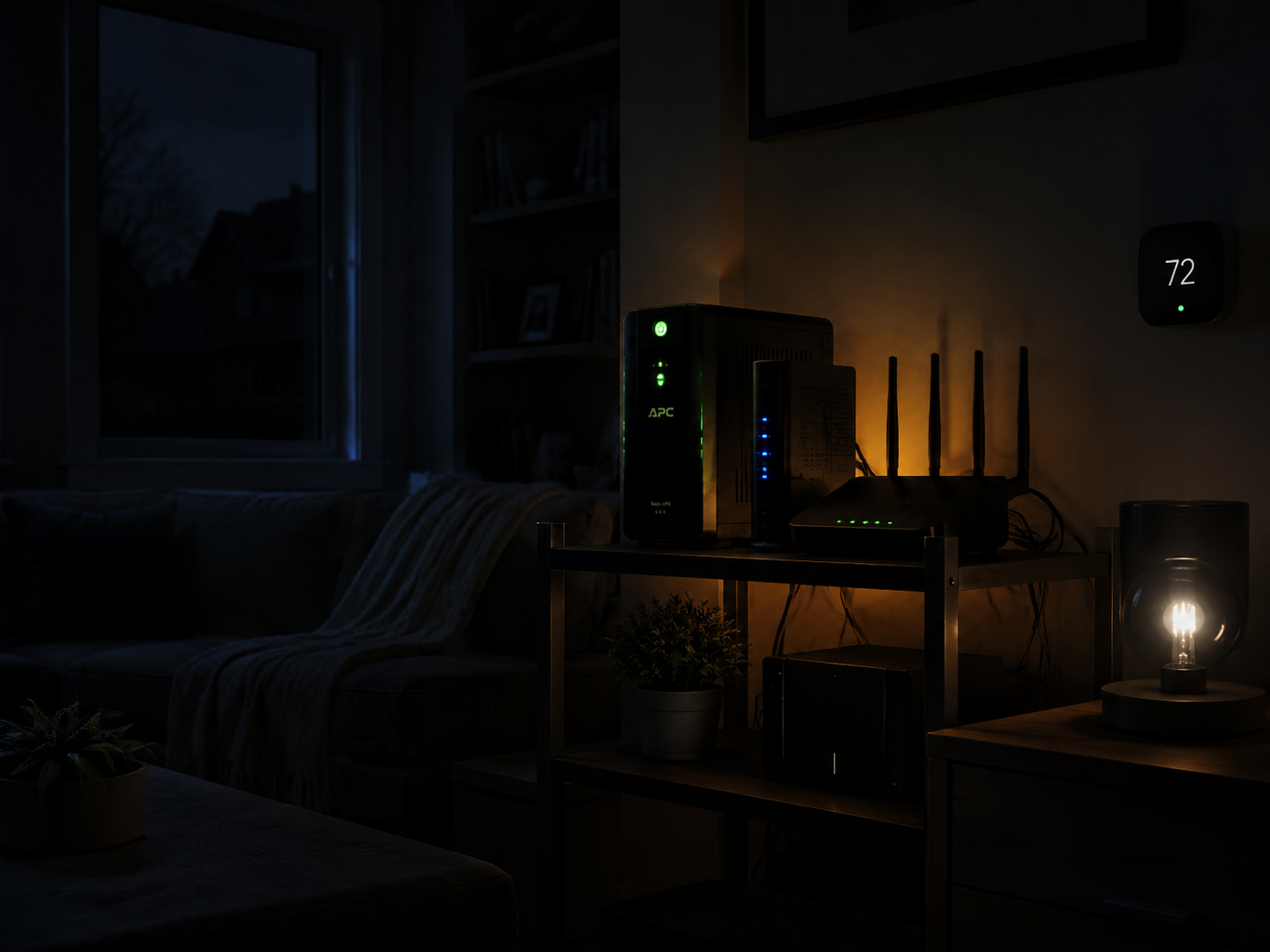
The blackout does not start with the fridge. In a smart home, it usually starts on the little shelf nobody looks at: modem, router, mesh node, bridge, hub, PoE switch if you have one. The lights go out, a few battery-powered locks and sensors may still be alive, and then the coordination layer disappears. Your phone drops off WiFi. The camera app spins. Cloud-connected devices cannot call home. Automations scheduled through a hub miss their moment because the hub is down or the network path is gone.
That is the practical question behind smart home backup power during blackouts: not “How do I run my entire house forever?” but “What breaks first, and what single backup choice prevents the most breakage?” For most homes, the answer is much smaller than a wall full of batteries. Put the network stack on battery first.
What actually has to stay on
“Keeping the smart home running” sounds broad until the power fails. Then it becomes a short list.
- Internet path: modem, ONT if you have fiber, router, and any required mesh node.
- Control path: smart home hub, bridge, or controller for Zigbee, Z-Wave, Matter, Thread, HomeKit, SmartThings, Hubitat, or Home Assistant.
- Security path: cameras, doorbell, alarm base station, smart lock bridge, or cellular backup module where used.
- Useful loads: a few lamps, phone charging, medical or accessibility devices, and eventually refrigeration.
- Comfort loads: TVs, desktop PCs, gaming consoles, HVAC, laundry, ovens, and other loads that change the budget immediately.
The first two paths matter more than their wattage suggests. A router and hub may be tiny loads, but they decide whether the rest of the system still behaves like one system. If they die, battery-powered sensors become isolated gadgets. Smart bulbs on dead wall circuits are gone either way, but battery sensors, locks, cloud cameras with their own power, and automations that depend on presence or security state all lose usefulness when the network disappears.
There is also a recovery problem. Community reports from SmartThings users describe Zigbee mesh disruption or device reconnection headaches after power loss, especially when repeaters drop and come back unevenly. That is a warning sign, not a measured failure rate; it should not be treated as proof that Zigbee or Z-Wave networks routinely fail after every outage. But it is enough reason to keep the hub and core network from bouncing if a cheap battery can do it.[1]
Match the battery to the outage, not the other way around
Outages are more consequential than they used to be because more household functions now depend on electronics and connectivity. U.S. customers experienced about 11 hours of power interruptions in 2024, up from about 5.5 hours in 2022, according to a 2026 blackout-statistics summary citing EIA data.[2] At the same time, the typical event is still not a multi-day emergency. DOE figures put median outage duration at 2–5 hours, and more than 80% of outages end within 6 hours.[2]
That combination is why a tiered setup beats a shopping-cart approach. The goal is not to buy the biggest battery you can justify in a spreadsheet. It is to spend the first dollars where they preserve the most function, then stop when your outage history says you can stop.
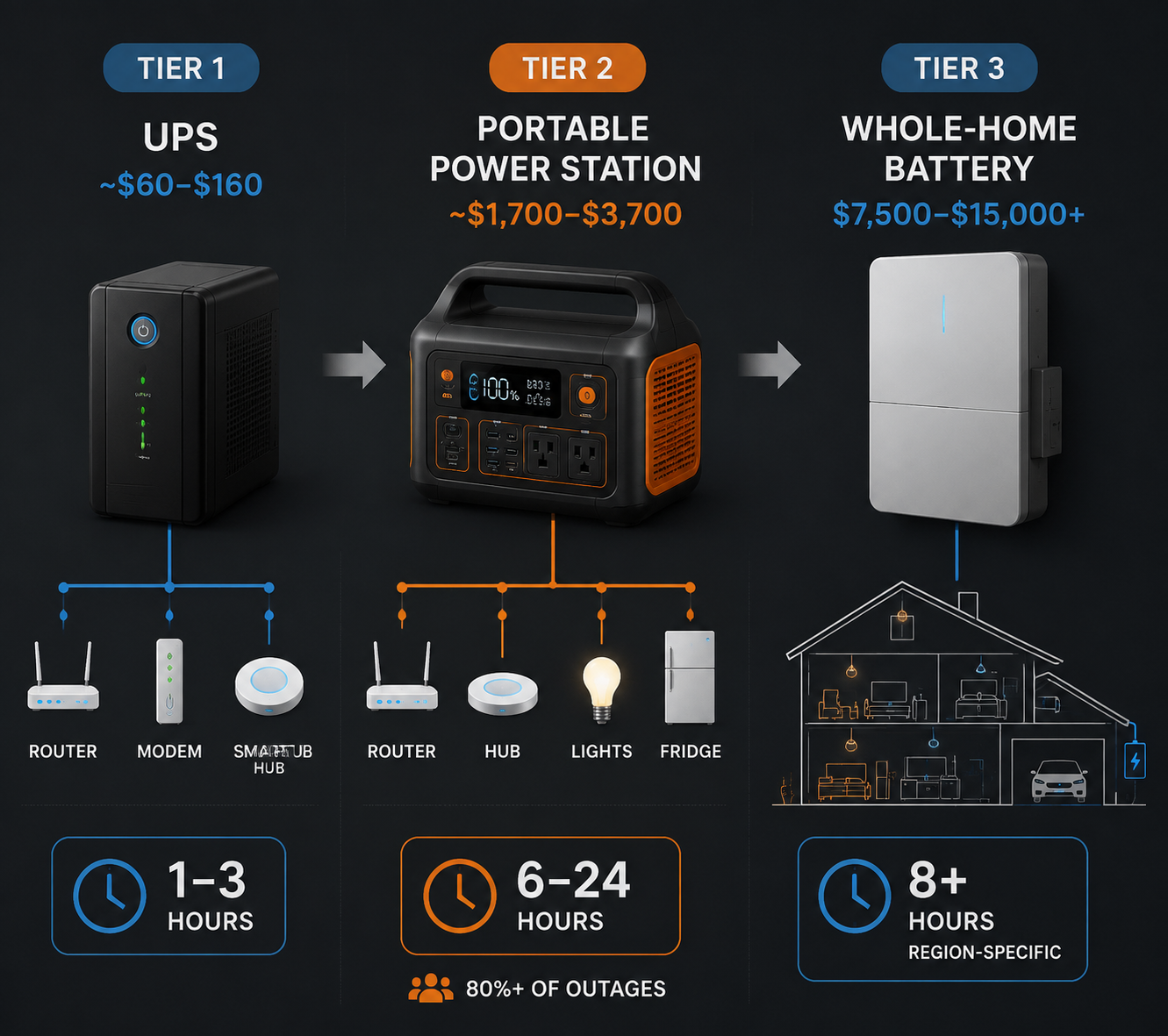
| Tier | Use it for | Typical role | When to stop there |
|---|---|---|---|
| Tier 1: UPS | Modem, router, hub, bridge, small switch | $60–$160 network backup for roughly 1–3 hours | Most outages are short and you mainly need WiFi, automations, locks, and cameras to remain reachable |
| Tier 2: portable power station | Network gear plus selected lights, chargers, cameras, and possibly fridge cycling | $1,700–$3,700 indoor battery backup for roughly 6–24 hours | Your outages often outlast a UPS, but you do not need whole-home backup |
| Tier 3: whole-home battery | Critical circuits or larger household loads through a transfer setup, smart panel, or solar-battery system | $7,500–$15,000+ backup for frequent long outages | You see regular 8+ hour outages or live where grid risk makes partial-house backup worth the installation cost |
Tier 1: put the network stack on a UPS
A UPS is not glamorous. That is the point. A basic unit under the network shelf can keep the modem, router, and hub alive through the kind of outage that would otherwise turn a smart home into a collection of offline devices. The practical price range in current buying guides is roughly $60–$160, with Wirecutter noting options such as the CyberPower LE1000DG around $140.[3]
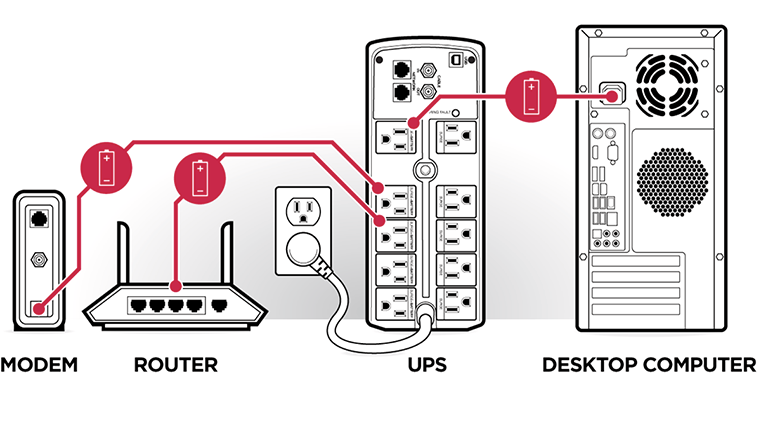
The wiring order matters. Plug the modem or fiber ONT into battery-backed outlets. Plug the router into battery-backed outlets. Add the primary mesh node if the router is not the WiFi access point. Add the smart hub or bridge. If you use a small Ethernet switch because the hub, bridge, camera recorder, or access point depends on it, include the switch too.
Do not waste the UPS on a printer, speaker, TV, desktop monitor, or decorative smart lamp. Those loads eat runtime and do not preserve the control layer. The clean version is a labeled power strip: ONT, modem, router, hub, switch. If the UPS has surge-only outlets, avoid accidentally plugging the router into those. It sounds obvious until the first outage proves the router was on the wrong side.
A UPS also buys time for graceful behavior. Cameras with local storage can keep writing if their recorder or network path is backed up. A hub can continue local automations that do not require cloud access. Phones stay on WiFi if the broadband line itself remains active. A security system with its own battery may still be able to notify you through the network rather than becoming a siren in a dark hallway.
The quick UPS audit
- Find the true internet entry point: cable modem, fiber ONT, fixed wireless gateway, or combined gateway.
- Follow the Ethernet path until WiFi is created; every required box in that path needs backup power.
- Add only the smart home controller or bridge that actually runs automations or device radios.
- Unplug the UPS from the wall for a short test and confirm WiFi, app control, and key automations remain available.
- Label the battery-backed outlets so the setup survives cleaning, troubleshooting, and future equipment swaps.
That last test is worth doing before storm season. A UPS that technically works but misses the ONT, the upstream mesh node, or the little switch feeding the hub is a very tidy false sense of security.
Tier 2: use a portable power station when outages outlast the UPS
Once outages regularly push past a couple of hours, the question changes. You are no longer just smoothing over a power blink or a short utility repair. You may want the network stack, a hub, a few lights, phones, a laptop, and refrigerator cycling. That is where a portable power station makes more sense than jumping straight to a fixed whole-home battery.
Current market guidance puts suitable portable power stations in the rough $1,700–$3,700 range for the kind of 6–24 hour role discussed here. Prices are especially volatile: SmartHomeExplorer’s July 2026 capture noted back-to-school discounts up to 55% on portable power stations, so list price, MSRP, and street price can tell different stories in the same week.[4]
The feature to look for is not just capacity. For smart home loads, a 0ms UPS mode can matter because the router, hub, or network switch may not tolerate even a brief transfer gap. If the power station is going to sit between the wall and your network gear every day, confirm that the model is designed for that kind of pass-through or UPS use, not merely emergency discharge. Product roundups such as ZDNET’s 2026 home battery coverage are useful for comparing specs, but the decision still comes back to the loads you will actually plug in.[5]
A sane Tier 2 setup is selective. Keep Tier 1 intact for the core network, then let the power station handle the loads that make the outage livable: one or two lamps, phone charging, the hub if it is not already on the UPS, and refrigerator cycling when needed. Indoors, this is also where battery stations have a simple safety advantage over fuel generators: no engine, no exhaust, no carbon monoxide risk from operation inside the home.
Refrigerators deserve realistic expectations. They do not draw their maximum load every minute, but startup surges and cycling behavior matter. Do not size a system from a single optimistic wattage label. Test the power station with the actual fridge before you need it, and make sure the cable path does not create a trip hazard through a dark kitchen.
What should move from UPS to power station
There are two clean ways to combine Tier 1 and Tier 2. The first is to leave the network UPS in place and recharge or support it from the power station during longer outages. The second is to run the network gear directly from a power station with a suitable UPS mode. The first approach is more modular; the second is neater if the equipment and transfer behavior are right.
| Load | Keep on UPS | Move to portable power station |
|---|---|---|
| Modem or fiber ONT | Yes, if the UPS gives enough runtime | Yes, if outages often exceed the UPS runtime |
| Router and main mesh node | Yes | Yes, but only with reliable transfer behavior |
| Smart hub or bridge | Yes | Yes, if it shares a clean network power setup |
| Extra lamps | Usually no | Yes, choose a few useful fixtures |
| Phone and laptop charging | No | Yes |
| Fridge | No | Possibly, after testing surge and runtime |
The common mistake is treating the power station like a tiny whole-home battery. It is better as a controlled island: network, hub, communications, light, food preservation, and a way to charge devices. If you are deciding which smart devices are worth prioritizing in normal times too, a payback-focused look at which smart home devices save the most energy is a useful companion exercise.
Tier 3: whole-home batteries are real backup, but not the default
Whole-home batteries are not hype. They are just often answering a bigger question than the one most smart home owners are asking. If your area sees frequent long outages, wildfire shutoffs, storm-driven failures, or grid instability, a fixed battery tied to selected circuits can be the difference between inconvenience and a house that still functions. For a broader look at that scenario, see why solar batteries are the best home energy solution for grid crises.
The threshold is usually not “I own smart devices.” It is “I have enough 8+ hour outages that installed backup earns its keep.” Whole-home battery systems commonly sit in the $7,500–$15,000+ range before the conversation expands into solar, panel work, critical-load subpanels, permitting, and installation details.[5] At that point, the decision is regional and household-specific.
The battery market is pushing this conversation harder in 2026. U.S. residential battery installations reached a record 673 MW in Q1 2026, according to reporting from Ars Technica in July 2026.[6] That does not mean every smart home now needs one. Adoption is market evidence, not proof of cost-effectiveness for a particular house.
There is also a 2026 incentive trap. The federal Section 25D residential clean energy credit is no longer available for property placed in service after December 31, 2025, according to the IRS page last reviewed July 4, 2026.[7] Any battery-buying guide that still treats the 30% federal credit as available for new 2026 installations is out of date. State programs may still change the math: the research brief identifies examples including California SGIP incentives up to $1,100/kWh, New York incentives up to $2,500, and Connecticut incentives up to $16,000, but those are state-specific and eligibility-dependent.[8]
Smart panels and load management
A whole-home battery becomes more compelling when it is paired with disciplined load management. Smart panels and controlled circuits can keep the battery from being drained by the wrong loads at the wrong time. SPAN states that its system can deliver 40% longer battery life based on an internal study of more than 1,200 simulated outage scenarios; that is a manufacturer-stated, simulation-based claim, not an independently verified field result.[9]
The principle is still sound. A battery that refuses to feed nonessential loads during an outage is more useful than a larger battery that quietly powers everything until it is empty. If you are already thinking about solar-battery controls, smart home automation that boosts solar battery savings is where the outage plan and the everyday energy plan start to overlap.
Build the blackout plan around loads, not devices
The cleanest smart home backup plan starts with a short load map. Write down what must stay on in the first 10 minutes, what matters after 2 hours, and what only matters after 8 hours. That sequence prevents overbuying because it separates coordination from comfort.
| Outage window | Main failure to prevent | Best-fit backup choice |
|---|---|---|
| First 10 minutes | Router, modem, hub, and bridge rebooting or dropping offline | UPS on the network stack |
| 1–3 hours | Loss of WiFi, app control, local automations, and reachable security devices | UPS, tested under real network load |
| 6–24 hours | Phones, lights, cameras, and fridge becoming the practical problem | Portable power station plus selective loads |
| 8+ hours repeatedly | Household routines and critical circuits failing often enough to justify installation | Whole-home or critical-load battery system |
Load shedding can be manual. During an outage, unplug the speaker, the display, the extra mesh node that only improves patio coverage, and the decorative lighting. If you want that behavior automated during normal operation too, start with simple rules from smart home automation ideas that save you money every month and adapt them for outage mode.
If your outages are tied to wildfire risk or utility shutoffs, preparation becomes more specific. In that case, a blackout plan should sit next to a sensor, camera, lighting, and notification plan like this red flag warning smart home checklist. The backup battery is only one piece; the house also needs to fail into a state you can understand quickly.
A practical buying order
Start with the UPS. It is cheap compared with every other option, easy to test, safe indoors, and aimed at the first thing that breaks. If your outage history is mostly short interruptions, that may be the whole project.
Step up to a portable power station when the UPS is doing its job but the outage keeps going. Buy it for a defined island of loads, not for the fantasy of running the house as usual. Confirm UPS mode if it will support network gear continuously. Test the fridge if the fridge is part of the plan. Treat promotional prices as temporary, not as proof that a higher tier has become necessary.
Consider whole-home or critical-load batteries when long outages are frequent enough that a staged setup has become a workaround rather than a solution. At that point, the right question is not whether the smart home deserves backup. It is which circuits, incentives, installation constraints, and regional risks justify a fixed system.
For most smart homes, the honest path is smaller: protect the network first, add portable backup if outages regularly outlast a UPS, and reserve whole-home batteries for households whose outage history makes the jump real.
References
- SmartThings Community Reports on Zigbee Mesh Fragmentation After Power Loss, SmartThings Community, https://community.smartthings.com/
- Blackout Statistics 2026, SunergyHub, https://www.sunergyhub.com/
- The Best UPS Battery Backup, Wirecutter, https://www.nytimes.com/wirecutter/reviews/best-uninterruptible-power-supply-ups/
- Portable Power Station Deals, SmartHomeExplorer, July 2026, https://www.smarthomeexplorer.com/
- The Best Home Battery and Backup Systems of 2026, ZDNET, 2026, https://www.zdnet.com/home-and-office/energy/best-home-battery/
- US battery installations hit record high in Q1 2026, Ars Technica, July 2026, https://arstechnica.com/
- Residential Clean Energy Credit, IRS.gov, last reviewed July 4, 2026, https://www.irs.gov/credits-deductions/residential-clean-energy-credit
- Battery Storage Incentives and Rebates, Solar Permit Solutions, https://solarpermitsolutions.com/
- SPAN Home Battery Backup and Smart Panel Claims, SPAN.io, https://www.span.io/
Data Updates
Know about updated rebate programs, changed subscription prices, or new ENERGY STAR certifications? Submit a note below to help keep this content current. For formal data corrections, use the contact page.
Comments
Join the discussion with an anonymous comment.