
Your iPad Hub Stopped Working on February 10 — Did You Notice?
If you are still using an iPad as your HomeKit hub, stop reading for a second and open the Home app on your iPhone. Try to change the temperature from outside your home. If it doesn't work, that's why.
On February 10, 2026, Apple finalized the switch to the new HomeKit architecture. iPads are no longer recognized as hubs. Remote access, automations, and Matter accessories that depend on a Thread border router all stopped working. Your iPad can still control things locally, but the moment you leave the house, the connection dies.
What a Hub Does (Remote Access, Automations, Thread)
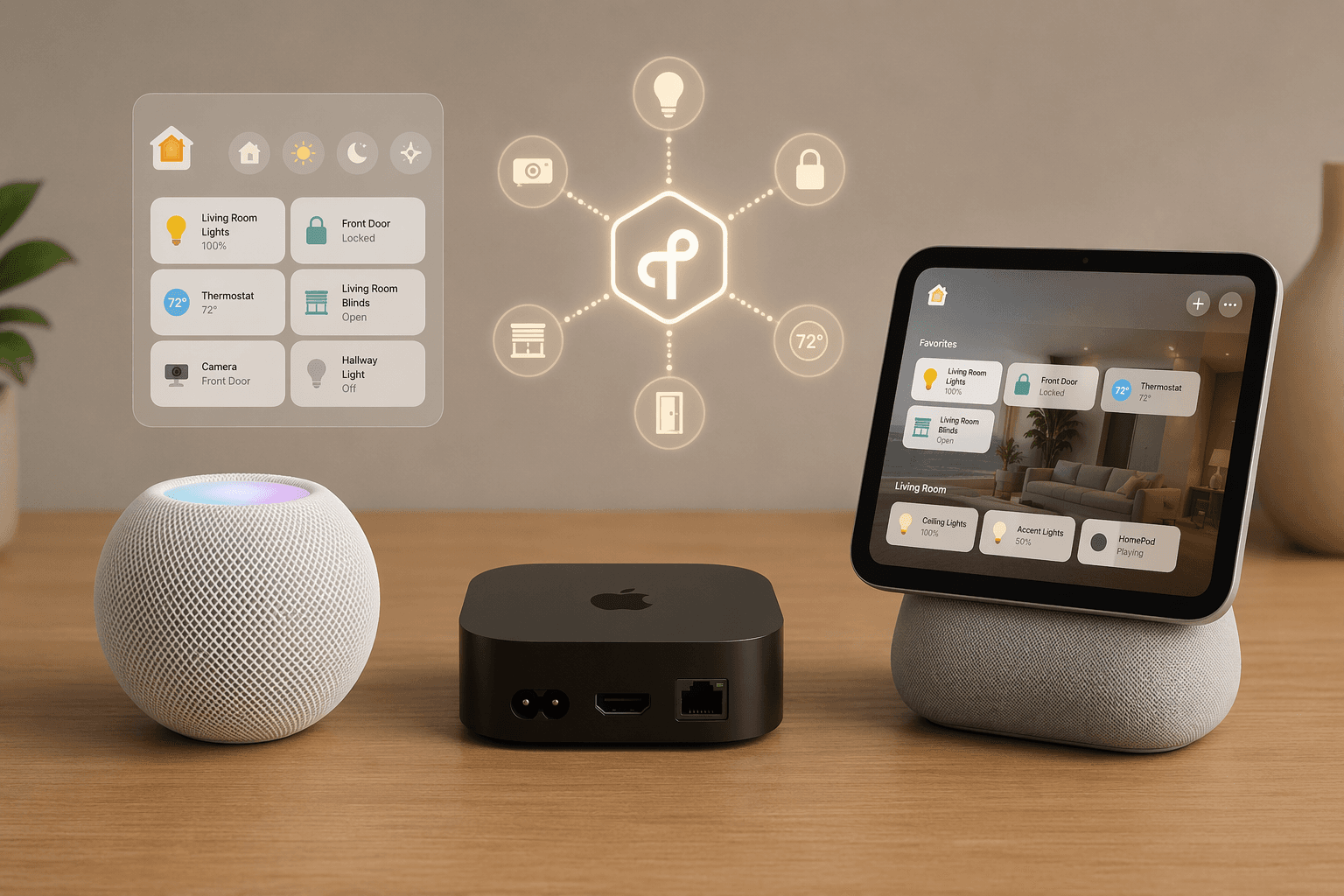
A HomeKit hub does three things: gives you remote access when you're away, runs your automations even when your phone isn't home, and provides a Thread border router for Matter accessories that use that protocol. If you have any Matter devices that say "Thread required," you need a hub with a Thread border router — a HomePod mini or an Apple TV 4K Wi‑Fi+Ethernet.
For a full breakdown of how a hub differs from a bridge (those little USB dongles for Zigbee or Z‑Wave), see our separate explainer: Apple HomeKit Hub vs Bridge: What's the Difference and Why It Matters in 2026. The short version: a hub is your home's connection to the internet and to Thread; a bridge speaks a different radio protocol on behalf of older accessories.
If you are still unsure whether you even need a hub, start with our Hub or No Hub guide. This article assumes you already know you need one — you just need to pick which one.
The Two Real Choices (and the $129 Trap)
As of June 2026, the devices that can serve as a HomeKit hub are:
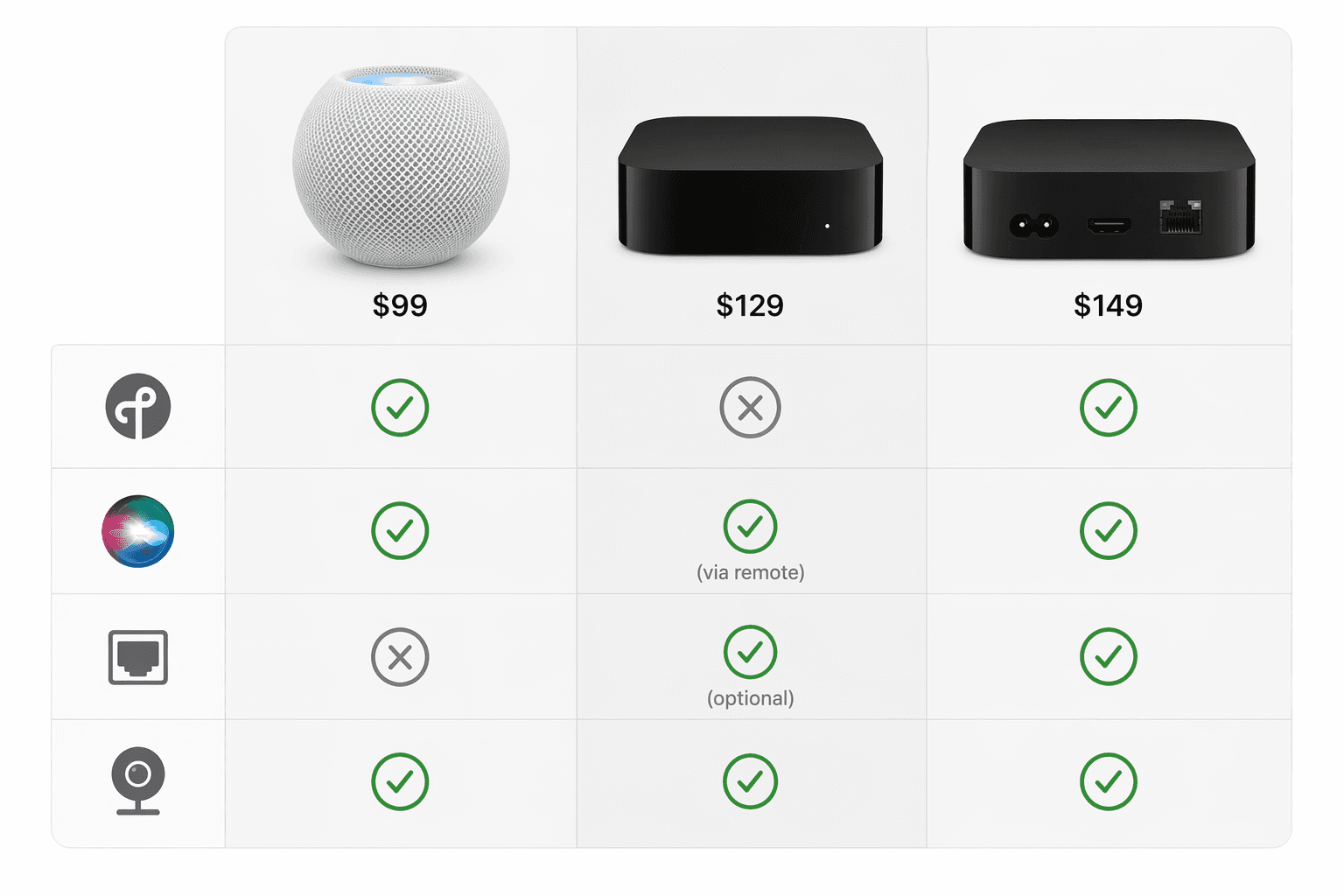
| Device | Thread | Ethernet | Siri | Camera feeds | Price |
|---|---|---|---|---|---|
| HomePod mini | Yes | No (Wi‑Fi only) | Yes | No (audio only) | $99 |
| HomePod (2nd gen) | Yes | No (Wi‑Fi only) | Yes | No (audio only) | $299 |
| Apple TV 4K Wi‑Fi (64 GB) | No | No | No (via remote or HomePod) | Yes (on TV) | $129 |
| Apple TV 4K Wi‑Fi+Ethernet (128 GB) | Yes | Yes | No (via remote or HomePod) | Yes (on TV) | $149 |
The HomePod (2nd gen) at $299 is listed for completeness, but unless you specifically want better audio, the HomePod mini does the same hub job for $200 less.
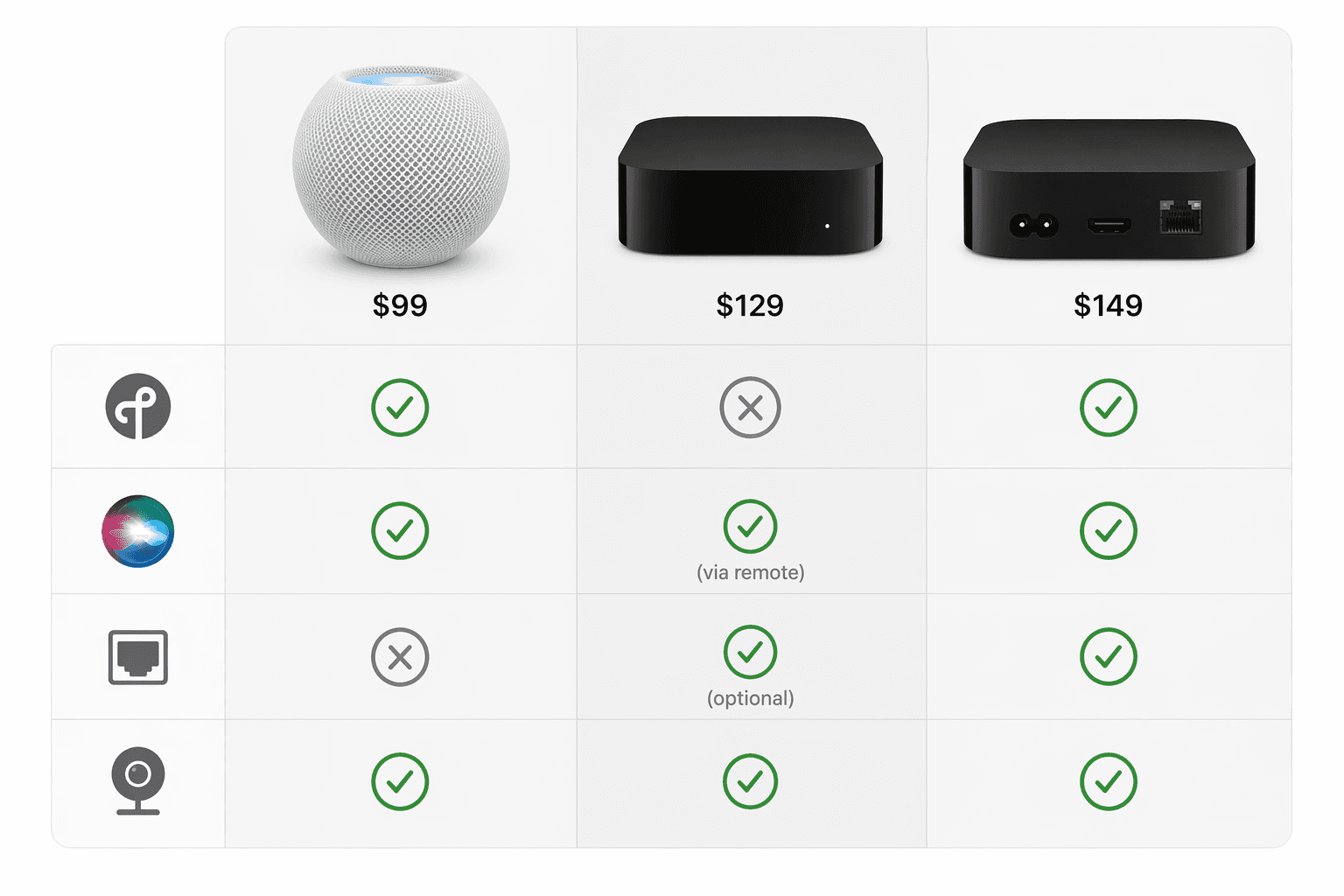
Setup differences: the HomePod mini automatically becomes a hub as soon as you add it to your home in the Home app. The Apple TV must be manually assigned to a room (Settings > AirPlay and Apple Home > Room) before it activates as a hub. Neither is difficult, but the HomePod mini is genuinely plug-and-play.
Should You Wait for the HomePad or the 2026 Refreshes?
You have probably seen the rumors: a new HomePod mini with an S10 or newer chip, a new Apple TV with an A17 Pro, and a rumored HomePad — a 7‑inch display with an A18 chip, Face ID, and a camera — all expected to ship in fall 2026 alongside iOS 27 and the revamped LLM Siri. The MacRumors report from May 2026 says the products are "nearly ready."
I do not accept the assumption that waiting is harmless. Here is what waiting actually costs: you lose remote access and automations for the whole gap. If your household relies on geofencing for away mode or time‑of‑day lighting, those stop working the moment your phone leaves the house. Waiting six months means six months of manually controlling everything.
The HomePad is still a rumor. Apple has not confirmed it. Even if it ships in fall 2026, it will likely cost around $350 — more than the HomePod mini and Apple TV combined. It is not a direct replacement for a hub; it is a dedicated smart home panel. You will still need a hub behind it.
Also note that the rumored new Apple TV and HomePod mini are expected to use the same form factor — no design changes, just chip bumps and new networking chips. The Thread border router functionality will not change. The only real reason to wait is if you want the HomePad's display for home control, or if you plan to buy the new Apple TV for its A17 Pro chip (which may enable local AI processing for future Siri features). Those are valid reasons, but they are future‑proofing, not a fix for a broken hub today.
When You Need a Second Hub
Larger homes often benefit from multiple hubs. When you have two or more, one is active and the others act as standby failover. They also extend Bluetooth and Thread range because each hub is a Thread border router.
If you have more than one floor, place a HomePod mini on each level and set your Apple TV (Wi‑Fi+Ethernet) as the preferred hub by connecting it via Ethernet. You can do this by disabling Automatic Selection in Home Settings > Home Hubs & Bridges and picking the hardwired Apple TV. This gives you a stable primary hub that rarely disconnects, with the HomePod minis providing coverage in dead zones.
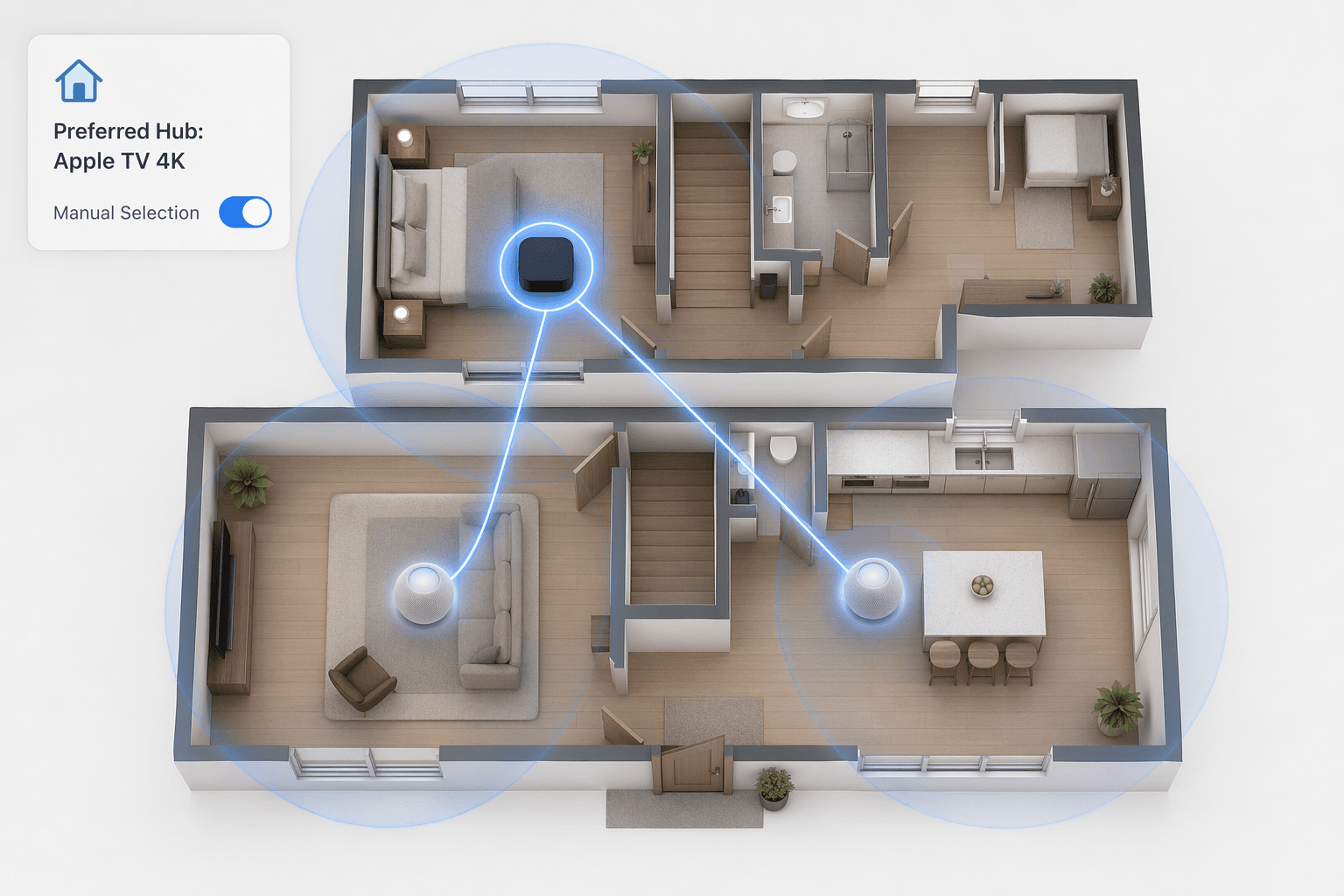
Apple's support documentation confirms that you can now manually choose which hub is the preferred one — a feature that used to be automatic and sometimes unpredictable. If you have a single HomePod mini and it works fine, you likely do not need a second hub. But if you notice sporadic connection drops on the far side of the house, adding a second HomePod mini (or an Apple TV) usually solves it.
The Verdict: Buy Now or Wait
- HomePod mini ($99): best value for most HomeKit users. Includes Thread border router, plug-and-play, covers all basic hub duties. Buy this unless you need wired Ethernet or camera feeds on a TV.
- Apple TV 4K Wi‑Fi+Ethernet ($149): get this only if you need wired stability or want to view camera feeds on your TV. Do not buy the $129 Wi‑Fi-only model — it lacks Thread and locks out future Matter accessories.
- Wait for fall 2026: only if you can go six months without remote access and automations. If your iPad hub is dead, waiting means living without control. Otherwise, buy now and upgrade later.
For most people — whether you are replacing a dead iPad hub or buying your first one — the answer is the HomePod mini right now.
For a broader view of how Apple HomeKit compares to other ecosystems, read The Smart Home Ecosystem Trap: Which Platform to Buy Into in 2026. And for the current state of Matter — the protocol that makes Thread accessories possible — see Matter in 2026: An Honest Status Review.
Reader Feedback
Share your purchase experience, flag outdated picks, or ask clarifying questions about the checklist items.
Comments
Join the discussion with an anonymous comment.