
T-Mobile 5G Home Internet vs Starlink for Smart Homes
Remote access to hubs and cameras blocked due to CGNAT
Last updated
A useful T-Mobile 5G Home Internet vs Starlink comparison for a smart home starts with the thing that actually breaks the mood: the doorbell rings, the camera preview spins, Home Assistant is unreachable from outside the house, and someone asks why the “fast” new internet is acting weird.
For a house with 25+ devices, a few cameras, one or two hubs, voice assistants, phones, laptops, and streaming boxes, the winner is not decided by download speed alone. If T-Mobile has strong, uncongested 5G service at your address, it is usually the better smart-home backbone because it costs less and has lower, steadier latency. If your address is rural, poorly served by cellular, or outside T-Mobile’s practical coverage, Starlink may be the only serious option — and it brings more device headroom. But neither one is the clean winner for remote access, because both can put you behind CGNAT, which blocks the kind of normal port forwarding many hub and camera owners expect to use.
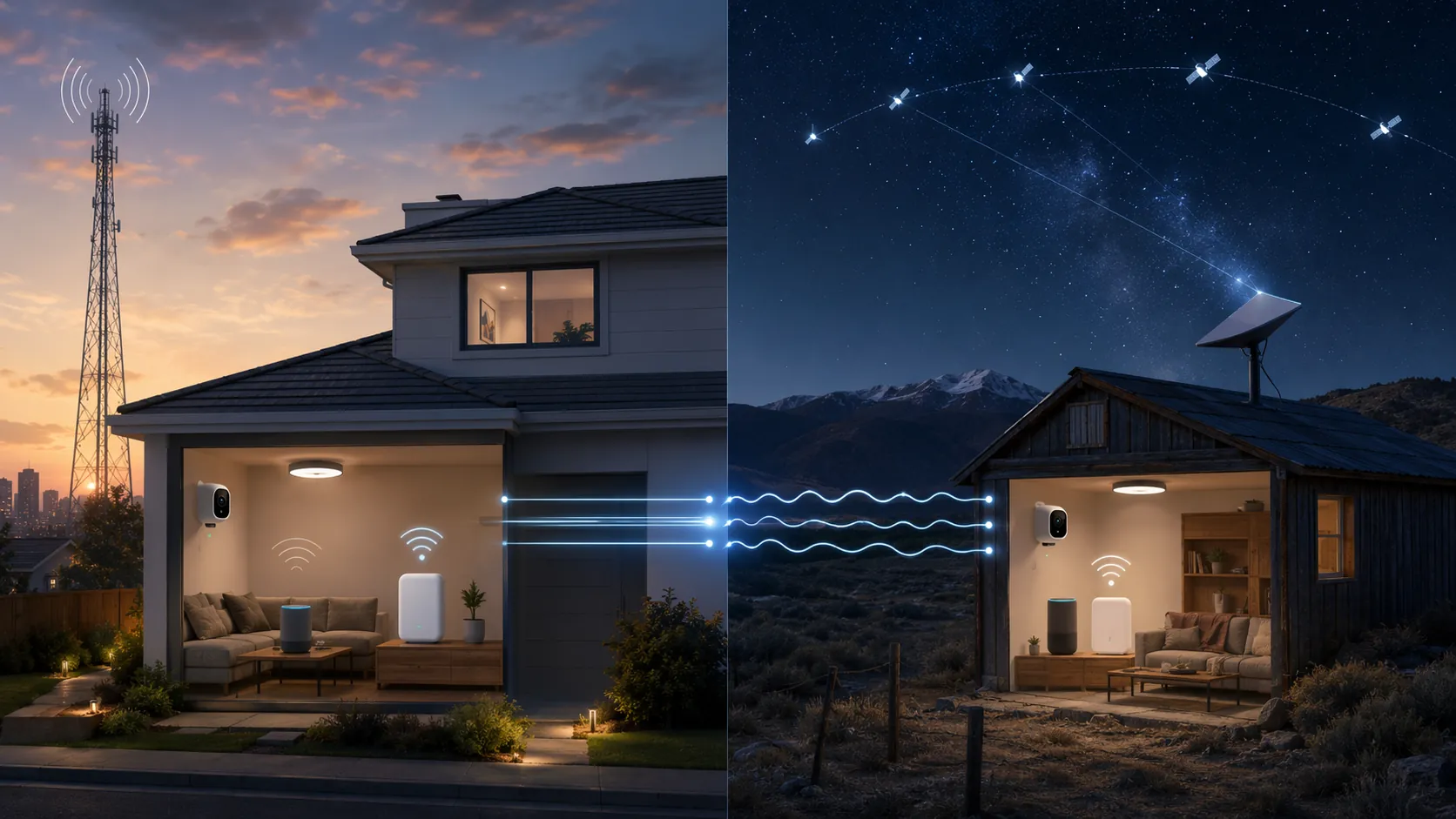
| Smart-home constraint | T-Mobile 5G Home Internet | Starlink | What it means in a connected house |
|---|---|---|---|
| Latency consistency | CNET reports 16–40ms latency for T-Mobile 5G Home Internet [1] | CNET reports 25–60ms latency for Starlink, with satellite handoff micro-outages noted in the comparison [1] | T-Mobile is usually better for camera loading, app taps, voice-assistant responsiveness, and hub dashboards when the local 5G signal is solid. |
| Two-year cost | US Mobile’s 2026 comparison puts T-Mobile at $600–$1,440 over two years [2] | US Mobile’s 2026 comparison puts Starlink at $1,739–$3,179 over two years [2] | The savings can pay for better Wi-Fi, a UPS for the gateway, or a proper remote-access workaround. |
| Coverage | CNET cites roughly 64% U.S. availability based on December 2024 FCC data [1] | CNET cites 99.7% U.S. availability for Starlink [1] | Starlink’s reach is the decisive advantage where cellular home internet is unavailable or unreliable, though local capacity and waitlists can still matter. |
| Device capacity | About 64 devices in the comparison data [1] | About 128–254 devices in the comparison data [1] | Starlink has more breathing room for device-heavy homes, especially where cameras, speakers, displays, and smart plugs pile up. |
| Weather and dropout exposure | No satellite weather path; performance still depends on tower signal, placement, and local capacity | More exposed to weather and satellite handoff behavior [1] | Starlink can run a smart home, but short consistency dips matter more to cameras and hubs than to casual browsing. |
| Gateway setup friction | Official performance is location-dependent, and gateway choice can affect antenna options [3][6] | Dish placement, obstruction avoidance, and router placement matter | Neither install should be treated like plugging in one laptop. Placement decides a lot. |
| Remote access and port forwarding | CGNAT can block native port forwarding [4] | CGNAT can block native port forwarding [5] | Plan on Tailscale, Cloudflare Tunnel, or a VPN with port forwarding before you trust remote camera or hub access. |
Latency is where smart homes feel the difference
Speed-test screenshots make a wireless ISP look simple. Smart homes are not simple. A light switch automation, a camera thumbnail, a voice command, and a remote Home Assistant dashboard do not all care about the same number. Download speed matters for firmware updates, video streaming, and cloud camera uploads, but the daily irritation usually comes from delay: the pause after tapping a camera, the half-second where a voice assistant seems to be thinking too long, or the dashboard that loads just slowly enough to make you tap again.
That is why the latency spread matters. CNET lists T-Mobile 5G Home Internet at 16–40ms and Starlink at 25–60ms, and also flags Starlink’s satellite handoff micro-outages [1]. Those figures are not dedicated Matter, Zigbee, Z-Wave, Hubitat, SmartThings, or Home Assistant benchmarks. They are general internet latency numbers. Still, for cloud-connected smart-home tasks, lower and steadier latency usually gives the system less opportunity to feel sticky.
The distinction is especially visible with cameras. A local PoE camera viewed inside the LAN may not care much which ISP you use. A cloud doorbell, a remote NVR stream, or a camera preview opened from a phone away from home absolutely can. The internet path has to wake up, authenticate, negotiate, and deliver video quickly enough that the person at the door is still there. If the service has periodic handoff hiccups, that does not mean it fails constantly; it means the bad moments are more likely to appear exactly when the household notices them.
This is the strongest smart-home argument for T-Mobile when the signal is good. It is not that 5G home internet is magically wired fiber. It is that a lower, tighter latency range is friendlier to the small, repeated interactions that make a connected home feel responsive. Open the thermostat app, ask a speaker to turn off a room, load a camera, refresh a hub dashboard: none of those is impressive on a speed test, but all of them expose jitter, delay, and short interruptions.
Starlink deserves a fairer reading than “satellite is bad.” Modern low-earth-orbit satellite internet is a serious piece of infrastructure, and for homes that have been stuck with weak DSL, overloaded fixed wireless, or no practical broadband at all, it can be the difference between a usable smart home and a pile of devices on cellular hotspots. But in a head-to-head choice where T-Mobile is strong at the address, Starlink’s higher latency range and handoff risk are real disadvantages for consistency [1].
The cost gap is big enough to change the rest of the setup
US Mobile’s 2026 comparison puts the two-year cost of T-Mobile 5G Home Internet at $600–$1,440, while Starlink lands at $1,739–$3,179 [2]. That is a $1,139–$1,739 difference over two years, depending on the plan and equipment assumptions in the comparison. For a normal household budget, that is not a rounding error. For a smart home, it is the difference between limping along with one ISP box in a bad corner and building a more stable network around the connection.
If T-Mobile works well at the house, the savings can go into the boring hardware that actually keeps smart homes sane: a better mesh or wired access point layout, a small UPS for the gateway and hub, proper Ethernet where cameras or access points need it, or a paid VPN service with port forwarding if that is the remote-access route you choose. The monthly internet bill is not the whole network. It is the pipe the rest of the network has to survive behind.
Starlink’s cost is easier to justify when it is solving a coverage problem rather than trying to beat a good 5G connection on value. If the alternative is unstable cellular service or no modern broadband, the higher two-year total becomes less of a luxury premium and more of an access cost. But when both services are genuinely available and T-Mobile is strong indoors, Starlink has to win on something other than price.
Coverage can overrule everything else
The cleanest T-Mobile recommendation falls apart if the house sits in a weak 5G pocket. CNET cites roughly 64% U.S. availability for T-Mobile 5G Home Internet based on December 2024 FCC data, while Starlink is listed at 99.7% U.S. availability [1]. The T-Mobile figure may have changed by 2026, and any address-level checker can disagree with broad national coverage. Still, the shape of the comparison is obvious: Starlink reaches many places where T-Mobile Home Internet does not.
Availability also has two layers. The first is whether the provider says it serves the address. The second is whether it has enough local capacity and signal quality to behave well under household load. T-Mobile can be technically available and still be a poor smart-home choice if the gateway only works in one upstairs window, slows badly at busy times, or drops between signal bands. Starlink can be broadly available and still face local capacity limits, waitlists, or obstruction problems that only show up once you study the installation site.
For suburban homes near solid T-Mobile mid-band 5G, the coverage question often becomes a placement question: can the gateway sit where signal is strong without making Wi-Fi awful for the rest of the house? For rural homes, Starlink’s dish placement problem may be easier to solve than cellular signal quality. Clear sky and a good router location are annoying requirements, but they are at least requirements you can inspect.
Device capacity favors Starlink, but Wi-Fi design still matters
For device-heavy homes, Starlink’s listed capacity advantage is real: the comparison data puts Starlink at about 128–254 devices, compared with about 64 for T-Mobile [1]. If your house has smart bulbs, plugs, cameras, voice assistants, TVs, laptops, phones, tablets, irrigation controllers, garage devices, and a guest network, that headroom is not theoretical.
Capacity should not be read as a promise that every device will behave well on the provider’s default router. A smart home with 25+ devices is often less limited by the ISP’s raw device count than by Wi-Fi layout, band steering, weak 2.4GHz coverage, and where chatty devices are placed. Zigbee and Z-Wave devices may not touch the ISP router directly at all, because they talk to their own coordinator or hub first. Wi-Fi cameras and speakers are different; they put pressure directly on the LAN and upstream internet.
The practical read is simple enough: Starlink gives more provider-side device headroom, which matters in large or gadget-heavy homes. T-Mobile can still support a sensible 25-device smart home, especially when many devices are on Zigbee, Z-Wave, or Thread behind hubs, but it leaves less margin for a household that keeps adding Wi-Fi cameras, displays, and speakers.
CGNAT is the remote-access trap on both services
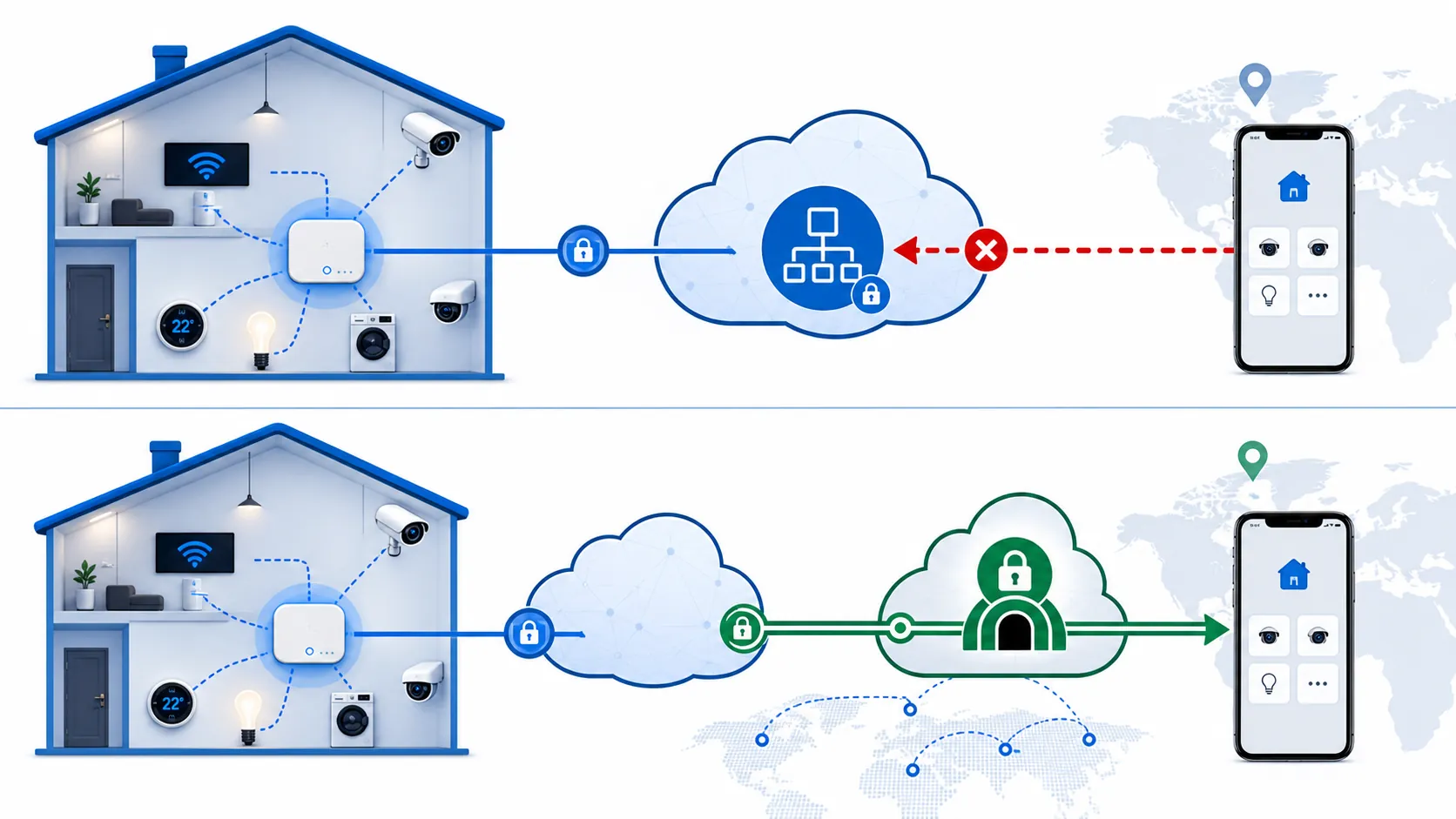
The nastiest surprise in this comparison is that the “better” ISP may still feel broken the first time you try to reach a hub, camera, or NVR from outside the house. T-Mobile 5G Home Internet and Starlink can both use carrier-grade NAT, or CGNAT, which means your home router does not receive a normal public IPv4 address that can accept unsolicited inbound connections from the internet. PureVPN’s T-Mobile guide and RSinc’s Starlink guide both describe CGNAT as the barrier that prevents conventional port forwarding from working normally on these services [4][5].
That matters because a lot of smart-home owners still think remote access works like this: open a port on the router, point a dynamic DNS name at the house, and connect directly to the hub or camera system. Behind CGNAT, that model breaks. The ISP is sharing a public address across multiple customers upstream, so your router cannot simply claim an inbound port from the public internet and route it to Home Assistant, a camera recorder, or a local dashboard.
This is not an exotic edge case. It is one of the basic architectural compromises that makes large wireless ISP networks easier to operate with limited IPv4 address space. It is also exactly the kind of compromise that gets hidden by “works great for streaming” reviews. Netflix does not need you to open a port back into your house. A remote hub dashboard might.
The workaround is to stop depending on native inbound port forwarding. For many smart homes, that means one of three approaches:
- A mesh VPN such as Tailscale, where your phone, laptop, and home server join a private network and reach each other without exposing inbound ports.
- A tunnel service such as Cloudflare Tunnel, where a device inside the home initiates the outbound connection and publishes selected services through that tunnel.
- A VPN provider that supports port forwarding, usually adding about $3–$10 per month depending on provider and plan assumptions in the workaround material [4][5].
None of those is automatically the right answer for every household. Tailscale is often the least painful for personal access to Home Assistant, Hubitat dashboards, or an admin machine. Cloudflare Tunnel can be elegant when you want controlled web access to a service without opening the router. A VPN with port forwarding is closer to the old “public port” model, but it adds another vendor, another recurring bill, and another thing the household tech wrangler has to understand when something stops connecting.
The key point for this comparison is that CGNAT does not hand a clean victory to either provider. T-Mobile may be cheaper and steadier; Starlink may reach the house and handle more devices. For direct remote hub and camera access, both need planning. If remote access is mission-critical, set up and test the tunnel or VPN before canceling the old connection.
Gateway details matter, but do not let them hijack the decision
T-Mobile’s official performance page presents home internet performance as location-dependent network service rather than a guaranteed fixed speed product [3]. That is the right lens for setup: do not assume the gateway can sit in the same closet where the cable modem used to live. It may need a window, a high shelf, or a specific side of the house to get the signal quality that makes the service worth using.
DisableMyCable’s T-Mobile 5G Home Internet review is useful here because it treats the gateway as an installation object, not just a box in a product photo. It notes setup friction around the HINT app and the practical caveat that the G4AR gateway had external antenna ports while the newer G5AR moves to Wi-Fi 7 but drops those antenna ports [6]. That matters if your house needs an external antenna to turn marginal signal into stable service.
That does not mean gateway model shopping should take over the whole comparison. If T-Mobile is weak at the address, antenna drama may not be worth the project. If T-Mobile is strong, the gateway details are mostly about getting the last bit of stability out of the service. For Starlink, the equivalent setup discipline is dish placement, obstruction checks, and deciding whether the default router belongs at the center of the home network or behind better Wi-Fi gear.
How to choose for a 25+ device smart home
Choose T-Mobile 5G Home Internet if the service is genuinely strong at your address, especially if the smart home depends on quick app response, cloud cameras, voice assistants, and a hub dashboard you expect to feel available all the time. The lower reported latency range, lower two-year cost, and lack of satellite weather exposure make it the better default when coverage is solid [1][2].
Choose Starlink if T-Mobile coverage is unavailable, unstable, overloaded, or trapped behind awkward gateway placement. Starlink’s much broader U.S. availability and higher listed device capacity are serious advantages for rural homes and large gadget-heavy households [1]. The tradeoff is that you are paying more and accepting more exposure to weather, obstructions, and satellite handoff behavior.
Whichever one you choose, do the remote-access work before you trust the setup from outside the house. Test the doorbell camera on cellular data. Test Home Assistant or your preferred hub from a phone away from Wi-Fi. Test the NVR, dashboard, or tunnel after a router reboot. If the plan depends on old-style port forwarding, assume CGNAT will interrupt that plan and design around it.
For most smart homes with reliable T-Mobile coverage, T-Mobile is the better backbone. For remote homes where availability and device headroom matter more than cost and latency consistency, Starlink is the more realistic backbone. If Starlink is the path you are taking, use our Starlink smart-home setup guide as the next step, because the comparison is only the first half of the job.
References
- Starlink vs. T-Mobile 5G Home Internet, CNET.
- Starlink vs T-Mobile, US Mobile.
- Internet Service Network Speed and Performance Metrics, T-Mobile.
- T-Mobile CGNAT Port Forwarding, PureVPN.
- How to Port Forward on Starlink and Bypass CGNAT, RSinc.
- T-Mobile 5G Home Internet, DisableMyCable.
Corroborating context
For protocol background on why this failure happens, see Compatibility & Protocols.
Not currently linked to a known regression. Background on the underlying protocol lives in Compatibility & Protocols.