
How to Build a Smart Home Wildfire Evacuation Alert System for Your Family
Single alert method fails to wake household
Last updated
The weakest wildfire evacuation alert system is the one that depends on one sound, one app, one phone, or one adult being awake enough to interpret a vague notification. A better family setup assumes something will fail: a phone is on Do Not Disturb, the router loses power, a teenager ignores a buzz, a grandparent does not have the right app, or smoke reaches the house before anyone has checked the county alert map.
For wildfire safety for families, smart home evacuation alerts work best as a stack. Community warnings tell you what is happening outside the house. Hardwired smoke and CO alarms tell everyone inside the house that the building itself may be affected. Automations make the house easier to leave. Backup power, radios, printed routes, and family check-in rules cover the ugly moment when the internet or cellular network is no longer dependable.
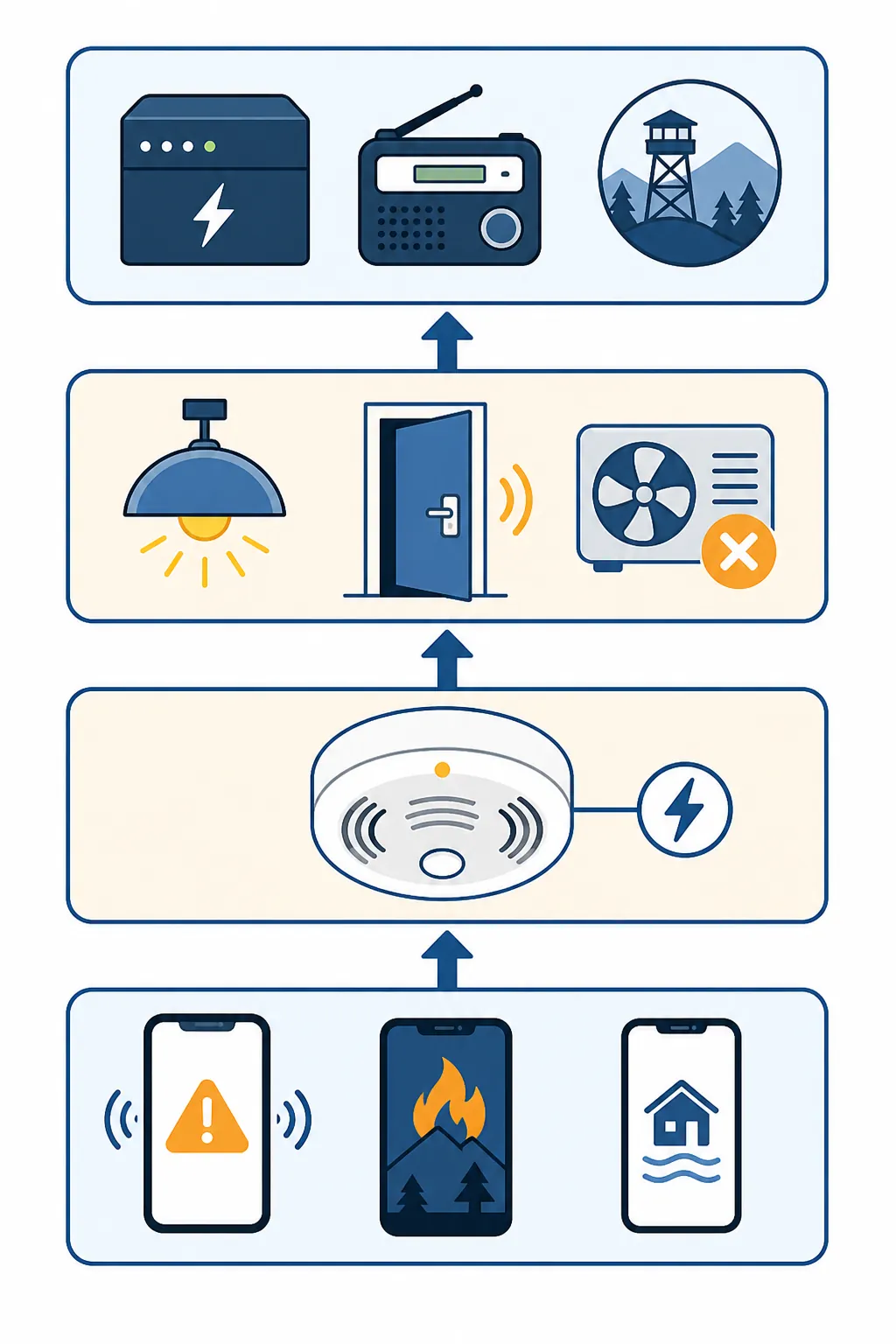
That stack starts with boring reliability. In NFPA data cited by Wirecutter, hardwired alarms operated in 94% of reported home fires, compared with 85% for battery-only alarms; the same reporting noted that 66% of home fire fatalities occurred in properties with battery-only alarms [1]. That data is not wildfire-specific, and it does not prove a hardwired smart alarm will detect wildfire smoke faster in every house. It does make one practical point hard to ignore: if you can use hardwired alarms, they belong at the center of the in-home layer rather than being treated as just another smart gadget.
Build the stack before choosing devices
A family wildfire alert system has a dependency order. The outside alert layer should reach every person who may need to act. The in-home detection layer should wake and direct people who are already inside. The automation layer should reduce small delays: finding shoes in a dark hallway, unlocking a door with shaking hands, or walking into a smoke-filled room because the HVAC is still circulating air. The backup layer exists because the other layers are not guaranteed to survive the same event.
| Layer | What it should do | What can break |
|---|---|---|
| Community alerts | Send evacuation warnings and incident updates to every household phone | Phone settings, app coverage, cell congestion, family members not enrolled |
| In-home detection | Sound a loud local alarm and notify household contacts when smoke or CO is detected | Battery failure, bad placement, delayed app notifications, Wi-Fi outage |
| Automated response | Turn on lights, unlock selected doors, shut down HVAC, send repeated alerts | Hub outage, cloud delay, lock compatibility, power loss |
| Backup and offline planning | Keep warnings and routes usable when grid power or cellular service fails | Dead batteries, outdated maps, unclear family meeting rules |
Do not make the smart home the source of truth for evacuation orders. The smart home can amplify warnings, wake people, and prepare the house for a faster exit. Official evacuation channels, local emergency management, law enforcement, and fire agencies still decide evacuation status.
Put official alerts on every phone, not just the responsible adult's
The first weekend setup is not glamorous: take every phone in the household and confirm emergency alerts are actually enabled. Wireless Emergency Alerts are intended to deliver urgent public safety messages to compatible mobile devices, and Ready.gov also points households to the FEMA app, which can be configured for up to five locations [2]. Five locations matter when the people you care about are not all sleeping under the same roof: home, a school, an aging parent's address, a workplace, and a cabin or second property can all deserve their own alert coverage.
This is also where families usually discover the human gaps. One parent has alerts enabled. One teenager has disabled everything except messages from friends. A visiting relative assumes someone else will tell them. A work phone is the only device with reliable reception in part of the house. Fix those before buying another sensor.
- Confirm Wireless Emergency Alerts are enabled on every phone that may be in the house overnight.
- Install and configure the FEMA app for home plus the other locations your family actually occupies.
- Enroll in county, city, school district, and workplace alert systems where available.
- Create a family group message that includes teenagers, grandparents, regular caregivers, and anyone who may need to pick up a child.
- Test whether urgent family messages break through Focus, Sleep, or Do Not Disturb modes.
Watch Duty deserves a place in this layer, but not as the layer. Wirecutter's wildfire preparedness guidance highlights Watch Duty as a useful nonprofit fire-tracking app, and first responders widely recommend it as a supplement; its coverage still varies by state [3]. Use it for situational awareness: incident maps, fire movement context, and a faster sense that something nearby is escalating. Do not use it as permission to ignore official evacuation alerts.
The same caution applies to social feeds, scanner apps, neighborhood chats, and map layers. They can be early, useful, and occasionally more descriptive than a county text. They can also be incomplete, stale, or misread under stress. The family rule should be simple: unofficial tools can make you prepare sooner; they should not make you wait longer.
Make hardwired smoke and CO alarms the in-home backbone
Once community alerts are covered, the next question is what wakes the house if smoke reaches the structure or a nearby fire creates an immediate in-home hazard. This is where a hardwired, interconnected alarm system earns its place. A phone alert may arrive late. A hub may be offline. A local siren tied into the home's alarm circuit is still the clearest cue for a sleeping adult, a child, or a visitor who does not know your app setup.
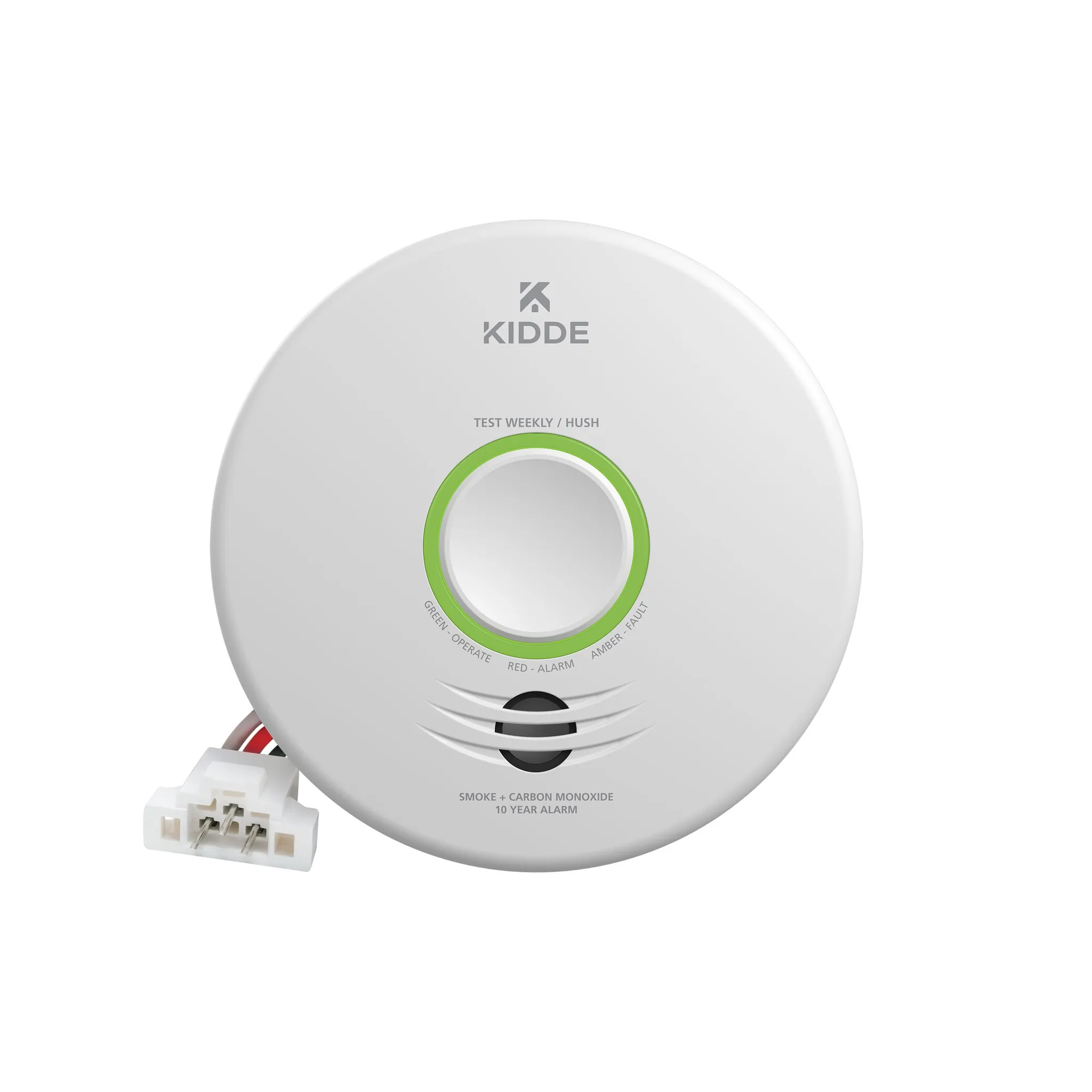
For many homeowners, the broad smart-alarm pick is the Kidde Smart Smoke + CO Alarm, Wirecutter's top smart smoke alarm pick for 2026 [1]. Kidde says its UL 217 edition 9-compliant alarm detects 29% faster than its previous generation and distinguishes real fires from cooking events three times better, but those are manufacturer performance claims, not independent wildfire evacuation findings [1]. The stronger reason to start here is less flashy: it fits the hardwired-smart-alarm role better than a phone-only or listener-only approach.
For Nest or Google households, the First Alert SC5 is the natural product to consider, especially if the home is already built around Google-compatible devices. Its caveat is important: in Wirecutter testing, the smartphone notification arrived about 45 seconds after the alarm triggered [1]. Forty-five seconds is not a reason to reject the device automatically. It is a reason not to design the family plan as if a push notification is the alarm. The siren is the alarm. The phone is the follow-up.
Ring households have a different path. The Kidde smoke and CO alarm made for Ring integration can fit if the family already uses Ring Alarm and wants smoke or CO events to land inside that monitoring workflow [1]. Ring also sells 24/7 Smoke and CO Professional Monitoring for $5 per month or $50 per year; over a 10-year alarm lifespan, that adds about $500 before hardware or other subscription costs [4]. That may be worth it for a household that wants a dispatch layer when nobody answers the phone. It is not the same thing as a county evacuation alert, and it does not make the house safe to leave unattended during red flag conditions.
Renters and owners without hardwired alarm access should not give up on the stack. A listener-style device, such as Ring's Smoke & CO Listener class of products, can hear an existing alarm and pass that event into a smart system. That fallback is roughly $35. It is a compromise: the listener depends on the original alarm working, on the listener hearing it, and on the smart system staying connected. Still, it may be the best available bridge when replacing the alarms is not allowed.
Place alerts where people actually sleep and move
Device choice does not fix bad placement or unclear household cues. The alarm that matters at 2 a.m. is the one that wakes the person in the back bedroom, the child with a fan running, and the visitor on the downstairs sofa. Follow local code and manufacturer placement instructions for smoke and CO alarms, then add the smart-home layer around that physical alarm plan rather than replacing it.
When the alarm sounds, every capable person in the household should know the first two actions without opening an app: shoes and go-bag, then the assigned exit or family meeting point. If your alert system requires reading a notification, tapping into an app, identifying which detector triggered, and deciding whether it is serious, it is too slow for the person who just woke up.
Use automations to make leaving easier, not to make decisions
The best wildfire evacuation automations are plain. They should reduce friction without asking the family to trust a complicated chain of conditions. If a smoke or CO alarm triggers, the house should become easier to see, easier to exit, and less likely to circulate smoke through the HVAC system.
- Turn on lights in bedrooms, hallways, stairways, the garage, and the main exit path.
- Unlock selected exterior doors if your lock hardware, household security needs, and local conditions make that safe.
- Shut down HVAC or switch it out of fan circulation mode when smoke is a concern.
- Send push notifications and text messages to every adult, teen, caregiver, and nearby relative who may need to act.
- Trigger a smart speaker announcement only as a secondary cue, not as the only wake-up signal.
Smart locks need extra judgment. The First Alert SC5's integration path includes compatible Kwikset and Schlage locks, which makes an alarm-triggered unlock routine possible in supported homes [1]. That sounds ideal until the household thinks through who can reach which door, whether pets may escape, whether an unlocked front door creates a security problem, and what happens if only one lock receives the command. For many families, unlocking the garage entry and one side door is more useful than unlocking every exterior door.
Lighting routines are usually safer and more universally helpful. Smoke, darkness, panic, and half-awake movement are a bad combination. A routine that turns on warm, bright lights along the exit path helps the person who is guiding a child and the grandparent who is trying to find glasses. It also gives a quick visual cue that this is not a normal low-battery chirp.
HVAC shutdown belongs in the same practical category. A smart thermostat or relay should not be treated as a smoke-control system, but stopping normal air circulation can be a reasonable part of an alarm response routine. Keep the command simple, label it clearly, and test it during a calm afternoon instead of discovering during an evacuation that the thermostat automation depends on a cloud service that is currently unreachable.
Add a responder and contact layer only if it solves a real gap
Professional dispatch and emergency-assist services can be useful, but they should be added for a specific reason. The strongest case is not that they make the home smarter. It is that they may tell other people what is happening when the household is asleep, away, injured, unreachable, or too busy leaving to make calls.
Alexa Emergency Assist is interesting here because it is not just another alarm notification. Gearbrain's 2025 coverage notes the service price at $7.99 per month and describes support for up to 25 emergency contacts, along with stored information such as medical conditions, gate codes, and pet details that can matter to responders [5]. Those details are exactly the sort of thing a panicked caller forgets and a standalone smoke alarm cannot provide.
There are limits. A professional-dispatch layer does not override evacuation orders, does not guarantee fire department access during a regional wildfire, and does not replace calling 911 when someone is in immediate danger. It is best treated as a contact and information bridge, especially for households with older adults, medical needs, locked gates, animals, or multiple family members who may not all answer one phone.
Plan for power loss and weak cellular service before fire season
The stack is not finished until it has a failure plan. Public Safety Power Shutoffs are a familiar part of dry, windy fire-weather planning in California, and cell-tower failures have occurred during past wildfires, including the 2017 Napa fires and the 2018 Camp Fire. Those examples should not be stretched into a claim that every wildfire will take down cellular service. They are enough to justify a family rule: any alert plan that assumes grid power, Wi-Fi, and mobile data will all remain available is incomplete.
Start with the router and modem. A small UPS can keep home internet alive through short outages if the upstream connection is still working. That buys time for smart alarm notifications, camera checks, and family messages. It does not help if the provider's equipment, local towers, or the broader network are down, so it should sit beside offline backups rather than replacing them.
- Put the modem, router, and smart-home hub on a UPS sized for the outage window you are trying to cover.
- Keep battery-powered smoke alarms where code and the housing situation require or allow them, especially if hardwired replacement is not possible.
- Store offline maps on every main phone and keep a printed local map in the go-bag or car.
- Keep a battery-powered NOAA weather radio where the household can find it in the dark.
- Use power banks for phones, but do not let the phone become the only alert receiver.
This is also where family contact coverage matters. If one parent is commuting, one child is at practice, and one grandparent is at the house, the alert plan cannot depend on a single group chat started by the person closest to the fire. Decide in advance who checks on whom, who can pick up children, and who is allowed to say, “Leave now, meet us later.”
Use advanced fire maps as context, not command channels
There is a tempting next layer for smart-home hobbyists: NASA FIRMS data, Home Assistant dashboards, proximity alerts, and map-based automations. The Home Assistant community has documented a wildfire-monitoring setup using NASA FIRMS live fire map data and proximity alerts without custom components, with the thread referencing version 0.4.0 of that community-built work [6]. For a technically comfortable household, that can be useful situational awareness on a wall tablet or dashboard.
It should not become the evacuation trigger. Community-built integrations depend on the maintainer, the data source, the polling interval, the internet connection, and the family's ability to interpret map data correctly. A dashboard can say, “Something near us deserves attention.” It should not be the thing that tells a sleeping family to stay or go.
Test the path from alert to feet out the door
Testing should follow the way people actually behave, not the way the app demo looks. Run one daytime test and one evening test. Do not set off a real alarm unless the manufacturer instructions and local rules allow a safe test mode. The point is to verify the chain: who hears what, which lights turn on, which door unlocks, which phone receives the message, and who freezes because the instruction is unclear.
| Test | Pass condition |
|---|---|
| Community alert coverage | Every household phone has official alerts enabled and at least one configured emergency app or local alert source |
| Alarm notification | Local siren is audible in sleeping areas, and phone notifications reach all intended contacts |
| Lighting routine | Exit-path lights turn on without requiring anyone to open an app |
| Lock routine | The selected door unlocks, or the family confirms that manual unlocking is the safer plan |
| Power backup | Router, hub, radio, and phone-charging plan still work during a simulated outage |
| Family action | Every person knows the first destination, backup destination, and who they contact if separated |
Pay attention to notification timing. If the phone alert arrives after the lights and siren, that may be acceptable. If it arrives after the family has already completed the drill, treat the phone as a logging and remote-notification layer rather than the cue that wakes the house. Wirecutter's roughly 45-second First Alert SC5 notification delay is a useful reminder to test your own network instead of assuming the app will behave instantly [1].
Where automation stops
The uncomfortable part of wildfire evacuation planning is that a perfect alert does not create an open road. NIST's April 2025 ESCAPE update emphasizes no-notice evacuations as a normal condition for fast-moving wildfires and recommends pre-designating Temporary Fire Refuge Areas as backups when routes are not passable [7]. That guidance is community-level evacuation and sheltering work, not smart-home setup advice. It still belongs in a family alert plan because the alert stack only buys time; it does not decide where the family goes when the usual way out is blocked.
CAL FIRE's family preparation and go-evacuation guidance also keeps the focus on ready routes, go-bags, family communication, and leaving when told [8]. The smart home should support that plan. It should not become a reason to wait for one more confirmation, check one more map, or pack one more bag.
The finished system is not the most automated house on the block. It is the one where official alerts reach every phone, hardwired alarms sound inside the home where possible, lights and exits respond without debate, contacts are notified, and the family still has radio, battery, map, and refuge plans for the moment the elegant parts stop working.
References
- The 3 Best Smart Smoke Alarms of 2026, NYT Wirecutter
- Emergency Alerts, Ready.gov
- The Best Wildfire Preparedness Supplies and Strategies of 2026, NYT Wirecutter
- 24/7 Smoke and CO Professional Monitoring, Ring
- The Evolution from Alexa Guard to Alexa Emergency Assist, Gearbrain, Oct 2025
- Wildfire monitoring with NASA FIRMS, Home Assistant Community
- Updates Critical Wildfire Evacuation and Sheltering Guidance, NIST, April 2025
- Prepare Your Family and Go Evacuation Guide, CAL FIRE
Corroborating context
For protocol background on why this failure happens, see Compatibility & Protocols.
Not currently linked to a known regression. Background on the underlying protocol lives in Compatibility & Protocols.