
Setup
Power Outage Duration by Region: How to Size Your Smart Home Backup
National averages hide dramatic regional variation in power outage lengths. Use actual outage data for your region to choose between a UPS, portable power station, or standby generator — and avoid both overspending and dangerous undersizing.
Router, modem, smart home hub, and regional outage data
The expensive mistake in smart-home backup is not buying too little battery. It is buying for the wrong outage. A small UPS that keeps a modem, router, and hub alive for an evening can be perfect in a dense neighborhood with short interruptions. The same UPS is not hurricane backup, not rural backup, and not a plan for a public-safety power shutoff that lasts through the weekend.
The national numbers are useful only as a warning light. J.D. Power reported that the average longest U.S. outage rose from 8.1 hours in 2022 to 12.8 hours by mid-2025, while Southeast customers averaged 95.2 hours after extreme weather events in 2024–2025.[1] That is customer-survey data, not the same measurement as utility reliability reporting, but it captures the buying problem well: the outage people remember is getting longer.
Utility data draws the sharper line. The U.S. Energy Information Administration reported that non-major-event outages average about two hours per year, while hurricanes in 2024 produced the most U.S. hours without power in a decade.[2] The Census Bureau’s 2023 American Housing Survey found that among U.S. households that experienced an outage, 70% reported at least one lasting six hours or more.[3] Put those together and the answer to “Is a UPS enough?” becomes: for which six hours, in which region, after what kind of event?
Start With Regional Duration, Not Product Size
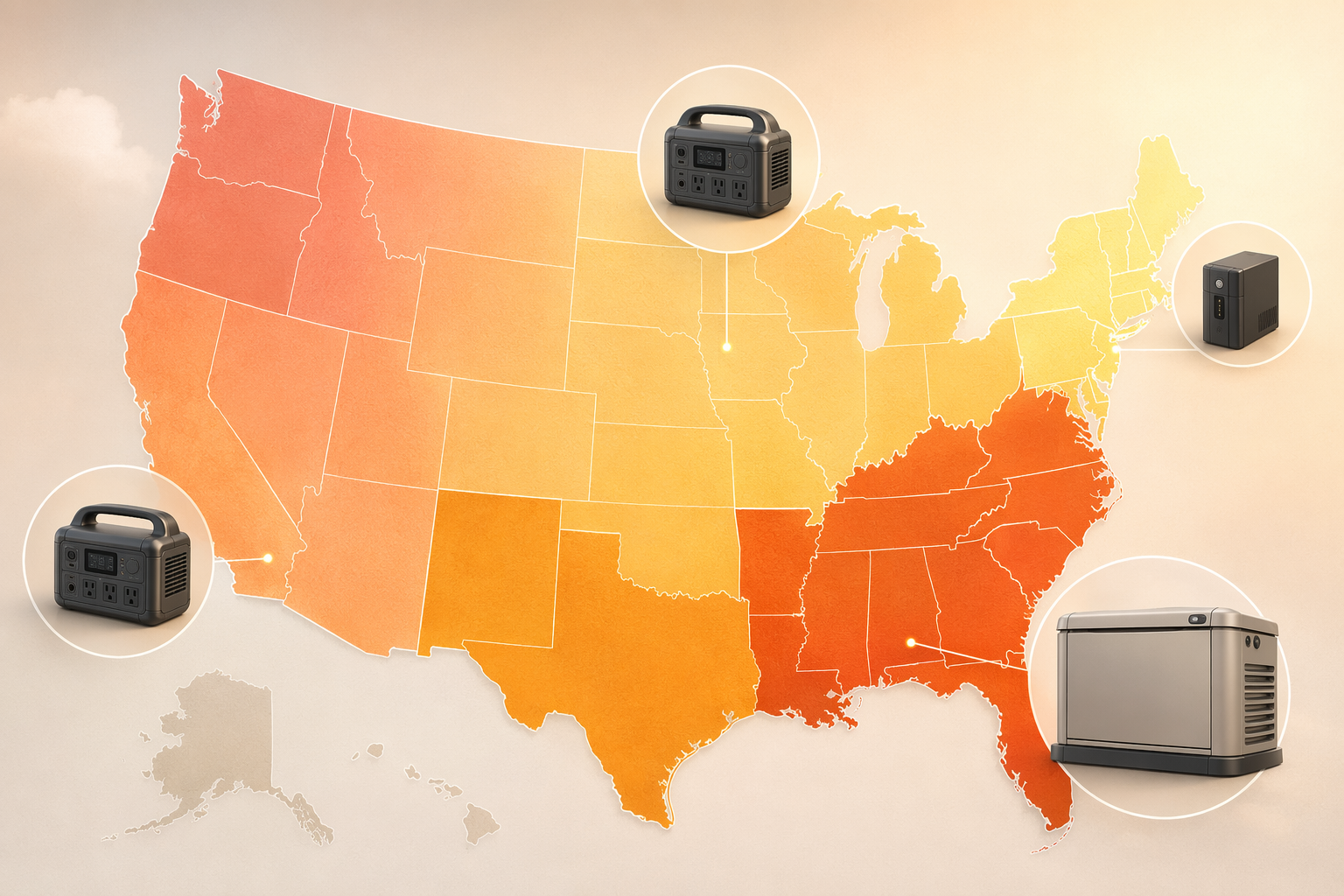
A backup purchase should start with the outage you are actually sizing for. PowerOutage.us summarizes regional planning ranges this way: Southeast hurricane outages can reach 14 or more days, Texas grid events can run 4–5 days, California PSPS events 2–5 days, Pacific Northwest outages 3–7 days, Northeast outages 5–10 days, and Midwest outages 1–5 days. It also notes that rural customers can wait 5–14 times longer than urban customers.[4]
| Region or exposure | Planning duration from available data | Smart-home backup tier that usually matches |
|---|---|---|
| Urban Northeast or well-served grid | Often short interruptions, though major storms can run longer | UPS for router, modem, and hub |
| Midwest ice or wind exposure | 1–5 days | Portable power station if multi-day events are realistic |
| California PSPS area | 2–5 days | Portable power station, with charging plan |
| Texas grid-event exposure | 4–5 days | Large portable power station or generator-backed plan |
| Pacific Northwest storm exposure | 3–7 days | Portable power station for short multi-day needs; generator if rural |
| Southeast hurricane zone | 14+ days possible | Standby generator plus UPS for clean handoff |
| Rural service territory | 5–14x longer waits than urban customers | Treat as multi-day unless local utility history proves otherwise |
This is where national averages become dangerous. A 12.8-hour “average longest outage” can make a 300Wh UPS look plausible. In a hurricane-prone part of the Southeast, that same number is too calm. In an apartment on a well-maintained urban circuit, buying a permanently installed generator because someone online had a seven-day outage may be solving the wrong problem.
State-level averages can help, but only if their date window is kept in view. Ooma’s state comparison using EIA data from 2019–2023, for example, lists Louisiana at 470 minutes per outage, but that window does not include the 2024 hurricane impacts highlighted by EIA.[7][2] Use those numbers as context, then check your local utility outage map history, county emergency notices, and the events that actually affect your neighborhood.
The Three Backup Tiers
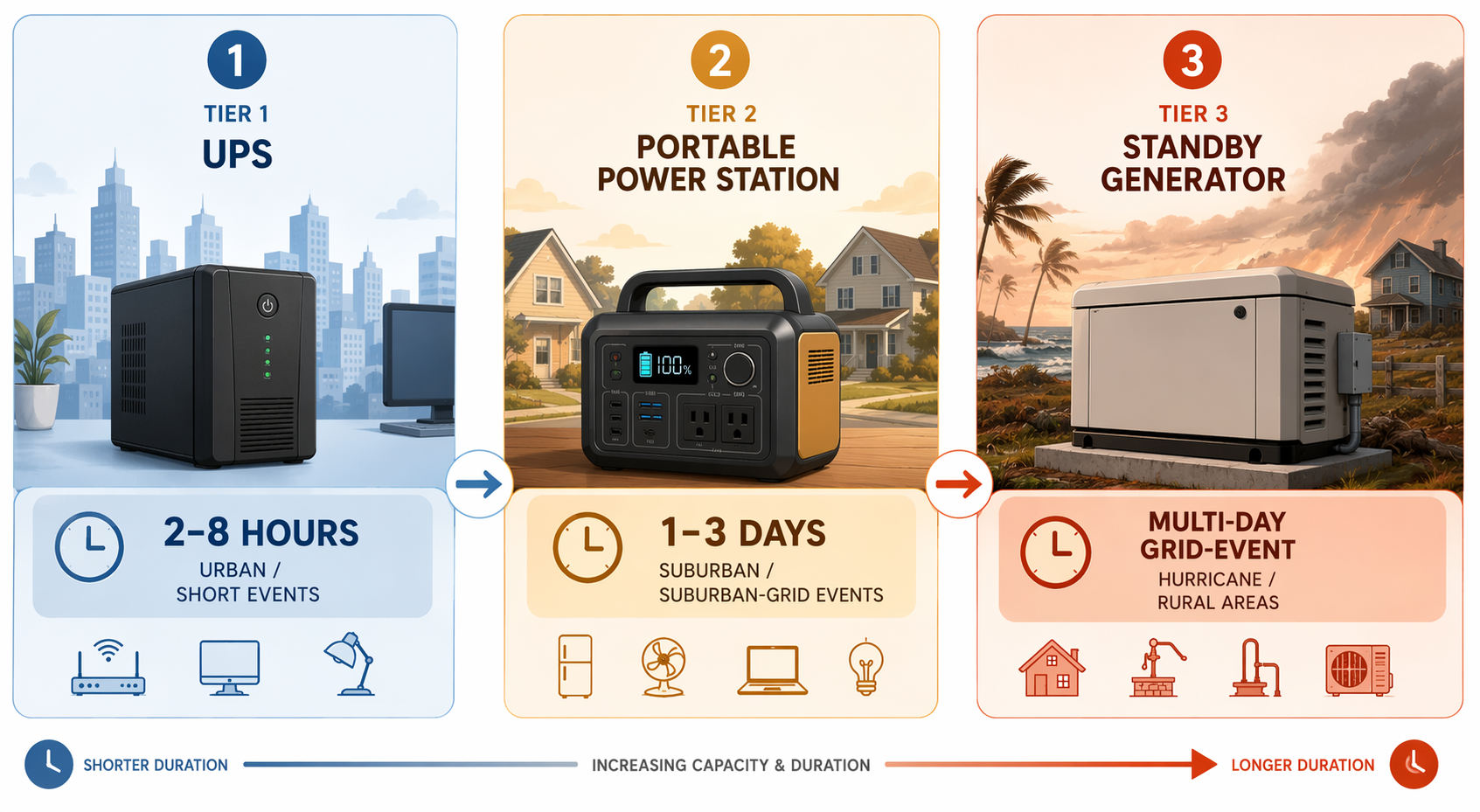
For smart-home continuity, the practical framework is three tiers. The tiers are not status levels. They are duration matches.
- Tier 1 — UPS only: Best for roughly 2–8 hours of network and hub runtime. This is the cleanest answer for short urban interruptions, ordinary utility blips, and homes where the goal is to keep automations and internet up through a brief outage.
- Tier 2 — portable power station: Better for 1–3 day planning. This fits many California PSPS, Midwest storm, and shorter Texas-style outage scenarios if the station is sized for the actual load and has a recharge plan.
- Tier 3 — standby generator plus UPS: The right category for repeated multi-day exposure, Southeast hurricane zones, rural waits, and households where refrigeration, medical equipment, well pumps, or HVAC enter the conversation. The UPS still matters because it bridges the transfer gap and keeps electronics from rebooting.
The important move is to resist making each tier sound equally reasonable for every home. If your realistic worst case is a two-hour utility interruption, a tidy UPS is not a compromise. If your realistic worst case is three days without service, a UPS is not a starter generator. It is a short bridge.
Where UPS-only sizing works
A UPS is excellent at a narrow job: keeping low-wattage electronics from dropping offline. HomeTechHacker’s outage preparation testing puts many router/modem combinations around 15–30 watts, and notes that a roughly 300Wh UPS can provide about 2–4 hours for the network stack. Typical router/modem UPS runtime lands around 2–8 hours depending on load and battery age.[5]
That is enough to preserve the parts of a smart home that are most annoying to rebuild after a short outage: internet, the hub, local automations, and sometimes cameras or bridges if they are on the same protected circuit. It is especially useful for homes built around a local controller; if you are still deciding whether that architecture fits your house, NestGrid’s guide to what a smart home hub does is the better place to sort out the hub question before buying backup hardware.
A UPS is less useful when the outage window is overnight or longer. Battery age, inverter efficiency, extra devices plugged in “just for now,” and higher-than-expected router draw all shorten runtime. The number on the product page is a starting point, not a promise.
Where a portable power station becomes the honest middle
The portable power station is the tier for people whose outages are too long for a UPS but not necessarily frequent or severe enough to justify a permanently installed generator. Think PSPS territory, ice-storm neighborhoods, parts of Texas with grid-event exposure, or suburban areas where one to three days is plausible but two weeks is not the planning baseline.
This tier also changes the operating pattern. A UPS sits quietly and transfers automatically. A power station asks someone to decide what gets plugged in, when the router gets priority over phones, whether the station can recharge from solar or a vehicle, and how much reserve to keep overnight. That is manageable, but it is not invisible infrastructure.
For a smart home, the usual load is still modest: network stack, hub, perhaps a bridge, and selected chargers. The mistake is adding comfort loads casually. A laptop, TV, space heater, refrigerator, or medical device changes the calculation immediately. Once the backup plan grows beyond connectivity and control, the sizing exercise is no longer just a smart-home project.
Where generator-backed backup is not overkill
In the Southeast hurricane belt, in rural service territories, and in homes with repeated multi-day exposure, generator-backed backup is not a luxury version of a UPS. It is a different answer to a different outage duration. PowerOutage.us lists Southeast hurricane outages at 14 or more days, and J.D. Power’s survey found Southeast customers averaged 95.2 hours after extreme weather events in 2024–2025.[4][1]
The UPS still belongs in that setup. Standby generators can take time to transfer, and sensitive network gear should not have to reboot every time power changes state. A small UPS in front of the router, modem, and hub makes the larger system behave more smoothly.
“Indefinite” backup needs a sober footnote at the buying stage, not after installation. Standby generators require professional installation, maintenance, and fuel planning. They also move the weak point: instead of battery runtime, the questions become fuel availability, service intervals, safe exhaust placement, and whether the transfer equipment was installed for the circuits that actually matter.
For homes in the 4–7 day storm window, NestGrid’s hurricane-ready smart home checklist goes deeper on what actually survives when the outage becomes a household operating mode rather than an inconvenience.
Now Shrink the Problem to Your Critical Load
After region comes load. The cleanest smart-home backup plan protects only what must stay alive. Everything else either runs on its own battery, waits for recovery, or needs a physical fallback.
| Component | Typical backup need | Sizing note |
|---|---|---|
| Router/modem | 15–30W | Usually the first device on UPS or power-station backup |
| Smart-home hub or local controller | 5–15W | Can often share the same UPS as the network stack |
| Battery sensors | No UPS for the sensor itself | Need hub or controller continuity if alerts depend on it |
| Smart lock | Physical key path required | Backup power does not replace manual access |
| Garage opener | Manual release knowledge required | Motor backup is separate from smart-home continuity |
A router/modem at 15–30W plus a hub at 5–15W is a very different load than “the house.” HomeTechHacker’s numbers explain why a small UPS can be satisfying for the network stack and disappointing the moment extra devices are added.[5] If the hub is a Hubitat, Home Assistant box, bridge-heavy setup, or another local controller, it is often worth protecting because battery sensors and local automations may depend on it staying online. NestGrid’s smart home controller comparison is useful if you are still deciding which hubs benefit most from UPS protection.
Sensors are the easy trap. A leak sensor, smoke listener, or door sensor may be battery-powered, but that does not mean the alert path survives. If the sensor reports through a hub, and the hub is dead, the battery in the sensor does not help much. If the alert requires internet, the modem and router matter too.
Locks and garage doors need a different kind of respect. WRAL’s January 2026 consumer report emphasized physical fallback awareness for smart-home outage preparation, including knowing manual override locations.[6] A smart lock should have a known key path. A garage door should have a known manual release cord. These are not old-fashioned extras; they are the parts that work when every battery estimate was optimistic.
Protocol-specific preparation can also matter before a storm. Zigbee, Z-Wave, Wi-Fi, Thread, and Matter devices fail in different ways when routers reboot, hubs lose power, or mesh repeaters disappear. For that layer, use NestGrid’s smart home storm preparation tips for every protocol after the power tier is chosen, not before.
A Conservative Sizing Method
Use a simple order of operations. First, pick a realistic worst-case duration from regional data and local history. Second, list only the critical smart-home load. Third, choose the backup tier that covers that duration without pretending every device in the house is critical.
- Write down your planning duration: two hours, eight hours, one day, three days, or longer.
- Add the watts for the modem, router, hub, and any bridge that must stay online.
- Add a margin for battery age, inverter loss, cold weather, and accidental extra devices.
- Match the result to UPS, portable power station, or generator-backed backup.
- Verify manual fallbacks for locks, garage doors, gates, and any device that controls access.
A hypothetical example shows the shape of the math without pretending to know your devices: if a network stack and hub together draw a modest continuous load, a UPS may comfortably cover a short evening outage but fall short overnight. The same load on a larger portable power station may run far longer, but only if nobody plugs in higher-draw appliances. The calculation fails less often when the protected circuit is boring and deliberately limited.
After the outage, recovery is its own task. Devices may not all reconnect in the right order, especially if the modem, router, hub, and cloud services wake up at different times. NestGrid’s guide to smart-home power outage recovery belongs next to the backup plan because keeping gear powered and getting it cleanly back online are related but separate problems.
What the National Average Can and Cannot Tell You
The national trend is real enough to take seriously. Longer remembered outages, hurricane-driven outage hours, and the share of outage-experiencing households reporting six-hour events all point in the same direction: backup planning is no longer only for people with remote cabins or elaborate home labs.[1][2][3]
But the national average should not size the battery. J.D. Power’s 12.8-hour figure is survey-based. EIA’s non-major-event reliability numbers answer a different question. Census data tells us what outage-experiencing households reported, not what every individual home should expect. Regional storm history, rural repair delays, and local infrastructure decide whether a UPS is elegant or naive.
Choose the backup tier only after identifying your regional worst-case duration and your critical smart-home load. Then add physical fallbacks anywhere power cannot be assumed. National averages can warn you that outages are getting longer; regional duration and critical load are what size the plan.
References
- Power outages are getting longer amid extreme weather: J.D. Power, Utility Dive, 2025.
- Hurricanes in 2024 caused the most hours without power in the United States in a decade, U.S. Energy Information Administration, 2024.
- Power Outages: More Than Just an Inconvenience, U.S. Census Bureau, 2024.
- How Long Do Power Outages Last?, PowerOutage.us.
- Preparing Your Smarthome for Outages, HomeTechHacker.
- Prepare for outages: Essential tips for smart home power failures, WRAL, January 2026.
- States with the Most and Longest Power Outages, Ooma.
Report a step that didn't work
Tell us which step failed and on what firmware or app version — we re-verify before changing the recipe.