
A smart home alert for a local tornado warning should not depend on one screen, one app, or one speaker. The practical setup is layered: Wireless Emergency Alerts on your phone, smart speaker announcements inside the home, hub automations that make the warning visible and audible, and a battery-backed NOAA Weather Radio that can still wake you when the house is dark and the network is gone.
That order matters. A tornado warning is not a slow notification. A widely cited estimate puts the average tornado warning lead time around 13 minutes, and overnight tornadoes are especially dangerous because people are asleep, separated from screens, and less likely to notice outdoor sirens or weather changes in time.[1][10] In the U.S., roughly 1,200 tornadoes occur in a typical year, so this is not only a Tornado Alley problem.[1]
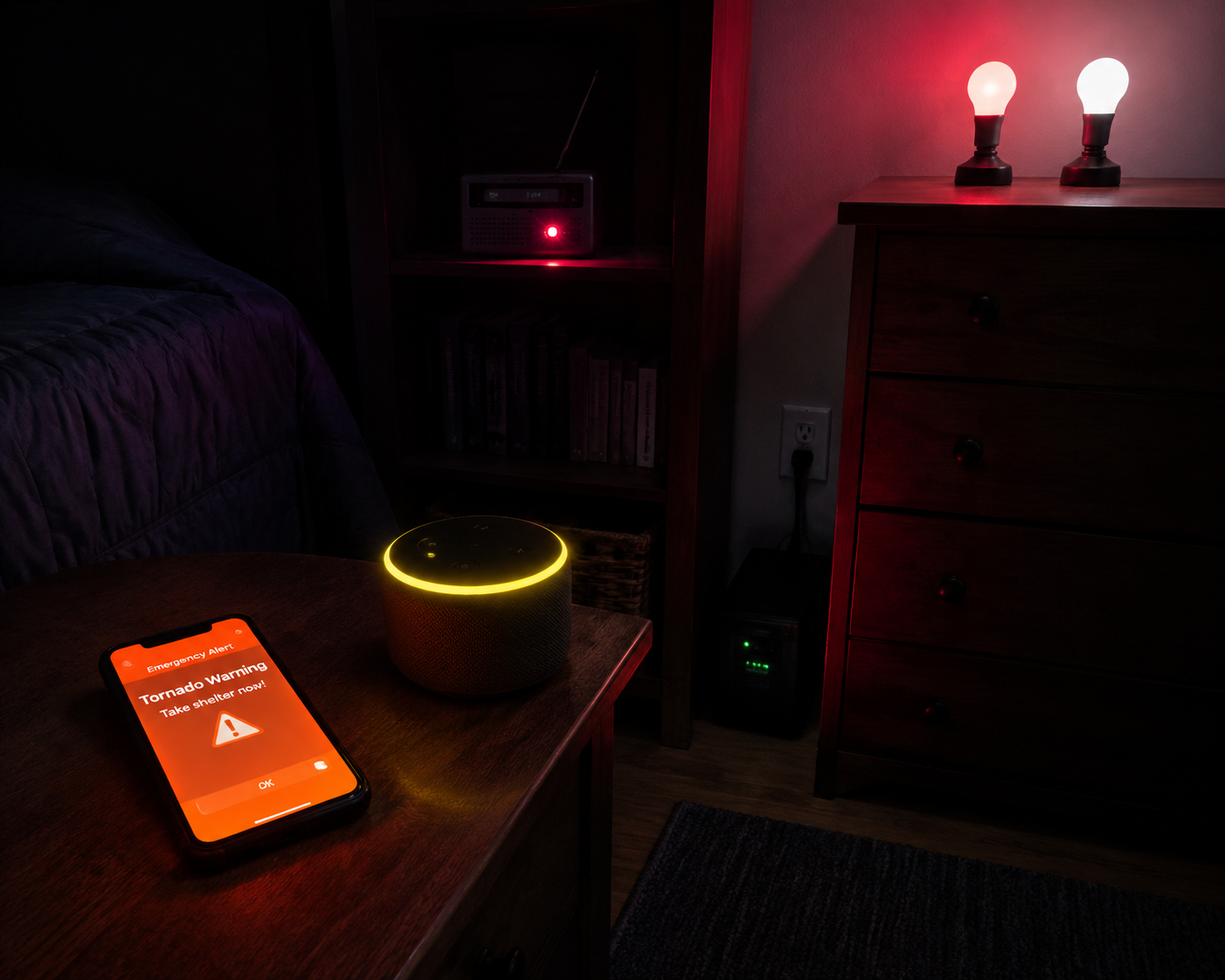
The goal is not to make the house look dramatic. It is to make sure someone who is asleep hears something, sees something, and has enough time to move.
| Layer | What it does | Main failure it covers |
|---|---|---|
| Phone Wireless Emergency Alerts | Receives official local emergency alerts through the mobile network | Baseline alert even without a smart home platform |
| Smart speaker announcements | Speaks the warning inside rooms where people may not be looking at phones | Missed phone vibration, muted rooms, sleeping household members |
| Smart hub automations | Flashes lights, plays audio, turns on lamps, or triggers sirens | Alerts that are heard but not immediately understood in the dark |
| Battery-backed NOAA Weather Radio | Receives weather radio alerts without relying on Wi-Fi or a phone app | Power outage, dead phone, router failure, platform outage |
Start With the Alert Path That Does Not Need Your Smart Home
Your phone is the first layer because it receives Wireless Emergency Alerts from authorized public alerting systems. On iPhone and Android, the basic job is to keep emergency, public safety, and severe weather alerts enabled in notification settings.[2] This is the layer that should work before any smart speaker, hub, routine, or custom automation gets involved.
On Android, the exact menu name varies by manufacturer and carrier, but the settings usually live under Safety and emergency, Wireless emergency alerts, or Emergency alerts. Make sure extreme threats, severe threats, public safety alerts, and test alerts are not casually disabled. If your phone separates weather alerts from other emergency categories, leave the severe-weather category on.
On iPhone, the important setting is at the bottom of the Notifications screen. Open Settings, then Notifications, then scroll to Government Alerts. Keep Emergency Alerts and Public Safety Alerts on. Recent iOS reporting also describes an Enhanced Safety Alerts area, including an Imminent Threat Alert toggle intended for severe weather, but Apple’s labels and placement can change with iOS updates, so verify the exact wording on your device before storm season.[3]
Do not stop after seeing the toggle turned on. The missed-alert failure on iPhone is often quieter than that: Focus, Sleep, or a schedule that behaves exactly as designed and still keeps the wrong notification from breaking through at night.
Keep Focus and Sleep From Becoming the Weak Link on iPhone
If you use Sleep Focus, Driving Focus, or a custom nighttime Focus, review it as if the warning arrives at 2 a.m. while the phone is face down. The question is not whether the phone can receive the alert. The question is whether your current settings let the alert make noise, light the screen, and break through the mode you use every night.
- Open Settings, then Focus, and inspect every Focus mode that might be active overnight.
- Check whether the Focus silences notifications from unknown senders, apps, or time-sensitive alerts.
- Review Sleep settings separately if you use Apple’s sleep schedule, because Sleep Focus may be active even when you did not manually turn it on.
- Keep the phone charged within reach, not across the room, in a bag, or under bedding where sound and vibration are muffled.
- If your household has more than one phone, verify settings on each phone rather than assuming one correctly configured device covers everyone.
The uncomfortable part is that there is no universal screenshot that covers every iPhone in 2026. iOS version, carrier behavior, regional alert categories, and Focus configuration can all affect what the user sees. That is exactly why the phone should be treated as the baseline, not the whole system.
Make Alexa Announce Severe Weather Instead of Waiting for a Question
Alexa is the clearest smart speaker path for proactive severe-weather announcements. The simple setup is to say, “Alexa, tell me when there is a severe weather alert.” Reviewed’s Echo severe-weather guide describes that voice command as the way to enable alerts for tornado warnings and other severe weather, with related controls also available in the Alexa app’s notification settings.[4]
After enabling it, open the Alexa app and check the weather alert settings for the home location associated with the Echo devices. If you have speakers in bedrooms, hallways, and living areas, do not assume one kitchen speaker will wake the whole home. Put the announcement where sleeping people are likely to hear it.
- Enable severe weather alerts by voice first, then confirm the setting in the Alexa app.
- Set the correct home address or weather location for the household.
- Place at least one Echo within hearing distance of sleeping areas.
- Keep the volume high enough overnight to wake someone, not just to sound polite during the day.
- If possible, put the router, modem, and one key Echo on a small UPS so a brief outage does not immediately silence the layer.
That last point is not a nice-to-have detail. Echo speakers do not have internal batteries. If power drops before or during the warning, the speaker layer disappears unless you have backup power. A UPS does not make Alexa as independent as a NOAA radio, but it can keep the network and one speaker alive through short interruptions.
Treat Google Home as Helpful, Not as Your Main Tornado Siren
Google Home and Nest speakers can answer weather questions, read forecasts, and run routines, but they are a weaker choice for proactive local tornado warning announcements. User-focused guidance and reports around Google Home tornado safety tend to fall back on asking the speaker for current conditions or building routines that query weather information, rather than relying on a native, dependable, hands-free tornado warning announcement path.[5]
That does not make a Nest speaker useless. It can still be part of a routine that turns on lights, announces a scripted message, or reads a weather response when triggered by another platform. What it should not be is the only device you expect to wake you for a warning you did not ask about.
If your home is mostly Google devices, pair them with stronger layers: phone WEA settings, a Home Assistant alert sensor if you run a hub, and a NOAA Weather Radio. A workaround is acceptable. Pretending the limitation does not exist is not.
Use the Hub for the Response Your Phone Cannot Create
A smart hub earns its place when it turns a warning into something the whole home can perceive: lights on, bedroom lamps flashing, speaker announcements, hallway illumination, or a siren sound. This is the layer that helps after the first alert, when someone has to get out of bed, wake others, and move through the house.
Keep the automation narrow. A tornado watch means conditions are favorable; a tornado warning means a tornado has been sighted or indicated by weather radar, and people in the warned area should take shelter immediately.[6] A watch can justify awareness. A warning should trigger the loud, visible, disruptive routine.
Home Assistant: the most flexible path, with the most setup
Home Assistant is the strongest technical example because it can turn National Weather Service alert data into automations. The key is using an alerts-capable integration. The Home Assistant NWS Alerts custom integration, distributed through HACS, polls alerts.weather.gov every 90 seconds by default, allows a configurable interval from 30 to 600 seconds, and exposes alert details such as severity and event type, including Tornado Warning and Severe Thunderstorm Warning.[7]
Do not confuse that with Home Assistant’s official NWS integration. The official integration provides forecast data; it does not provide weather alerts.[8] For tornado warning automations, forecast temperature and wind speed are not enough. You need an alert entity or sensor whose attributes can be matched against the warning event.
A practical Home Assistant warning routine can watch for an active alert where the event is Tornado Warning and the severity is Severe or Extreme. From there, it can turn on bedroom lights, flash selected bulbs red, send a mobile push notification, play a text-to-speech warning through speakers, and turn on a hallway path to the shelter location.
alias: Tornado warning alert
mode: single
trigger:
  - platform: state
    entity_id: sensor.nws_alerts
condition:
  - condition: template
    value_template: >
      {{ 'Tornado Warning' in state_attr('sensor.nws_alerts', 'event') | string }}
action:
  - service: light.turn_on
    target:
      entity_id:
        - light.bedroom_lamp
        - light.hallway
    data:
      brightness_pct: 100
      color_name: red
  - service: notify.mobile_app_phone
    data:
      title: Tornado Warning
      message: Take shelter now. Check the warning area and move to your safe location.
  - service: media_player.volume_set
    target:
      entity_id: media_player.bedroom_speaker
    data:
      volume_level: 0.9
  - service: tts.speak
    target:
      entity_id: tts.home_assistant_cloud
    data:
      media_player_entity_id: media_player.bedroom_speaker
      message: Tornado warning. Take shelter now.
Treat that YAML as a shape, not a copy-paste guarantee. Entity names, TTS services, speaker integrations, and light capabilities vary. Alexa Media Player, Google Cast, Philips Hue, Z-Wave sirens, Zigbee bulbs, and mobile app notifications each bring their own setup. Home Assistant can do the job well, but only after the parts are already working on an ordinary day.
The best test is boring: create a harmless test automation that uses the same lights and speakers with a manual trigger. If the bedroom speaker cannot play TTS during a calm afternoon, it will not become reliable during a warning.
HomeKit: useful when Home Assistant bridges the alert
HomeKit does not become a weather-alert platform by itself, but it can participate when another system exposes the alert. A documented workflow from the Automators community uses Home Assistant’s NWS alert sensor and the Home Assistant-HomeKit bridge so HomeKit can react to a severe weather alert trigger.[9]
That makes sense if your lights, plugs, and scenes already live in Apple Home. Let Home Assistant handle the alert detection, then let HomeKit run the visible response: turn on bedroom lights, illuminate the hallway, and activate a scene that points people toward the safest interior room available.
Vivint and managed hubs: simpler, but still not magic
A managed system can reduce the amount of tinkering. Vivint describes its Smart Hub as providing built-in weather alerts, battery backup, and cellular connectivity, which addresses two common smart-home weaknesses at once: power loss and internet failure.[10] For a household that does not want to maintain Home Assistant, that kind of all-in-one path is worth considering.
The tradeoff is control. You are relying on the platform’s alert handling, supported devices, service status, and subscription model. It may be more resilient than a Wi-Fi-only speaker sitting on a nightstand, but it should still sit beside phone alerts and a weather radio, not replace them.
Keep One Battery-Backed NOAA Weather Radio Where It Can Wake You
The least glamorous device in the setup is the one I would be most reluctant to skip. A NOAA Weather Radio with battery backup does not care whether your router is rebooting, your phone is charging badly, your smart speaker lost power, or your cloud automation is delayed. It listens for weather radio alerts and makes noise.
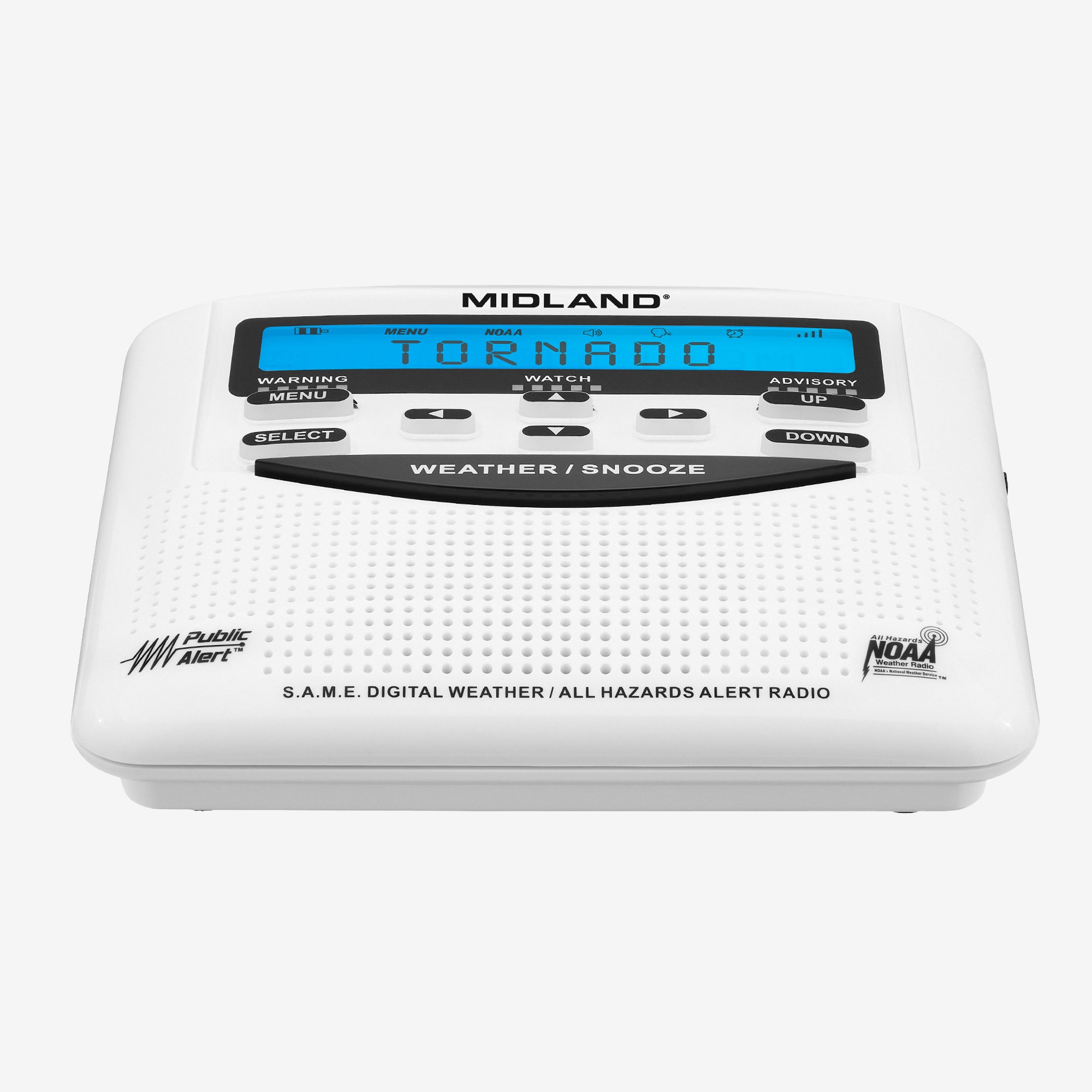
Wirecutter recommends a dedicated weather radio as part of tornado preparedness and highlights SAME encoding, which lets a radio alert for selected counties instead of every broadcast in range. Its Midland ER310PRO pick has SAME support and a minimum 77 dB alert tone.[1] That kind of county-level filtering matters because a radio that cries wolf all night is more likely to be unplugged, silenced, or ignored.
Place the radio in the sleep path, not in a utility room or emergency bin. Program the county or counties that actually matter for your home, test the alert volume, install batteries, and set a reminder to check those batteries before peak storm season. If your sleeping area is far from the radio, buy another radio rather than trusting sound to travel through closed doors and HVAC noise.
A weather radio is not a smart-home downgrade. It is the layer that lets the smart home fail without taking the household’s warning path with it.
Add Local Sensors Only for Local Conditions, Not Official Warnings
A home weather station can add useful context, but it should not be treated as a tornado warning source. The Tempest Weather System, for example, can provide hyper-local wind and lightning data and can broadcast data over the local network using UDP even without internet access. Residential Tech Today describes using that local data in automations such as retracting screens or awnings when conditions worsen.[11]
That is valuable for property protection and situational awareness. It is not the same thing as an official tornado warning. A sudden wind shift at your house does not define the warned polygon, and a calm reading does not mean the warning is irrelevant. Let sensors protect things; let official alerts move people.
Automate the Parts That Help People Move
The most useful tornado warning automations are blunt. They do not need to explain the whole forecast. They need to wake people, make the path visible, and reduce the number of decisions someone makes while half-awake.
- Turn bedroom and hallway lights on at full brightness.
- Flash selected smart bulbs in a distinct color used only for emergencies.
- Play a short spoken message: “Tornado warning. Take shelter now.”
- Send push notifications to every adult phone in the household.
- Turn on lights along the route to the basement, interior bathroom, hallway, or lowest-level shelter area.
- If you automate locks, limit that to interior doors needed for shelter access; unlocking exterior doors during a warning can create a separate security problem.
Commercial systems use the same basic idea at larger scale. Connect ONE describes severe-weather alert automations that can activate strobes, public-address announcements, and mass notifications when National Weather Service alerts are issued.[12] A home does not need enterprise software to borrow the principle: make the warning impossible to miss in the places where people actually are.
A Sensible Setup for a House, Apartment, or Rental
If you own the home and can tinker, the strongest consumer setup is usually: phones configured for emergency alerts, Alexa severe-weather announcements in sleeping areas, Home Assistant watching for NWS alert events and triggering lights and audio, and a programmed NOAA Weather Radio with fresh batteries.
If you rent or live in an apartment, simplify the same pattern. Keep phone alerts on, place one smart speaker near the bedroom if you use Alexa, plug in one or two smart lamps that can turn on during an alert, and keep a battery-backed weather radio on a shelf where it can be heard from bed. You do not need a hardwired siren or a dedicated safe room to build redundancy.
If you have family members who sleep heavily, wear headphones, use white-noise machines, or keep phones on silent, design around that person. A warning system that works only for the lightest sleeper in the house is not finished.
Test the Failure Modes Before the Warning
Do not wait for severe weather to find out which layer is decorative. Test each part in calm weather without using false emergency language that could confuse the household. Trigger the Home Assistant routine manually. Ask Alexa to confirm severe-weather alerts are enabled. Turn off Wi-Fi briefly and see what still works. Unplug the weather radio and confirm its battery keeps it alive.
The test is not a performance demo. It is a search for quiet failures: a speaker volume set too low, a bulb that lost pairing, a phone Focus mode that looks harmless, a weather radio still programmed for an old county, or a UPS that powers the router but not the modem.
Once those are fixed, stop adding complexity unless it covers a different failure. One alert wakes the phone. One alert speaks in the room. One automation makes the path visible. One battery-backed radio survives the outage. That is the point where a smart home becomes useful for a local tornado warning: not because every device is clever, but because at least one path still has a chance to reach a sleeping person when the others do not.
References
- The Best Tornado Preparedness Supplies and Strategies — Wirecutter / The New York Times
- How to set up severe weather alerts on iPhone, Android, and Alexa — Asurion
- I missed a tornado warning — Apple settings to make sure you don't — NEWS10 ABC
- 9 ways Amazon Echo can help you in severe weather — Reviewed
- Google Home / Alexa Tornado Safety — Michigan blog
- Understand Tornado Alerts (Watch vs Warning vs Emergency) — National Weather Service
- Weather Alerts custom integration for Home Assistant — GitHub
- NWS Integration (official, forecast-only) — Home Assistant
- Trigger HomeKit on NWS severe weather alert — Automators Talk
- How a Smart Home Protects You During a Natural Disaster — Vivint
- Integrating Natural Disaster Detection Sensors into a Smart Home — Residential Tech Today
- Turning Severe Weather Alerts into Automated Action — Connect ONE
Policy Updates & Reader Notes
Privacy policies, monitoring plan prices, and security disclosures change frequently. Report new data retention terms, updated plan pricing, or new vulnerability disclosures below. For formal editorial corrections, use the contact page.
Comments
Join the discussion with an anonymous comment.