
Tornado Warning at Home? Smart Safety Tips with Home Assistant
Build a Home Assistant automation that detects NWS tornado warnings and automatically flashes red lights, broadcasts a shelter TTS announcement, locks exterior doors, and closes the garage. Covers the NWS Alerts integration, scene-save-restore pattern, and exact event conditions to avoid false triggers on watches.
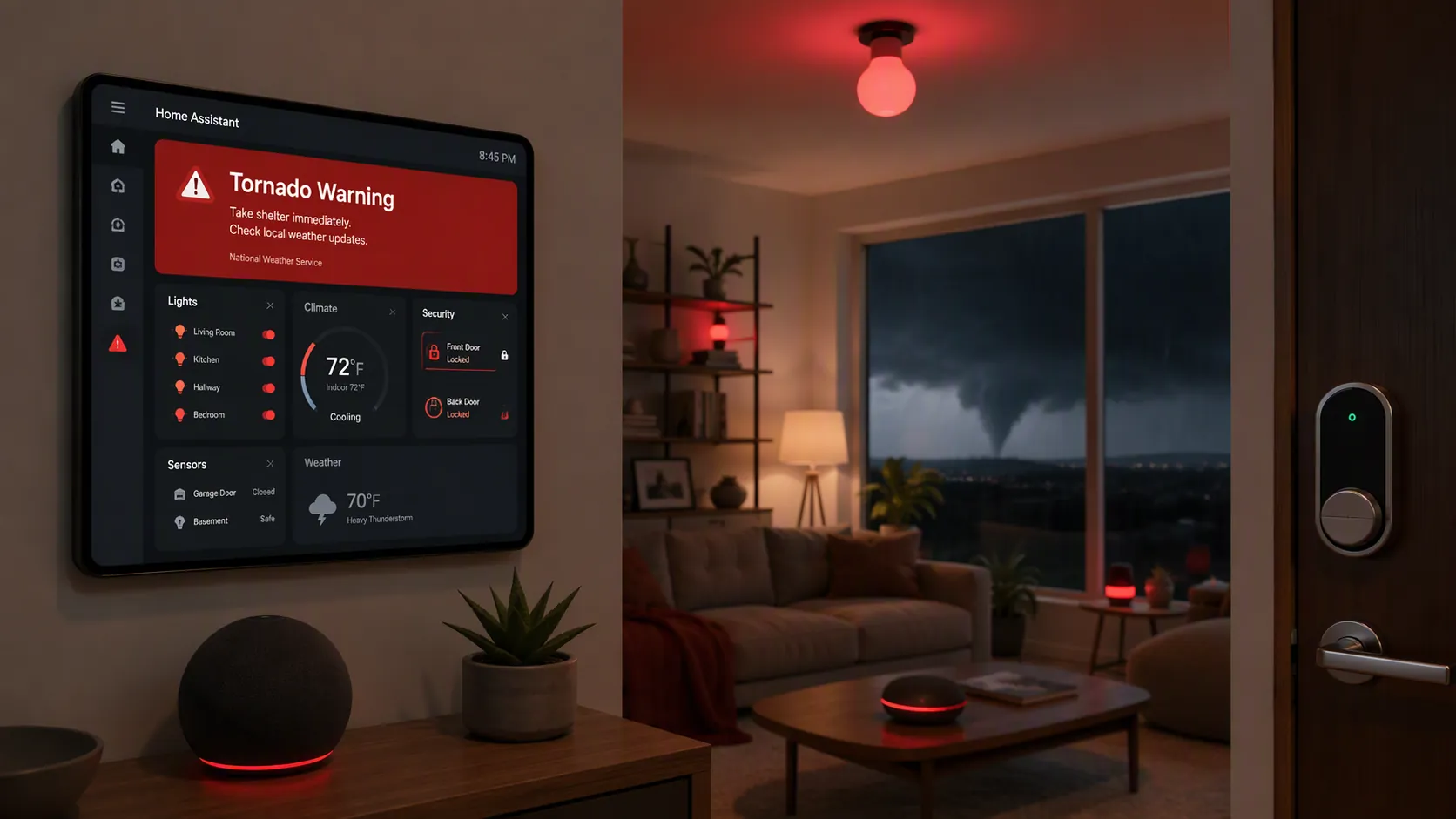
For smart tornado-warning safety at home, the useful question is not whether Home Assistant can make the house look dramatic. It can. The useful question is whether it can react to the right alert, in the right area, without leaving the house in a broken state afterward. A commonly repeated benchmark puts average tornado warning lead time around 13 minutes, but that figure traces back to older NWS/Atlantic-cited material rather than a newly validated 2026 measurement. It is still a fair urgency frame: if a warning is issued, your automation should not be waiting for someone to open a dashboard. [1]
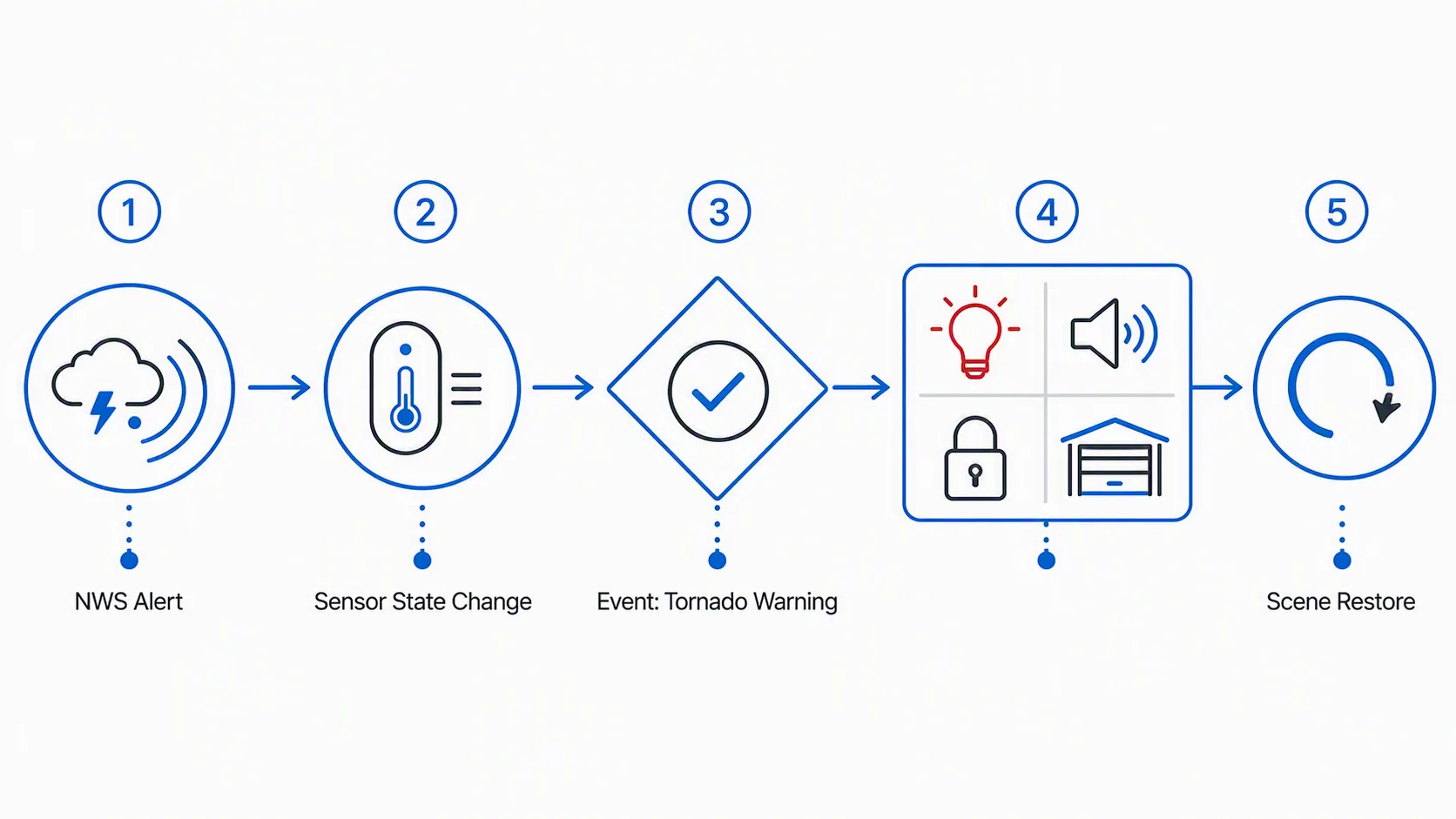
The recipe below uses sensor.nws_alerts from the NWS Alerts custom integration. When that sensor changes, the automation checks the alert attribute Event. Only an exact Tornado Warning match proceeds. A Tornado Watch does not.
| This automation does | It requires | It will not do |
|---|---|---|
| Detects a state change on sensor.nws_alerts and filters for Event: Tornado Warning | The NWS Alerts custom integration installed through HACS and configured for your correct NWS zone or county | Trigger on Tornado Watch, Severe Thunderstorm Warning, or a vague weather-alert count |
| Snapshots selected light states before changing them | Working Home Assistant light entities for the bulbs you want to flash red | Guarantee that every bulb model handles rapid red/off transitions cleanly |
| Broadcasts a shelter message by TTS | A working TTS service and speakers that are loud enough in the rooms that matter | Make household members read a dashboard during a siren |
| Locks selected exterior doors and closes the garage | Working lock and cover entities already tested from Home Assistant | Replace official emergency instructions or local shelter planning |
| Restores the lights after the warning action finishes | A scene snapshot created before the flashing sequence | Unlock doors or reopen the garage afterward |
The NWS Alerts integration used here is the custom-components/weatheralerts project. It exposes weather alert data to Home Assistant through a sensor and attributes, including the alert event name used for filtering in this automation. Install and configure it from HACS, then confirm your configured alert area before you trust any action tied to it. [2]
Prerequisites that actually matter
Before writing the automation, get these boring parts right. They are where most severe-weather automations fail quietly.
- NWS Alerts is installed through HACS and the integration has created sensor.nws_alerts.
- Your NWS zone or county code is correct for the location you want protected. A beautiful automation pointed at the wrong alert area is worse than no automation because it teaches you to trust the wrong silence.
- The lights you plan to flash red already respond reliably from Home Assistant.
- Your speakers already play TTS from Home Assistant at a useful volume.
- Your exterior lock entities already lock from Home Assistant.
- Your garage door entity already closes from Home Assistant, with its normal obstruction and safety behavior intact.
If you want a dashboard view, add it after the automation works. A Weather Alerts Card-style panel is useful for visibility, but it should not be the thing a household depends on during a warning. The automation path should run from the alert sensor to the devices without requiring anyone to tap anything.
The full automation YAML
Replace the entity IDs before enabling this. The light list should include only lights you are willing to flash and restore. The lock and garage actions are intentionally not restored; after a warning action, the house should not automatically unlock itself or reopen the garage.
alias: Tornado Warning - Whole Home Safety Response
description: >-
  Reacts only to NWS Tornado Warning alerts. Flashes selected lights red,
  broadcasts a shelter announcement, locks exterior doors, closes the garage,
  and restores the original light scene afterward.

mode: single

trigger:
  - platform: state
    entity_id: sensor.nws_alerts

condition:
  - condition: template
    value_template: >-
      {{ trigger.to_state is not none
         and trigger.to_state.attributes.Event == 'Tornado Warning' }}

action:
  # Snapshot only the lights you will modify.
  - service: scene.create
    data:
      scene_id: tornado_warning_before_alert
      snapshot_entities:
        - light.living_room_lamps
        - light.hallway
        - light.bedroom_lamp
        - light.basement_stairs

  # Run the visible/audible/security actions together.
  - parallel:
      - sequence:
          - repeat:
              count: 10
              sequence:
                - service: light.turn_on
                  target:
                    entity_id:
                      - light.living_room_lamps
                      - light.hallway
                      - light.bedroom_lamp
                      - light.basement_stairs
                  data:
                    brightness_pct: 100
                    rgb_color: [255, 0, 0]
                    transition: 0
                - delay:
                    seconds: 1
                - service: light.turn_off
                  target:
                    entity_id:
                      - light.living_room_lamps
                      - light.hallway
                      - light.bedroom_lamp
                      - light.basement_stairs
                  data:
                    transition: 0
                - delay:
                    seconds: 1

      - sequence:
          - service: tts.speak
            target:
              entity_id: tts.piper
            data:
              media_player_entity_id:
                - media_player.kitchen_speaker
                - media_player.bedroom_speaker
                - media_player.basement_speaker
              message: >-
                Tornado Warning. Move to the shelter area now.
                Avoid windows. Bring phones and shoes.

      - sequence:
          - service: lock.lock
            target:
              entity_id:
                - lock.front_door
                - lock.back_door
                - lock.garage_entry_door

      - sequence:
          - service: cover.close_cover
            target:
              entity_id: cover.garage_door

  # Restore lights to their previous state after the flash sequence completes.
  - service: scene.turn_on
    target:
      entity_id: scene.tornado_warning_before_alert
    data:
      transition: 1
The condition is the safety catch
The trigger is intentionally broad: any state change on sensor.nws_alerts. That is fine only because the condition is narrow. The condition does not ask whether the sensor has an alert count. It does not search for the word tornado somewhere in a description. It checks one attribute:
{{ trigger.to_state is not none
   and trigger.to_state.attributes.Event == 'Tornado Warning' }}
That exact comparison is what keeps a Tornado Watch from becoming a shelter-order automation. A watch is still serious, but it is not the same operational state as a warning. Treating them the same trains the household to ignore the automation, which is the worst possible outcome for a system that is supposed to cut through noise.
After installation, open Developer Tools → States and inspect sensor.nws_alerts. You are looking for the actual attribute name and value as Home Assistant sees them. This setup depends on the integration exposing the alert Event attribute, so do not guess from a card label or a notification title. [2]
Then check the same logic in Developer Tools → Template:
{{ state_attr('sensor.nws_alerts', 'Event') == 'Tornado Warning' }}Most of the time, outside an active warning, this should return false or evaluate with no matching event. That is not a failure. It means you are testing the guardrail, not pretending a warning exists.
Why the scene snapshot comes before the red lights
The scene-save-restore pattern is borrowed from real Home Assistant severe-weather automation practice: save the current light state, do the alert behavior, then restore the saved scene. The Home Assistant Community severe-weather thread shows this pattern being used so alert lighting does not leave the house stuck in its emergency look after the action ends. [3]
That order matters. If the automation turns everything red first and snapshots later, the restore scene becomes useless. The snapshot must happen while the house is still in its normal state:
- service: scene.create
  data:
    scene_id: tornado_warning_before_alert
    snapshot_entities:
      - light.living_room_lamps
      - light.hallway
      - light.bedroom_lamp
      - light.basement_stairs
Only snapshot entities the automation will change. Do not add locks or the garage door to this scene. Restoring a lock state after a warning sequence is not the same kind of cleanup as restoring a lamp color. Lights can go back to normal; doors should stay in the safer commanded state until a person decides otherwise.
Test the flash sequence on the exact bulbs you plan to use. Some Zigbee bulbs tolerate rapid color and on/off transitions cleanly; others lag, drop commands, or come back at the wrong brightness. If a bulb misbehaves, slow the loop down, reduce the repeat count, or use a steady red scene instead of flashing.
Tune the action sequence for the person moving people to shelter
The action block runs four branches in parallel: lights, TTS, locks, and garage. That is deliberate. A warning response should not wait for ten light flashes before it tells people where to go. It should not delay the garage close until after the announcement. If your Home Assistant instance and integrations are healthy, these branches can begin within seconds of the filtered sensor change.
The TTS message should be short enough to survive panic and noise. This is a poor time for a weather bulletin readout. The example says:
Tornado Warning. Move to the shelter area now. Avoid windows. Bring phones and shoes.Change the shelter area to your actual household language if that helps. “Basement bathroom,” “interior hallway,” or “storm room” is better than a generic phrase if everyone in the home understands it. Keep the message focused on action, not explanation.
For locks, use exterior doors where locking is appropriate for your household. Do not include doors that could trap someone outside if that is a real possibility in your situation. For the garage, use the existing Home Assistant cover entity and rely on the garage door’s normal safety equipment. The automation should call the close service; it should not bypass obstruction handling.
Entity substitutions
Replace these placeholders before enabling the automation:
| Placeholder in YAML | Replace with |
|---|---|
| sensor.nws_alerts | Your NWS Alerts sensor entity, if your instance uses a different name |
| light.living_room_lamps, light.hallway, light.bedroom_lamp, light.basement_stairs | The lights you want to snapshot, flash red, and restore |
| tts.piper | Your actual TTS entity or service target |
| media_player.kitchen_speaker, media_player.bedroom_speaker, media_player.basement_speaker | The speakers people will actually hear from bedrooms, living areas, or the shelter route |
| lock.front_door, lock.back_door, lock.garage_entry_door | Exterior lock entities that are safe to lock automatically |
| cover.garage_door | Your garage door cover entity |
If your Home Assistant install still uses a legacy TTS service rather than tts.speak, keep the same message and speakers but adapt that one service call to your existing TTS setup. Do not rewrite the warning condition just because your speaker service differs.
Test without waiting for a real warning
Do not use the first real Tornado Warning as your integration test. Test the action chain separately from the NWS condition, then test the condition separately from the action chain.
- Confirm sensor presence: In Developer Tools → States, verify sensor.nws_alerts exists and inspect its attributes. If the entity is missing, fix the integration before touching the automation.
- Confirm alert-area configuration: Re-check the NWS zone or county you entered in the integration. This is not a cosmetic setting; it decides which alerts your home sees.
- Confirm the condition expression: Use Developer Tools → Template to evaluate whether state_attr('sensor.nws_alerts', 'Event') == 'Tornado Warning'. You are verifying the attribute path and spelling.
- Test lights on a duplicate automation: Temporarily remove the trigger and condition in a copy, keep only the scene snapshot, flash loop, and restore. Run it while watching the lights. They should end where they started.
- Test TTS directly: Call the same TTS service with the same speaker list. Stand where people sleep, cook, or watch TV. If the message is not understandable there, the automation is not done.
- Test locks deliberately: Run the lock service when someone can verify each door. Remove any lock entity that does not report or behave reliably.
- Test the garage close action with someone watching the door. If your garage integration is flaky on normal days, do not trust it on severe-weather days.
- Review Automation Traces after each test. You want to know which branch ran, which branch failed, and whether the restore action completed.
For a safer full-chain test, create a temporary duplicate automation with the condition changed to {{ true }} and with low-risk entities first. Run it manually, observe the sequence, then delete the duplicate. Do not leave a test automation enabled. The production automation should keep the exact Event == 'Tornado Warning' condition.
Failure modes worth fixing now
| Symptom | Likely cause | Fix |
|---|---|---|
| Automation never fires during relevant weather | NWS Alerts sensor missing, wrong entity name, or wrong alert area | Verify sensor.nws_alerts, inspect attributes, and re-check zone/county configuration |
| Automation fires on a watch | Condition is too broad or searches text instead of matching the Event attribute | Use the exact Event == 'Tornado Warning' condition |
| Lights stay red or off after the sequence | Snapshot happened after light changes, restore failed, or bulbs missed commands | Snapshot first, review traces, slow transitions, or use fewer bulbs |
| TTS runs but nobody hears it | Wrong speaker group, low volume, or media player unavailable | Test from real rooms and use speakers that are powered and online overnight |
| Garage does not close | Cover entity is unavailable, obstructed, or unreliable | Fix the normal garage entity behavior before including it in emergency automation |
| Second alert update interrupts the first run | Automation mode changed or overlapping runs are allowed | Keep mode: single unless you have a tested reason to do otherwise |
The mode: single choice is conservative. If the alert sensor changes again while the flash sequence is already running, Home Assistant will not stack another copy of the same lock, garage, TTS, and restore sequence on top of it. If you change this to restart or queued, test what happens to the scene restore. Overlapping emergency lighting automations are a good way to create a mess at exactly the wrong time.
What this should and should not replace
This automation is a household alerting and device-coordination layer. It is not your tornado plan. It does not decide where the safest shelter area is, whether anyone should drive, or which official instruction applies to your location. Those decisions come from local emergency guidance and the safety plan you already have.
Its job is narrower and still useful: when the NWS alert configured for your area changes to Tornado Warning, Home Assistant can make the house harder to ignore. Red lights flash, speakers say the shelter instruction, exterior doors lock, and the garage closes. Then the lights return to their previous state instead of punishing everyone for having a safety automation.
If you want the closest sibling recipe using the same integration with a different event type, see Automate Tropical Depression Warnings in Home Assistant. If you are building automations that matter during severe weather, also read Automate Power Outage Load Shedding with Home Assistant. This tornado warning automation depends on Home Assistant, your network gear, and the target devices still having power when the weather is bad.
One well-filtered automation is enough to create a fast whole-home response. The catch is not glamour; it is accuracy. The alert area has to be right, the Event condition has to be exact, and every device entity in the action path has to be proven before the sky turns ugly.
References
- Stay Safe During A Tornado Warning — Vivint
- NWS Alerts — GitHub
- Severe Weather Alert — Home Assistant Community