
Program Your Smart Thermostat for Better Sleep in the Heat
A copyable, research-backed temperature schedule you can set in any smart thermostat app tonight—exact pre-cool and hold temperatures, timing, and step-by-step instructions for Nest, ecobee, Honeywell, and generic thermostats.
If you are standing in a hot bedroom with the thermostat app open, start here: for most adults under 65, set the sleep target to 65°F, begin cooling 30 minutes before bedtime, hold it overnight, then shift to your wake setting before you get up. That target sits inside the commonly recommended 60–67°F sleep range, with 65°F often treated as the practical default for adults who run hot in summer.[1]
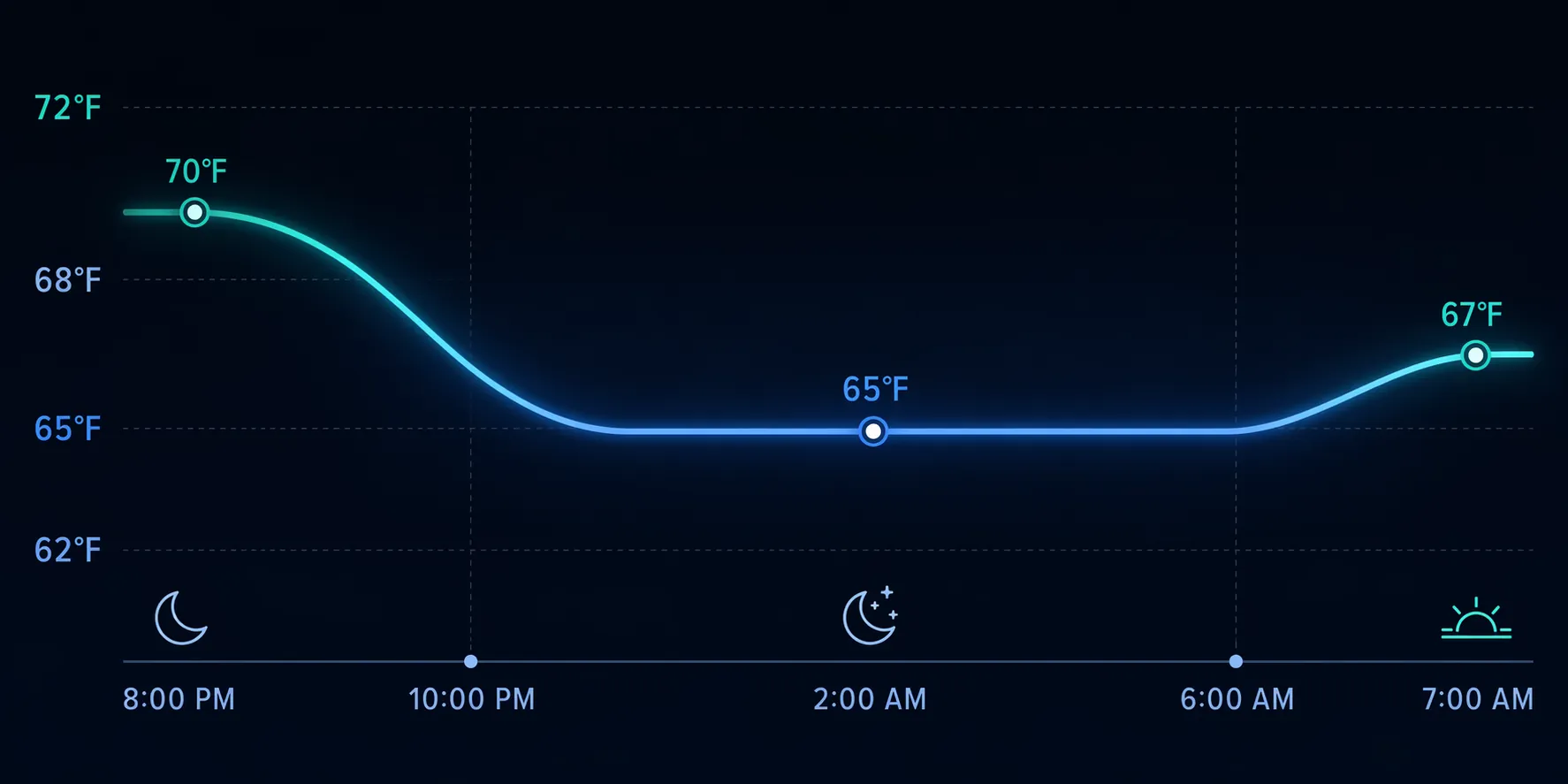
| When | What to program | Temperature |
|---|---|---|
| 30 minutes before bedtime | Pre-cool the bedroom | 65°F for most adults under 65; 75°F starting point for adults 65+ |
| Bedtime through the night | Hold the Sleep setting | 65°F under 65; about 75°F for 65+ |
| 30 minutes before wake time | Switch to morning setting | 72–74°F under 65; around 75°F for 65+ unless they prefer cooler |
| Daytime / away period | Use your normal comfort or energy-saving setting | Do not judge sleep from this setting |
The important part is the first entry. Do not wait until the minute you get into bed. Your thermostat and the room both need time to move, especially during a heat wave, and your body is already trying to shed heat as sleep approaches. Sleep physiology sources commonly describe a roughly 2°F core-body-temperature decline across the night, with the low point before sunrise, so the thermostat should help that drop instead of making your body fight the room.[1]
Do not use 65°F as a universal rule
The 65°F default is for most younger and middle-aged adults. It is not the right starting point for everyone in the house.
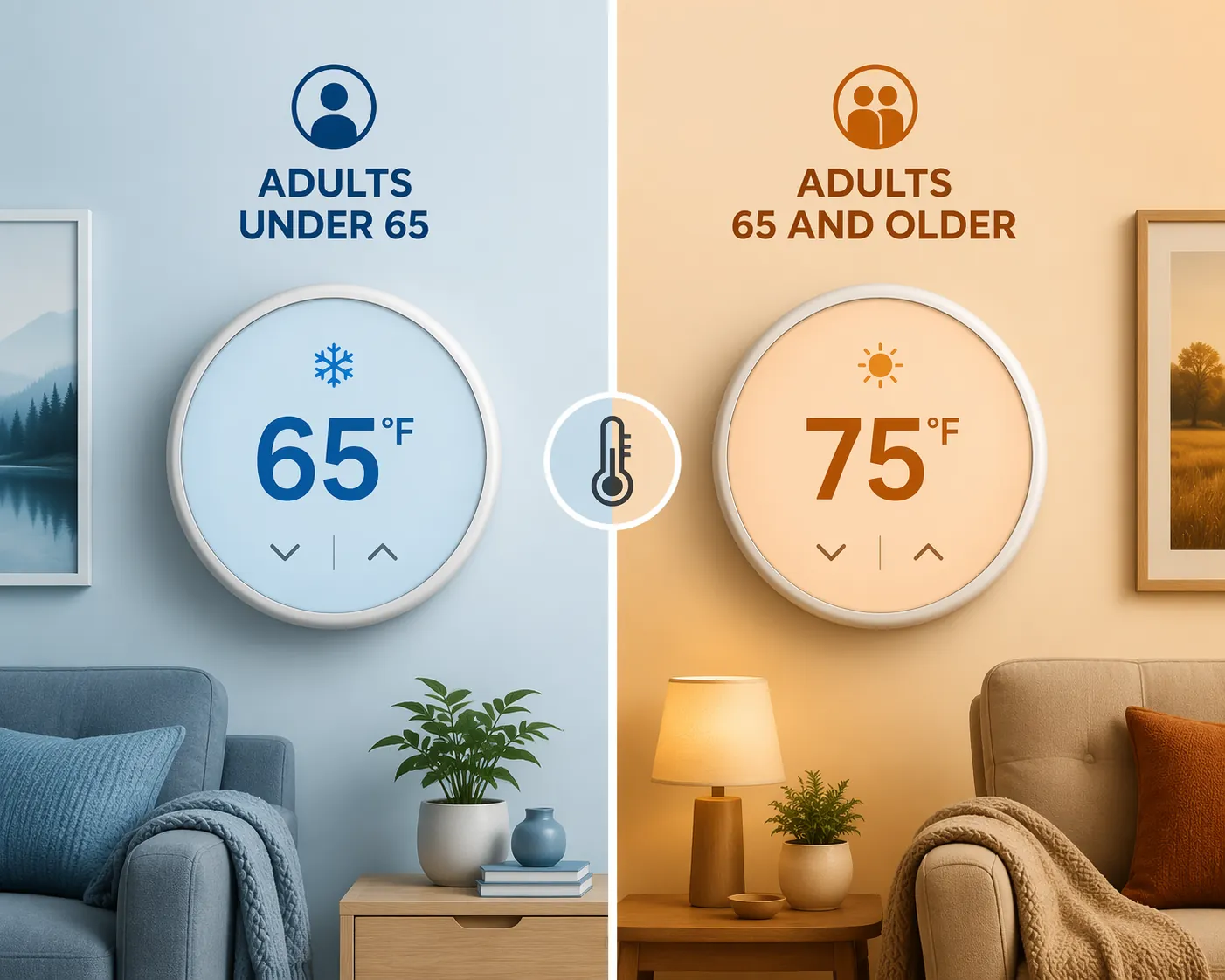
For adults 65 and older, start around 75°F instead. A 2026 Griffith University study reported that older adults had better sleep and fewer stress responses around 75°F, while younger adults were described as needing cooler conditions around 65–68°F.[2] That is a big enough split that it should change the schedule, not sit in a footnote.
If two age groups share one system, do not force one bedroom to win the whole house. Use a remote sensor, a room priority setting, a window AC supplement, or a warmer sleep target with lighter bedding in the cooler room. If the older adult is the person you are programming for, enter 75°F tonight and adjust from there.
- Use 65°F as the first-night target if you are under 65, usually sleep hot, and the bedroom is heat-loaded.
- Use 67–68°F if 65°F wakes you cold, dries you out, or causes your partner to add blankets.
- Use about 75°F if the sleeper is 65 or older, then move only 1–2°F at a time.
- Be more cautious with menopause, night sweats, fever, metabolic conditions, or medications that affect heat tolerance.
How to enter the schedule in Nest
In the Google Home app, open your thermostat, go to the temperature schedule, and add a nighttime cooling point 30 minutes before bed. If your app shows routines or presence settings instead of a simple schedule, treat the goal the same way: create a Sleep period, give it the bedroom target, and make sure Home/Away behavior does not override it while you are asleep.
- Open Google Home or the Nest app and select the thermostat.
- Open Schedule or temperature schedule.
- Add a cooling setpoint 30 minutes before bedtime: 65°F for most adults under 65, or about 75°F for adults 65+.
- Keep the same target through the night. Do not let an Eco or Away setting take over during normal sleep hours.
- Add a morning point 30 minutes before wake time: 72–74°F for most adults under 65, or around 75°F for adults 65+ unless they prefer cooler.
Nest users should pay attention to which sensor the thermostat is using at night. If the thermostat is in a hallway and the bedroom is three degrees warmer, the app can look perfect while the bed still feels wrong. A cheap nightstand thermometer will tell you whether you programmed the house or actually cooled the room where you sleep.
How to enter the schedule in ecobee
ecobee is usually easiest if you edit the Sleep Comfort Setting first, then place it on the schedule. Comfort Settings define the temperature and participating sensors; Activities tell ecobee when to use those settings.[3]
- Open the ecobee app and select your thermostat.
- Go to Main Menu, then Comfort Settings.
- Open Sleep and set cooling to 65°F for most adults under 65, or about 75°F for adults 65+.
- Choose the bedroom sensor for Sleep if you have one. Remove hallway or living-room sensors from Sleep if they distort the bedroom reading.
- Go to Schedule and place Sleep 30 minutes before bedtime through 30 minutes before wake time.
- Set the next morning Comfort Setting to 72–74°F for most adults under 65, or around 75°F for adults 65+ unless they prefer cooler.
One ecobee caveat matters at bedtime: ecobee documents a temperature differential behavior around Comfort Settings, and user experience can vary by model and firmware.[3] If you set Sleep to 65°F and the room seems to float closer to 66°F before cooling restarts, check your device settings and firmware before assuming the schedule failed.
This is also where ecobee’s sensors can do real work. A smart thermostat study using ecobee’s Donate Your Data program analyzed 178,706 households and reported that thermostat motion sensors could identify distinct sleep-quality clusters at population scale.[4] That does not prove your thermostat can diagnose your sleep, but it does support a smaller, useful point: occupancy and room-level sensing can reveal overnight patterns a single hallway thermostat misses.
How to enter the schedule in Honeywell Home
For Honeywell Home and Resideo thermostats, including T9-style setups, look for Schedule, Sleep, or Geofencing depending on how the system was installed. The names move around more than the idea does.
- Open the Honeywell Home or Resideo app and select the thermostat.
- Open Schedule. If the app asks between location-based control and time-based scheduling, use a time-based Sleep period for this setup.
- Create or edit the Sleep period to start 30 minutes before bed.
- Set cooling to 65°F for most adults under 65, or about 75°F for adults 65+.
- Set the next period, usually Wake or Home, to 72–74°F for most adults under 65, or around 75°F for adults 65+ unless they prefer cooler.
- If you use room sensors, prioritize the bedroom at night rather than the thermostat location.
Geofencing is helpful when people leave the house. It is less helpful at 2:00 AM if the phone, thermostat, or household presence logic decides nobody needs the Sleep setting. For a heat-wave sleep schedule, time should be the anchor.
How to enter it on a generic smart thermostat
If your app is not Nest, ecobee, or Honeywell, ignore brand vocabulary and build four events. The app may call them periods, blocks, comfort settings, scenes, modes, or schedule entries.
| Generic schedule name | Start time | Cooling target |
|---|---|---|
| Evening pre-cool | Bedtime minus 30 minutes | 65°F under 65; about 75°F for 65+ |
| Sleep | Bedtime | Same as pre-cool |
| Wake | Wake time minus 30 minutes | 72–74°F under 65; around 75°F for 65+ unless they prefer cooler |
| Day | After wake period | Your normal daytime setting |
If the app will not let you create a separate pre-cool entry and Sleep entry at the same temperature, that is fine. Make Sleep begin 30 minutes before bed. The bed does not care what the app calls the block.
Adjust for humidity before you blame the temperature
A sticky 65°F room can feel worse than a drier 68°F room. Trane recommends a bedroom relative humidity range around 40–50% for sleep comfort, and American Standard also treats humidity as part of the sleep-temperature equation rather than a separate luxury setting.[5][6]
If your thermostat or bedroom sensor shows high humidity, try 68–70°F with better dehumidification before pushing the cooling setpoint lower. That may mean using the thermostat’s dehumidify-overcool feature if it has one, running a standalone dehumidifier in another part of the home, or increasing fan circulation without blowing air directly across your face all night.
- If you wake sweaty and the room reads above target, the system is not keeping up; start with pre-cooling earlier.
- If you wake sweaty and the room is at target with high humidity, address moisture before lowering the setpoint.
- If you wake cold around 3:00–5:00 AM, raise the Sleep target by 1–2°F.
- If you fall asleep well but wake hot before morning, extend the 65°F hold closer to wake time instead of warming early.
When the thermostat reading is not the bedroom temperature
This is the most common failure mode: the thermostat says 65°F, the bedroom is 69°F, and the app looks smug about it. Hallways, stair landings, sunny walls, closed doors, and return-air placement can all make the thermostat’s number less useful at night.
Put a basic digital thermometer on the nightstand for two nights. Check it when you get into bed and once if you wake up hot. You are not trying to build a lab; you are checking whether the room where your body is sleeping matches the number you typed.
If the bedroom runs warmer than the thermostat, use a remote sensor or room-priority feature if your system supports it. If you are deciding whether sensors are worth adding, the practical question is not whether they are clever; it is whether they can make the bedroom the control point during Sleep. For a deeper placement pass, see the smart thermostat remote sensor comparison and the guide to remote sensor limitations.
Optional upgrades after the basic schedule works
Do not buy hardware before testing the four schedule entries. If the room reaches target and you sleep better, the thermostat has done its job. If the bedroom still misses target, then upgrades have a clear job description.
- Remote bedroom sensor: useful when the thermostat is outside the bedroom and the app can prioritize that sensor during Sleep.
- Zoning or dampers: useful when one bedroom needs cooling and the rest of the home does not.
- Portable or window AC: useful when central air cannot pull the bedroom down during a heat wave.
- Platform switch: only worth considering if your current thermostat cannot schedule Sleep reliably or use the sensor you need.
Some industry and consumer-tech estimates put cooling-energy savings from sensor-based or zoning approaches around 15–23%, but treat that as an estimate, not a sleep guarantee. The reason to solve the bedroom first is comfort; any savings are secondary and house-specific.
If you are still choosing equipment rather than programming tonight, start with a platform guide such as the smart thermostat ecosystem guide or the best smart thermostats in 2026.
Check the result after one or two nights
Give the schedule one or two nights unless it is obviously uncomfortable or unsafe. The useful test is not whether 65°F sounds correct. It is whether you fall asleep faster, wake less from heat, and see a bedroom reading close to the target.
| What happened | Change tonight |
|---|---|
| Still hot at bedtime | Start pre-cooling 45–60 minutes before bed instead of 30. |
| Hot after midnight | Hold the Sleep target longer; do not start the morning warm-up too early. |
| Cold before morning | Raise Sleep by 1–2°F. |
| Room target is correct but air feels sticky | Work on humidity; try 68–70°F with 40–50% RH. |
| Sleeper is 65+ and uncomfortable at 75°F | Adjust slowly by 1–2°F and watch for cold stress or overheating. |
| Thermostat says target but bedroom does not | Use a bedroom sensor, change sensor priority, or measure with a nightstand thermometer. |
For most adults under 65, the first setting to try is still simple: 65°F, 30 minutes before bed, held overnight. For adults 65 and older, start around 75°F. The schedule is only good if the person in the bed is actually comfortable, and the bedroom—not the hallway thermostat—is the room that proves it.
References
- What’s the Best Temperature for Sleep? Sleep Foundation.
- Study reveals the best room temperature for older adults’ sleep ScienceDaily, February 10, 2026.
- What are Activities and Comfort Settings? ecobee Support.
- Smart thermostats can monitor sleep quality ScienceDaily, June 4, 2024.
- Ideal Temperature and Humidity for Sleep Trane.
- What’s the Ideal Temperature for Sleep? American Standard.