
Prepare Your Smart Home for Hurricanes Phase by Phase
This guide walks you through what to do with your smart home devices before, during, and after a hurricane — from disarming motion sensors during high winds to using camera recordings and thermostat data for insurance claims.
One of the easiest smart home hurricane preparation tips to miss is also one of the least glamorous: some sensors that protect the house all year may need to be disarmed, muted, or reconfigured when the wind starts throwing branches at the windows. CNET’s storm-prep guidance specifically warns that motion and glass-break sensors can create false alarms during high winds, potentially triggering emergency dispatch and fees when nobody needs that extra confusion.[1]
That is the point of treating hurricane prep as a timed operating plan, not a single checklist. The same camera, sensor, thermostat, hub, or shutter controller can have one job in May, a different job 72 hours before landfall, and a third job after the all-clear. Food, water, medications, evacuation plans, flashlights, and paper documents still matter; they are simply not the job of this guide. This is the smart-home layer for gear you already own.
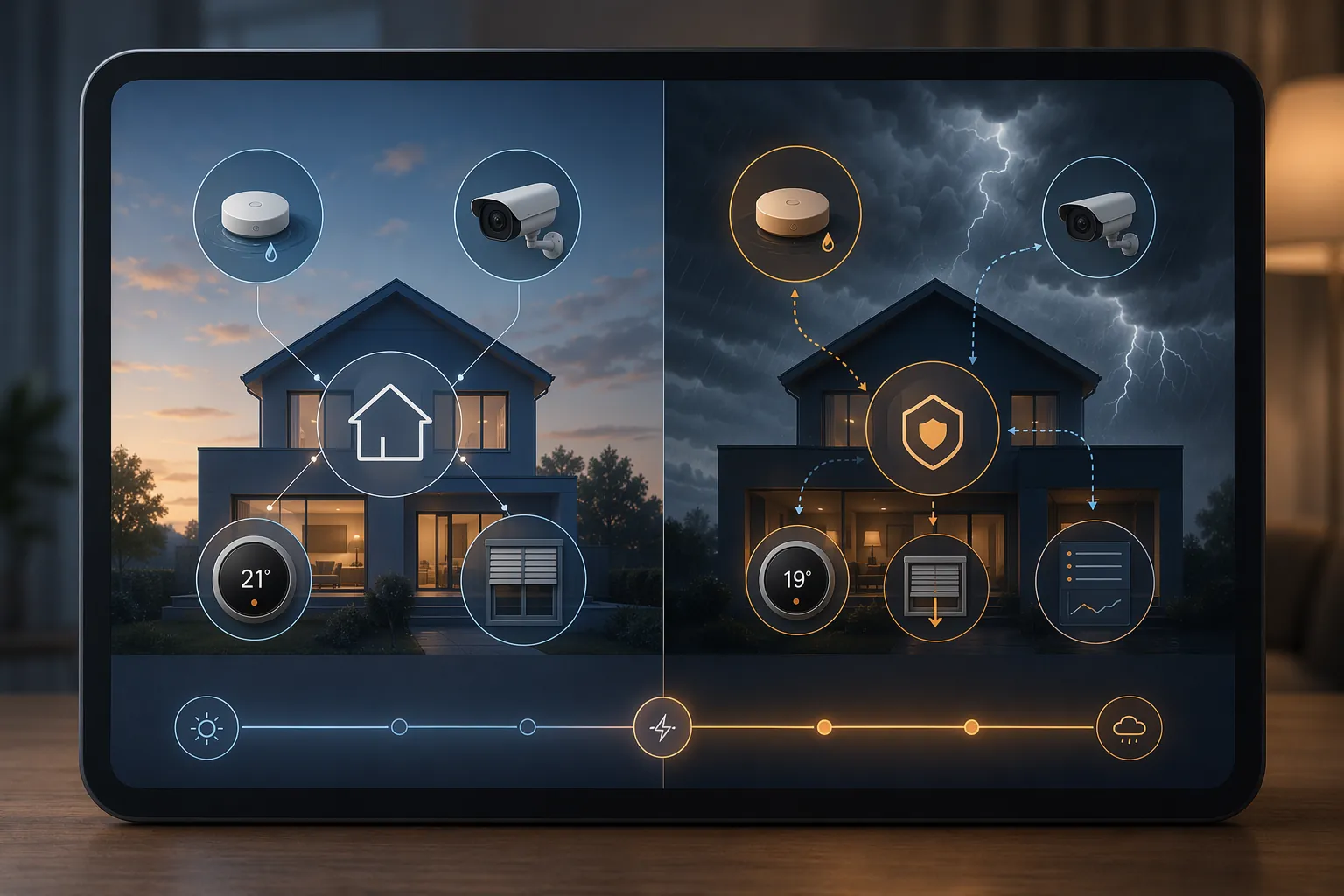
The Timed Smart-Home Plan
| When | Main smart-home job | Devices that change roles |
|---|---|---|
| Before hurricane season | Install, label, test, and document the system while there is no pressure. | Leak sensors, shutoff valves, shutters, hub, router, UPS, automations |
| 72 hours before expected landfall | Charge, secure, simplify, and move fragile outdoor gear before wind arrives. | Cameras, doorbells, locks, sensors, panels, batteries, network gear |
| During the storm | Keep essential monitoring online while reducing false alarms and bad automations. | Motion sensors, glass-break sensors, cameras, security panel, thermostat, hub |
| After the all-clear | Use device records to find damage, reconstruct the outage, and support claims. | Camera footage, thermostat logs, leak alerts, shutoff history, sensor timelines |
Before Hurricane Season: Build the Parts You Cannot Improvise
Pre-season work is mostly boring, which is why it works. You are not guessing where the hub power supply went while a county alert is buzzing. You are installing leak sensors, proving that the shutoff valve actually closes, labeling the UPS outlets, and writing down the few manual steps that still matter when an app refuses to load.
Put water sensors where water actually wins
Leak detectors belong at the low, hidden, and unattended points: under sinks, behind the washing machine, near the water heater, beside the HVAC condensate line, near a sump or drain, and wherever wind-driven rain has found a seam before. PCMag’s 2026 leak-detector guide treats smart water sensors as a distinct protection category, not a novelty accessory, because the useful ones can alert before a small leak becomes a room-level problem.[2]
If you already have a smart water shutoff valve, test it before the season and record what happens. Does the app close the valve? Does the physical control work? Does everyone in the house know whether shutting it off also affects irrigation, ice makers, or a fire-suppression system? Moen says its Flo system has produced a 96% reduction in water-damage claim events and that 60% of users discover a leak they did not know about within the first 30 days, but those are manufacturer-published figures, not an independent field study.[3] Useful, yes. A reason to test your own plumbing, definitely.
Make shutters and storm scenes boring before June
Motorized hurricane shutters, where already installed, should be treated as storm hardware first and smart-home hardware second. Lafferty describes smart storm-protection systems that can integrate with Alexa, Google Home, Apple HomeKit, SmartThings, Lutron, Somfy, and Control4, including voice commands such as “Alexa, close the shutters.”[4] The important pre-season task is not admiring the integration; it is confirming which openings close, which do not, and what the manual fallback is if the controller, bridge, or internet connection is down.
A Storm Mode scene can be helpful if it is simple enough to trust: close compatible shutters, turn selected indoor lights to a low-power setting, pause sprinkler schedules, raise or lower thermostat setpoints for outage preparation, and send a household notification. Do not put every clever automation in this scene. A storm scene should reduce decisions under pressure, not hide critical steps inside a routine nobody has tested since last year.
Give the network a short, realistic lifeline
Remote monitoring usually dies in this order: utility power, modem, router, hub, then the cloud connection that made everything look effortless. A UPS will not run a house, but it can keep the small stack alive long enough to tell you what failed first. Wirecutter testing found that a CyberPower CP900AVR kept a broadband modem and Wi-Fi router running for about four hours.[5] That result is useful as tested context, not a promise; your runtime depends on the modem, router, hub, battery age, and anything else plugged into the unit.
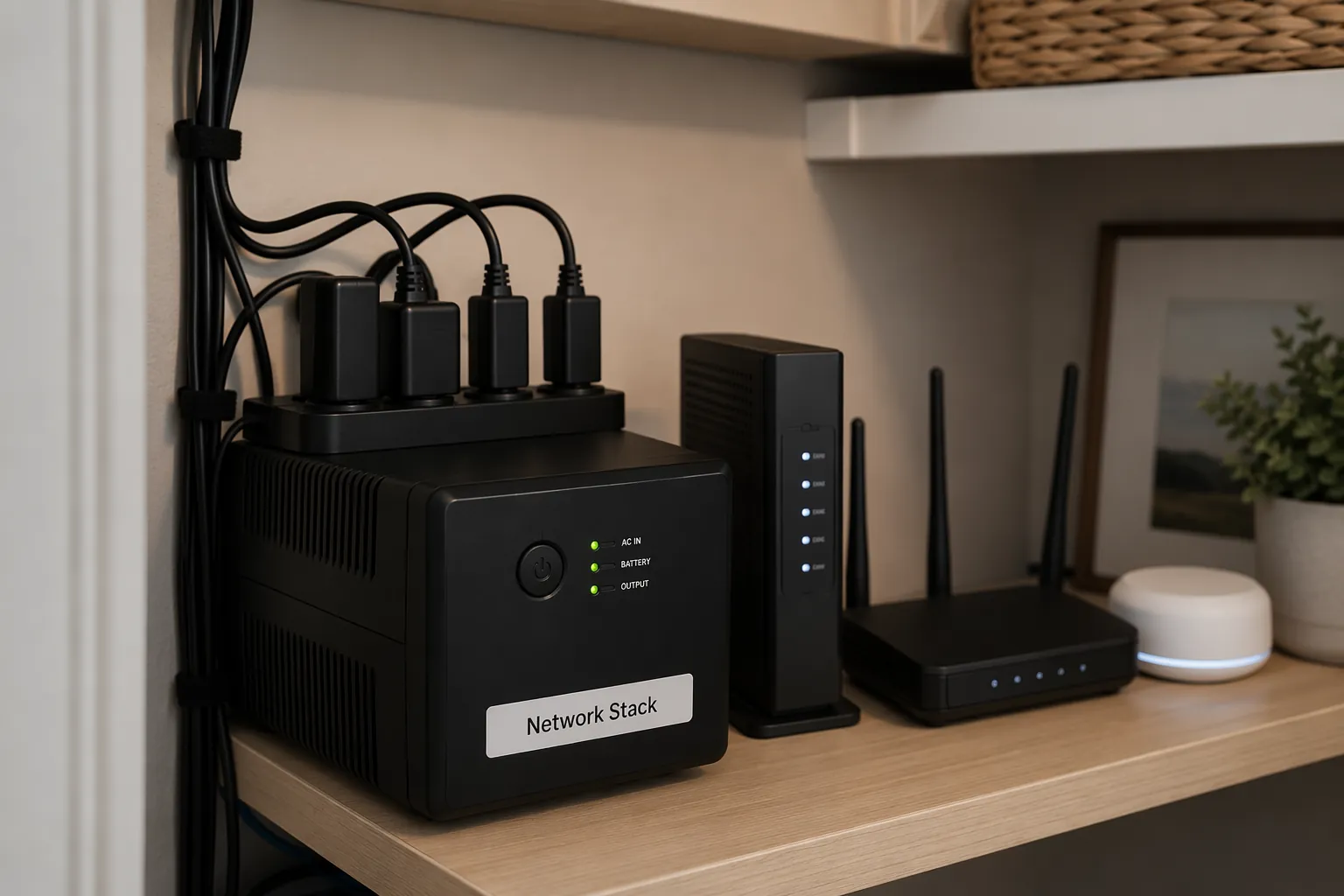
- Plug only the essentials into the UPS: modem, router, primary hub or bridge, and possibly an ONT if fiber service needs one.
- Label each plug so nobody adds a lamp, speaker, or charger to the battery-backed outlets.
- Run a short outage drill and write down the actual runtime you see, even if it is disappointing.
- Print or handwrite the Wi-Fi name, hub location, shutoff-valve location, alarm company number, and manual shutter instructions.
Portable power stations and solar panels can extend the continuity plan, especially during longer outages. EcoFlow frames portable stations as a bridge between grid failure and restoration, with solar recharging extending coverage during multi-day outages.[6] The caution is the same as with a UPS, just at a larger scale: runtime is a load calculation. A modem and router are one problem; refrigeration, medical equipment, window AC, and device charging are another.
Some homes use an automatic transfer switch to move selected circuits from grid power to backup power. Nature’s Generator says an ATS can switch in milliseconds, fast enough that smart devices may avoid rebooting and preserve camera feeds or sensor reporting.[7] That continuity is valuable, but only if the circuits, battery or generator capacity, and maintenance schedule match the loads you expect to carry.
72 Hours Before Landfall: Stop Optimizing and Start Securing
At roughly 72 hours out, smart-home prep changes from installation to triage. Forecast tracks may still shift, but there is enough warning to charge batteries, move exposed devices, close known gaps, and simplify automations before the house is noisy, wet, and full of people asking different questions.
Charge everything that might become evidence
Charge battery cameras, video doorbells, smart locks, security panels, spare sensor batteries, phones, tablets, and any hotspot or cellular router you depend on. Replace weak coin-cell batteries in contact sensors and leak detectors now, not after the first low-battery chirp. If the app lets you export or screenshot battery status, do it for the devices that matter most.
This is also the time to reduce camera settings that waste battery without improving storm awareness. Continuous recording may be useful on a powered indoor camera aimed at a vulnerable door or window. On a battery camera outside, it may simply drain the device before the first feeder band arrives.
Bring in cameras that were mounted for ordinary weather
A camera mounted for package theft is not automatically mounted for hurricane debris. CNET advises taking in outdoor cameras and other loose smart-home devices before a storm.[1] If a camera is not hurricane-rated, hard-mounted, and placed where it will not become a projectile, bring it inside. The last useful clip from an outdoor camera should not be the camera tearing itself off the wall.
Indoor placement can still help. Aim one camera at a main entry, a window that has leaked before, or the utility area where the router, hub, and water shutoff live. Do not block evacuation paths or run extension cords across wet floors. A plain interior angle often tells a better recovery story than a dramatic outdoor view that disappears when the mount fails.
Close integrated shutters while the system still has margin
If your shutters are integrated, close them before conditions make troubleshooting dangerous. Watch each zone complete. Confirm the app state against the physical opening. If one shutter stalls, you still have time to use the manual method, call the installer, or protect that opening another way. This is where smart integration earns its keep: not by making storm prep effortless, but by revealing problems early enough to act.
Confirm cellular backup before the broadband line is gone
If your security system has monitored cellular backup, check that it is active, paid for, and actually communicating. Vivint says its smart-home panel includes a 24-hour battery backup and dedicated cellular connectivity so monitoring can continue without Wi-Fi or grid power.[8] That describes Vivint’s panel, not every alarm panel. Check your own provider’s app, contract, and test procedure instead of assuming a cellular icon means dispatch, alerts, and automations will all behave normally.
During the Storm: Keep the Useful Signals, Kill the Noisy Ones
Once winds are up, the house is no longer a normal smart home. It is a wet, vibrating, power-unstable structure where sensors may report movement that is not an intruder, glass vibration that is not a break-in, and device outages that are more important than comfort settings. The work now is to preserve the signals that help you make safe decisions and silence the ones likely to create false urgency.
Disarm or adjust motion and glass-break sensors
High wind, rattling frames, flying debris, moving curtains, and pressure changes can make ordinary security logic misbehave. If your alarm company or local policy treats alarms as dispatch events, false triggers can waste emergency resources and may create fees. CNET’s advice to disarm motion and glass-break sensors during a hurricane is narrow but important: it is about false alarms during storm conditions, not about abandoning security altogether.[1]
- Keep door and window contact sensors active if they are reliable and useful for knowing whether an opening has failed.
- Mute or bypass motion sensors in rooms with large windows, curtains, hanging plants, or pets moving unpredictably.
- Bypass glass-break sensors if wind and debris are likely to trigger them before actual entry matters.
- Write down what you bypassed so you can restore normal security after the storm.
If you evacuate, make these changes before leaving, while you can still see the panel and confirm the mode. If you shelter in place, do not walk across the house during peak conditions just to silence a device unless there is a life-safety reason to move.
Use cameras for confirmation, not entertainment
Storm camera footage is tempting to watch constantly. Resist that unless the camera is answering a specific question: Is water entering the utility closet? Did the back door open? Is the sump area dry? Is the router stack still powered? A camera feed that drains backup power or cellular data without changing a decision is not helping.
If an outdoor camera stayed mounted because it is protected and properly installed, expect motion alerts to become noisy. Rain bands, trees, reflections, and debris can overwhelm ordinary detection zones. Disable push notifications if they are making people ignore more important alerts. Recording can continue quietly if power and storage allow.
Protect network uptime without pretending it is permanent
When utility power drops, the UPS buys time for the modem, router, and hub. Cellular backup may buy a different kind of time if broadband fails. A portable power station may extend both. None of those layers should be treated as a guarantee that the home will stay online through a long outage. The useful question is simpler: which devices must remain reachable long enough to tell you about water, entry, temperature, or power failure?
If you are home and using backup power, avoid plugging convenience loads into the same source that keeps monitoring alive. A router and hub stack is a small, high-value load. A television, dehumidifier, or extra refrigerator can change the math quickly. If you already tested the setup before the season, follow that tested plan rather than rebuilding it in the dark.
Let the thermostat become an outage marker
A smart thermostat cannot cool a house without power, but its app history can still matter. If it goes offline, comes back, records indoor temperature drift, or shows gaps in connectivity, those timestamps can help reconstruct what happened. Do not delete alerts or reset the device casually after power returns. The boring log may become more useful than the comfort schedule.
After the All-Clear: Turn Device History Into a Recovery Record
Wait for the official all-clear before inspecting damage. Smart-home records can help you prioritize where to look first, but they are not worth stepping into floodwater, downed lines, unstable trees, or a compromised structure. Once it is safe, the system’s job changes again: it becomes a timeline.
Start with water and entry alerts
Review leak alerts, water-shutoff events, contact-sensor openings, lock activity, and camera motion in chronological order. A leak sensor under the water heater may show when water first reached the utility closet. A door sensor may show whether a latch failed during the worst winds. A shutoff valve history may show whether the system closed the main line automatically or whether someone did it manually.
Take screenshots before clearing notifications. Export clips before subscriptions roll them off. Photograph the physical damage from the same angle as the camera view when possible. The goal is not to make the smart home the final authority; it is to give cleanup crews, adjusters, and your own memory a dated sequence instead of a pile of guesses.
Use thermostat data carefully
Hive describes a Department of Energy-linked example in which data from 1,000 internet-connected thermostats was used to track power outages during Hurricane Irma.[9] For a homeowner, the narrower takeaway is enough: thermostat connectivity and temperature history may help document when power failed, when it returned, and how indoor conditions changed while systems were down. Because this article relies on Hive’s description of that research rather than independently verifying the original paper, treat the example as a supported use case, not a universal insurance rule.
Save the thermostat’s outage notifications, temperature graph, equipment runtime history, and any utility alerts that match the same window. If refrigerated medication, humidity-sensitive materials, or heat exposure matters in your claim, those timestamps may help establish duration. Your insurer may still require other evidence, but a clean device timeline is better than “the power was out for a while.”
Restore normal automations deliberately
Do not simply tap every device back to normal while standing in a damp hallway. Restore security zones first: re-enable motion and glass-break sensors only after windows, doors, and rooms are stable enough not to trigger them. Put outdoor cameras back only after mounts, siding, soffits, and cable penetrations are intact. Reopen the main water valve only after checking fixtures, supply lines, and any alert that caused the shutoff.
Then update the paper note in the utility closet. Add the UPS runtime you actually saw, the devices that failed early, the sensor that cried wolf, the camera angle that helped, and the automation you will remove before next season. That record is the quiet difference between a maintained system and a pile of gadgets that has to be rediscovered every storm.
A smart home will not storm-proof a coastal house. It can, however, reduce avoidable failures: fewer false alarms when the wind is shaking the glass, fewer exposed cameras becoming debris, fewer dead routers hiding useful alerts, and better evidence when cleanup and claims begin.
References
- Experts Reveal How to Prep Your Home Tech for a Hurricane, CNET
- Best Smart Water Leak Detectors 2026, PCMag
- Flo Smart Water Monitor, Moen
- Smart Storm Protection, Lafferty Hurricane Protection
- How Smart-Home Technology Can Help During a Natural Disaster, Wirecutter
- Hurricane Power Prep Checklist and Outage Forecast, EcoFlow
- How an ATS Protects Your Smart Home, Nature's Generator
- How a Smart Home Protects You During a Natural Disaster, Vivint
- 3 Essential Smart Home Hurricane Devices, Hive