
Edge 70 Fusion vs Galaxy F70 Pro 5G: Which Smart Home Phone?
Choosing a smart-home control phone under Rs 30,000 between the Motorola Edge 70 Fusion and Galaxy F70 Pro 5G comes down to your ecosystem: both are Matter commissioners that still need a hub, but the F70 Pro fits SmartThings households while the Edge 70 Fusion suits Google Home setups. The comparison explains which pick matches your household and what extra hub hardware each path still requires.
Last updated
The answer is an ecosystem answer, not a CPU answer
For a smart-home buyer in India comparing the Motorola Edge 70 Fusion vs Galaxy F70 Pro 5G, “smart home phone” should mean a phone used for control, commissioning, companion-app access, and dashboard duty. It should not mean a standalone Matter hub. On that definition, the Galaxy F70 Pro is the cleaner buy for a SmartThings household, while the Motorola Edge 70 Fusion is the more appealing control surface for a Google Home-first household.
The reason is procedural. Google’s Matter setup requirements include Android 8.1 or later, Google Play services 22.48.14 or later, Bluetooth Low Energy 4.2 or later, and a Matter-enabled hub; Google also says the Home app will prompt you that a hub is required if one is missing.[1] SmartThings is even more explicit about the roles: during Matter onboarding, the phone is “the commissioner,” while a SmartThings 2018 Hub or Aeotec Smart Home Hub on the required firmware acts as the controller; Thread devices additionally need a controller that includes a Thread border router.[2]
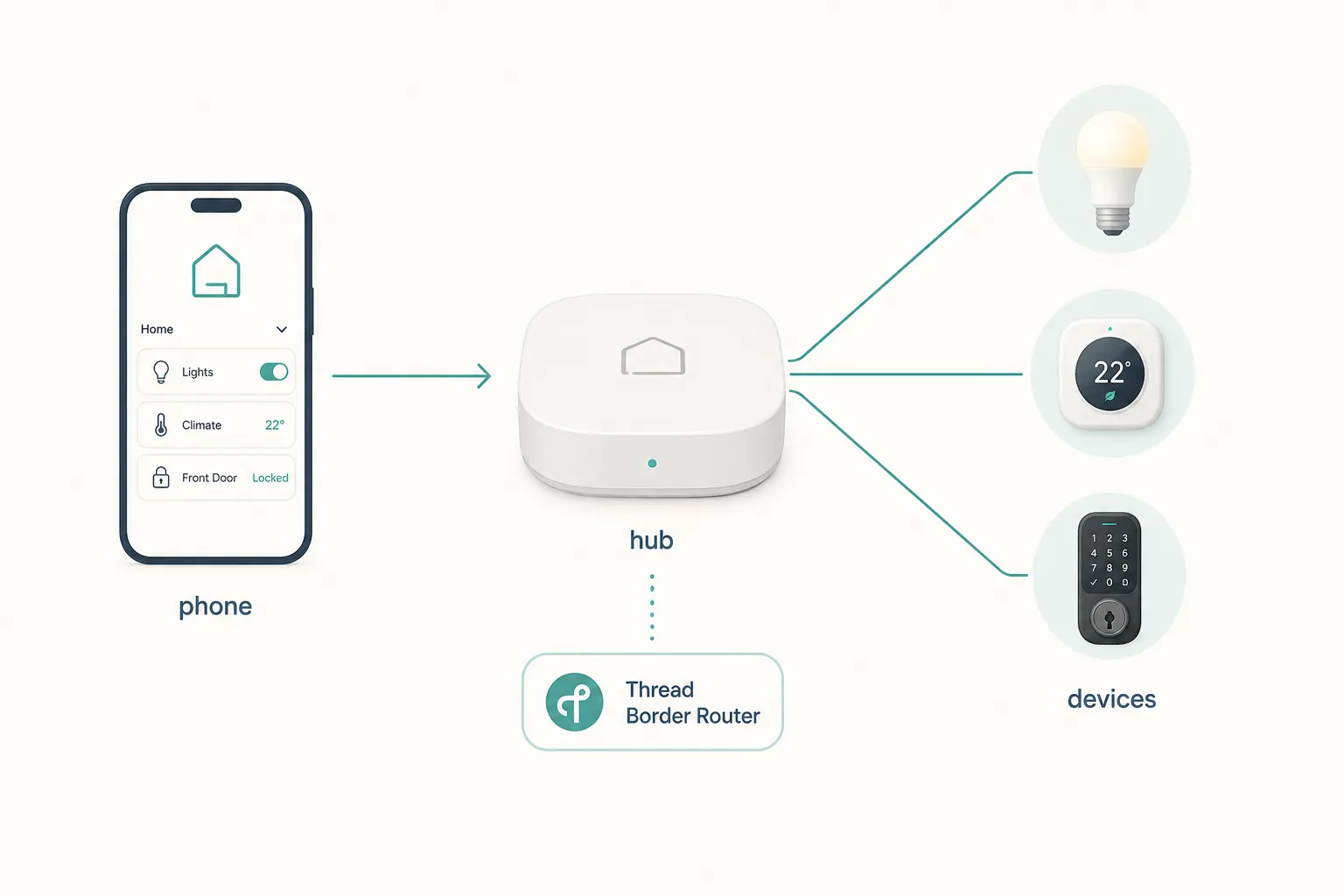
That chain matters more than whether one phone has a slightly better benchmark run. The phone can help add and control devices. The hub keeps the Matter fabric available to the home. If the device is Thread-based, a Thread border router must also be present somewhere in the system. Current Thread border-router lists do not make either of these mid-range phones that missing device, and Google’s recent phone-based Thread exception track is about Pixel models from the Pixel 8 series onward, not these two phones.[3][4]
If you want the longer version of that role split, the same mistake appears in other phone comparisons too: a handset may be an excellent Matter commissioner without being the hub. We make that distinction in the Galaxy A27 5G smart-home control guide and in the Pixel Thread exception explainer. It is the first thing to check before spending money on a “smart-home phone.”
Compatibility status: what is confirmed, and what should stay under investigation
| Question | Motorola Edge 70 Fusion | Samsung Galaxy F70 Pro 5G | Practical status |
|---|---|---|---|
| Can it be used as a phone to set up or control Matter devices through Google Home? | Requirements-compatible on paper if the local unit has the required Android, Play services, and BLE support. | Requirements-compatible on paper if the local unit has the required Android, Play services, and BLE support. | Investigating for exact-model behavior; Google still requires a Matter-enabled hub.[1] |
| Can it replace a Matter hub? | No evidence for that role. | No evidence for that role. | Do not buy either phone expecting hub replacement.[1][2] |
| Can it act as a Thread border router? | Not a listed Thread border-router path in the supplied materials. | Not a listed Thread border-router path in the supplied materials. | Do not assume Thread support from the phone; plan for a separate Thread border router if buying Thread devices.[3][4] |
| Is SmartThings support called out by the manufacturer? | No special SmartThings support claim in the supplied Motorola material. | Samsung India lists “SmartThings Support: Yes.” | Confirmed for Samsung’s listed support; exact Matter onboarding on this model still deserves live verification.[5] |
That table is intentionally conservative. These are new India-market phones, and compatibility writing is a poor place to pretend that a spec page equals a finished household setup. The safe purchase question is not “which phone has Matter?” It is “which ecosystem am I already building around, and do I already own the hub that ecosystem expects?”
If your home is Google Home-first, the Edge 70 Fusion makes more sense
For a Google Home household, the Motorola Edge 70 Fusion’s appeal is as a handsome, durable Android control surface. It is the phone I would rather leave on a stand near the sofa, use as a bright dashboard, or hand to a family member who mostly wants Google Home, camera feeds, lights, plugs, and routines in one place.
The official Motorola specifications list a 7000mAh battery, 68W charging, Wi-Fi 6E, IP68/IP69 protection, MIL-STD-810H durability testing, and a software window of 3 OS upgrades plus 5 years of security updates to February 2031.[8] Those are the right kinds of strengths for dashboard duty. A bright display and stronger ingress protection will be noticed in normal homes: near a kitchen counter, on a balcony-facing desk, next to a sink, or in a dusty renovation phase when smart bulbs and switches are often being added room by room.
The Google Home workflow still has a missing-hardware checkpoint. If you buy a Matter light, plug, lock, or sensor and open Google Home on the Edge 70 Fusion, the phone is not the thing that makes the home Matter-ready by itself. Google’s help page says a Matter-enabled hub is part of setup; if you do not have one, the app tells you one is required.[1] For Wi-Fi Matter devices, that hub role may be enough. For Thread Matter devices, the home also needs a Thread border router, usually supplied by a compatible Google/Nest device or another supported ecosystem device, not by this Motorola phone.
So the Edge 70 Fusion path looks tidy only if the household already has, or plans to buy, the right Google-compatible hardware. A buyer using a Nest Hub, Nest Wi-Fi Pro, or another Matter-enabled Google Home hub path is in a very different position from someone hoping the phone alone will quietly become the hub. For India-market mid-range controller checks, this is the same practical line we draw in the Poco M8 Power smart-home controller guide and the iQOO Z11 smart-home controller guide: a good phone can be a very good controller without being infrastructure.
If your home is SmartThings-first, the Galaxy F70 Pro is the tidier purchase
The Galaxy F70 Pro’s best argument is not that it magically turns into a SmartThings Hub. It does not. Its argument is that Samsung’s own India page lists SmartThings support, and Samsung commits to security updates until 31 July 2032.[5] For a household already using SmartThings, that combination is more valuable than another round of camera samples.
The SmartThings Matter path is precise enough to plan around. The phone is the commissioner during onboarding. The SmartThings 2018 Hub or Aeotec Smart Home Hub, on firmware 45.9 or later, is the Matter controller. If the device is Thread-based, SmartThings says you need a controller that includes a Thread border router.[2] In a real purchase basket, that means the phone and the hub are separate line items unless you already own the hub.
That is where the F70 Pro feels less messy than the Motorola for Samsung households. SmartThings is already named on Samsung’s page; the update window is long; and Samsung’s India launch story placed the phone in the price band this buyer is likely shopping, with the Galaxy F70 Pro starting at Rs 25,999 and offer pricing reported around Rs 23,999 at launch.[6] If the home already has a SmartThings Hub or Aeotec-class hub, the phone becomes the natural household remote, setup device, and companion screen.
There is also a small household-maintenance advantage in Samsung’s hardware choices. The F70 Pro is listed with a 6000mAh battery, 45W charging, bypass charging, and microSD support in the available launch/spec material.[6][7] Bypass charging is not glamorous, but for a phone that spends long hours docked as a dashboard, it is exactly the kind of feature that matters after the novelty of a new setup wears off.
For a step-by-step SmartThings angle, the Galaxy A27 5G SmartThings setup recipe is the more useful comparison than a gaming benchmark chart. The phone’s job is to get the device into the right home, keep the app accessible, and stay supported for years; the hub’s job is to keep the Matter home running.
The phone comparison, after the hub question is settled
Once the hub requirement is understood, the hardware comparison becomes easier and less dramatic.
| Smart-home-control factor | Motorola Edge 70 Fusion | Samsung Galaxy F70 Pro 5G | Who benefits |
|---|---|---|---|
| Ecosystem fit | Better as a Google Home control surface, especially for buyers who like near-stock Android. | Better for SmartThings households because Samsung India lists SmartThings support. | Choose by household platform, not by Matter branding.[1][2][5] |
| Hub role | Still needs a Matter-enabled hub for Google Home Matter setup. | Still needs a SmartThings/Aeotec-class hub for Matter controller duty. | Neither replaces the hub.[1][2] |
| Thread devices | Plan for a separate Thread border router through the Google-compatible hardware path. | Plan for a SmartThings controller that includes Thread border-router capability if buying Thread devices. | Thread buyers must check the hub, not the phone.[2][3][4] |
| Battery/dashboard duty | Official 7000mAh battery and 68W charging; 91Mobiles reported 17h 34m in a PCMark endurance run with AOD, 5G, hotspot, and maximum refresh enabled. | 6000mAh battery, 45W charging, and bypass charging in the available spec/launch material. | Motorola looks stronger for untethered use; Samsung has the more dashboard-friendly bypass-charging angle.[6][7][8][9] |
| Display and durability | 5200-nit peak HDR display claim, IP68/IP69, and MIL-STD-810H testing listed by Motorola. | Around 1200 nits and IP64 in available third-party spec listings. | Motorola is the more convincing kitchen-counter or bright-room dashboard phone.[7][8] |
| Connectivity | Wi-Fi 6E listed by Motorola. | Wi-Fi 802.11ac listed in available spec material. | Motorola has the nicer network spec for congested homes, though router support and placement still matter.[7][8] |
| Software runway | 3 OS upgrades and 5 years of security updates to February 2031. | Samsung lists security updates through 31 July 2032. | Samsung has the longer stated security window in the supplied material.[5][8] |
| Storage flexibility | No microSD advantage in the supplied Motorola material. | microSD support listed in available specs. | Samsung is easier to keep around as a shared household media/app device.[7] |
Battery is the one place where it is easy to overclaim. Motorola’s official “up to 50 hours” style battery positioning, 91Mobiles’ PCMark endurance result, and Tech Advisor’s review observations are not the same test as Samsung’s 6000mAh, 45W, and bypass-charging spec story.[6][7][8][9][10] The useful conclusion is narrower: Motorola looks better for long untethered use and outdoor/bright-room visibility; Samsung looks better for a docked SmartThings controller that may sit plugged in for long stretches.
I would not make the CPU the centre of this buying decision. Edge 70 Fusion chipset references also vary by market in the available reporting, and the phone is not sold in the US as a normal retail model even though Motorola’s US support material is useful for specifications.[8][10] For lights, plugs, cameras, scenes, and family-dashboard duty, app reliability, updates, charging behavior, display visibility, and the correct hub path matter more than squeezing a gaming-phone verdict out of a smart-home question.
How to choose without buying the wrong missing box
Start with the devices you plan to add, not with the phone.
- If the home is already SmartThings-based, buy the Galaxy F70 Pro 5G. Then confirm you have a SmartThings 2018 Hub, Aeotec Smart Home Hub, or another appropriate SmartThings controller path before buying Matter devices.
- If the home is Google Home-first, buy the Motorola Edge 70 Fusion. Then confirm you have a Matter-enabled Google Home-compatible hub before expecting Matter setup to work.
- If the devices are Thread devices, check for a Thread border router separately. Neither of these phones should be treated as that border router.
- If the phone will sit on a stand as a dashboard, give extra weight to display brightness, charging behavior, software updates, and household durability.
A SmartThings buyer who chooses the Galaxy F70 Pro is paying for a smoother Samsung-side fit, longer stated security support, bypass charging, and expandable storage. A Google Home buyer who chooses the Edge 70 Fusion is paying for a brighter, tougher, longer-running Android control surface with Wi-Fi 6E. Those are both sensible purchases. The expensive mistake is treating either one as the box that replaces the hub.
References
- Set up Matter-enabled devices in the Google Home app, Google Home Help
- SmartThings x Matter Integration, SmartThings Support
- Thread Border Routers: The Complete List, Matter Alpha
- Pixel 10 Pro series continues Google’s Thread and Matter roadmap, Matter Alpha
- Galaxy F70 Pro 5G, Samsung India
- Samsung Galaxy F70 Pro 5G Price in India, Launch Sale, Features, Specifications, Gadgets360
- Samsung Galaxy F70 Pro 5G, GSMArena; Motorola Edge 70 Fusion vs Samsung Galaxy F70 Pro 5G, Smartprix
- Specifications - motorola edge 70 fusion, Motorola Support
- Motorola Edge 70 Fusion review, 91Mobiles
- Motorola Edge 70 Fusion review, Tech Advisor
Known issues with this device / protocol
Spec-version history
For active regressions on this protocol, see Update Watch.
No linked Update Watch entries yet.