
The awkward part of buying a smart smoke detector is that the word “compatible” usually hides four separate questions. A detector can send alerts to your phone and still fail to join the red interconnect wire already in your ceiling. It can support Google Home and still require a hub you do not own. It can be certified for one region and not another. It can work beautifully as a local smart-home sensor and still have nothing to do with professional monitoring.
Start with the most restrictive layer in your house, not the logo printed largest on the box.
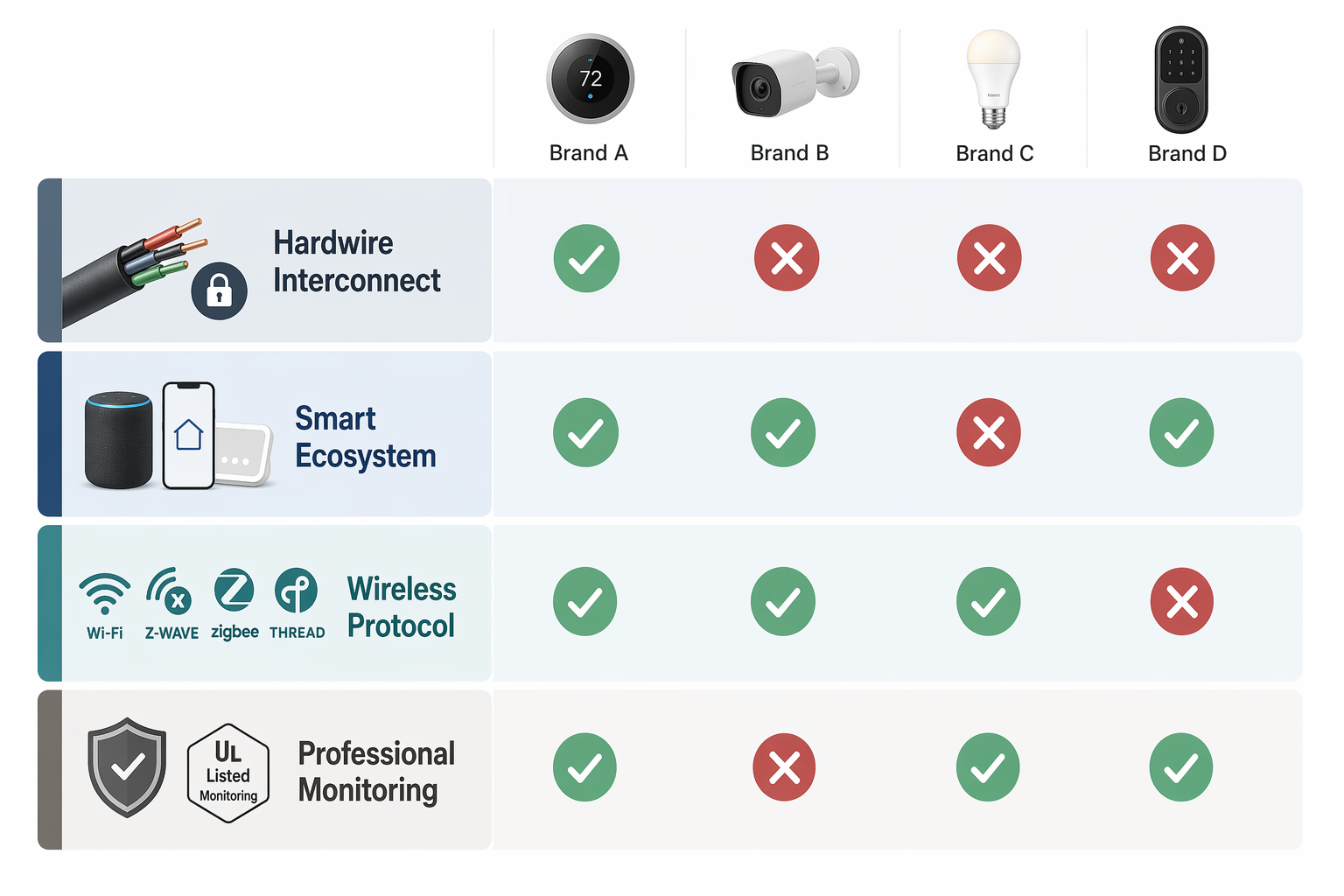
| Compatibility tier | What it actually answers | What does not automatically follow |
|---|---|---|
| Hardwire interconnect | Will this alarm join the existing alarm chain in the walls so one alarm can trigger the others? | A smart app connection does not mean it can join your current interconnect line. Kidde and First Alert/BRK interconnect families are separate, with limited exceptions. [1][2][3] |
| Smart ecosystem | Will the detector appear in Alexa, Google Home, Ring, SmartThings, Home Assistant, Apple Home, or another platform? | A platform badge does not prove hardwire compatibility, local control, or monitoring support. [4][5] |
| Wireless protocol | Does it use Wi-Fi, Z-Wave, Zigbee, Thread, or Matter-over-Thread, and do you already own the required hub or border router? | Matter, Z-Wave, or Zigbee support does not remove safety certification requirements or make the detector part of a wired alarm chain. [5][6][7] |
| Professional monitoring | Can an alarm event be routed to a paid monitoring service such as Ring, Vivint, or ADT? | Monitoring is a service relationship, not the same thing as smart-home integration or local interconnect. |
First, identify the alarm chain already in the walls
If your current alarms are hardwired and interconnected, this is the tier that can turn a simple replacement into a longer project. The interconnect wire is not a universal smoke-alarm bus. It is a manufacturer-controlled compatibility boundary.
Kidde’s own support page says its hardwired interconnected alarms work with Kidde, Fyrnetics, Nighthawk, Silhouette, and Lifesaver alarms, not with every alarm that fits the same ceiling box. [1] First Alert and BRK alarms sit in their own interconnect family; they are not generally interchangeable with Kidde on the same interconnected alarm line. Wirecutter’s 2026 smart smoke alarm guide also treats cross-brand interconnection as a compatibility point buyers must verify rather than assume. [3]
There is one especially important exception for Google/Nest households: the First Alert SC5 is positioned by First Alert as a 9th-generation alarm and Nest Protect replacement that can wirelessly interconnect with Nest Protect devices. [2] That exception matters because Nest Protect has been discontinued, but it should not be stretched into a general rule that First Alert, Nest, Kidde, and every other smart detector can all join one shared alarm network.
The practical check is plain: remove one existing alarm, read the brand and model family, and look up the manufacturer’s interconnect list before you shop by ecosystem. If the house has Kidde hardwired alarms and you need all alarms to sound together through the existing interconnect, a Google Home badge on a non-Kidde product does not solve that. If the house has First Alert/BRK units, a Kidde smart model may still be a fine detector, but not a drop-in member of that existing interconnect family.
There is also a system-size limit. NFPA guidance limits interconnected alarm systems to 18 total devices, with no more than 12 smoke alarms on one interconnect line. [3] That number is easy to miss in larger homes, additions, accessory dwelling units, and houses where smoke, CO, heat, and relay devices have accumulated over several renovation cycles.
What this means for common replacement situations
- Replacing one failed hardwired alarm: match the existing interconnect family first, then choose the smartest compatible model inside that family.
- Replacing every alarm in the house: you have more freedom, but you still need to stay within the device limits and follow the manufacturer’s wiring instructions.
- Keeping existing Nest Protects alive: the First Alert SC5 exception is worth checking, but treat it as a specific Nest/SC5 bridge rather than a universal cross-brand bridge. [2]
- Adding one smart detector to a mostly dumb wired chain: verify whether it can participate in the alarm chain, not merely whether it can send phone notifications.
Then separate ecosystem support from protocol support
The next layer is where product pages create the most false comfort. “Works with Alexa” and “works with Google Home” usually answer a platform question: can the detector surface alerts or status in that ecosystem? They do not answer whether it talks over Wi-Fi, Z-Wave, Zigbee, or Thread. They also do not say whether alerts continue locally if the internet goes down.
Kidde Smart models work with Alexa and Google Home. The First Alert SC5 works with Google Home only. Kidde Ring models fit into Ring, Alexa, and Google Home. First Alert Z-Wave alarms, including ZCombo and SMCO410 lines, are documented by First Alert as working with Z-Wave ecosystems such as SmartThings, Hubitat, and Ring when paired through a compatible Z-Wave controller. [4][5]
That list is useful, but it is not a ranking. A Google Home household replacing Nest Protects has a different problem from a SmartThings household trying to keep local automations. A Ring household that wants monitoring has a different problem from a Home Assistant household trying to avoid subscriptions. The same detector can be a neat fit in one house and an awkward compromise in another.
| If your priority is... | Look first at... | Watch for... |
|---|---|---|
| Keeping an existing hardwired interconnect | The same alarm manufacturer/interconnect family already installed | Smart ecosystem labels that skip interconnect details |
| Google Home after Nest Protect | First Alert SC5 and current Google Home compatibility details | Feature gaps versus Nest Protect and regional availability |
| SmartThings, Hubitat, or Ring with Z-Wave | First Alert Z-Wave alarms and your hub’s supported device list | Buying a Z-Wave detector without an actual Z-Wave controller |
| Apple Home, Google Home, Alexa, SmartThings, or Home Assistant from one device | Matter-over-Thread smoke detectors | Thread Border Router requirements, safety certification, and regional standards |
| No extra hub | Wi-Fi models | Cloud and internet dependency for remote alerts |
Wi-Fi is simple until the internet is the dependency
Wi-Fi detectors are the easiest to understand at checkout because they normally do not require a separate smart-home hub. Kidde Smart and First Alert SC5 are examples in this bucket. For many homeowners, that is enough: install the alarm, connect it to the app, and receive remote alerts when the detector can reach the internet.
The tradeoff is dependency. Current Wi-Fi smoke detectors typically lose remote alerts during internet outages, with battery life often in the 1-to-3-year range. That does not mean the alarm stops being a local life-safety device; it means the smart notification layer is not the same as the alarm’s on-device sounder or a hardwired interconnect.
A Wi-Fi detector is often the right choice for someone who wants phone alerts and voice-assistant visibility without learning another protocol. It is a poor shortcut if the real need is local automation, non-cloud alerts, or a guaranteed fit with an existing wired alarm chain.
Z-Wave and Zigbee are hub choices, not just detector choices
Z-Wave smoke and CO alarms appeal to people who already run SmartThings, Hubitat, Ring Alarm, or another Z-Wave controller. First Alert’s Z-Wave support documentation lists Z-Wave alarms and points buyers toward compatible Z-Wave systems rather than treating the alarm as a standalone Wi-Fi product. [5]
The reason some smart-home users still like Z-Wave is not novelty. Z-Wave’s 900 MHz range is known for strong wall penetration, and mature Z-Wave setups can support local control without depending on a manufacturer cloud in the same way a Wi-Fi app device might. The catch is equally concrete: if you do not own a Z-Wave hub or controller, a Z-Wave detector is not the cheaper, simpler choice.
Zigbee smoke detectors are common in Home Assistant and SmartThings-style homes, especially where buyers already run a Zigbee coordinator. Heiman, frient, and Aqara are common examples in this broader Zigbee category. Zigbee can be less expensive than Z-Wave, but the same rule applies: the detector choice depends on the coordinator and integration path you already have, not just the radio label printed in the listing.
If you need a deeper protocol comparison before choosing a detector, a broader Zigbee vs. Z-Wave vs. Thread guide is more useful than another smoke-alarm roundup. If you already know you want Z-Wave but lack the controller, start with a Z-Wave hub buying guide before choosing the alarm.
Matter-over-Thread is the 2026 shift worth watching carefully
Matter-over-Thread smoke detectors are the clearest answer yet to the platform-fragmentation problem. Devices such as Heiman S1-M, Sensereo MSC-1/MS-1, and Meross MA151 are described in Matter Alpha’s 2025–2026 coverage as Matter smoke detector options that can work across Matter-compatible platforms, with listed prices in the roughly $39.99-to-$69.99 range depending on model and market. [7]
That is a meaningful change. A single Matter device can be designed to surface in Apple Home, Google Home, Amazon Alexa, SmartThings, and Home Assistant instead of being built for one ecosystem at a time. For a household that has already mixed phones, speakers, and hubs, that matters more than another voice-assistant badge.
The caution is just as important: Matter-over-Thread does not mean “no hub.” Thread devices need a Thread Border Router. In many homes, that role may already be filled by a compatible smart speaker, display, router, or hub, but it is still a dependency to verify before buying. If you are not sure what counts, check whether you already have a Matter hub or a dedicated Thread Border Router.
Safety certification is another boundary. Heiman says its S1-M is certified to UL 217 9th Edition, the U.S. smoke alarm standard cited in its Matter smoke detector explainer. [6] Matter Alpha describes Sensereo’s MSC-1 as CE/EN 14604, which points to a European certification context rather than a U.S. UL 217 listing. [7] That distinction is not paperwork trivia when the device is mounted on a ceiling and expected to satisfy local safety rules.
Matter also does not make a Thread detector join your hardwired interconnect wire. It can improve smart-home visibility and local smart alerts across platforms; it does not magically bridge Kidde and First Alert wiring families or override NFPA system limits. For homes with no existing wired interconnect, Matter-over-Thread may be the cleanest platform choice. For homes full of hardwired alarms, it is still only one layer of the decision.
Nest Protect households need a narrower answer than “buy the replacement”
Nest Protect’s discontinuation leaves Google Home users with a compatibility problem that feels more personal than theoretical. The installed base exists, the app expectations are familiar, and many homes already have a mix of wired and battery Nest Protects. First Alert positions the SC5 as a Nest Protect replacement and says it can wirelessly interconnect with Nest Protect devices. [2]
That positioning deserves attention, especially for a staged replacement where not every Nest unit is coming down on the same day. It also deserves a caveat. The research brief notes user-reported feature gaps such as no pre-alarm and no pathlight compared with Nest Protect. Those reports should not be treated as a lab finding, but they are enough reason to compare feature behavior before assuming “replacement” means “same experience.”
For a Google Home household, the right question is not just whether the new detector appears in Google Home. Ask whether it can coexist with the remaining Nest Protects, whether you are replacing the whole alarm network or only part of it, and whether the features you relied on are actually present.
Monitoring is the last compatibility layer, not a bonus feature
Professional monitoring belongs at the end of the decision because it can override otherwise tidy platform logic. A homeowner choosing Ring, Vivint, or ADT-style service is not only buying a detector; they are choosing how alarm events are routed, who receives them, and what subscription or service relationship is required.
Ring is the obvious example for many DIY security households. A detector that works with Ring may be attractive because it fits the existing security dashboard and monitoring plan. That does not mean it is the best fit for a Home Assistant user who wants local alerts, or for a hardwired First Alert/BRK house where interconnect continuity is the limiting issue.
If avoiding subscription fees is part of the goal, decide that before buying the alarm. A local Z-Wave, Zigbee, or Matter-over-Thread setup may align better with that goal than a monitored security ecosystem, but it changes who is responsible for receiving and acting on alerts. For more on that tradeoff, see this guide to choosing smart-home protocols to avoid subscription fees.
A compatibility path that prevents the usual surprises
Use this order before comparing prices or reading top-pick lists. It keeps the most expensive constraints at the top.
- Check the existing alarm brand and interconnect family. If the alarms are hardwired and interconnected, this decides the replacement field before smart-home preference does.
- Count the interconnected devices. Stay within the 18-device total and 12-smoke-alarm limit for one interconnected system. [3]
- Decide whether you need the new alarm to trigger existing alarms, merely send smart alerts, or both. Those are different compatibility claims.
- Match the ecosystem to the household: Google Home, Alexa, Ring, SmartThings, Home Assistant, Apple Home, or another platform.
- Verify the protocol dependency: no hub for many Wi-Fi models, Z-Wave controller for Z-Wave, Zigbee coordinator for Zigbee, Thread Border Router for Matter-over-Thread.
- Check safety certification for your region, especially with newer Matter-over-Thread imports or listings.
- Decide whether professional monitoring is required. If yes, choose inside the monitoring ecosystem rather than treating monitoring as an afterthought.
Which direction fits your setup?
| Your current setup | Most practical starting point | Reason |
|---|---|---|
| Hardwired Kidde-family alarms | Kidde-compatible hardwired replacement first; smart features second | The existing interconnect family is the hardest constraint to preserve. [1] |
| Hardwired First Alert/BRK alarms | First Alert/BRK-compatible replacement first; verify any smart model against the interconnect need | A platform badge does not make it cross-compatible with Kidde or other wiring families. |
| Existing Nest Protects in a Google Home household | Evaluate First Alert SC5 carefully, especially if replacing in stages | It is positioned as a Nest Protect replacement and can wirelessly interconnect with Nest Protect, but feature parity should be checked. [2] |
| SmartThings, Hubitat, or Ring with an existing Z-Wave hub | First Alert Z-Wave options such as ZCombo or SMCO410 lines | The hub is already present, and First Alert documents Z-Wave ecosystem support. [5] |
| Home Assistant or SmartThings with Zigbee already installed | A Zigbee detector supported by your coordinator and integration | The existing coordinator matters more than the generic Zigbee label. |
| Mixed Apple Home, Google Home, Alexa, SmartThings, or Home Assistant household | Matter-over-Thread detector with verified Thread Border Router and regional certification | Matter offers the broadest platform path, but it still depends on Thread infrastructure and certification. [6][7] |
| Security system with paid monitoring as the main goal | Ring, Vivint, or ADT-compatible detector inside that service | Monitoring compatibility is a service decision, not just a smart-home integration. |
The right smart smoke detector is usually the one that satisfies the most restrictive tier you already have. In a newly built smart-home setup, that may be Matter-over-Thread. In a house with a wired Kidde or First Alert chain, it may be a less glamorous hardwired model that keeps every alarm sounding together. In a monitored security system, it may be the detector your monitoring provider actually supports.
A product can be smart and still be wrong for your ceiling. Make the compatibility claim name its layer before you trust it.
References
- Kidde Interconnectivity, Kidde Canada.
- First Alert 9th Generation Alarm Nest Replacement, First Alert Store.
- The 3 Best Smart Smoke Alarms of 2026, Wirecutter.
- Best smart smoke detectors 2026, TechHive.
- Z-Wave alarms, First Alert Support.
- What is a Matter Smart Smoke Detector?, Heiman.
- Best Matter smoke detectors, Matter Alpha.
Reader Feedback
Share your purchase experience, flag outdated picks, or ask clarifying questions about the checklist items.
Comments
Join the discussion with an anonymous comment.