
Ecobee Thermostat Troubleshooting: How to Fix Every Common Problem Yourself
Blank screen, no heat/cool, Wi-Fi drops, temperature inaccuracies
Last updated
The thermostat goes blank. Then what?
I’ve had that moment: walk past the wall and the screen is dark. No temp. No glowing bezel. Just a black rectangle where your Ecobee should be. First thought: dead unit. Second thought: that was expensive. Third thought before I call anyone: give it thirty seconds.
Pop the thermostat straight off its base — it pulls right off when you lift from the bottom. I know it feels like you’re breaking it, but you’re not. Wait thirty seconds, then press it back on until you hear that click. That is a hard reset. It is not a factory reset — it doesn’t wipe your schedules, your sensors, or your Wi-Fi credentials. It just kills the residual charge and forces a clean boot. I’ve seen this fix a blank screen nine times out of ten. Learned that after replacing a perfectly good thermostat once.
Two other problems look catastrophic and are trivial. First: no heat or cool. Before you touch the thermostat wiring, check the breaker. I once spent an hour rewiring before realizing my wife had flipped the HVAC breaker to run a saw. Flip it off, wait thirty seconds, back on. The system can take up to two minutes to reboot. While you’re at the panel, check your air filter. A clogged filter triggers the safety limits on most furnaces and they simply stop calling for heat. I change mine every three months whether it looks dirty or not — it’s the cheapest insurance against a no-heat call.
Second: Wi-Fi dropped. The thermostat says it lost connection. You reboot your router. Still gone. Here’s the real check — what band is your network on? Ecobee thermostats work best on 2.4 GHz. If your router is a mesh system with band-steering (one SSID that jumps between 2.4 and 5 GHz automatically), the thermostat can lose its grip silently. The fix: create a dedicated 2.4 GHz-only SSID for the thermostat, or disable band-steering in your router settings. That catches probably half the intermittent Wi-Fi complaints I see. I switched to a separate IoT network and haven’t had a disconnect since.
Six categories, one diagnostic framework
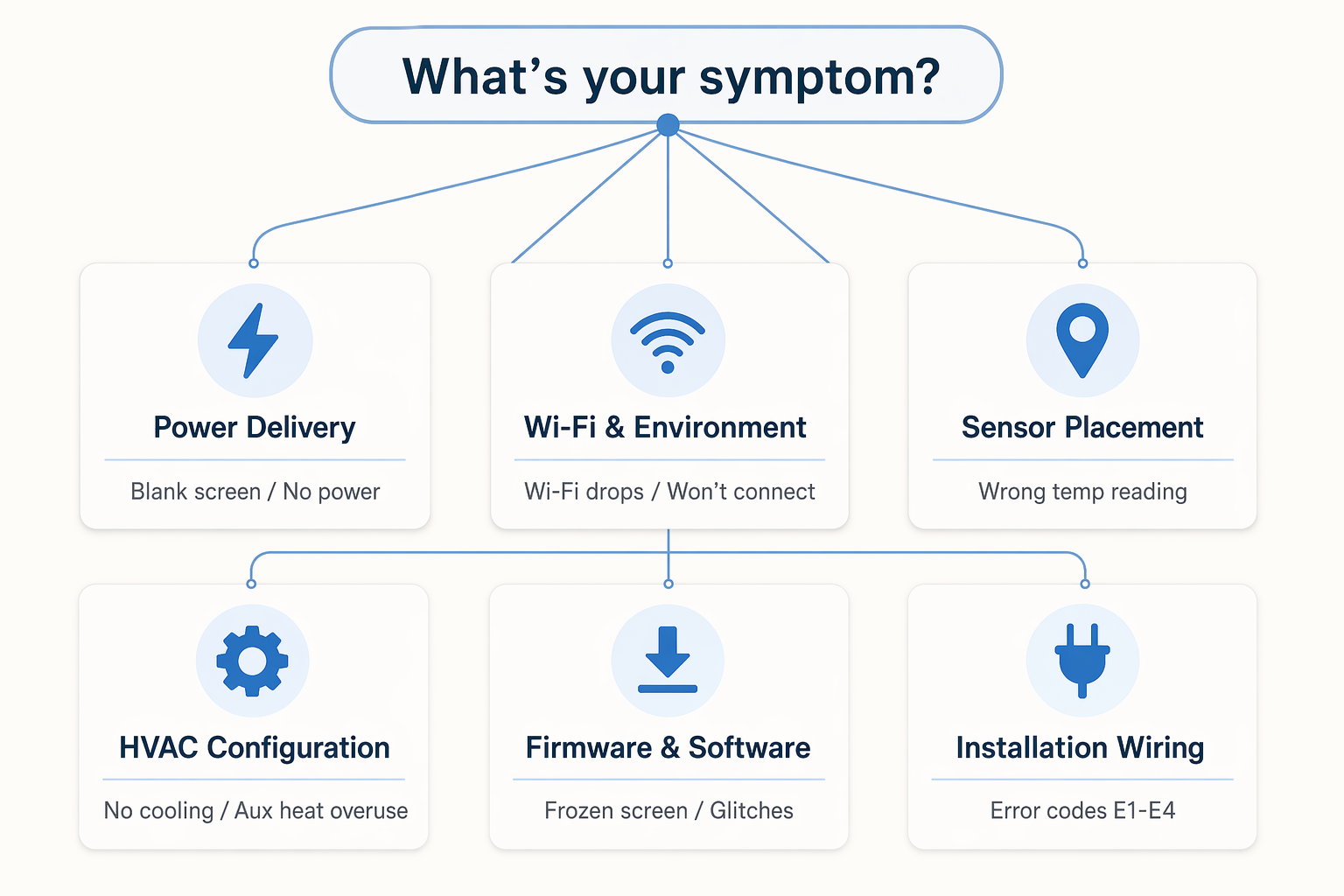
Those three fixes cover the most common glitches — blank screen, no heat, Wi-Fi drop. But the rest of the problems you’ll see fit into the six categories above: Power Delivery, Wi-Fi & Environment, Sensor Placement, HVAC Configuration, Firmware & Software, Installation Wiring. Each category has a targeted fix that takes under 30 minutes. Don’t try to diagnose the symptom; diagnose the category. I’ve found that approach cuts troubleshooting time in half, and you rarely need a pro.
Corroborating context
For protocol background on why this failure happens, see Compatibility & Protocols.
Not currently linked to a known regression. Background on the underlying protocol lives in Compatibility & Protocols.