
When Alexa or Google Assistant stops answering, the first bad assumption is that the whole smart home is dead. It may be. More often, one layer has failed: the voice assistant, the cloud service behind it, your internet connection, the router, the hub, or one device that has quietly dropped off the network.
The October 20, 2025 AWS outage made that painfully visible. Nearly 5,500 users reported Alexa problems on Downdetector, while smart home services including Ring, Ecobee, Govee, and SwitchBot were also reported as affected during the wider AWS disruption.[1][2] That Downdetector number is a crowd-sourced report trend, not a verified count of failed devices, but it matches the practical experience: people were not debugging “the cloud” in the abstract. They were standing in rooms where lights, cameras, thermostats, and routines had stopped behaving normally.
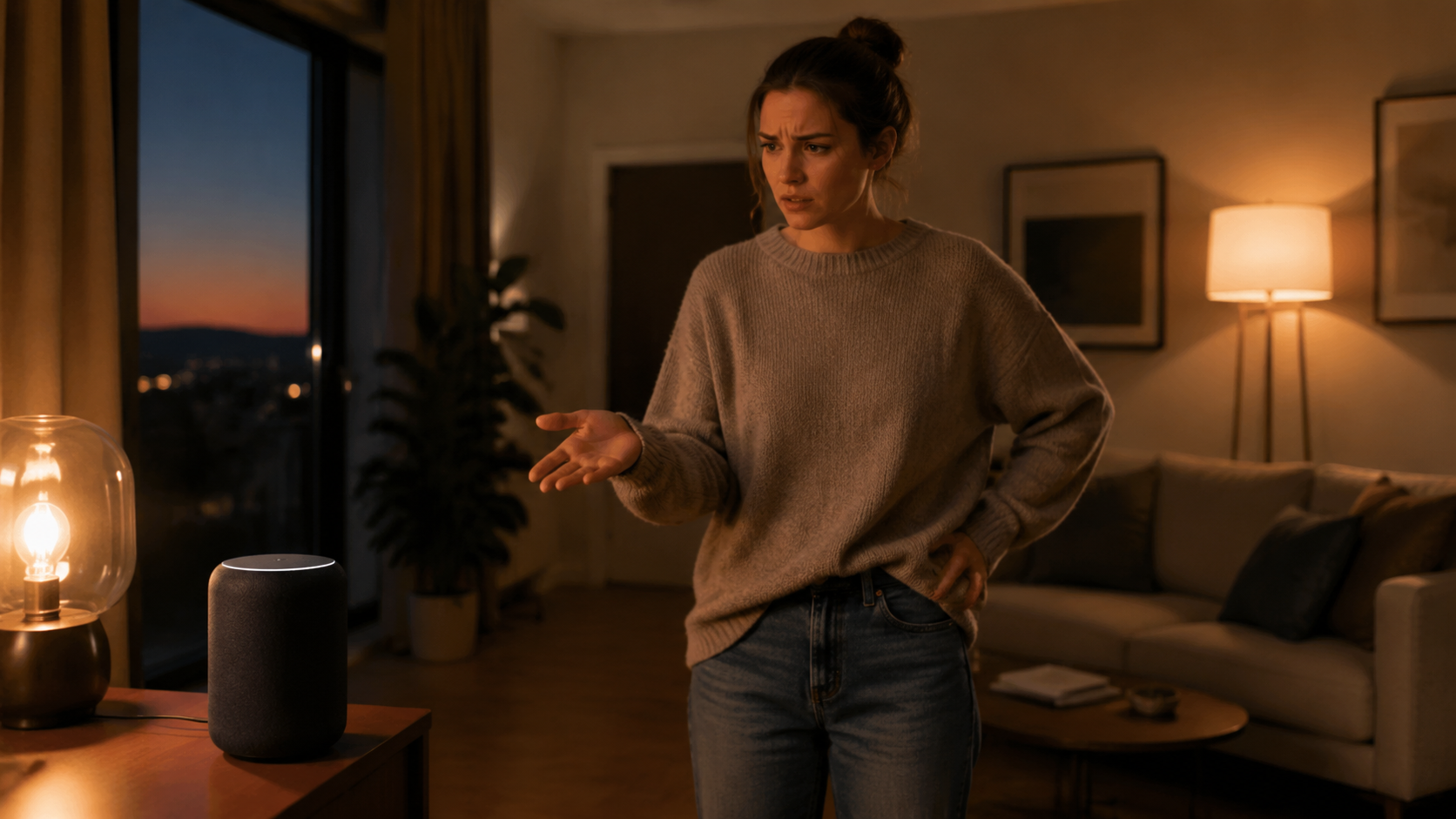
The useful question during an AI assistant outage is not whether cloud smart homes are good or bad. It is: which layer failed, and what control path still works right now?
Start by separating voice failure from home failure
If a voice command fails, stop repeating it for a minute. The assistant may be the only broken piece. A bulb can still have power, a bridge can still be reachable, and a thermostat can still operate from its own controls even while the cloud service that usually coordinates everything is unavailable.
Use this quick split before you reset anything:
- Ask the assistant for something unrelated to the smart home, such as the weather or a timer. If that fails too, suspect the assistant service, internet connection, or account authentication.
- Check an outage-reporting site or the vendor status page from mobile data, not only from your home Wi-Fi. If many users are reporting the same platform at the same time, do not start factory-resetting devices.
- Open a non-smart-home cloud service on your phone or laptop. If nothing online works from home Wi-Fi, the problem is probably your internet service, modem, router, or DNS path.
- Try the device maker’s own app. If Alexa fails but the Hue, Ecobee, SmartThings, or other device app still works, the assistant integration is likely the weak link.
- Try a physical control: wall switch, lock keypad, thermostat faceplate, button, dimmer remote, or hub-connected remote. If that works, the device is alive and you are looking for a better control path, not a replacement.
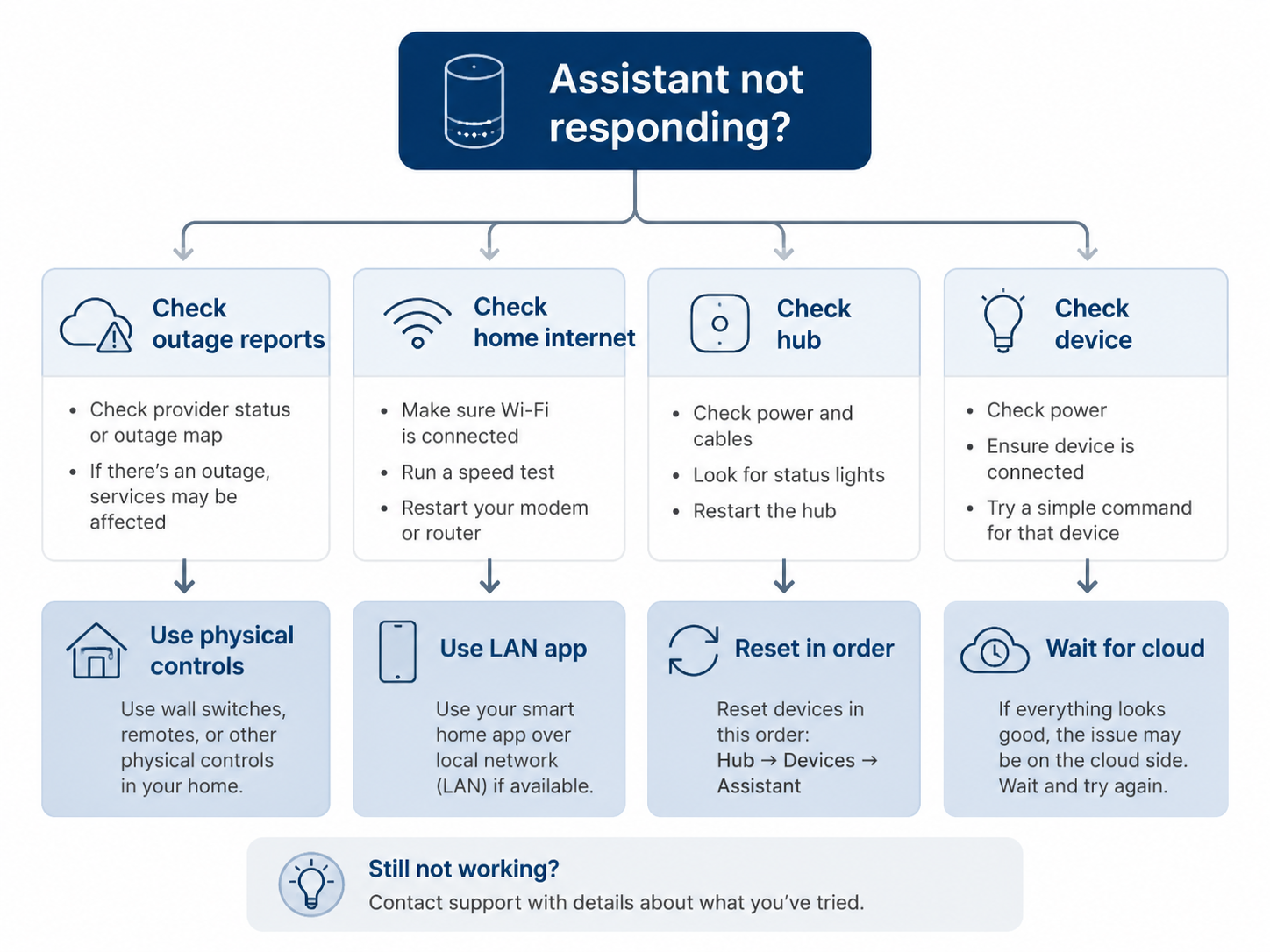
This matters because the wrong fix can make the outage worse. During a cloud outage, deleting skills, removing devices, unlinking accounts, or factory-resetting hubs usually adds work after the service comes back. Save those moves for later, after you know the failure is local to your home.
Regain control before you rebuild anything
The first recovery goal is boring: turn the light on, unlock the door, change the temperature, stop the alarm, or keep the routine from surprising someone. Do that before you chase the root cause.
Use the physical control path if one exists
A physical wall switch, lock keypad, thermostat faceplate, garage wall button, or lamp switch is the fastest way out of the hallway argument. It may not preserve your preferred automation state, and it may cut power to a smart bulb, but it restores human control.
For critical rooms, this is the control path that should never disappear. If the only way to turn on a bedroom light is a voice command, the installation is convenient until the night it is not.
Try the device app on the same Wi-Fi
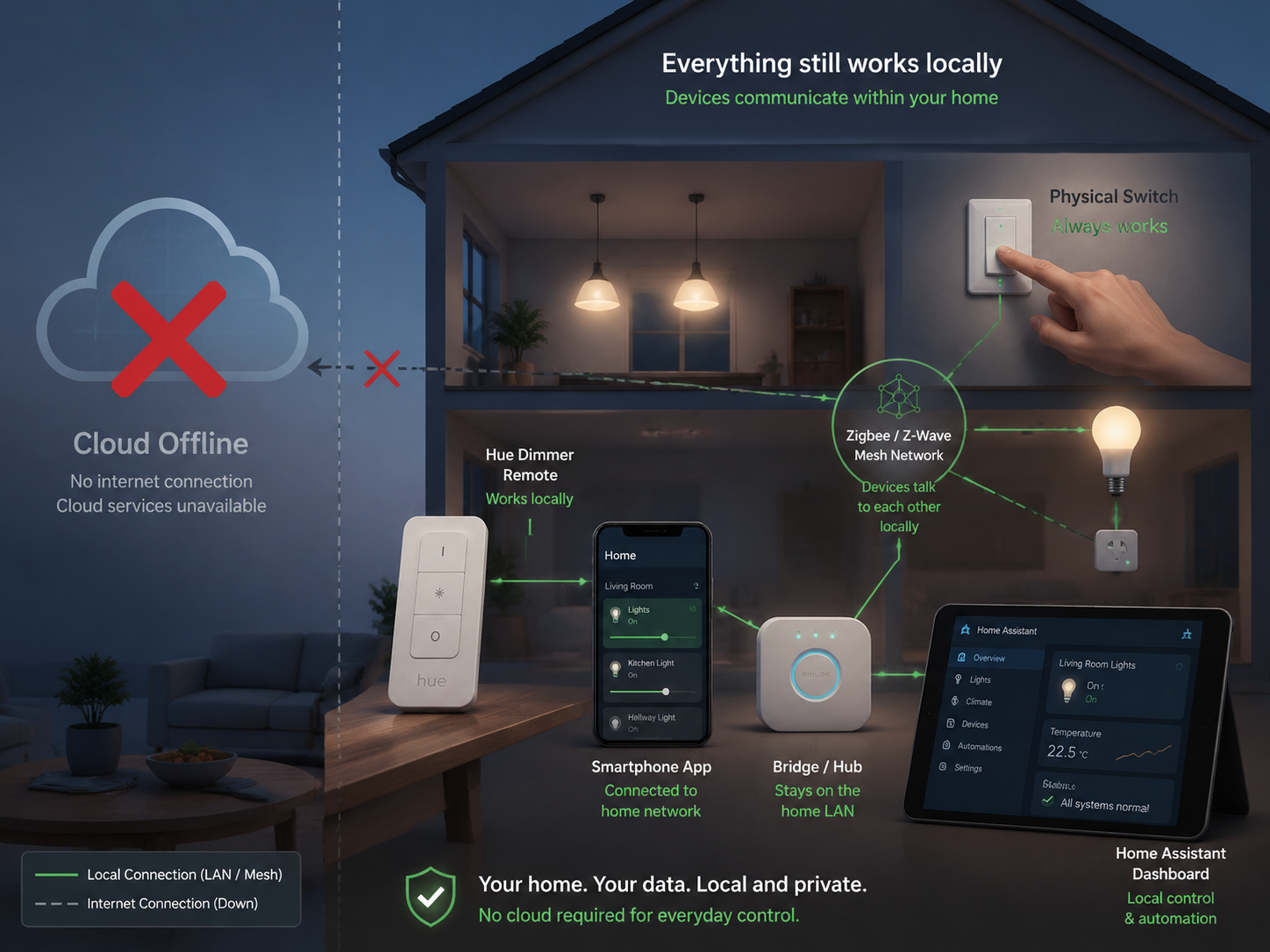
If your internet is down but your router and Wi-Fi still work, some bridge-based systems can still be controlled from a phone on the same local network. Philips Hue is the common example: the Hue Bridge can support local control from the Hue app when your phone is on the same LAN, even if Alexa or Google Assistant cannot reach it through the cloud.[3]
Do not assume every app behaves this way. Some apps need cloud login, cloud device lookup, or a vendor service even for actions that feel local. If the app opens but shows devices as unreachable, try staying on home Wi-Fi rather than cellular; if it still cannot authenticate, move to the next control path.
Use Zigbee remotes and buttons where you have them
Dedicated Zigbee controls are easy to forget until the cloud is down. Philips Hue dimmer switches and IKEA Tradfri wireless dimmers can continue controlling paired lights without an internet connection when they are set up for local Zigbee control.[3]
That does not mean every button in a smart home is local. A button that triggers an Alexa routine, a Google Home automation, or a cloud-to-cloud scene may do nothing during the same outage. The test is simple: press it. If the action still happens with the assistant unavailable, mark that control as part of your fallback plan.
Check the hub before blaming every device
If several Zigbee, Z-Wave, or bridge-connected devices fail at once, look at the hub or bridge. A single unplugged Hue Bridge, SmartThings hub, Home Assistant box, or router Ethernet cable can make many devices look dead at the same time.
Check power first, then Ethernet or Wi-Fi, then the hub’s local status lights. If the hub has a local web dashboard or local app access, try that before power-cycling it. If you reboot too early, you may destroy the one working local path you still had.
What may still work locally during an outage
Local control is not one feature. It depends on the device, the radio protocol, the hub, the automation engine, and the app path. The same home can have one light that works perfectly, one routine that half-runs, and one lock that waits for a cloud service.
| Control path | What to try | Likely limitation |
|---|---|---|
| Physical switch, keypad, or thermostat controls | Use the device directly | May bypass automations or cut power to smart bulbs |
| Bridge app on the same LAN | Open the device app while connected to home Wi-Fi | May still require cloud login or vendor authentication |
| Zigbee or Z-Wave remote | Use paired dimmers, buttons, or scene controllers | Only works for devices and actions paired locally |
| Hub-local automation | Try local dashboards, hub apps, or saved local routines | Cloud scenes, notifications, weather triggers, and third-party integrations may fail |
| Voice assistant with built-in hub | Try controlling directly paired Zigbee devices | Voice recognition and cloud-dependent routines may still be unavailable |
Echo devices with Zigbee hubs
Some Echo models, including Echo Plus and Echo Show devices from the second generation onward, include a built-in Zigbee hub. For Zigbee devices paired directly to that hub, basic local control may remain possible even when an internet path is impaired.[4]
The important word is “paired.” A Wi-Fi bulb linked through a manufacturer cloud, or a device controlled through an Alexa skill, is a different path. If it depends on a cloud skill to translate the command, the built-in Zigbee radio does not rescue it.
Hue Bridge and similar bridge systems
A bridge-based lighting system can be more graceful in an outage because the bulbs talk to the bridge locally. Users have documented local smart home control through apps such as the Hue app and through local-first platforms when the wider internet is unavailable.[5]
The practical test is whether your phone, bridge, and bulbs can complete the command without leaving the house. If the bridge is reachable and the app supports LAN control, the assistant can be down while the lights remain controllable.
SmartThings Edge is local, but not everywhere
SmartThings Edge can run some device drivers and automations locally. In one community account of a 24-hour internet outage, lighting and heating controlled by local Edge drivers continued to work, while the SmartThings app itself was inaccessible because authentication still depended on the cloud.[6]
That is the right level of expectation. Local SmartThings control can help with certain lighting and heating paths, but scenes, cloud integrations, weather-based triggers, notification actions, and app sign-in may still need cloud services. If a routine mixes local and cloud pieces, expect only the local pieces to survive.
Ecobee and thermostats
Thermostats deserve calmer treatment than lights because they usually have a direct interface on the wall. During a cloud or assistant outage, try the thermostat faceplate before touching account settings. If remote control, voice control, or a third-party integration is unavailable, basic heating and cooling control may still be available at the thermostat itself.
The October 2025 AWS disruption affected Ecobee reports along with other smart home services, but that does not mean every thermostat lost its local HVAC function.[2] Separate “I cannot reach it from the app” from “the equipment cannot heat or cool.”
Home Assistant and other local-first hubs
Home Assistant, Hubitat, and similar local-first hubs are resilience options, not moral victories. They help when they control devices locally and expose a dashboard or automation engine inside the house. Local control can also feel faster: one 2026 account compared cloud voice-command round trips of about 1–3 seconds with local control responses around 0.2–0.4 seconds.[5]
That speed comparison is useful, but it should not be stretched into a promise that every local setup is flawless. A local server can crash. A Zigbee network can have weak routing. A dashboard no one else in the household knows how to open is not much of a fallback at 2 a.m.
If it is your internet, router, or hub, recover in order
Once you have basic control, restart the network in the order that matches the dependency chain. The modem feeds the router, the router feeds hubs and Wi-Fi devices, and hubs feed the devices behind them.
- Check whether the outage is public. If Alexa, Google Home, AWS, or the device vendor is widely down, wait and use local controls.
- Restart the modem or gateway first if home internet is unavailable.
- Restart the router after the modem is fully online.
- Restart bridges and hubs after the router is stable.
- Restart individual devices last, and only if they still fail after the network and hub are healthy.
That same order is useful after a power event, when devices come back at different speeds and integrations lose track of each other. If the outage involved a blackout or breaker trip, use the fuller recovery sequence in Smart Home Not Working After Power Outage? Fix It Step by Step.
After the cloud comes back, do the quiet cleanup
A restored assistant does not always mean every integration has recovered cleanly. Cloud skills can need a refresh. Devices can show as duplicated, offline, or stuck in an old state. Routines may run late once and then settle.
- Open the assistant app and check whether the affected devices are online before re-adding them.
- Disable and re-enable a skill or integration only if the device maker’s app works but the assistant still cannot control it.
- Run a manual sync or device discovery after the vendor service is stable.
- Test routines that control locks, thermostats, garage doors, or alarms before trusting them again.
- Write down which control path actually worked during the outage while everyone still remembers.
The last item is not busywork. It tells you which parts of the house degraded gracefully and which parts turned into a support ticket.
Build the next version so one outage cannot immobilize the house
The older Google Home outage in 2017 is still worth remembering because it showed this pattern before the current wave of larger smart home ecosystems: a cloud-side assistant failure can make otherwise powered devices feel unreachable for an uncomfortably long time.[7] The lesson is not to avoid assistants. It is to avoid making assistants the only usable handle.
Choose local protocols for the devices you touch every day
For lights, plugs, sensors, and some switches, Zigbee and Z-Wave devices can form local mesh networks through a hub instead of depending on each device’s separate cloud account. Offline smart home builders commonly favor those protocols because device-to-hub control can continue inside the home when the internet path is unavailable.[8][9]
Matter and Thread can also be part of a local-control strategy, but the details depend on the device, controller, and platform. If you are comparing devices, use a Matter/Thread guide in the protocols section rather than assuming the logo alone guarantees every automation will run offline.
Keep one non-voice control path for critical rooms
Bedrooms, entryways, bathrooms, stairs, nurseries, and heating controls should not require a voice assistant. Use wall switches that remain meaningful, smart buttons with local bindings, dimmer remotes, keypads, or a dashboard that the household can actually find.
This is where a small amount of redundancy pays off. A Hue dimmer on the wall beside a smart bulb is not elegant because it has more features. It is useful because someone can press it without knowing which cloud service is having a bad morning.
Know which automations require the cloud
Do a plain-language audit of important routines. If a routine uses voice recognition, a cloud skill, a weather service, a notification action, a cloud scene, a remote API, or a third-party account link, mark it as cloud-dependent unless you have tested otherwise.
Then decide whether that is acceptable. A cloud-dependent “turn on movie lights” scene is an annoyance. A cloud-dependent heating fallback, entry light, or accessibility routine deserves a local alternative.
Use watchdogs only where the hardware supports them
Some advanced setups can make devices fall back automatically. One documented Shelly approach uses scripting to return a relay to direct physical control when Home Assistant becomes unreachable.[10] That is a useful pattern, but the caveat is strict: it applies to Shelly Plus/Gen2 relays with scripting support, not to every smart switch or every Shelly product.
If you add a watchdog, test the failure mode on purpose. Disconnect the hub, block the server, or simulate the outage in a safe way and confirm the switch still behaves in a way the household understands.
A resilient smart home fails smaller
Alexa and Google Assistant are useful when they remove friction. Voice control, routines, and cloud integrations can make a home easier to live in. The problem starts when they become the only route to a light, lock, thermostat, or alarm.
During the next AI assistant outage, aim for a smaller failure: voice commands unavailable, some routines paused, remote access unreliable, but basic local control still intact. A smart home does not need to be outage-proof to be well built. It needs to degrade into a less convenient home, not an unusable one.
References
- Is Amazon Alexa down? Thousands report issues amid AWS outage — USA Today, October 20, 2025
- How an AWS outage left the smart home ecosystem in the dark — Matter Alpha
- 6 Smart Home Devices That Still Work With No Internet Connection — SlashGear
- Amazon forum posts on Echo devices with built-in Zigbee hubs — Amazon Digital and Device Forum
- My smart home still works without the internet, and it's all thanks to one app — XDA Developers, February 2026
- Lessons learned from an internet outage — SmartThings Community, 2023
- Google Home Outage Shows Smart Homes Can Be Dumb Sometimes — ExtremeTech, 2017
- Building a Truly Offline Smart Home — Vesternet
- How I built a fully offline smart home — Android Authority
- Shelly Fallback When Home Assistant Is Down — Danny Tsang, May 2025
Community Notes & Edge Cases
Has this fix worked for you? Is it still valid after a recent firmware or app update? Share firmware-specific variations, platform quirks, or edge case solutions below. Substantive corrections can also be submitted via the contact page for editorial review.
Comments
Join the discussion with an anonymous comment.