
Which smart thermostat settings save energy in extreme heat?
During extreme heat, the thermostat settings that actually cut cooling costs come down to five levers — setpoint, away scheduling, eco modes, pre-cooling, and demand response — and each platform exposes them differently. Find the dated, status-labeled configurations for Nest, ecobee, Honeywell/Sensi, and Home Assistant/Matter to see which savings claims hold for your setup.

During a heat wave, smart thermostat energy saving is less about owning the cleverest thermostat and more about whether five settings are actually doing what you think they are doing: occupied setpoint, away scheduling, eco mode, pre-cooling, and demand response.
That distinction matters in 2026 because the cooling bill is no longer a background annoyance. Ohio University reported that U.S. summer cooling costs were projected to reach a record roughly $800 for June through September 2026, up 10.5% year over year, and noted that air conditioning can account for more than half of summer electricity use in some areas.[1] Grid pressure is no longer abstract either: during the early July 2026 heat wave, PJM activated about 6,113 MW of demand response on July 2.[2]
So the useful question is not whether a smart thermostat can save energy in general. It is: when the hallway is hot, the app says one thing, the utility says another, and someone is about to override everything, which exact thermostat levers still move the bill?
The five settings to check first
The matrix below is dated to Q3 2026. “Confirmed” means the behavior is described in vendor or standards documentation checked as of 2026-08, not that NestGrid reproduced it on every thermostat model, app version, hub, HVAC system, or utility tariff. “Community pattern” means the idea is practical for power users, but it has to be verified in the local hub and on the actual thermostat entity before treating it as a savings control.
| Lever | What to check during extreme heat | Nest | ecobee | Honeywell / Sensi | Home Assistant / Matter | Savings confidence |
|---|---|---|---|---|---|---|
| Occupied setpoint | Raise the cooling setpoint as far as the household can tolerate. The commonly cited 78°F summer baseline is useful, but not magic. | Use the normal cooling setpoint or schedule. Confirm the displayed target temperature, not just the schedule you intended. | Use the normal cooling setpoint or schedule. Confirm whether eco+ or a utility event is modifying it. | Use the schedule or app setpoint for the installed model. The checked sources do not support a distinctive Honeywell/Sensi-only summer savings mode. | Use climate setpoints exposed by the integration. Verify that the thermostat accepts and holds the command. | Strongest lever. Consumer Reports cites ENERGY STAR’s 78°F cooling guidance and notes cooling is about 19% of typical home energy costs; Trane cites about 3% cooling-cost change per degree raised.[3][4] |
| Away / setback | Use a higher away temperature when the home is empty; 80–85°F is a practical maximum range before comfort, pets, humidity, and recovery time become the constraint. | Eco Temperatures and presence sensing are vendor-documented. Status: Confirmed — vendor documentation, accessed 2026-08.[5] | eco+ and occupancy-aware adjustments are vendor-positioned as savings features. Status: Confirmed for eco+ program behavior, accessed 2026-08.[6] | Use away/geofence/schedule features if your model and app expose them. Status: verify in the installed app. | DIY automations can set an away temperature from presence, calendar, or security-system state. Status: Community pattern — verify per hub, firmware, and thermostat entity. | Good when the house is actually empty. Consumer Reports warns setback savings shrink in always-occupied homes, already-programmed homes, and some variable-speed AC or heat-pump systems.[3] |
| Eco mode | Make sure the thermostat’s eco feature is enabled only if the household understands when it changes the setpoint or compressor behavior. | Eco Temperatures, presence sensing, and Airwave are documented; Airwave turns the compressor off before the setpoint and runs fan-only, but only below a humidity threshold. Status: Confirmed — vendor documentation, accessed 2026-08.[5][7] | eco+ is the named feature set. ecobee disclosed a 2020 Demand Side Analytics summer evaluation showing about 5% incremental savings over the thermostat alone and 7–23% cooling savings for time-of-use customers. Status: Vendor-disclosed evaluation, accessed 2026-08.[6] | Use schedule, geofence, utility, or energy-saving modes available for the installed model. Status: verify in app; no distinct current vendor evidence checked here comparable to Airwave or eco+. | Represent eco mode as explicit automations, not assumptions. Example: when everyone is away, raise cooling setpoint; when occupied, restore comfort setpoint. | Potentially useful, but platform-specific. Vendor savings figures are benchmarks, not household promises. |
| Pre-cooling | Cool earlier only when a time-of-use price window, utility event, or comfort-recovery problem gives it a reason to exist. | Rush Hour Rewards may pre-cool before an event and shows “ENERGY RUSH HOUR” during the event. Status: Confirmed — vendor documentation, accessed 2026-08.[8] | Community Energy Savings can pre-cool ahead of an event and then reduce AC use during the event. Status: Confirmed — vendor documentation, accessed 2026-08.[9] | Use only if your utility program, rate plan, or schedule supports it. Status: verify per thermostat and utility. | DIY pre-cooling recipes can work with time windows and utility signals, but must be tested against the actual rate plan and home recovery behavior. | Conditional. Useful for some rates and events; contested as a general hack. |
| Demand response | Enroll only if you can see when an event is active, how far the setpoint may change, and how to opt out when comfort or health requires it. | Rush Hour Rewards is the documented Nest demand-response path in the provided sources. Look for event display, including “ENERGY RUSH HOUR.”[8] | Community Energy Savings is the documented ecobee path in the provided sources.[9] | Program names vary by utility and thermostat model. Check the utility enrollment screen and app event display. | Matter energy and device-management work may improve cross-platform control, but current demand-response automations remain local DIY unless tied to a real utility signal. | Useful for grid peaks and sometimes bill savings. Not the same as ordinary thermostat efficiency. |

Start with the setpoint, then decide how much automation you can trust
The setpoint is still the cleanest lever because it is visible, reversible, and easy to verify. If the thermostat is calling for 72°F while the outdoor temperature is punishing the condenser all afternoon, no eco badge in the app can fully rescue the bill.
The familiar 78°F advice is best treated as a starting line. Consumer Reports cites ENERGY STAR guidance around 78°F for cooling and also puts cooling at about 19% of typical home energy costs.[3] Trane explains the same practical math in homeowner terms: raising the thermostat by about 1°F can reduce cooling costs by roughly 3%, and a 7–10°F setback for eight hours a day can save up to about 10% on annual heating and cooling bills.[4]
That does not mean every home should sit at 78°F all day. A household with medical needs, poor insulation, upstairs bedrooms, pets, or high indoor humidity may have a lower comfort ceiling. A household with ceiling fans, good shading, and people who tolerate warmer rooms may be able to go higher. The bill moves when compressor runtime drops; the number on the screen is only the command.
Away settings deserve more care than they usually get. The practical summer range is often around 80–85°F for an empty home, but “empty” has to be true. A remote worker in a back room, an elderly relative napping during the afternoon, or a pet in a sunny room turns an away setback from savings into a comfort problem. Consumer Reports also warns that setback-based savings shrink when the home is always occupied, when the previous thermostat was already programmed well, or when a variable-speed air conditioner or heat pump does not benefit from large temperature swings in the same way a simpler system might.[3]
For a quick heat-wave audit, do not start in the marketing screen. Stand in front of the thermostat or open the live control view and check three things: the current indoor temperature, the target cooling temperature, and whether the device says it is in an away, eco, rush-hour, or utility-event state. If the schedule says one thing and the live state says another, the live state is what the HVAC system is following.
Nest: Eco Temperatures, Airwave, and Rush Hour Rewards are three different controls
Nest owners have several savings features that sound similar but behave differently. Eco Temperatures and presence sensing are about the thermostat choosing a more efficient target when the home appears empty or when eco behavior is active. Google’s support documentation groups Eco Temperatures and presence sensing among Nest thermostat energy-saving features.[5]
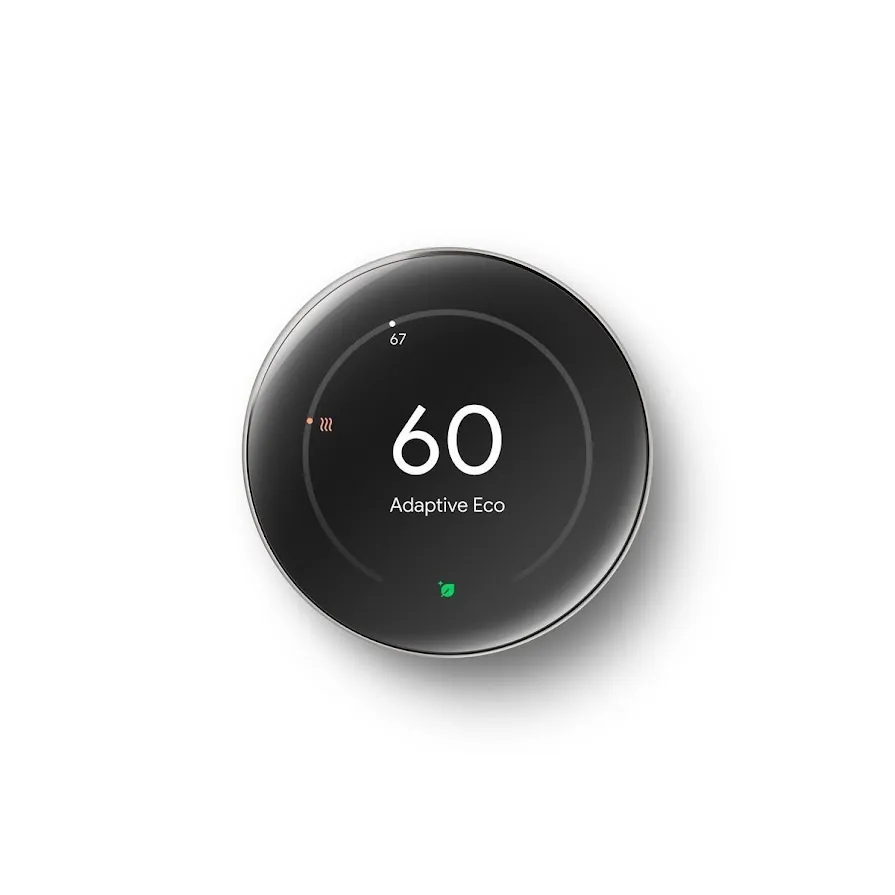
The operational check is simple: confirm the Eco Temperature values and confirm what the thermostat thinks about occupancy. Presence sensing is helpful when it matches the household pattern. It becomes expensive or uncomfortable when a room is occupied but the thermostat or phone-location logic believes the house is away, or when the thermostat stays in comfort mode for an empty house because someone’s phone or schedule keeps it there.
Airwave is a separate behavior. Google documents Airwave as turning off the compressor slightly before the target temperature is reached while continuing to run the fan, using the already-cooled coil to keep moving cool air. Google also states that Airwave only turns on below a humidity threshold, so it should not be treated as a guaranteed every-day compressor cutoff in muggy conditions.[7]
Rush Hour Rewards is different again. It is a utility demand-response program, not a normal schedule. Google says Nest may pre-cool the home before a rush-hour event and that the thermostat can display “ENERGY RUSH HOUR” during the event.[8] That display matters. During a hot late afternoon, a visible event state is the difference between “the thermostat is broken” and “the thermostat is obeying a utility event I enrolled in.”
Model differences still matter. If you are unsure which Nest thermostat you have, check NestGrid’s Nest thermostat model guide before assuming a feature name, display behavior, or app location applies to your hardware.
ecobee: eco+ savings are real enough to configure, but dated enough to label
ecobee’s main savings control is eco+, a bundle rather than a single temperature. That makes it powerful and slightly harder to audit during a heat wave. If eco+ is active, the thermostat may be doing more than following the visible schedule.
The useful savings numbers need their label. ecobee announced that a Demand Side Analytics summer evaluation found eco+ delivered about 5% incremental savings over the thermostat alone, and that time-of-use customers saw 7–23% cooling savings. That is a vendor press release describing an evaluation, not a universal guarantee for every ecobee home in 2026.[6]
Community Energy Savings is ecobee’s demand-response lane. ecobee describes pre-cooling before an event and reducing air-conditioning use during high-demand periods.[9] As with Nest, the important household question is not whether the feature exists; it is whether the person in the house can tell when the thermostat is in an event-driven state and how comfort will be restored afterward.
Remote sensors can make or break these settings because they affect what the thermostat believes about occupied rooms. For households comparing room-sensor behavior across ecobee, Nest, Honeywell, and Sensi, NestGrid’s remote sensor comparison is the better place to sort sensor ecosystems; the heat-wave point here is narrower: occupancy data only saves money when it reflects the rooms people are actually using.
Honeywell and Sensi fit the same five-lever test, even when the brand evidence is thinner
The documentation checked here does not include current, platform-specific Honeywell or Sensi evidence for a summer savings feature as distinctive as Nest Airwave or ecobee eco+. That does not make those thermostats irrelevant. It means the audit has to stay closer to the basic levers: occupied setpoint, schedule, geofence or away mode if available, utility program enrollment if offered, and any visible event or eco state in the app.
For these platforms, avoid translating Nest or ecobee terms directly. A “leaf,” “eco,” “away,” “smart response,” or “energy savings” label may not mean the same thing across brands. During extreme heat, the safe check is mechanical: what target temperature is active now, what schedule takes over next, what occupancy rule can change it, and whether a utility event can override it.
That is less satisfying than a branded feature checklist, but it is more honest. A thermostat that reliably raises the setpoint from 74°F to 79°F while the house is empty is doing more useful work than a thermostat with a beautiful savings screen and an away rule that never triggers.
Pre-cooling is not a universal hack
Pre-cooling has one strong use case: shifting cooling away from an expensive or grid-stressed window. If your utility charges more from late afternoon into evening, or if a demand-response event is scheduled, cooling the house earlier can reduce compressor use during the expensive window. That is why pre-cooling appears inside Nest Rush Hour Rewards and ecobee Community Energy Savings rather than only as a DIY trick.[8][9]
Outside those windows, the case gets messy. NPR reported utility disagreement on the practice: APS promoted pre-cooling, Georgia Power conditioned it on an extremely efficient home, and Exelon warned that it could raise costs.[10] Those positions can all be true under different houses, climates, insulation levels, and rate plans.
The mistake is pre-cooling without a price signal or event signal. Dropping the house several degrees at noon and then letting it heat back up may feel clever, but if the utility rate is flat and the house gains heat quickly, you may simply have bought extra compressor runtime earlier in the day. If the household wants a concrete pre-cooling plan for a peak window, NestGrid’s Las Vegas smart thermostat pre-cooling recipe shows the kind of rate-window thinking this setting needs.
Demand response saves differently than efficiency
A demand-response event is not the same as ordinary smart scheduling. Ordinary scheduling tries to reduce your own runtime when comfort allows. Demand response asks many homes to reduce load at the same time so the grid can survive a peak. That can come with bill credits, rebates, or program incentives, depending on the utility, but the comfort impact lands in the living room at 5 p.m.
The visible state is the homeowner’s protection. Nest documents the “ENERGY RUSH HOUR” display during Rush Hour Rewards events.[8] ecobee describes Community Energy Savings as pre-cooling before an event and adjusting during the high-demand period.[9] If your app or thermostat does not make the event obvious, write down the utility’s event window and opt-out rules before the next heat alert, not during it.
This is also where generic savings claims get least useful. ENERGY STAR-certified smart thermostats must demonstrate at least 8% heating and 10% cooling runtime reduction from field data, which is a meaningful certification baseline.[11] But runtime reduction for a certification population is not the same as the dollar result for a particular home during a particular heat wave, on a particular rate plan, with a particular family overriding the thermostat after dinner.
Home Assistant and Matter: promising control, still local verification
Home Assistant users can build the same five levers with automations: raise the cooling setpoint when everyone leaves, pre-cool before a known time-of-use window, pause aggressive setbacks when indoor humidity is high, or respond to a utility alert if the signal is available. Those are useful patterns, but they are not universal thermostat standards. The automation has to be tested against the climate entity, integration behavior, thermostat firmware, HVAC response, and utility tariff.
Matter is moving in the right direction, but it should not be oversold as a solved 2026 answer to heat-wave savings. The Connectivity Standards Alliance says Matter 1.3 added energy reporting and Matter 1.4 added Device Energy Management work along with thermostat presets.[12] That points toward better cross-platform energy control, especially as more devices expose usable data and commands.
For today’s homeowner, though, a Matter badge does not prove that a thermostat will expose every savings lever cleanly to every hub. If you are building around Google, Nest, and Matter, NestGrid’s Google Nest Matter controller and device guide is the safer companion. For heat-wave savings, the rule is simple: if the hub cannot confirm the active setpoint and state after an automation runs, the automation is not yet evidence.
Where the savings claims stop working
A smart thermostat can only save cooling energy by changing behavior that would otherwise have consumed energy. That sounds obvious until the app starts giving annualized savings estimates while the household is already careful, already hot, or already on a variable-speed system that dislikes blunt setbacks.
- If the home is occupied all day, away scheduling has less room to work.
- If the old thermostat was already programmed well, “smart” scheduling may produce smaller incremental savings.
- If the AC or heat pump is variable-speed, large setbacks may not behave like they do on simpler single-stage equipment.
- If indoor humidity is high, features such as fan-only coast-down or aggressive temperature setbacks may be limited or uncomfortable.
- If the utility rate is flat and there is no demand-response event, pre-cooling needs evidence from your own home before it deserves trust.
- If people regularly override the thermostat, the app’s configured savings mode is no longer the actual operating mode.
The summer counterpart to NestGrid’s winter smart thermostat savings methodology is the same discipline: do not move savings figures from one season, region, tariff, or device population into another home without checking the mechanism.
During extreme heat, the safest savings path is to raise the occupied setpoint as far as the household can tolerate, verify that away logic is not fighting real occupancy, enable eco features only after understanding what they change, reserve pre-cooling for rate windows or demand-response events that justify it, and treat vendor savings numbers as dated benchmarks. The answer is not that Nest saves one number or ecobee saves another. The answer is the matrix: these are the levers your platform exposes, these are the documented behaviors as of Q3 2026, and these are the conditions under which they stop saving.
References
- The Cooling Crisis: Scorching temperatures, rising energy costs leave Americans feeling the heat — Ohio University, 2026-07
- Early July 2026 Heat Wave — Grid Status
- Best Setting for Central Air Conditioning — Consumer Reports
- Should You Really Set Your Thermostat to 78 in the Summer? — Trane
- Learn about Nest thermostat energy savings features — Google Nest Help
- New Evaluation Report Proves ecobee Smart Thermostats Save — ecobee
- Learn about Airwave and how to change settings — Google Nest Help
- Learn about Rush Hour Rewards — Google Nest Help
- How ecobee helps keep the lights on during extreme heatwaves — ecobee
- Heat, air conditioning forecast: supercooling and precooling — NPR, 2025-07-23
- Smart Thermostat FAQ — ENERGY STAR
- Matter 1.4 Enables More Capable Smart Homes — Connectivity Standards Alliance