
Smart Light Switch Buyer's Guide: The 4 Decisions You Need to Make First
A practical guide to choosing the right smart light switch by evaluating your home's wiring, smart ecosystem, circuit layout, and control protocol — so you avoid compatibility mistakes and unnecessary costs.
Last updated
Do not pick a smart light switch by brand first. Pick it by the four things that can actually make the purchase work or fail: whether the switch box has a neutral wire, which protocol you want the switch to use, whether the light is controlled from one location or several, and which smart-home ecosystem your household already depends on.
That sounds less fun than comparing app screenshots, but it is the difference between a clean Saturday install and ten opened boxes on the kitchen counter. In mid-2026, the temptation to buy cheap is real: TP-Link Kasa KS225 Matter Wi-Fi dimmers have been selling around $19–$21, while a 10-switch Lutron Caséta setup with hub lands around $630–$730; ten Kasa dimmers land around $190–$210 with no hub required.[1] That gap is too large to ignore. It is also too large to treat as the whole decision.
| Decision | What to verify before buying | Why it matters |
|---|---|---|
| Neutral wire | Open the switch box safely and confirm whether a neutral bundle is present | Most smart switches need constant power; many no-neutral claims are model-specific |
| Protocol | Choose Wi-Fi, Zigbee, Z-Wave, Thread/Matter, or a proprietary system | This affects hubs, network load, local reliability, and cross-platform control |
| Circuit type | Confirm single-pole vs. 3-way or multi-way control | A 3-way circuit often needs a compatible companion switch or specific wiring method |
| Ecosystem | Check Apple Home, Alexa, Google Home, SmartThings, or Home Assistant support | The switch has to join the routines and voice controls your household actually uses |
Start With the Box, Not the App
A smart switch is not just a prettier wall control. It is a small powered device that has to stay awake when the light is off, listen for commands, and report its state back to an app or hub. That is why neutral wiring matters so much.
Most smart switches require a neutral wire. Older switch boxes often do not have one because many homes used switch-loop wiring, especially before the mid-1980s; the National Electrical Code has required neutrals in most switch boxes only since 2011.[2][3] The age of the house is a clue, not proof. Remodels, regional practice, builder habits, and the specific room all matter.
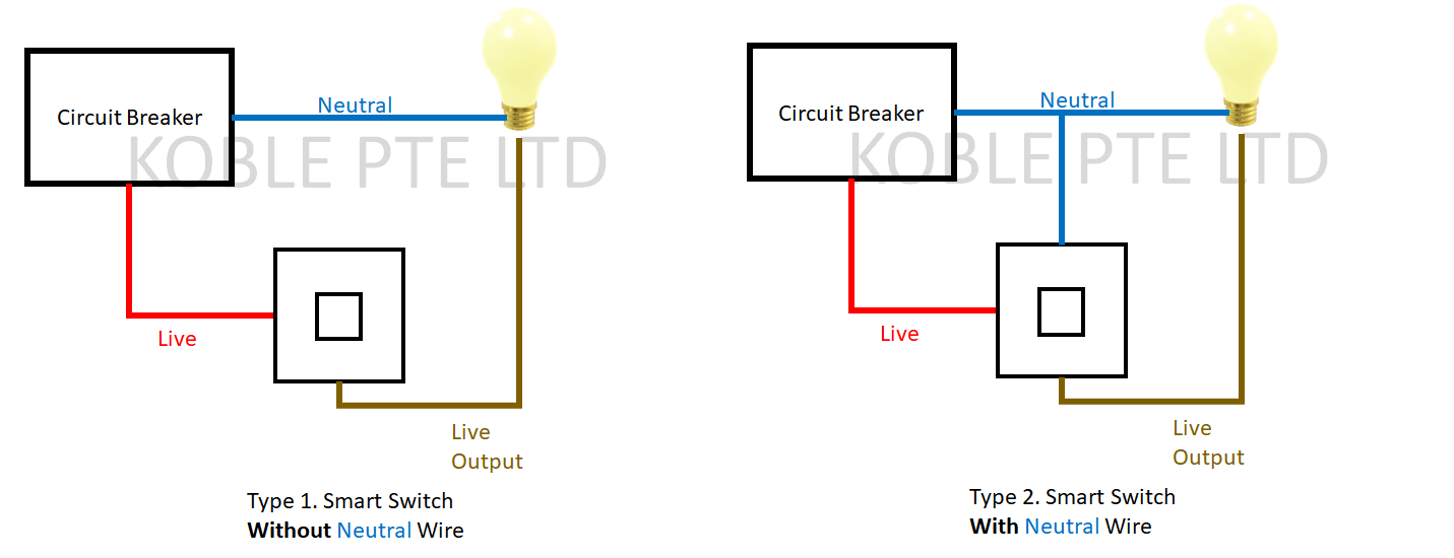
Before shopping seriously, turn off power at the breaker, remove the wall plate, and look for a bundle of white wires capped together in the back of the box. Do not rely on the color of the wires attached to the existing switch alone. If you are not comfortable identifying conductors safely, this is the point to stop and call an electrician, not the point to guess.
This one check immediately narrows the product field. If you have neutrals in the boxes you want to automate, budget Wi-Fi and Matter switches become much easier to consider. If you do not, the cheap shelf tag may be irrelevant unless that exact model is designed for no-neutral installation.
No-Neutral Switches Are Real, but They Are Not Interchangeable
No-neutral smart switches solve a real problem, but they do it with trade-offs. Options cited in current buyer discussions include Lutron Caséta and Diva models using Lutron’s proprietary ClearConnect system, Inovelli Blue Series Thread/Matter models, GE Cync no-neutral models, and Leviton Decora Smart DN6HD, which uses a Wi-Fi bridge.[3] Those names do not all install the same way, and they do not all behave the same way with every load.
Some no-neutral switches may need a bypass capacitor. Some may be more vulnerable to LED flicker or ghost glow. Some cannot provide energy monitoring. In Zigbee and Z-Wave networks, no-neutral devices may also act as mesh end-devices rather than routers, which changes what they contribute to the network.[3] None of that means no-neutral switches are bad. It means “no neutral required” is the beginning of the compatibility check, not the end of it.
This is also where Lutron keeps earning its reputation. A Caséta switch is rarely the cheapest answer in 2026, but its no-neutral advantage and predictable behavior are often exactly what an older home needs. If your switch boxes lack neutrals, read a dedicated no-neutral installation guide before buying the bargain pack.
Then Choose the Protocol You Want to Live With
The protocol is how the switch talks. It is the difference between a switch that joins your Wi-Fi directly, one that talks to a hub, one that uses Thread through a border router, and one that lives inside a proprietary lighting system. The box may say Alexa, Google, Apple Home, Matter, or SmartThings in large print. The protocol line is usually the part that tells you what else you are signing up for.
| Protocol path | Typical buyer consequence | Best fit |
|---|---|---|
| Wi-Fi | Lowest entry cost and usually no hub, but every switch joins the home network | A few switches, strong Wi-Fi, simple app or voice control |
| Zigbee | Needs a hub or compatible controller; devices can form a low-power mesh | SmartThings, Home Assistant, or hub-centered homes |
| Z-Wave | Needs a Z-Wave hub; known for dedicated smart-home mesh behavior | Homes already using Z-Wave sensors, locks, or switches |
| Thread/Matter | Matter can reach multiple ecosystems, but Thread devices need a Thread border router | Apple Home, Google Home, Alexa, or SmartThings households wanting cross-platform flexibility |
| Proprietary systems | Usually require the brand’s bridge or hub; reliability can be excellent inside that system | Whole-home lighting where boring reliability matters more than lowest device cost |
For many first-time buyers, Wi-Fi is a perfectly reasonable starting point. A Kasa KS225 around $19 or a Tapo S505D around $15 keeps the hardware cost low and avoids a separate hub purchase.[1][4] If you are replacing one or two switches and your router is not already struggling, “no hub required” can be a practical advantage.
The phrase becomes less convincing as the installation grows. Ten, twenty, or thirty Wi-Fi switches are not the same decision as one switch in a guest room. Wi-Fi devices add RF load to the home network, while Zigbee, Z-Wave, Thread, and proprietary lighting systems are designed around separate low-power networks or bridges. That does not make hub-based systems automatically better. It means the hub is sometimes the thing that keeps the lighting network from becoming another burden on the router.
Matter makes this choice more interesting in 2026. Matter is the cross-platform promise: one certified device can, in principle, work across Apple Home, Google Home, Alexa, SmartThings, and other Matter controllers. Matter 1.6 shipped in June 2026, and the Matter ecosystem had more than 750 certified products by then.[4] That is real progress, but it does not erase the hardware underneath. A Thread-based switch still needs a Thread border router. A Wi-Fi Matter switch still uses Wi-Fi. Matter improves ecosystem reach; it does not magically fix wiring, dimming quality, or weak networks.
There are also new devices arriving fast enough that the category can feel settled before it really is. LIFX launched a Matter Smart Dimmer Switch at $49.99 in June 2026.[4] It is worth watching if you want Matter-forward lighting, but a new launch is not the same thing as long-term household reliability.
Single-Pole and 3-Way Are Shopping Filters, Not Fine Print
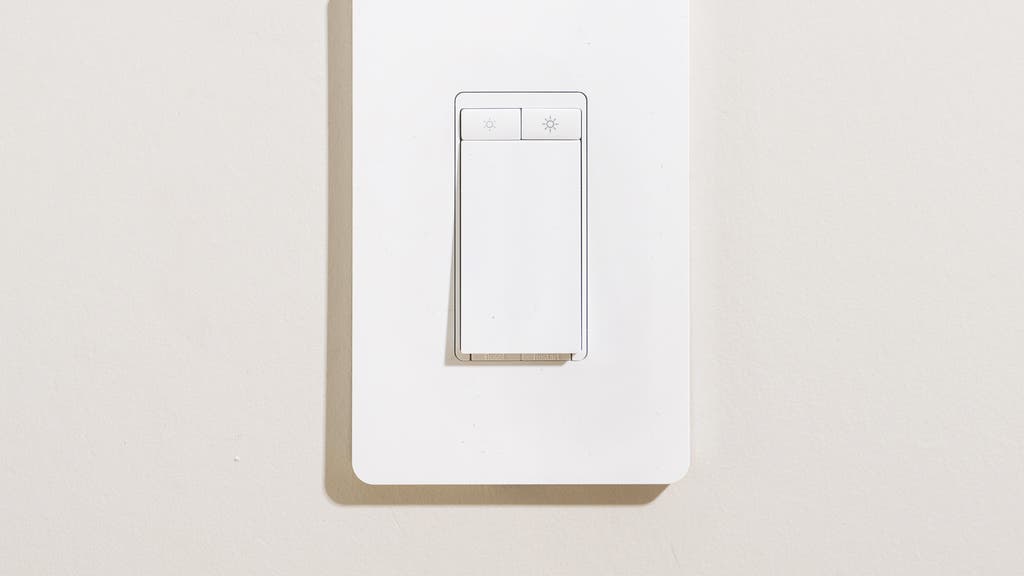
A single-pole switch controls a light from one wall location. A 3-way circuit controls the same light from two locations, such as the top and bottom of stairs or both ends of a hallway. Larger multi-way setups add more locations. This matters because a smart switch built for a simple single-pole circuit may not work correctly in a 3-way box, even if the faceplate looks identical.
Before buying, walk the house and press every switch that controls the fixture you want to automate. If two wall controls operate the same light, shop for a model that explicitly supports 3-way installation and check whether it requires a matching companion switch, an add-on switch, or reuse of the existing mechanical switch. The answer varies by manufacturer and model.
This is where price comparisons often go sideways. A cheap smart dimmer may be cheap only for the first box. If the hallway needs a companion device, if the wiring method is limited, or if the instructions require a neutral in a specific box that you do not have, the “$19 switch” is no longer the actual project cost.
If You Want Dimming, Check the Bulbs Too
Dimmers are where a lot of smart lighting upgrades go from satisfying to irritating. Smart dimmers need compatible dimmable LED bulbs. In testing across many dimmer models, mixing smart dimmers with non-dimmable LEDs produced problems such as flickering, buzzing, or strobing.[2]
Do this check before blaming the switch: confirm that every bulb on the circuit is labeled dimmable, avoid mixing random bulb types on the same dimmer when possible, and look for a switch with trim or calibration settings if the light drops out at low brightness. A switch can be wired correctly and still feel broken if the load is wrong.
Energy-savings claims deserve the same restraint. Dimming can reduce consumption, but the real savings depend on the bulb type, compatibility, and how the room is used. The more reliable reason to choose a smart dimmer is control: schedules, scenes, physical wall access, and a light level that does not require opening an app.
The Cost Math Changes by Room
A smart switch usually makes the most financial sense when one wall control handles several bulbs. One $15–$65 switch can control a chandelier, a row of recessed cans, or several exterior lights on the same circuit; smart bulbs commonly cost $10–$30 per bulb and are rated for replacement after roughly 15,000–25,000 hours.[5] In a four-bulb fixture, the switch often wins before you even get to automations.
Professional installation changes the math again. Security.org puts smart switch installation at about $75–$200 per switch.[5] That does not mean every buyer needs an electrician. It does mean that if you are uncertain about neutral wires, multi-way wiring, aluminum wiring, crowded boxes, or old cloth-insulated conductors, the labor cost should be part of the purchase decision rather than a surprise after the return window closes.
Smart bulbs still have a place. They are useful for lamps, rentals, color lighting, and fixtures where changing the switch would be awkward or unsafe. But for built-in ceiling lighting, exterior circuits, and rooms where everyone expects the wall switch to work normally, a smart switch is usually the cleaner household experience. If you are still deciding between smart bulbs, switches, and a larger lighting system, use a separate comparison before buying hardware.
Ecosystem Comes Last, but It Still Gets a Veto
Once the wiring, protocol, circuit type, and load are known, ecosystem compatibility becomes the final filter. This is where the box label matters. A switch that works beautifully in Alexa may be the wrong buy for an Apple Home household. A Home Assistant user may care more about local control and integration path than about a polished brand app. A SmartThings household may prefer Zigbee or Z-Wave options that fit the hub already running the house.
- Apple Home buyers should verify Apple Home or Matter support and confirm whether a Thread border router is needed.
- Alexa and Google Home buyers should check whether the switch connects directly, through Matter, or through a brand account integration.
- SmartThings buyers should decide whether they want Wi-Fi devices, Zigbee/Z-Wave devices, or Matter devices managed through the hub.
- Home Assistant buyers should verify local control options and avoid assuming that cloud-friendly means automation-friendly.
The important household test is simple: can the person who does not manage the smart home still turn the light on from the wall, and will the automations keep working when the app, internet, or voice assistant is having a bad day? The best smart light switch is usually the one people stop thinking about.
What to Buy After the Four Checks
If your switch box has a neutral wire, the circuit is single-pole, the bulbs are dimmable if you want dimming, and you are only installing a few switches, a budget Wi-Fi or Wi-Fi Matter switch is a sensible starting class. The Kasa and Tapo pricing pressure in 2026 is real, and for a small installation it can be the right kind of boring.
If you lack neutral wires, put no-neutral compatibility ahead of price. Look at Lutron Caséta or Diva, GE Cync no-neutral models, Inovelli’s relevant no-neutral options, or other products that explicitly support your wiring style, then read the installation requirements for that exact model. This is the moment to open a no-neutral smart switch installation guide, not to skim retailer Q&A answers.
If you are planning a whole-home lighting upgrade, compare the total system instead of one switch. A hub-based Zigbee, Z-Wave, Thread, or proprietary system may cost more up front, but the bridge or hub can be part of what keeps the system stable as the number of devices grows. This is also where the Lutron-versus-budget decision deserves its own deeper look.
If you have 3-way or multi-way circuits, buy only after confirming the exact companion-switch requirement. A compatible 3-way kit that costs more is cheaper than a mismatched bargain switch that leaves one end of the hallway useless.
Once those filters are done, brand comparison becomes useful. Before that, it is mostly noise.
References
- Is Lutron Caséta Still Worth It in 2026? — Existing site article.
- The Best In-Wall Smart Light Switch and Dimmer — Wirecutter.
- Pros and Cons of No-Neutral Smart Switches — SmartHomeScene.
- Matter in Mid-2026: What Works, What Doesn't, and What to Buy — Existing site article.
- Smart Light Switch Costs and Installation — Security.org.
Known issues with this device / protocol
Spec-version history
For active regressions on this protocol, see Update Watch.
No linked Update Watch entries yet.