
How your smart home picks Pixel Watch 5 or Galaxy Watch 7
The right smart home wrist remote comes down to the ecosystem you already own, not the watch hardware. Google Home on the Pixel Watch 5 and SmartThings on the Galaxy Watch 7 differ in tiles, complications, camera feeds, and two-way talk, and since the Galaxy Watch 7 is the only one of the two that can realistically run both apps, it's the safer pick for mixed-ecosystem homes while the Pixel Watch 5 wins for Nest-centric setups.
Last updated
The strange thing about a Pixel Watch 5 vs Galaxy Watch 7 smart home control comparison is that these watches are not really from the same shopping moment. Google’s Pixel Watch 5 is a brand-new 2026 watch, announced August 12 with general availability on August 20, starting at $399 for the 41mm model and $429 for the 45mm model. Samsung’s Galaxy Watch 7 is a 2024 watch that launched at $299–$329, with LTE adding $50, and Samsung discontinued it on July 9, 2025.[1][2]
That mismatch is exactly why the comparison is still useful. A discounted Galaxy Watch 7 is still easy to find, while the Pixel Watch 5 is the clean new Google option. But for smart-home control, the question is not which watch has the fresher spec sheet. It is which one puts the right tile, camera feed, lock button, thermostat control, or automation on your wrist when your phone is somewhere else.
The short version: choose the Pixel Watch 5 if your daily smart home already lives in Google Home and Nest. Choose the Galaxy Watch 7 if your home is SmartThings-first or split between SmartThings and Google Home. The Galaxy Watch 7 is the only one of the two with native SmartThings control and a realistic Google Home install path, even though that Google Home path has documented gaps.

Start with the app that already owns your home
A smartwatch does not make a messy smart home less messy by itself. It exposes controls from the services you already use. If your devices are organized in Google Home, the Pixel Watch 5 has the cleaner story. If your home depends on Samsung TVs, appliances, SmartThings scenes, or SmartThings-connected devices, the Galaxy Watch 7 has the cleaner story. If both apps matter, the Galaxy Watch 7 has the safer overlap.
| Your current home setup | Better wrist-remote fit | Why |
|---|---|---|
| Mostly Google Home, Nest cameras, Nest doorbells, Google automations | Pixel Watch 5 | Google Home on Wear OS is the main control surface, with Favorites, complications, automations, Home/Away modes, and camera controls documented for Google’s watch ecosystem.[3] |
| Mostly SmartThings, Samsung TVs, Samsung appliances, connected AC, robot vacuum, SmartThings scenes | Galaxy Watch 7 | SmartThings has a native Galaxy Watch app, and Samsung documents watch control for SmartThings devices already added through the phone app.[4] |
| Mixed Google Home plus SmartThings | Galaxy Watch 7 | It can run SmartThings natively and can also install Google Home, although the Google Home experience is not identical to a Pixel Watch.[5] |
| Matter devices with no clear home-app plan | Neither watch solves that alone | Pick the phone app and hub/controller path first; the watch only controls devices already available through its app ecosystem. |
Pixel Watch 5: the deeper Google Home wrist controller
Google Home on Wear OS requires Wear OS 3 or later, and Google says the Home app needs to be installed on both the watch and the paired phone. From the watch, the documented controls go beyond simple on/off buttons: light brightness, color, and temperature; thermostat setpoints and modes; fan speed; TV input and volume; vacuum docking; appliance modes and toggles; locks; and automations are all part of the current Wear OS Home control set. Google also warns that some devices may show status on the watch but can only be adjusted from the phone.[3]
That last sentence matters. A watch control surface is only valuable when the thing you expect to tap is actually adjustable there. Google’s own documentation draws the boundary: many common smart-home controls are available from the wrist, but not every device type gets full watch-side control.[3]
The Pixel Watch 5 also has the operating-system advantage for Google’s own watch stack: Google lists it as running Wear OS 7.0.[6] That does not magically make unsupported devices controllable, but it does mean the watch is on Google’s newest Wear OS generation at launch.
The most important interface pieces are the Google Home Favorites tile and complications. Google began rolling out a Wear OS Favorites tile and device/automation complications in 2024, giving users faster access to selected smart-home controls from the watch face and tile carousel instead of forcing every action through the app list.[7] For frequent actions — porch light, front-door lock, thermostat, garage camera, bedtime automation — that difference is the whole point of wearing the remote.
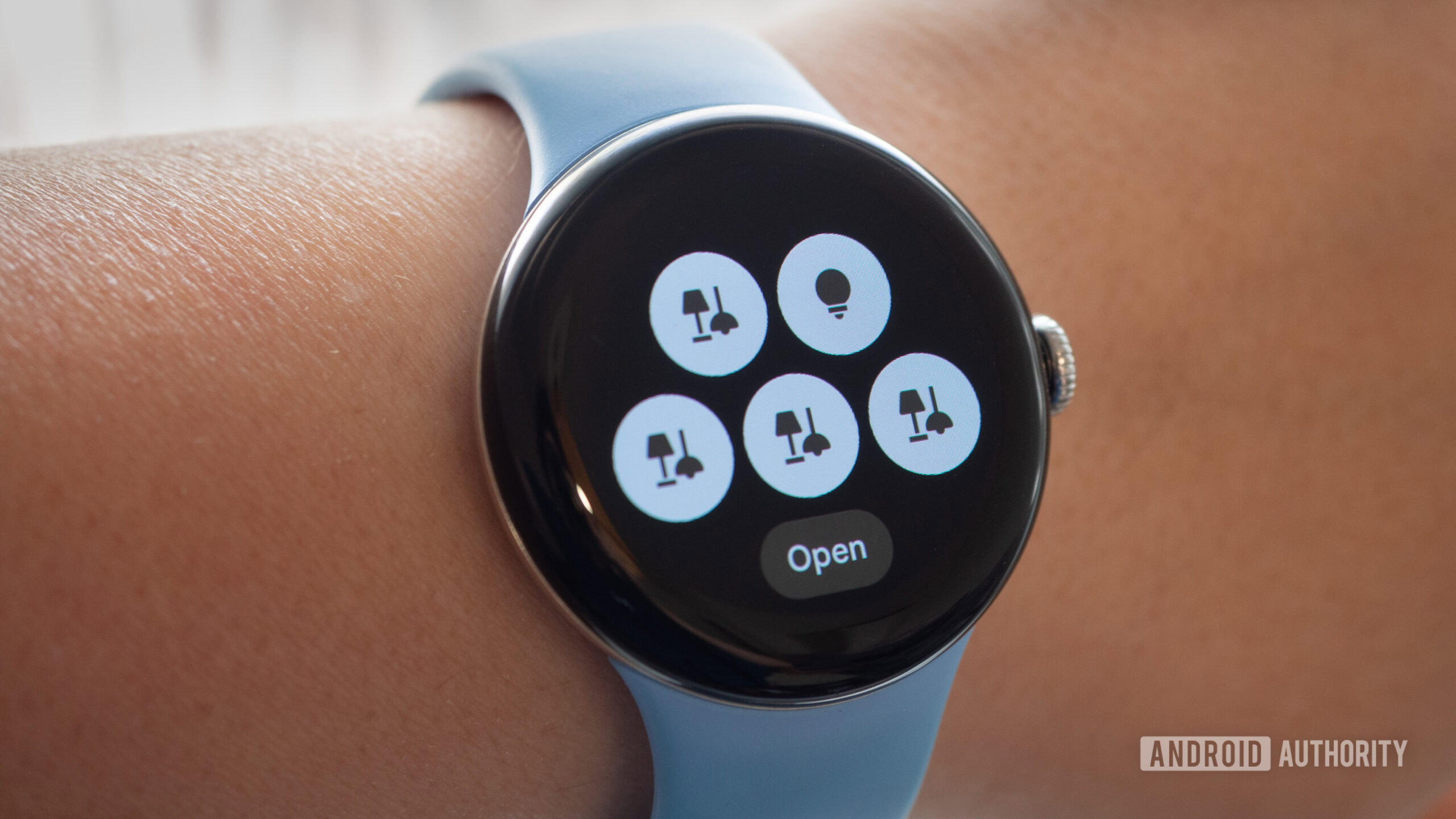
For Nest-centric homes, cameras are the other major reason to prefer the Pixel path. Google’s current Home feature set includes live camera views and two-way talk from the watch experience.[8] Android Authority’s hands-on coverage of the Pixel Watch 3 Google Home app also highlighted the richer wrist experience, including camera access and the expanded 45mm Favorites tile behavior.[9]
Because the Pixel Watch 5 has only been generally available for a few days, that needs one caution label. The strongest evidence here is Google’s current Wear OS Home documentation, the Pixel Watch 5’s Wear OS 7.0 support listing, and prior hands-on behavior from recent Pixel Watches. I would treat Pixel Watch 5 Google Home parity as the expected path, not as a substitute for a fresh final-hardware test on the exact devices in your house.[3][6][9]
Galaxy Watch 7: the stronger SmartThings remote
The Galaxy Watch 7’s smart-home advantage starts with native SmartThings. Samsung’s support page describes SmartThings for Galaxy Watch as a watch app for controlling devices already connected to SmartThings, while also making clear that new devices need to be added in the SmartThings phone app first.[4]
That is the right design for a wrist remote. Pairing, onboarding, room assignment, and troubleshooting belong on the phone. The watch should be for the repeat actions: turn on the living-room lights, start or dock the robot vacuum, adjust the AC, control a TV, or check a camera while standing near the door.
Samsung’s January 2023 SmartThings watch expansion is still the key reference point for what makes the Galaxy Watch useful in a Samsung-heavy home. Samsung said Galaxy Watch users could control SmartThings-connected TVs, air conditioners, lights, speakers, and other devices, and the update expanded support to air purifiers, thermostats, and blinds. It also added live feeds from Ring and Nest cameras, plus two-way talk for Ring cameras and doorbells.[10]
9to5Google’s coverage of that same SmartThings update called out the practical categories that make the watch feel less like a novelty: Samsung TVs, AC units, robot vacuums, speakers, and lighting controls, including multiple lighting types.[11] Those are exactly the kinds of devices where a watch shortcut can beat pulling out a phone.

This is also where a plain hardware comparison starts to mislead. The Galaxy Watch 7 is older, and it launched on Wear OS 5 before later Samsung watch software updates moved the line forward.[2][12] But if your home’s important controls are already in SmartThings, an older discounted Galaxy Watch 7 can still be a more useful wrist remote than a newer watch that does not expose those controls cleanly.
The crossover path is where the Galaxy Watch 7 pulls ahead for mixed homes
The asymmetry is simple: the Galaxy Watch 7 has native SmartThings, and Google Home can realistically be installed on it. Tom’s Guide’s Galaxy Watch 7 hands-on specifically describes installing Google Home from the Play Store and using it on the watch.[5]
That does not mean a Galaxy Watch 7 becomes a Pixel Watch. A Samsung Community thread documents Google Home gaps on Galaxy Watch, including a Nest doorbell live view not appearing, Google Home tiles not loading, and the watch app linking the user back to the phone.[13] Community threads are warnings, not lab results, but these are exactly the kind of interface-level failures that matter when you are buying a watch mainly for smart-home access.
The reverse path is less reassuring. The SmartThings Play Store listing includes Wear OS availability, but it also says SmartThings is optimized for Samsung smartphones.[14] Samsung’s own Galaxy Watch SmartThings documentation is written around the Galaxy Watch experience.[4] There are also inconsistent install-path descriptions around SmartThings on Wear OS, including Samsung-side guidance that can point users through Galaxy-specific channels. I would not buy a Pixel Watch 5 assuming it will be an equal SmartThings watch unless you have verified the exact install and sign-in path with your phone.
For a deeper Galaxy-side app-path breakdown, the same basic logic applies to Samsung’s newer watches too: SmartThings, Google Home, and more advanced paths such as Home Assistant are separate control routes, not interchangeable skins. See our guide to Galaxy Watch smart home control paths if you are choosing between those apps rather than between these two watch models.
The control-surface matrix
This is the part that should decide the purchase. Processor names, storage, and wellness features can matter for a general smartwatch review, but they do not answer whether the watch lets you unlock the door, dim the kitchen lights, or see who rang the bell.
| Smart-home control surface | Pixel Watch 5 with Google Home | Galaxy Watch 7 with SmartThings | Galaxy Watch 7 with Google Home | Pixel Watch 5 with SmartThings |
|---|---|---|---|---|
| Primary app fit | Best fit for Google Home and Nest homes. | Best fit for SmartThings and Samsung-heavy homes. | Useful secondary path for Google Home in mixed homes. | Uncertain enough that it should be verified before purchase. |
| Tiles and shortcuts | Google Home Favorites tile and complications are the main quick-access layer.[7] | SmartThings watch app exposes connected devices and controls from the Samsung ecosystem.[4] | Google Home can be installed, but user reports describe tile-loading gaps on Galaxy Watch.[5][13] | No clean first-party evidence here supports treating this as equivalent to Galaxy Watch SmartThings. |
| Lights and thermostats | Google documents brightness, color, temperature, thermostat setpoints, modes, and related controls on Wear OS.[3] | Samsung’s SmartThings watch expansion includes lighting, thermostats, and broader device controls.[10][11] | Likely useful for basic Google Home controls, but not documented as identical to Pixel Watch behavior. | Depends on install compatibility and phone pairing; verify before relying on it. |
| Cameras and doorbells | Google’s current Home experience includes live camera view and two-way talk from the watch path.[8] | Samsung’s expansion includes Ring and Nest livestreaming, with Ring two-way talk.[10] | Documented community gaps include Nest doorbell live view not appearing on Galaxy Watch.[13] | Not a safe assumption for SmartThings camera control. |
| Automations and modes | Google documents running automations and Home/Away modes from Wear OS.[3] | SmartThings scenes and device controls are the natural Samsung-side path, depending on what is already configured in SmartThings.[4] | May work for some Google Home actions, but the experience should be checked device by device. | Not enough support evidence to recommend as the reason to buy Pixel Watch 5. |
| Best buyer | Nest-centric household that wants the most direct Google Home wrist experience. | SmartThings-first household with Samsung TVs, appliances, cameras, lighting, AC, or robot vacuum controls. | Mixed household that needs both SmartThings and some Google Home access from one watch. | Only a buyer who has already confirmed SmartThings works acceptably with their phone and watch setup. |
Neither watch is your hub
A watch is a remote, not the foundation of the smart home. Google says its Wear OS Home app requires the Home app on both the watch and phone, and Samsung says new SmartThings devices must be added through the phone app before the watch can control them.[3][4]
That boundary is especially important for Matter devices. Matter does not mean every watch can directly commission, bridge, or fully control every device. Your phone app, hub, border router, account linking, and device enrollment still decide what the watch can see. If a device is not properly present in Google Home or SmartThings on the phone, the watch should not be expected to rescue it.
The same controller-not-hub framing applies on the Google side more broadly; if you are trying to separate phone controller duties from hub duties, our Pixel smart home controller guide uses the same distinction.
Cautions before buying older Galaxy Watch 7 stock
The Galaxy Watch 7 being discontinued is not automatically a problem for smart-home control. The bigger issue is whether the discounted watch you are considering still has the app support, software update path, battery condition, and return window you are comfortable with. The model itself is older, and Samsung has since moved on from it, but the SmartThings and Google Home question is mostly about app behavior rather than raw hardware.[2]
There is also at least one documented SmartThings latency complaint worth treating carefully. A March 2025 SmartThings Community thread described about a 15-second enable delay on a Galaxy Watch 7, with support reportedly explaining that commands were relayed through the phone; the thread also included corroborating reports from Galaxy Watch 4 users.[15] That is not a universal benchmark for all Galaxy Watch 7 setups. It is a warning to test your own must-have controls during the return period.
Battery should be treated the same way. Tom’s Guide’s Galaxy Watch 7 hands-on found real-world battery life closer to daily charging in its use, which is relevant if your watch is supposed to be available for evening lock, camera, and lighting checks.[5] Vendor battery claims are less useful than the practical question: will the watch still be on your wrist at the time you usually need the smart-home controls?
So which one should control your home?
Buy the Pixel Watch 5 for a Google Home and Nest household. It is the cleaner Google wrist remote: current Wear OS, Google Home Favorites, complications, automations, Home/Away modes, camera live view, and two-way talk all line up with the ecosystem your devices already use.[3][6][7][8]
Buy the Galaxy Watch 7 for a SmartThings-first household. Its native SmartThings app is the better match for Samsung TVs, appliances, AC, robot vacuums, speakers, lights, Ring/Nest livestreaming through SmartThings, and Ring two-way talk.[4][10][11]
Buy the Galaxy Watch 7 for a mixed SmartThings-plus-Google Home household, but with eyes open. It can realistically run both SmartThings and Google Home, which the Pixel Watch 5 cannot match as cleanly in the other direction. The tradeoff is that Google Home on Galaxy Watch has documented gaps, so Nest doorbells, tiles, and camera behavior should be checked before you keep the watch.[5][13][14]
Do not buy either one as a substitute for checking hub, app, and device compatibility. The watch that wins is the one that exposes the controls your home already has, not the one with the nicer launch slide.
References
- Google Pixel Watch 5 — Google Blog, Aug 12, 2026
- Samsung Galaxy Watch 7 — Wikipedia
- Control Google Home devices with your watch — Google Home Help
- About SmartThings for the Galaxy Watch — Samsung Support
- I swapped my Apple Watch for the Galaxy Watch 7 — here’s what I liked and disliked — Tom’s Guide
- Google Pixel Watch technical and device specifications — Google Pixel Watch Help
- Google Home for Wear OS rolling out Favorites Tile and device complications — 9to5Google, July 8, 2024
- Enhanced controls and more for Google Home — Google Home
- The Pixel Watch 3’s Google Home app is the wearable smart home hub I’ve always wanted — Android Authority
- Samsung Galaxy Watch Update Offers New Smart Home Controls with SmartThings — Samsung Newsroom, Jan 2023
- Samsung Galaxy Watch gets new SmartThings controls for Nest, Ring cameras, more — 9to5Google, Jan 19, 2023
- Wear OS 6 starts rolling out to the Galaxy Watch 7 — Android Central
- Google Home app — Samsung Community
- SmartThings — Google Play
- Controls slow on Galaxy Watch 7 — SmartThings Community, March 2025
Known issues with this device / protocol
Spec-version history
For active regressions on this protocol, see Update Watch.
No linked Update Watch entries yet.