
Why the Pixel 11 Pro is a smart home controller, not a hub
The Pixel 11 Pro ships with a Thread radio and can control Matter-over-Thread devices directly, but it is a controller, not a hub. This compatibility check maps its smart-home capabilities and hard limits — no Thread border-router role, no Zigbee or Z-Wave radio, and UWB smart-lock keys still unconfirmed for Pixel — so you can judge whether it fits your existing setup before buying.
Last updated
If the buying question is whether Pixel 11 Pro smart home control can replace a hub, the clean answer is no. The Pixel 11 Pro is a serious controller: Google’s official specs list Thread, a UWB chip for accurate ranging, Wi‑Fi 7, Bluetooth 6, and NFC, which is unusually strong radio hardware for a phone used around Matter and Google Home setups.[1] But the phone is still not listed by Google as a Thread border router, it does not add Zigbee or Z-Wave radios, and Pixel UWB home-lock keys remain unconfirmed.
That distinction matters before the $1,099-level purchase decision, because “has Thread” is not the same claim as “keeps your Thread mesh online.” A phone can be excellent at control and still be the wrong device to make responsible for infrastructure.
| Question | Pixel 11 Pro status as of Aug. 25, 2026 | Practical meaning |
|---|---|---|
| Does it have Thread hardware? | Yes. Google lists Thread in the Pixel 11 Pro specs.[1] | It can participate in Thread-based smart-home workflows under the supported Android and Google Home conditions. |
| Can it join an existing Thread network? | Android’s Thread documentation says a compatible Android device can join an existing Thread network without a border router, and shows a Thread toggle under Settings > Connected devices > Connection preferences > Thread.[2] | The phone can be a participating controller, not the always-on gateway for the mesh. |
| Is it a Thread border router? | No official Google list includes the Pixel 11 Pro. Google’s supported border-router list names Nest Hub 2nd gen, Nest Hub Max, Nest Wifi Pro, Google TV Streamer 4K, and Google Home Speaker spring 2026.[2] | You still need one of those devices, or another supported Thread border router, for the network backbone. |
| Does it replace a Zigbee or Z-Wave hub? | No. The official phone specs do not list Zigbee or Z-Wave radios.[1] | Existing Zigbee and Z-Wave devices still need their own bridge, hub, or controller. |
| Is UWB useful? | Yes for supported digital car-key use. Google Wallet documents digital car keys on Pixel 6 and later, and Android’s digital car key page describes passive entry behavior.[3][4] | The Pixel’s UWB is real, but the verified consumer key use is automotive. |
| Is UWB home-lock key support confirmed on Pixel? | No. Samsung’s Aliro-based Digital Home Key shipped with NFC tap and UWB proximity unlock in March 2026, while broader Aliro support from Apple, Google, and Samsung has been promised or reported as coming.[5][6] | Do not buy the Pixel 11 Pro assuming it is already a confirmed UWB front-door key. |
| Can Gemini control smart-home devices? | Yes, within Google’s supported control layer. Gemini can control categories such as lights, climate, media, and vacuums, but security-sensitive actions such as unlocking a door are not completed directly in Gemini.[7] | Voice and app control can improve without replacing the hub layer underneath. |

The Thread radio changes control, not the backbone
The Pixel 11 Pro’s Thread radio is the part that makes this phone more interesting than a normal Google Home remote. In a Matter-over-Thread setup, the phone is not only talking through Wi‑Fi to a cloud account and hoping another box handles everything. Under Android’s Thread model, a compatible Android device can join an existing Thread network, and Google exposes Thread controls at Settings > Connected devices > Connection preferences > Thread.[2]
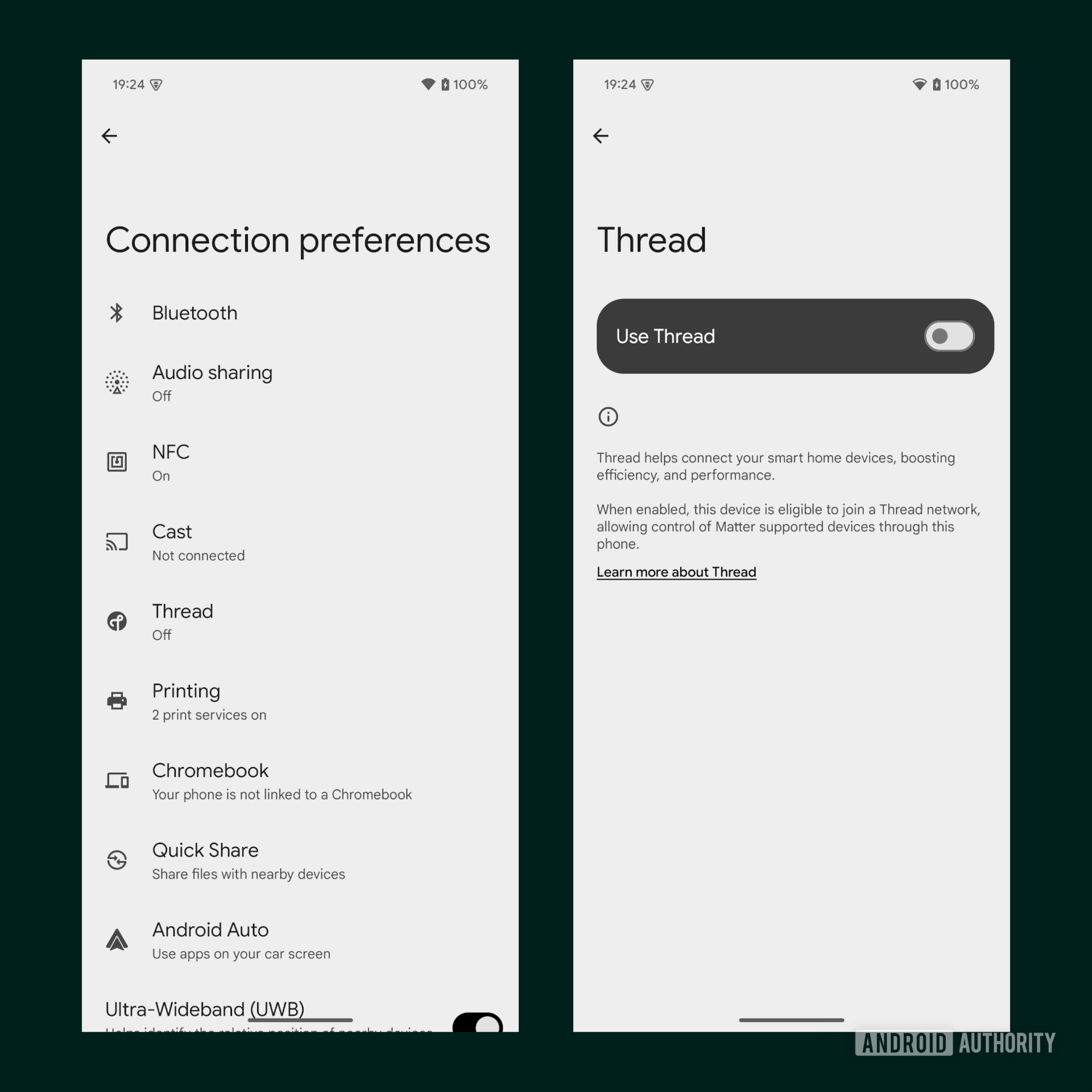
That is a useful capability. It should reduce some of the awkward handoff feeling that older phone-only control had around Thread devices, especially when the Android device has the right network credentials available. It also makes the Pixel 11 Pro a better commissioning and control device for a Google Home household than a phone with only Wi‑Fi, Bluetooth, and NFC.
The limit is just as important: Google’s own Thread documentation separates joining a Thread network from serving as the border router that connects that Thread mesh to the rest of the home network. Google’s listed Thread border routers are Nest Hub 2nd gen, Nest Hub Max, Nest Wifi Pro, Google TV Streamer 4K, and Google Home Speaker spring 2026. The Pixel 11 Pro is not on that list.[2]
That exclusion is not a paperwork detail. A Thread border router is infrastructure. It is expected to sit in the home, stay powered, and keep the mesh reachable. A phone leaves the house, drops to low power, reboots, gets replaced, or sits dead on a nightstand. Those are normal phone behaviors and terrible backbone behaviors.
Why “has Thread” keeps getting overread
Smart-home language tends to flatten different jobs into one word: hub. In Matter and Thread setups, that creates bad purchase decisions. A controller, commissioner, Thread end device, Thread border router, Zigbee bridge, and Z-Wave controller are not interchangeable roles.
- A controller sends commands and presents devices in an app or voice interface.
- A commissioner helps add a device securely to a Matter fabric or network.
- A Thread participant can communicate on the Thread mesh when properly credentialed.
- A Thread border router keeps the Thread mesh connected to the broader IP network.
- A Zigbee or Z-Wave bridge translates those older radio networks into whatever your app or automation platform can use.
The Pixel 11 Pro can sit comfortably in the first three buckets when the setup is compatible. The evidence does not move it into the last two. If your home already depends on a Nest Hub, Nest Wifi Pro, Google TV Streamer 4K, Home Assistant with a Thread border router, a Philips Hue Bridge, a SmartThings hub, a Hubitat box, or a Z-Wave stick, the Pixel 11 Pro does not make that hardware disappear.
This is also where launch-week anecdotes need to be handled carefully. A user successfully pairing a Matter-over-Thread device from the phone does not prove the phone is acting as the border router. A fast pairing session does not prove the same setup will survive when the phone leaves the home. A search snippet saying devices can be controlled from a Pixel does not identify which device is carrying the network.
For a broader hub-replacement framing, we have a separate compatibility piece on whether the S26 Ultra or Pixel 11 can replace your smart home hub. The Pixel-specific answer here is narrower and more useful: it is a controller with Thread hardware, not a new always-on home hub.
What happens in common smart-home setups
In a Google Home setup with Matter-over-Thread devices, the Pixel 11 Pro is best understood as a stronger front end. It can help with control and supported Android Thread participation, while a supported Nest or Google device continues doing border-router work. If you unplug the Nest Hub or Nest Wifi Pro that was quietly anchoring the network, the phone is not documented as the replacement.[2]
In a Home Assistant setup, the answer is similar. The Pixel 11 Pro may be a good phone for commissioning, app control, and daily interaction, but Home Assistant still needs an actual path into Thread, Zigbee, or Z-Wave depending on your devices. For Thread, that means a supported border router. For Zigbee or Z-Wave, that means dedicated radio hardware somewhere in the system.
In an older Zigbee-heavy home, nothing about the Pixel 11 Pro’s radio list changes the Hue Bridge, SmartThings hub, Aqara hub, or other bridge question. Wi‑Fi 7, Bluetooth 6, NFC, Thread, and UWB are all useful radios, but none of them is a Zigbee or Z-Wave radio.[1]
The safer buying test is simple: if a device in your home currently depends on a box to translate or route its network, identify that job before assuming the phone can take it over. If the job is app control, commissioning, or Gemini/Google Home interaction, the Pixel 11 Pro is in play. If the job is always-on routing or protocol bridging, keep the hardware.
UWB is real on Pixel 11 Pro, but door-lock support is the unresolved part
The Pixel 11 Pro’s UWB chip is not decorative. Google lists an ultra-wideband chip for accurate ranging in the phone’s official specs.[1] Google Wallet also documents digital car key support on Pixel 6 and later, and Android’s digital car key page describes passive entry behavior for compatible cars.[3][4]

The mistake is jumping from “UWB works for car keys” to “UWB works for my front door.” Those are different ecosystems, different credential systems, and different rollout paths.
There is real movement around UWB home access. Samsung’s Digital Home Key, based on Aliro, shipped in March 2026 with NFC tap and UWB proximity unlock support.[5] The broader Aliro smart-lock standard has also been reported with promised support from Apple, Google, and Samsung.[6] That still does not confirm Pixel 11 Pro support for UWB home-lock keys today.
For a lock buyer, that difference is not academic. If you are choosing a lock because you want passive UWB unlock from this specific phone, treat Pixel 11 Pro home-key support as unconfirmed until the lock maker, Google Wallet, or Google Home explicitly names the Pixel path. NFC, Matter control, and app unlock may still work depending on the product, but they are not the same feature.
Gemini improves the control layer, not the network layer
Gemini is part of the Pixel 11 Pro smart-home story because the phone is where many people will issue commands. Google’s Gemini documentation says Gemini can control supported smart-home categories such as lights, climate devices, media devices, and vacuums. It also states that Gemini cannot complete certain security actions such as unlocking a door directly; instead, it opens the Google Home app.[7]
That fits the same boundary. Gemini can be the interface that hears or interprets the request. Google Home can be the app layer that knows the device. Matter can be the interoperability layer. Thread can be the mesh. A border router still has to keep that mesh connected, and a Zigbee or Z-Wave bridge still has to translate those networks when your devices use them.
The timing also matters for Pixel buyers. Our Update Watch on Pixel 11 Google Assistant smart home control ending Sept. 4 tracks the routing change from Assistant toward Gemini. That is a control-layer change. It does not turn the phone into the device that bridges Thread, Zigbee, or Z-Wave.
If you are mapping the whole voice-to-device chain rather than just Pixel hardware, our guide on how to use voice assistants to control your smart home is the better place to sort out account linking, assistant routing, and device exposure.
Wi‑Fi 7, Bluetooth 6, and NFC are useful, but they do not change the hub answer
The remaining radios are still worth having. Wi‑Fi 7 is helpful for a flagship phone living on a busy home network. Bluetooth 6 and NFC matter for setup flows, pairing, nearby interactions, and tap-based credentials. Google lists all three in the Pixel 11 Pro specs alongside Thread and UWB.[1]
None of those radios makes the phone a Zigbee bridge, a Z-Wave controller, or an always-on Thread border router. They make the Pixel 11 Pro a better device to hold in your hand while controlling the home. They do not make it the quiet box that should stay plugged in behind the TV, on the shelf, or next to the router.
The practical purchase boundary
Buy the Pixel 11 Pro for smart-home use if you want Google’s strongest phone controller for Matter-over-Thread participation, Google Home interaction, Gemini-based commands, NFC setup flows, and verified UWB digital car-key use. It is the most compelling Pixel yet for someone who spends real time managing a modern Matter home from a phone.
Do not buy it to replace a Thread border router. Do not buy it to remove a Zigbee or Z-Wave hub. Do not buy it assuming UWB home-lock keys are confirmed for Pixel just because UWB car keys are supported. For the Matter-enabled-hub requirement context, see our separate iPhone 17 Pro Max vs Pixel 11 Pro XL smart-home hub comparison.
As of Aug. 25, 2026, the Pixel 11 Pro is still a launch-week device, so mature compatibility reports are not available. The verified boundary is already clear enough for buying: the phone can complement the smart-home backbone. It is not the backbone.
References
- Pixel 11 Pro tech specs — Google Store.
- Use Thread on Android — Android Help.
- Use your phone as a car key — Google Wallet Help.
- Digital car key — Android.
- Samsung’s Digital Home Key with UWB and NFC — 9to5Google — March 2, 2026.
- Aliro smart lock standard launches, Apple, Google, Samsung promise support — The Verge.
- Control smart home devices with Gemini — Gemini Apps Help.
Known issues with this device / protocol
Spec-version history
For active regressions on this protocol, see Update Watch.
No linked Update Watch entries yet.