
Setup
Smart Fan Automation to Cool a Bedroom Without AC
Set up a smart home automation that uses an outward-facing fan to cool your bedroom at night by comparing indoor and outdoor temperatures, reliably dropping the room temperature by 5–15°F without an air conditioner.
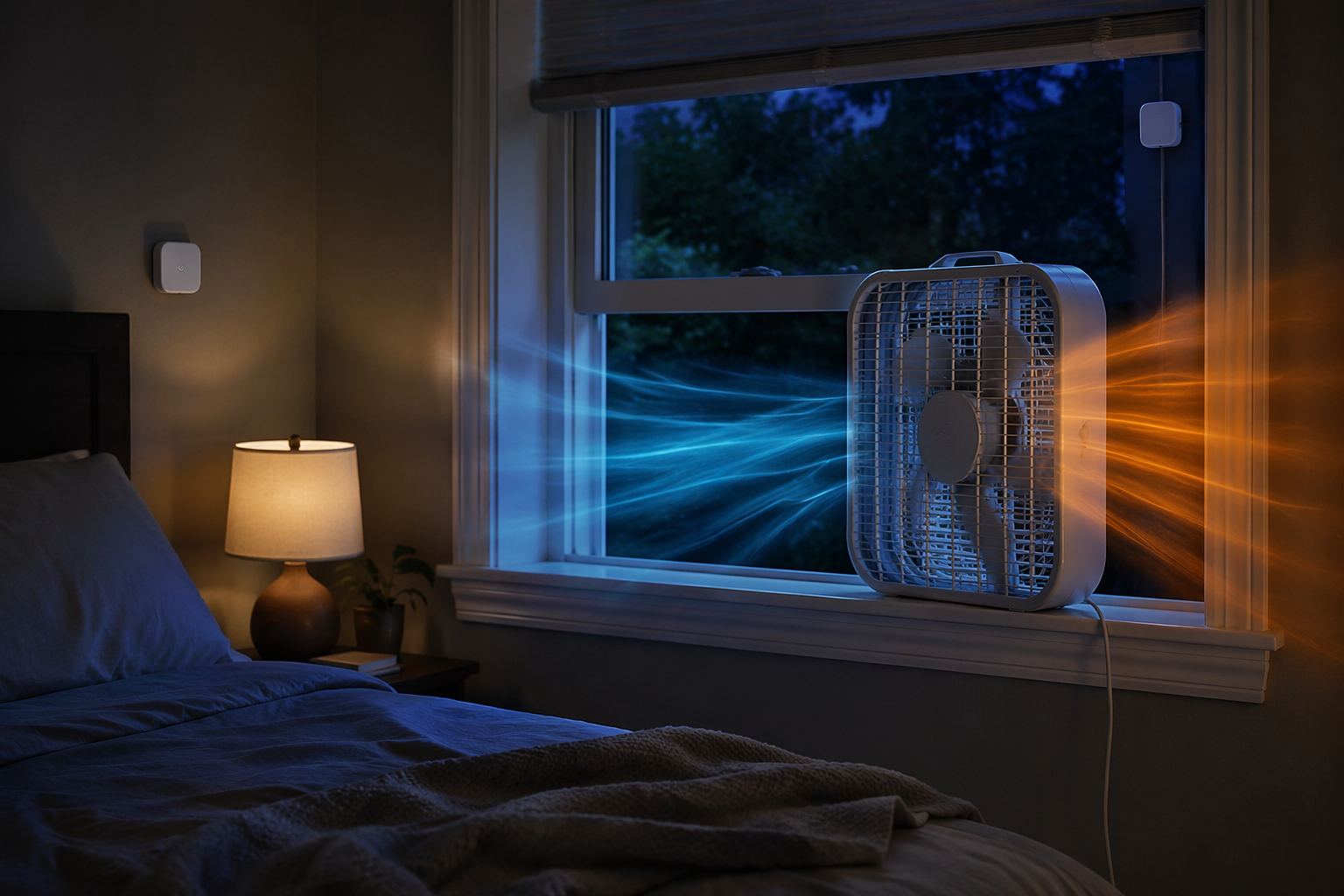
The useful moment starts when your bedroom is still 78°F at 11 p.m. and the air outside has finally fallen to 68°F. That difference is the whole trick. A fan is not cooling equipment by itself; it is a way to move air. If the air outside is cooler than the bedroom, a window fan can trade the hot room air for cooler night air. If the air outside is warmer, the same fan can make the room worse.
The smart home version is simple enough to build in one evening: compare bedroom temperature with a shaded outdoor temperature, turn on an outward-facing window fan only when outside is cooler, and shut it off when the room has equalized or the outdoor air stops helping. Austin's Nerdy Things documented this pattern with Home Assistant and a Python controller, reporting real overnight room-temperature drops in the 5–15°F range when cold outside air was available.[1]
The Recipe
You need four things: a fan that can sit securely in or near a window, a smart plug rated for that fan, a bedroom temperature sensor, and an outdoor temperature source. The outdoor reading can come from a physical sensor or, with less precision, a weather feed. A physical sensor is better when you can place it properly.
- Put the indoor sensor in the bedroom, away from the fan stream, direct sunlight, lamps, computers, and the outside wall if that wall heats up during the day.
- Put the outdoor sensor in shade, where it can measure outside air rather than sun-warmed siding, balcony flooring, dryer exhaust, or another appliance's waste heat.
- Place the fan so it exhausts bedroom air out the window. Cool air will enter from another cracked window or door path if the room has one.
- Plug the fan into the smart plug, leave the fan's physical switch on, and let the automation control power.
- Do not use the only bedroom egress window for this setup, and secure the fan so it cannot be pushed in from outside.
If you have not already added temperature sensors to your system, start with this Home Assistant temperature sensor walkthrough. Sensor placement matters more here than brand choice, because a bad outdoor reading can tell the fan to pull heat into the room.
The Automation Logic
The fan should turn on only when all of these are true:
- The bedroom is above your comfort threshold.
- The outdoor air is cooler than the bedroom.
- The difference is large enough to be worth running the fan.
- There is no safety condition telling the fan to stay off.
A practical starting point is: if the bedroom is warm and the outdoor air is at least a few degrees cooler, turn the fan on. Turn it off when the bedroom gets close to the outdoor temperature, when the outdoor temperature rises back above the bedroom temperature, or when a smoke or CO detector reports an alarm.
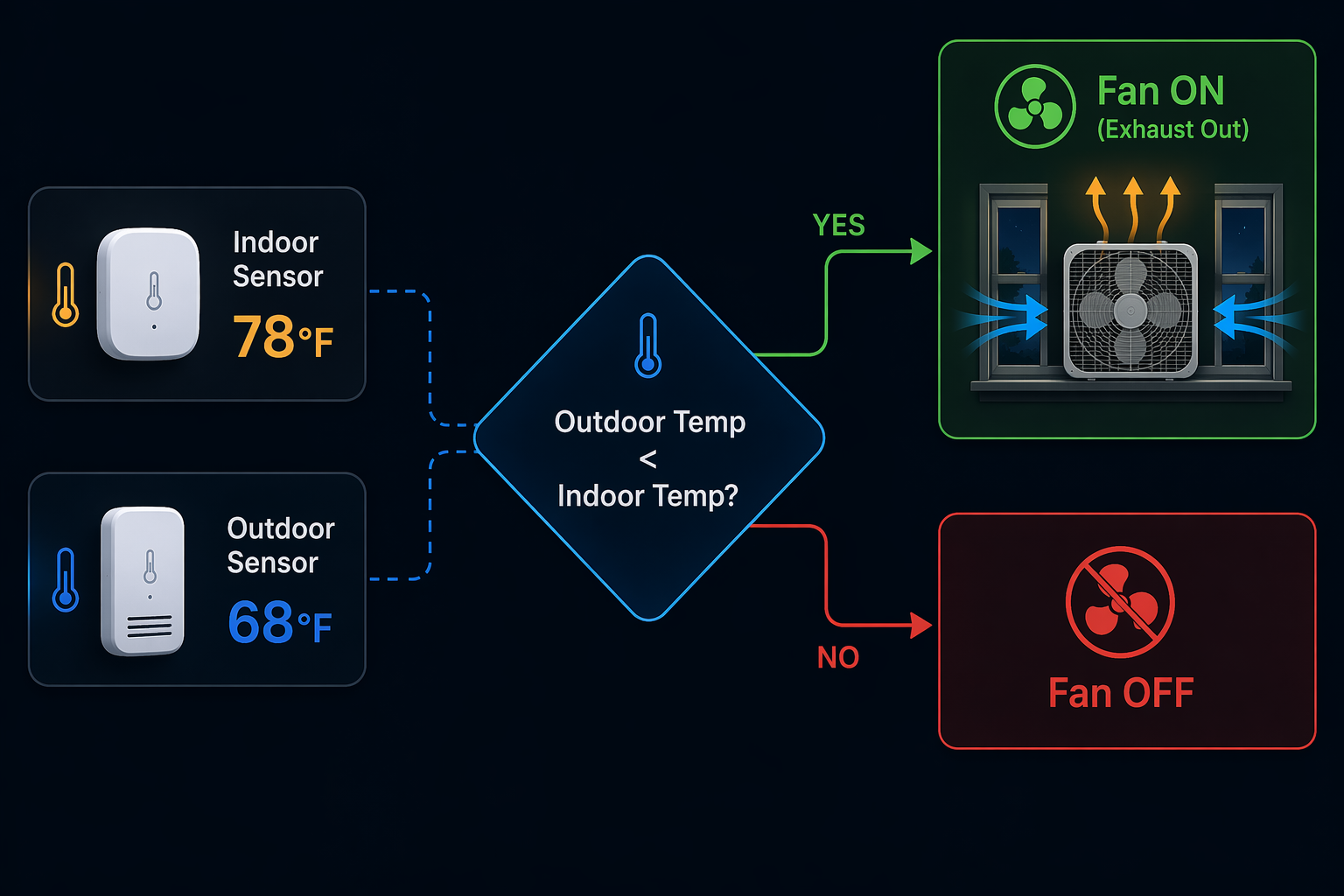
That middle condition is the one generic cooling tips usually skip. A bedroom at 78°F and outdoors at 68°F is a good candidate. A bedroom at 78°F and outdoors at 82°F is not. The fan will still move air across your skin, but as a room-cooling strategy it is now importing heat.
| Condition | Fan state | Why |
|---|---|---|
| Bedroom warm; outdoor air cooler | On | The fan can exhaust hot room air and help pull in cooler replacement air. |
| Bedroom warm; outdoor air about the same | Usually off | The fan may use power without meaningfully lowering room temperature. |
| Bedroom warm; outdoor air warmer | Off | The fan can make the room hotter. |
| Smoke or CO alarm active | Off | The automation should not keep pulling or pushing air during an alarm condition. |
| Bedroom close to outdoor temperature | Off | The useful temperature difference has mostly disappeared. |
Home Assistant Build
Home Assistant is the cleanest version because it can compare sensor values locally and act immediately. Austin's implementation used Home Assistant with MQTT, Python, and the generic thermostat platform to create a bang-bang controller: when conditions crossed the set point, the fan switched on; when the room reached the shutoff condition, it switched off.[1]
You do not need to copy that exact stack to get the same control pattern. The important entities are:
- A bedroom temperature entity, such as sensor.bedroom_temperature.
- An outdoor temperature entity, such as sensor.outdoor_temperature.
- A smart plug switch entity, such as switch.window_fan.
- Optional safety entities, such as smoke and CO detector binary sensors.
In plain language, the automation looks like this:
IF bedroom temperature is above comfort threshold
AND outdoor temperature is lower than bedroom temperature by your chosen margin
AND smoke/CO alarms are clear
THEN turn on window fan

IF outdoor temperature is no longer lower than bedroom temperature
OR bedroom temperature has dropped near the outdoor temperature
OR smoke/CO alarm is active
THEN turn off window fan
Use a small margin between the on and off points so the plug does not chatter on and off every time a sensor reading wiggles. For example, a hypothetical setup might turn on when the bedroom is several degrees warmer than outside, then turn off when that advantage shrinks. The exact numbers depend on your room, fan, and noise tolerance; the comparison matters more than the particular threshold.
A Home Assistant-style rule
This is intentionally written as readable logic rather than a finished YAML file, because entity names, sensor units, and helper names vary:
alias: Bedroom night cooling fan
trigger:
  - platform: state
    entity_id:
      - sensor.bedroom_temperature
      - sensor.outdoor_temperature
      - binary_sensor.smoke_alarm
      - binary_sensor.co_alarm
condition: []
action:
  - choose:
      - conditions:
          - condition: template
            value_template: >
              {{ states('sensor.bedroom_temperature') | float > 75
                 and states('sensor.outdoor_temperature') | float <
                     (states('sensor.bedroom_temperature') | float - 3)
                 and is_state('binary_sensor.smoke_alarm', 'off')
                 and is_state('binary_sensor.co_alarm', 'off') }}
        sequence:
          - service: switch.turn_on
            target:
              entity_id: switch.window_fan
      - conditions:
          - condition: template
            value_template: >
              {{ states('sensor.outdoor_temperature') | float >=
                     (states('sensor.bedroom_temperature') | float - 1)
                 or is_state('binary_sensor.smoke_alarm', 'on')
                 or is_state('binary_sensor.co_alarm', 'on') }}
        sequence:
          - service: switch.turn_off
            target:
              entity_id: switch.window_fan
mode: single
Treat those temperatures as placeholders, not universal comfort advice. The useful part is the structure: the fan does not run because it is nighttime; it runs because the room is hot, the outdoor air is cooler, and the safety checks are clear.
Hubitat, SmartThings, Alexa, and Google
Hubitat and SmartThings can usually express the same basic idea if both temperature readings are available to the hub. Build two routines or rules: one to turn the fan on when the indoor/outdoor comparison is favorable, and one to turn it off when the comparison is no longer favorable. Keep the safety-off rule separate if your hub supports smoke or CO detector conditions, because that rule should win even when the room is still hot.
Smarthome Solver's cooling automations show the practical value of multi-condition rules: fan behavior can depend on temperature, occupancy, and other sensors rather than a single schedule.[2] For this bedroom setup, occupancy can be useful if you only want the fan to run when someone is home or sleeping, but it should not replace the indoor/outdoor temperature comparison.
Alexa and Google Home can work as fallbacks, especially if you already own compatible plugs and sensors. The tradeoff is precision. Cloud routines may depend on supported device triggers, weather-service readings, and delayed updates. If your outdoor reading comes from a general weather location instead of your shaded window area, the system may think the air is cooler than it actually is at the building.
| Platform | Best use | Main limitation |
|---|---|---|
| Home Assistant | Local sensor comparison, custom thresholds, safety overrides | Requires setup time and correct entity logic |
| Hubitat | Local or hub-based rule control with multiple conditions | Rule complexity depends on available devices and apps |
| SmartThings | Accessible routines with common smart plugs and sensors | Device support and condition logic can vary |
| Alexa or Google Home | Simple fallback routines for existing cloud smart homes | Less precise outdoor readings and possible delay |
The interest in this exact setup is not theoretical. A 2025 r/homeautomation discussion asked for a window fan that could sense both indoor and outdoor temperature, which is exactly the gap this automation fills when off-the-shelf fan controls are too simple.[3]
Fan Choice Matters Less Than Control Logic
A basic box fan can work if it is stable, secure, and compatible with being switched by a smart plug. A purpose-built window fan can be cleaner because it fits the opening better, but it is not magic. If it runs when outside is warmer than inside, it is still the wrong tool at the wrong time.
If you are buying new, look for a fan that restarts after power is restored. Some electronic-control fans stay off after a smart plug cuts power, which breaks the automation. Mechanical dials are boring in the best way here: set the speed once, then let the plug switch the fan.
Power use is usually modest compared with air conditioning, especially with efficient motors. Alibaba's 2026 buying guide describes BLDC fans in the 25–45W range versus 60–133W for AC-motor fans and gives season-long runtime estimates around $4–5, but that is a commercial buying guide and should be treated as cost context, not proof that a fan will cool every room.[4]
Safety Conditions Before You Let It Run Overnight
A night-cooling automation is only worth having if it fails safely. Start with the physical window. Do not block the only bedroom exit window with a fan, boards, brackets, or a semi-permanent insert. In a rental or older house, that may mean using a different room, using the fan only while awake, or skipping the setup entirely.
Secure the fan so it cannot fall out, fall in, or be pushed in from outside. A smart plug does not make an unsecured fan safe. It only changes when the fan receives power.
Add a smoke and CO detector kill condition if your platform can see those detectors. The rule is blunt: if smoke or CO is detected, turn the fan off. During an alarm, you do not want an automation continuing to move air because the temperature condition still looks favorable.
If your area gets wildfire smoke, heavy outdoor pollution, or security concerns from open windows, add those as manual stop conditions. The temperature math can be right while the outside air is still not air you want in the bedroom.
How to Tell Whether It Worked
Do one overnight test before you tune anything. Note the bedroom temperature when the fan turns on, the outdoor temperature at the same time, the lowest bedroom temperature by morning, and whether the fan stayed off during any period when outdoor air was warmer than the room.
- If the room cooled but the fan ran too long, increase the shutoff margin or add a morning cutoff.
- If the fan short-cycled, widen the difference between the on and off thresholds.
- If the room barely changed while outside was much cooler, improve the air path by cracking another window or interior door.
- If the fan ran when outside was warmer, fix the outdoor sensor placement or weather-source logic before using it again.
This is also where a broader heat-response setup can help. If you already use Home Assistant for hot-weather routines, a separate heat-advisory automation can change daytime behavior while this fan recipe waits for the nighttime condition that actually makes free cooling possible.
When the logs show a real overnight drop, the fan stayed off during bad conditions, and the window setup is safe, you have the part that generic “use a fan” advice misses: a cheap cooling system that knows when outside air is actually an upgrade.
References
- Ultra efficient 'air conditioner' (fans controlled with Home Assistant and Python) using cold outside air. Austin's Nerdy Things. 2022.
- How I set up Home Automations to keep me cool. Smarthome Solver.
- Community discussion asking for a window fan that senses indoor and outdoor temperature. Reddit r/homeautomation. 2025.
- How to Cool a Room Without AC — Practical 2026 Guide. Alibaba Buying Guide. 2026.
Report a step that didn't work
Tell us which step failed and on what firmware or app version — we re-verify before changing the recipe.