
Local AI in a smart home sounds solved until someone actually tries to use it from the kitchen. A cloud voice assistant can be fast one week and weird the next. A local stack can be private and theoretically reliable, then spend so long transcribing a sentence that nobody in the house wants to repeat it. For Home Assistant users, the question behind NVIDIA AI chips for smart home devices is not whether a board can run a model once. It is whether the full voice path is quick enough to leave installed.
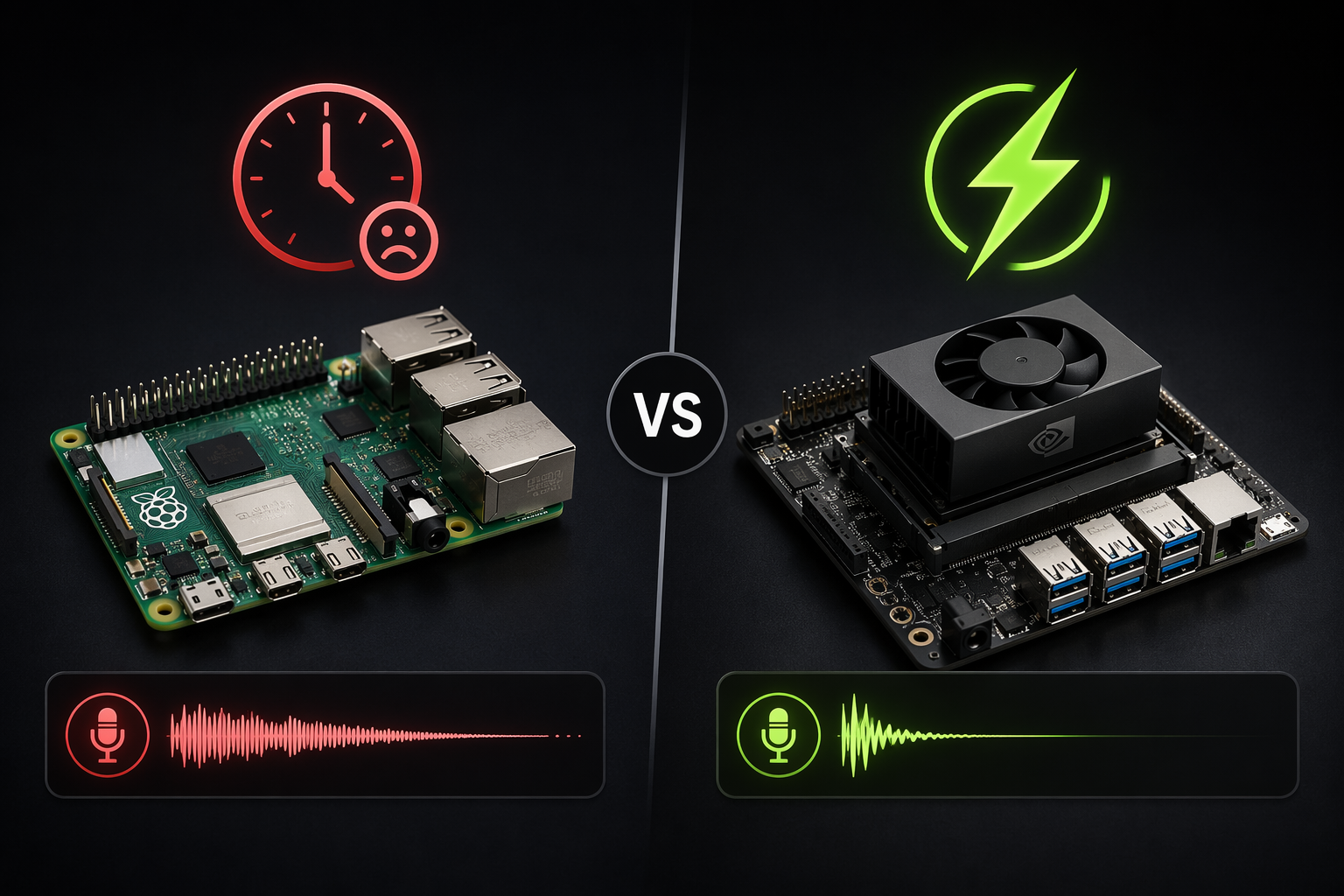
That is why the Raspberry Pi 5 versus Jetson Orin Nano comparison matters more than the usual small-board spec sheet. In NexLine testing and a Home Assistant community build thread, Whisper speech-to-text was reported around 8–12 seconds on a Raspberry Pi 5, while Jetson Orin Nano results landed roughly in the 300–800ms range depending on the setup and model path.[1][2] Those are not official NVIDIA smart home benchmarks, and they should not be treated as laboratory truth. They are still useful because they describe the difference between “I made it work” and “people will actually use this light switch by voice.”
The useful Jetson is the co-processor, not the smart home brain
The cleanest role for a Jetson in a Home Assistant house is not replacing Home Assistant. Let Home Assistant keep doing what it is good at: state, automations, integrations, dashboards, device events, and household logic. Put the Jetson next to it as the inference box that handles the workloads a Pi struggles to do quickly: speech-to-text, text-to-speech, local conversation, and possibly vision.
The current center of gravity is the Jetson Orin Nano Super Developer Kit. NVIDIA lists it at 67 TOPS, 102 GB/s memory bandwidth, 8GB of memory, a 7–25W power range, and a $249 price.[3] That combination is the reason it belongs in this conversation. It is not cheap compared with another Pi-class board, but it is also not AGX workstation money.
The rest of the Jetson family only matters if the workload outgrows the Nano. NVIDIA lists Orin NX at up to 100 TOPS, AGX Orin 32GB at 200 TOPS with a 15–40W range, and AGX Orin 64GB at 275 TOPS with a 15–60W range.[3] For a hallway or kitchen voice box, that is scale-up context, not the starting point.
| Hardware | Where it fits in a Home Assistant build | Practical caveat |
|---|---|---|
| Raspberry Pi 5 | Home Assistant host, basic services, light local workloads | Community voice tests put Whisper latency in the multi-second range |
| Jetson Orin Nano Super | Dedicated local AI co-processor for STT, TTS, and small LLMs | 8GB memory limits model size and concurrency headroom |
| Jetson AGX Orin 64GB | Heavier local LLM and multimodal experiments | Higher cost and 15–60W power range put it in a different class |
What can actually run at the same time
A usable local voice loop has more than one model in it. A microphone captures audio. Whisper or another STT engine turns it into text. Home Assistant decides whether the sentence maps to an intent, a script, or a conversation agent. A local LLM may handle the response or choose a tool. Piper or another TTS engine speaks back. If the house has to wait at every stage, the benchmark that looked fine in isolation becomes a failed user interface.
On the Orin Nano Super, the credible daily-driver target is Whisper STT, Piper TTS, and a small quantized LLM running on the same box. Joe Karlsson’s local voice build and community discussion around the Orin Nano Super place the realistic LLM ceiling around 3–4B quantized models on the 8GB Nano, while AGX Orin 64GB is the class people look at for 7B–20B+ ambitions.[4][5] That distinction matters. A tiny model that reliably maps “turn off the downstairs lamps” is more valuable in a house than a larger model that pages memory, stalls, or forces the rest of the voice pipeline to wait.
The 8GB memory limit is where the romance ends. It is enough to make local voice feel real, especially when the task is bounded by Home Assistant entities and services. It is not enough to pretend the Nano is a general local ChatGPT appliance. Once the plan includes larger general-purpose models, long context, multiple simultaneous users, camera analysis, and voice all at once, the build has left Nano territory.
That does not make the Nano weak. It makes it specific. The best smart home AI workload is often narrow: classify this command, call this service, summarize this sensor state, answer a house-specific question, or decide which automation branch should run. Those jobs benefit from low latency and local availability more than from a huge model with encyclopedic range.
The Home Assistant route that makes sense
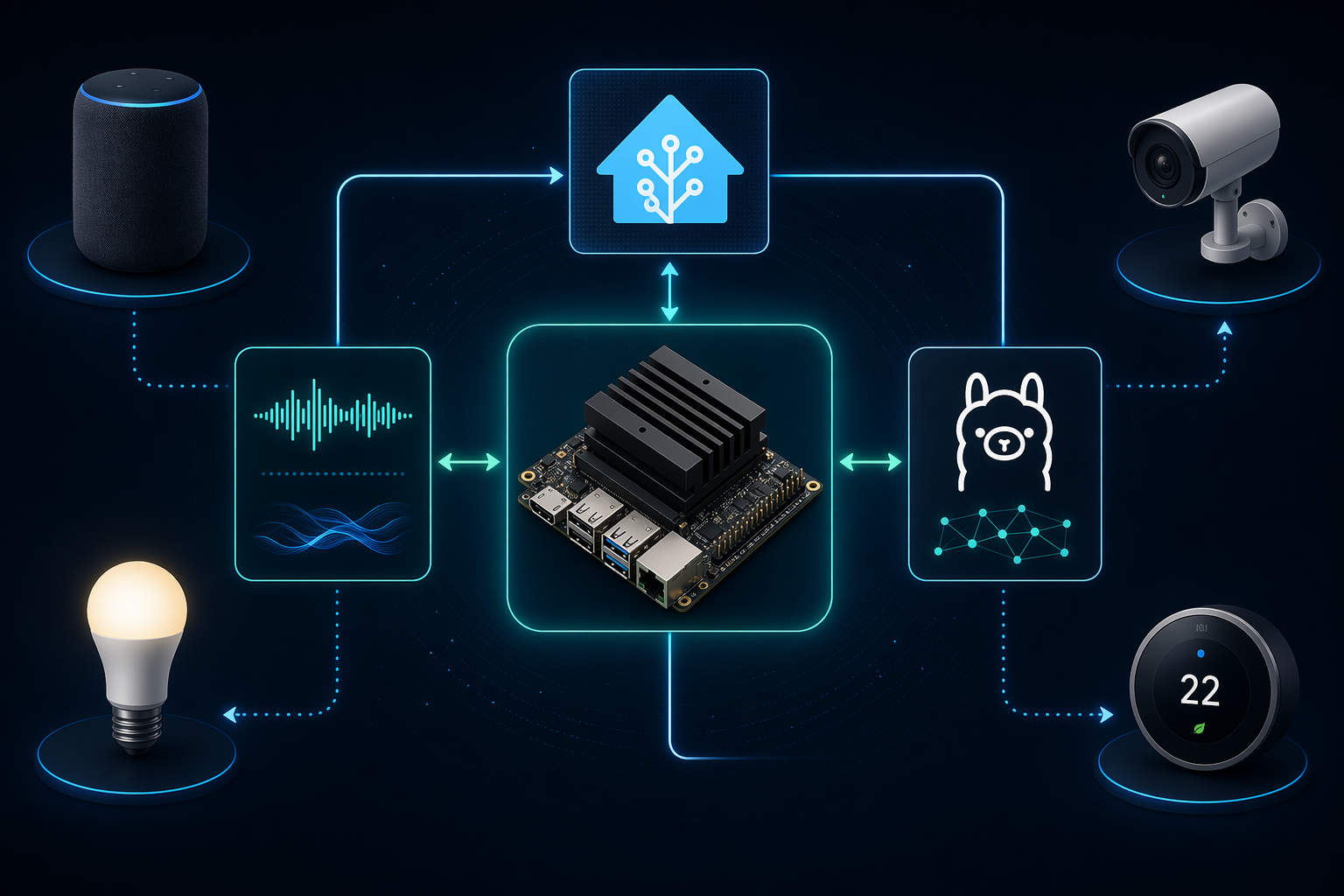
The practical architecture is simple to describe and a little fussy to assemble: Home Assistant remains the automation brain, while the Jetson exposes local AI services over the network. NVIDIA’s smart home hub article describes a Jetson-based hub pattern for bringing AI workloads into the home, and NVIDIA forum posts around Jetson AI Lab show Home Assistant-related container work rather than a one-click consumer appliance.[6][7]
A builder’s route usually looks like this:
- Flash the Jetson with a current JetPack 6.x image and confirm CUDA, storage, networking, and cooling before adding Home Assistant services.
- Run the speech services on the Jetson, commonly through containers or Python services, so Whisper STT and Piper TTS are not competing with Home Assistant’s main host.
- Expose STT and TTS to Home Assistant through Wyoming-compatible services, then select them inside Home Assistant’s voice pipeline.
- Add the local conversation layer with a small quantized model through Ollama or a similar local LLM service, keeping model size inside the Nano’s memory budget.
- Measure the full path from wake word or push-to-talk through response audio, because isolated model speed is not the same as household latency.
The Wyoming part is important because it gives Home Assistant a clean way to talk to external voice services. The Jetson does not need to become the main Home Assistant machine. In many homes, the less annoying design is to keep the existing Home Assistant box stable and add the Jetson as a replaceable inference node. If a model container breaks after an update, the lights, sensors, and automations should not go down with it.
The validation step is where a lot of local AI projects become honest. Test the sentence patterns people actually use: “turn on the island lights,” “set the thermostat to 70,” “is the garage door open,” “start movie mode.” Watch the total time, not just the transcription time. If the answer is correct but arrives after the person has already touched the wall switch, the system is still losing.
Where commercial boxes fit
The interesting commercial products are not interesting because everyone should buy one. They are interesting because they show the DIY pattern hardening into something repeatable. NexLine describes a passive-cooled Voice Box aimed at privacy-first local home AI, and also points to ClawBox at €549 as a preconfigured OpenClaw agent box.[1] That is a useful signal: the stack is no longer only a forum thread, even if the forum thread is still where the sharp edges show up first.
A prebuilt box may be the right answer for someone who wants the inference appliance but not the entire Linux weekend. It does not remove the need to understand the architecture. Home Assistant still needs service endpoints, entities still need sane names, and a local LLM still needs constraints. A box can ship with defaults; it cannot know that “the big lamp” in one house means the Zigbee plug behind the sofa.
Power draw is acceptable only if the workload deserves it
NVIDIA’s listed 7–25W operating range for the Orin Nano Super is perfectly reasonable for an always-available inference box, especially compared with leaving a desktop GPU awake for household voice control.[3] It is also wasteful if the device is only hosting Home Assistant, polling sensors, or running ordinary automations. A Raspberry Pi-class host can do those jobs with less power and less heat.
This is the practical split: use low-power hardware for the always-on control plane, and wake or load the Jetson for work that benefits from its GPU. If local voice is used all day, the Jetson earns its place. If it handles one novelty command per evening, it becomes another warm box on the shelf.
The beginner warning is not gatekeeping
A Jetson smart home build is not plug-and-play in the way a normal hub is plug-and-play. Expect Linux administration, JetPack images, CUDA versions, Docker containers, network services, logs, and the occasional mismatch between what a model tutorial assumes and what the current container actually provides. NVIDIA’s forum activity and Jetson AI Lab work help, but they do not turn the project into a finished retail assistant.[7]
That warning should not scare off the right reader. Home Assistant users already live with YAML, integrations, add-ons, backups, entity cleanup, and vendor weirdness. The Jetson just moves the difficult part into local AI infrastructure. If that sounds like an interesting Saturday, the Nano Super is a credible board. If that sounds like punishment, a cloud assistant or a prebuilt local box will be a better household decision.
When a Jetson is the right smart home AI chip
For simple automations, NVIDIA AI chips are the wrong starting point. Motion turns on a light. A door sensor sends a notification. A thermostat follows a schedule. None of that needs 67 TOPS, and adding an AI board can make the system more fragile without making the house better.
For responsive offline voice in Home Assistant, the Jetson Orin Nano Super is the practical step up from a Raspberry Pi 5. The latency gap reported by builders is large enough to change behavior, the hardware specs match the workload, and the software path through Wyoming, containers, and local LLM services is visible even if it still requires hands-on work.[1][2][3][7]
For larger local models, do not talk yourself into the 8GB board because it is small and affordable. The Orin Nano Super is a strong small-model inference node, not a replacement for AGX-class hardware when the plan depends on 7B–20B+ models.[4][5] Buying the wrong board here leads to the worst version of local AI: private, impressive in screenshots, and too slow or cramped to keep using.
References
- Jetson Orin Nano for Home Automation, NexLine
- Returning AI to Home Assistant: Running LLMs locally, Home Assistant Community
- Jetson Orin Nano Super Developer Kit, NVIDIA
- Local Voice AI Home Assistant GPU, Joe Karlsson
- Does the new Jetson Orin Nano Super make sense?, Reddit r/LocalLLaMA
- Smart Home Hub Brings Artificial Intelligence Into Your Home, NVIDIA Technical Blog
- Jetson AI Lab: Home Assistant integration, NVIDIA Developer Forums
Updates & Corrections
Protocol specifications and platform features change rapidly — especially with Matter version evolution. Report version changes, certification count updates, or platform policy changes that have occurred since the last editorial review.
Comments
Join the discussion with an anonymous comment.