Devices
Configure Your Smart Home for Automated Heat Wave Safety
Learn how to set up automation routines on Home Assistant, SmartThings, Apple Home, and Alexa that automatically respond to heat wave conditions using devices you may already own — smart thermostats, temperature sensors, smart plugs, and blinds — backed by CDC heat-health thresholds and verified compatibility data.
Local control & certification
Local vs. cloud control is not yet documented for this device.
The thermostat can be perfectly on schedule while the back bedroom is already becoming the unsafe room. That is the problem a useful heat-wave routine has to solve: not whether the forecast says it is hot, but whether the home’s indoor temperature and humidity have crossed a line where the hub should close blinds, send an alert, start cooling, and stop pretending a fan is enough.
The safest heat-wave setup starts with indoor readings. Outdoor weather alerts are good advance notice, especially for pre-cooling and closing shades before the afternoon sun hits the glass. They are not a substitute for a sensor inside the room where someone sleeps, sits, or recovers.
The Safety Logic Map
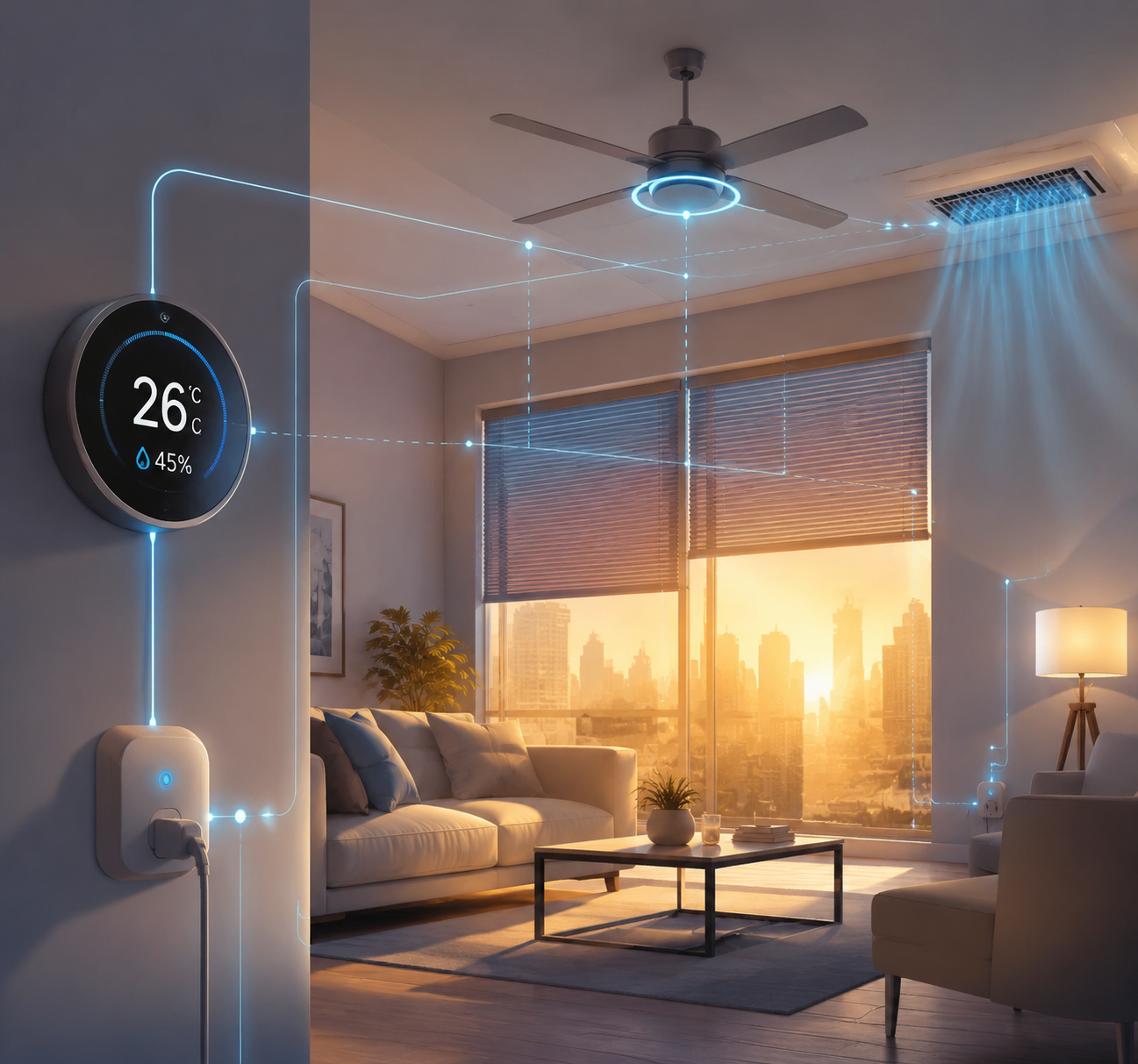
A heat-wave automation should make four decisions in order. First, measure indoor temperature and humidity. Second, act early on heat gain by closing blinds or shades. Third, choose cooling based on heat-health guidance, not on comfort language inside an app. Fourth, use smart plugs only as conditional helpers for noncritical loads, not as the sole control for life-safety cooling.
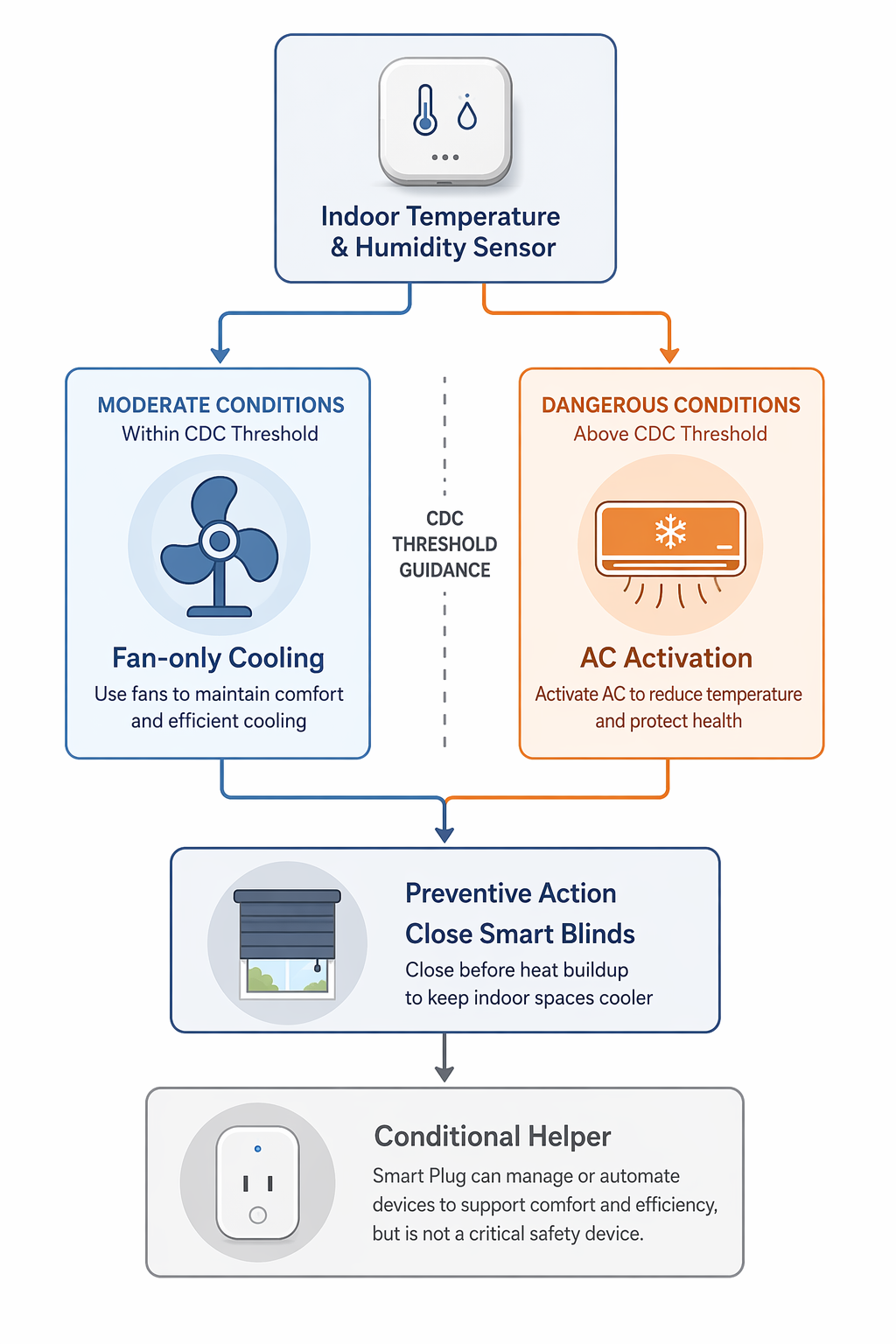
The CDC’s heat guidance for older adults is the line that keeps this from becoming a convenience routine. It advises older adults to stay in air-conditioned buildings as much as possible and warns that electric fans may provide comfort but do not prevent heat-related illness when temperatures are high enough to be dangerous.[1] In automation terms, that means fan-only action belongs below your heat-health danger threshold. Once the indoor condition crosses that threshold, the default action should be air conditioning, relocation to a cooler part of the home, or a caregiver alert—not just a fan.
| Automation input | Preferred rule | Why it matters |
|---|---|---|
| Indoor temperature | Use the room or zone where risk is highest, not only the hallway thermostat | A thermostat schedule can miss a room that heats faster than the rest of the house |
| Indoor humidity | Pair it with temperature when the hub supports it | Humid heat changes the body’s cooling burden and can make a room feel worse than the temperature alone suggests |
| Window coverings | Close before peak solar gain, or when indoor temperature begins rising | Prevention is faster than cooling a room after the glass and walls have heated |
| Fan | Allow only under moderate indoor conditions | Fan-only cooling should not be treated as sufficient once heat-health danger conditions apply |
| AC or cooling mode | Make it the default response above the danger threshold | The automation should not ask an overheated person to decide whether conditions are serious |
| Smart plugs | Use for lamps, fans, dehumidifiers, or notification devices only when safe for that appliance | A plug is a helper, not a universal safety controller |
Alerts also work better when they are tied to a clear condition and a specific cooling recommendation. In the 2025 Ethos trial in Southeast Queensland, 78 participants used a system that connected temperature and humidity thresholds with personalized recommendations; participants acted on 90% of yellow alerts and 94% of red alerts, and the system received a usability score of 78.[2] That does not prove those exact thresholds should be copied into every U.S. climate. It does support the operational point: an alert that says what crossed the line and what to do next is more useful than a generic “hot weather” notification.
Set the Rule Before Choosing the Hub
Before opening Home Assistant, SmartThings, Apple Home, or Alexa, write the automation in plain English. This prevents the platform from quietly shrinking the safety logic into whatever its routine builder happens to make easy.
- Hub ecosystem: the platform that will run the rule, such as Home Assistant, SmartThings, Apple Home, or Alexa.
- Required devices: indoor temperature sensor, humidity source if available, thermostat or AC controller, blinds or shades if installed, and optional smart plugs.
- Sensor source: the exact room sensor or thermostat sensor that decides the rule, with its location recorded.
- Trigger logic: the indoor temperature and humidity conditions, plus any time window or weather-alert precondition.
- Action sequence: close blinds, send alert, set cooling mode, adjust thermostat setpoint, optionally run a fan under moderate conditions, then verify state.
- What not to automate: critical medical devices, unsafe plug loads, or fan-only cooling above the household’s heat-health threshold.
A smart thermostat can be a usable sensor source if it exposes indoor humidity and the hub can read it. Ecobee Smart Thermostat Premium is one common example because it includes built-in humidity and air-quality sensing; the part to check is not whether the thermostat has the sensor, but whether your hub can use that indoor reading as an automation trigger. If the thermostat sits in a hallway that stays cooler than the vulnerable room, add or select a room sensor instead.
Blinds deserve to appear early in the action list, not as a cosmetic extra. Consumer Reports cites a Department of Energy figure that window-covering management can reduce heat gain by up to 77%.[3] “Up to” is doing real work there; the result depends on window orientation, covering type, and timing. Still, the action is concrete: close the heat-facing blinds before the room becomes the problem.
Home Assistant: Express the Whole Rule
Home Assistant is the cleanest place to make the automation explicit because it can combine indoor sensors, humidity, time windows, covers, thermostat service calls, notifications, and follow-up checks in one readable rule. The advantage is not that every household needs Home Assistant. The advantage is that the logic is visible enough to audit.
Use helpers for your thresholds instead of burying numbers in the YAML. That lets you adjust the household’s yellow alert, red alert, and fan-limit values after checking current CDC and local public-health guidance, the occupant’s health situation, and the room’s behavior during real heat.
alias: Heat Wave Safety - Indoor Threshold Response
mode: restart

trigger:
  - platform: numeric_state
    entity_id: sensor.back_bedroom_temperature
    above: input_number.heat_yellow_temp_f
    for: "00:10:00"
  - platform: numeric_state
    entity_id: sensor.back_bedroom_humidity
    above: input_number.heat_humidity_limit
    for: "00:10:00"

condition:
  - condition: state
    entity_id: input_boolean.heat_wave_mode
    state: "on"

action:
  - service: cover.close_cover
    target:
      entity_id:
        - cover.back_bedroom_blinds
        - cover.living_room_south_blinds

  - choose:
      - conditions:
          - condition: numeric_state
            entity_id: sensor.back_bedroom_temperature
            above: input_number.heat_red_temp_f
        sequence:
          - service: climate.set_hvac_mode
            target:
              entity_id: climate.main_thermostat
            data:
              hvac_mode: cool
          - service: climate.set_temperature
            target:
              entity_id: climate.main_thermostat
            data:
              temperature: "{{ states('input_number.heat_safe_cooling_setpoint_f') | float }}"
          - service: switch.turn_off
            target:
              entity_id: switch.portable_fan_plug
          - service: notify.family_caregivers
            data:
              title: "Heat safety alert"
              message: "Back bedroom crossed the red indoor heat threshold. AC cooling was requested; fan-only cooling is disabled for this condition."
      - conditions:
          - condition: numeric_state
            entity_id: sensor.back_bedroom_temperature
            above: input_number.heat_yellow_temp_f
          - condition: numeric_state
            entity_id: sensor.back_bedroom_temperature
            below: input_number.cdc_fan_limit_f
        sequence:
          - service: switch.turn_on
            target:
              entity_id: switch.portable_fan_plug
          - service: notify.family_caregivers
            data:
              title: "Heat warning"
              message: "Back bedroom crossed the yellow indoor heat threshold. Blinds closed and fan enabled because the room is still below the fan-only limit."
    default:
      - service: notify.family_caregivers
        data:
          title: "Heat sensor warning"
          message: "Indoor heat or humidity is elevated, but no cooling branch matched. Check the automation thresholds."

  - delay: "00:15:00"

  - condition: numeric_state
    entity_id: sensor.back_bedroom_temperature
    above: input_number.heat_red_temp_f

  - service: notify.family_caregivers
    data:
      title: "Heat alert still active"
      message: "Back bedroom remains above the red threshold 15 minutes after AC was requested. Check the room and thermostat state."
The most important line in that example is not a service call. It is the separation between the fan branch and the cooling branch. A smart plug can turn on a portable fan below the danger boundary. Above it, the automation turns the fan plug off and requests AC, because the device that feels reassuring can be the wrong response under dangerous heat conditions.
If you already use weather-triggered Home Assistant automations, keep them as early warning rather than final authority. A National Weather Service alert can turn on `input_boolean.heat_wave_mode`, close shades early, or send a heads-up. The indoor room sensor should still decide whether the safety branch fires. A pattern like Home Assistant weather-alert automation is useful as a trigger scaffold, but the heat rule needs indoor confirmation.
For plug-controlled helpers, copy the caution from energy-monitoring recipes rather than the optimism from gadget packaging. A smart plug can automate a fan, lamp, or dehumidifier if the appliance is rated for plug control and will resume safely after power cycling. The logic used in smart plug automation recipes can be adapted, but portable AC units, window units, and high-load devices require manufacturer-specific checks before any plug is added.
Home Assistant verification notes
- Check that the temperature sensor, humidity sensor, thermostat, blinds, and plug entities all update locally or reliably enough for the household’s risk level.
- Place the deciding sensor in the room that overheats, away from direct sun, AC vents, and electronics that distort the reading.
- Use a notification group that reaches the person who can actually respond, not only the person sitting beside the hub.
- Record the date you last tested the red branch with a temporary lower threshold.
SmartThings: Build Scenes, Then Guard the Trigger
SmartThings can run a practical heat response if your devices expose the right capabilities. The safest setup is usually two routines: one for prevention and one for danger response. That keeps the blinds and fan logic from getting tangled with the AC rule.
| SmartThings routine | Trigger | Actions |
|---|---|---|
| Heat prevention | Heat-wave mode is on, time is before peak sun, or indoor temperature begins rising | Close sun-facing blinds; notify household; optionally lower thermostat modestly if someone is home |
| Yellow indoor heat alert | Room sensor crosses the household’s warning threshold | Close blinds; notify caregiver; allow fan plug only if still below the fan-only limit |
| Red indoor heat alert | Room sensor crosses the household’s danger threshold | Set thermostat to cool; use the safe cooling setpoint; notify caregiver; do not rely on fan-only action |
The weak point to watch is sensor selection. SmartThings may make it easy to choose “temperature” from a multipurpose sensor, thermostat, or room sensor without forcing you to think about placement. Name the deciding device plainly: “Back Bedroom Heat Sensor” is better than “Sensor 3.” If humidity is available in SmartThings for that device, add it as a condition or a separate alert routine. If it is not available, do not pretend the rule is equivalent to a combined temperature-humidity trigger.
For thermostats, confirm that SmartThings can set cooling mode and a specific setpoint for your model. For blinds, confirm that the device reports state after closing. A routine that sends a close command but never checks whether the cover moved is only half a heat-gain strategy.
Apple Home: Use Scenes for the Response, Shortcuts for the Gaps
Apple Home is strongest when the response is a scene: close the shades, set the thermostat to cooling, and notify through the household’s normal Apple devices. It becomes more limited when the safety rule needs layered conditions, humidity comparisons, or different actions based on a red versus yellow threshold.
Start with two Home scenes: “Heat Prevention” and “Heat Safety Cooling.” The prevention scene closes heat-facing window coverings and can adjust the thermostat before the room climbs. The safety cooling scene sets the thermostat to cooling mode and the household’s safe setpoint. If your Home-compatible sensor exposes indoor humidity, test whether Apple Home can use that value in an automation. If it cannot, the honest version is a temperature-based automation plus a separate alert, not a full temperature-humidity safety rule.
- Good fit: closing blinds before peak heat, setting a thermostat scene, sending household-visible alerts, and using presence to avoid unnecessary pre-cooling.
- Needs testing: whether your sensor’s humidity reading is exposed as an automation condition, not merely visible in the device tile.
- Avoid: a single fan scene that runs whenever it is hot outside, especially for an older adult’s room.
- Workaround: use Shortcuts or the device manufacturer’s app for notifications or conditions Apple Home cannot express cleanly, then document where the rule actually lives.
Apple Home users do not need to rebuild their home just to get a useful heat response. They do need to resist the urge to call a simple scene a safety system unless the trigger, sensor, cooling action, and follow-up alert have all been tested.
Alexa: Useful Alerts, Limited Safety Logic
Alexa routines can be enough for a household that needs straightforward actions: when a compatible indoor sensor crosses a temperature threshold, announce a warning, close compatible blinds, set a compatible thermostat, or turn on a plug-controlled fan under moderate conditions. The risk is that Alexa can make a routine feel complete because the voice announcement works.
Build Alexa heat routines in three pieces. Use one routine for early prevention, one for moderate indoor heat, and one for danger-level indoor heat. Give the danger routine the plainest possible action: set cooling, announce the room and condition, and notify the caregiver through the channel they actually see. If Alexa cannot evaluate the humidity condition or cannot confirm the thermostat state, write that limitation into your household notes.
| Alexa can usually help with | Do not assume without testing |
|---|---|
| Voice announcements when a supported sensor triggers | That the sensor reports often enough for heat-safety use |
| Simple smart plug control for a fan under moderate conditions | That plug control is safe for every appliance |
| Thermostat setpoint changes on supported models | That cooling mode and setpoint both changed successfully |
| Blind or shade commands on supported devices | That the shade closed and did not stall or lose connection |
Alexa is a reasonable environment for many homes because it is already installed, familiar, and easy to test out loud. The line to hold is equivalence. A voice routine with one temperature trigger is not the same as a local, multi-sensor, verified cooling sequence. If the occupant is at higher risk, that difference matters.
Where Energy Savings Fit
Smart thermostats can save energy, but savings should not be the organizing principle of a heat-wave safety routine. CBS News reported an average savings range of 10% to 15% for smart thermostats during heat-wave conditions.[4] That number is useful context, not a guarantee. Insulation, local electric rates, thermostat model, HVAC condition, and prior thermostat habits can all change the result.
The better order is safety first, efficiency second. Close blinds early because it reduces heat gain. Use indoor sensors because they reveal what the room is doing. Let the thermostat avoid waste when conditions are moderate. When indoor heat crosses the danger threshold, the automation’s job is no longer optimization; it is getting cooling started and getting a person notified.
The Verification Routine
A heat automation is not finished when the app says “enabled.” It is finished when the household has watched the rule fire, confirmed the correct devices responded, and written down the last verified date.
- Check the sensor readings. Compare the deciding temperature and humidity sensor with another trusted reading in the same room, then move the sensor if sun, vents, or electronics are distorting it.
- Test the hub trigger. Temporarily lower the yellow and red thresholds during a safe test window, then confirm the correct branch fires.
- Confirm AC behavior. Verify that the thermostat changes to cooling mode and the intended setpoint, not merely that the app sent a command.
- Confirm fan limits. Make sure fan-only action is disabled or bypassed when the danger branch is active.
- Check blinds and plugs. Watch the blinds close, confirm plug-controlled devices are safe for automation, and remove any plug that controls critical cooling equipment without manufacturer support.
- Record the last-verified date. Put it in the automation name, a household note, or the caregiver’s shared document so nobody has to guess whether the rule was tested this season.
Most homes do not need a box of new devices before the next heat wave. They need the devices already installed to stop performing confidence: indoor-sensor-based triggers, platform-appropriate actions, AC as the default above heat-health danger conditions, and a dated test proving the routine actually ran.
References
- Heat and Older Adults Aged 65+, CDC, https://www.cdc.gov/heat-health/risk-factors/heat-and-older-adults-aged-65.html
- Ethos system trial, PMC, 2025, https://pmc.ncbi.nlm.nih.gov/articles/PMC11840092/
- Beat the Heat With Window Coverings, Consumer Reports, https://www.consumerreports.org/home-garden/energy-efficiency/beat-the-heat-with-window-coverings-a9364047186/
- How much can a smart thermostat save during a heat wave?, CBS News, https://www.cbsnews.com/news/how-much-smart-thermostats-save-during-heat-wave/
Known issues
No known issues summary recorded for this device.
No open Troubleshooting entries are currently tracked for this device.
Spot something outdated?
Flag anything that no longer matches current firmware, app, or spec behavior. This is recorded for internal review, not published automatically.