
Which 5G home internet plan works for smart home devices?
Speed tiers are the wrong way to choose a 5G home internet plan for a smart home — data policy, gateway Wi-Fi band splitting, and CGNAT limits decide what actually works. This Q3 2026 comparison of T-Mobile, Verizon, and AT&T fixed-wireless plans focuses on the specs that keep cameras, hubs, and remote access running.
Last updated
If by “5G mobile plan for smart home devices” you mean 5G home internet, not tethering the house to a phone, the first correction is simple: for a home full of cameras, thermostats, speakers, sensors, and hubs, the advertised Mbps number is usually the least interesting part of the decision. T-Mobile’s own bandwidth examples put a doorbell camera at 2–4 Mbps, a security camera anywhere from 1–25 Mbps, a smart assistant at 0.1–0.3 Mbps, and a thermostat around 0.1 Mbps; its worked household example lands around 102 Mbps total and calls a 100–200 Mbps plan ideal for that mix of ordinary internet use and connected devices [1].
That does not mean bandwidth never matters. A house with several people streaming, gaming, backing up laptops, and watching cloud camera feeds can still saturate a weak connection. But the smart home itself is rarely the bandwidth monster. BroadbandNow estimates a smart-home-heavy baseline around 150 GB per month, while the average U.S. household is above 500 GB per month, which is a useful way to reset the problem: streaming and total household use drive the bill and congestion risk more than thermostats and hubs do [2].
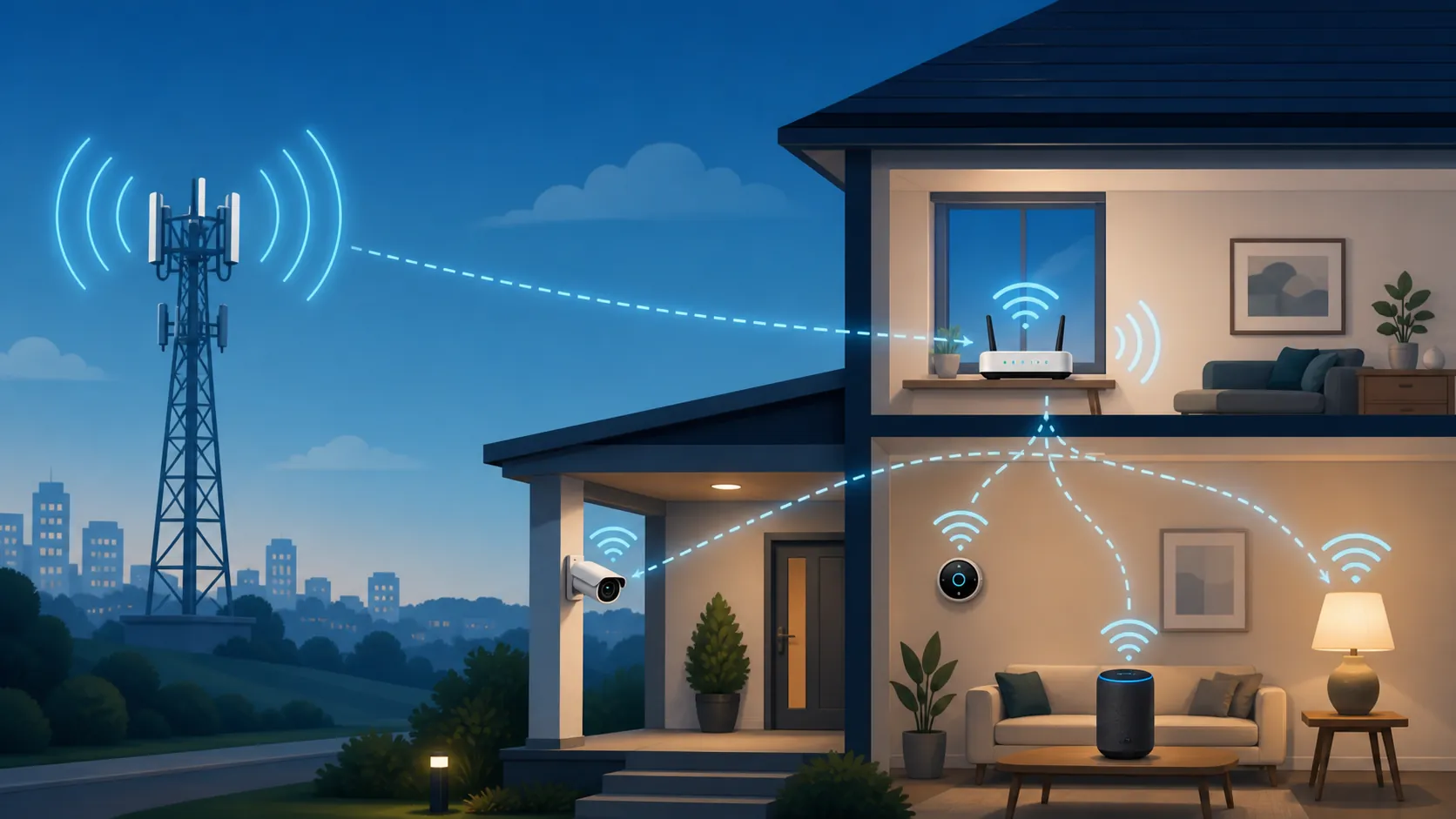
The second correction is just as important. Your smart devices are not joining the carrier’s 5G network. The 5G link feeds a home gateway; the camera, bulb, thermostat, speaker, Matter controller, Thread border router, Zigbee hub, or Z-Wave stick still lives on your local network or talks through its own hub. That distinction has been true since early 5G smart-home discussions and fits the fixed-wireless-access model: the cellular network replaces the wired last-mile connection to the premises, not the local radios inside the home [3][4].
Once that is clear, the buying question changes. The best 5G home internet plan for a smart home is not the one with the largest speed claim. It is the one whose data policy, gateway Wi-Fi controls, and remote-access limits match the devices you actually need to keep online.
Q3 2026 plan facts, judged by smart-home compatibility
These are the relevant fixed-wireless home internet plans from T-Mobile, Verizon, and AT&T as of Q3 2026. Pricing, promotions, address availability, gateway models, and eligibility can change by location, so the table is a pre-purchase screen, not a substitute for checking the exact service address.
| Provider / plan | Published price and promo notes | Published speed / data policy | Smart-home compatibility read |
|---|---|---|---|
| T-Mobile Rely | $50/month; as low as $35/month with eligible voice-line discount; 5-year price guarantee | Unlimited data; typical 170–498 Mbps down and 12–55 Mbps up across T-Mobile Home Internet; heavy users may see further speed reduction above 1.2 TB/month during congestion | Already fast enough for ordinary smart-home traffic. The stronger reason to consider T-Mobile is gateway/app control, especially the ability to split bands for 2.4 GHz onboarding. |
| T-Mobile Amplified | $60/month; as low as $45/month with eligible voice-line discount; 5-year price guarantee | Same published typical speed range and unlimited-data framework as T-Mobile Home Internet | Worth considering for household broadband needs or included features, not because a thermostat, hub, or doorbell needs the extra plan tier. |
| T-Mobile All-In | $70/month; as low as $55/month with eligible voice-line discount; 5-year price guarantee | Same published typical speed range and unlimited-data framework as T-Mobile Home Internet | A higher tier does not cure CGNAT or a bad tower. Buy it for the plan bundle only if the address tests well. |
| Verizon 5G Home | From $35/month with Auto Pay and eligible mobile plan; 3-year price lock | Carrier-published up to 100 Mbps | Enough for many smart homes and light household use. Check the gateway Wi-Fi controls before assuming older 2.4 GHz-only devices will pair cleanly. |
| Verizon 5G Home Plus | From $35/month with Auto Pay and eligible mobile plan; 4-year price lock | Carrier-published up to 150 Mbps; premium data | The middle tier is more about household internet experience than IoT bandwidth. Premium data can matter if the tower is busy. |
| Verizon 5G Home Ultimate | From $35/month with Auto Pay and eligible mobile plan; 5-year price lock | Carrier-published up to 300 Mbps; 4K and Whole-Home Wi-Fi positioning | Most relevant if the home needs stronger whole-home Wi-Fi coverage or heavier household streaming. It still should not be treated as a workaround for port-forwarding needs. |
| AT&T Internet Air | About $55–65/month; no contract | 90–300 Mbps; no data cap | Viable if the address tests well and your devices are cloud-relay friendly. Confirm gateway controls and remote-access needs before canceling cable or fiber. |
Verizon is the one place where speed claims need extra caution. For this comparison, the carrier-published figures — up to 100 Mbps, 150 Mbps, and 300 Mbps across its three 5G Home tiers — are the safer numbers to use, even though some aggregators publish broader advertising ranges for Verizon 5G home internet. A smart-home buyer should prefer the number the carrier is actually selling at the service address, then test it at home during busy hours [7].
Data policy matters, but not because your thermostat is hungry
For a smart home, an unlimited plan with a tolerable deprioritization rule is better than a metered plan that looks cheap until the whole household starts using it. The connected-home devices may be modest, but the house around them is not. Cloud camera clips, live viewing, streaming boxes, consoles, laptops, tablets, and software updates all share the same pipe.
T-Mobile’s published policy is a good example of the distinction. Its home internet plans are unlimited, but customers using more than 1.2 TB in a month may see further speed reductions during congestion [6]. For many homes, that is a reasonable tradeoff. For a household that routinely pushes well beyond that amount with 4K streaming, cloud backup, gaming downloads, and multiple camera feeds, the trial period matters more than the plan name.
This is also where “smart home” can hide the real user. A porch camera that uploads motion clips is not the same load as three people streaming video every night while a console downloads a large update. If a plan fails under that combined load, the symptom may look like a smart-home problem — delayed camera notifications, slow live view, missed voice assistant responses — even though the cause is ordinary household congestion.
The gateway Wi-Fi test is where many smart-home installs actually fail
A speed test can look excellent while a 2.4 GHz-only camera refuses to join. That is the failure mode a plan table usually misses.
Many smart-home devices still use 2.4 GHz Wi-Fi because it reaches farther and is inexpensive to implement. Plenty of routers and gateways now ship with one combined network name for 2.4 GHz and 5 GHz, with band steering deciding where each client should go. That can be fine for phones and laptops. It can be miserable for older plugs, bulbs, doorbells, garage controllers, and budget cameras that expect the phone doing setup to be on the same 2.4 GHz network they are trying to join.
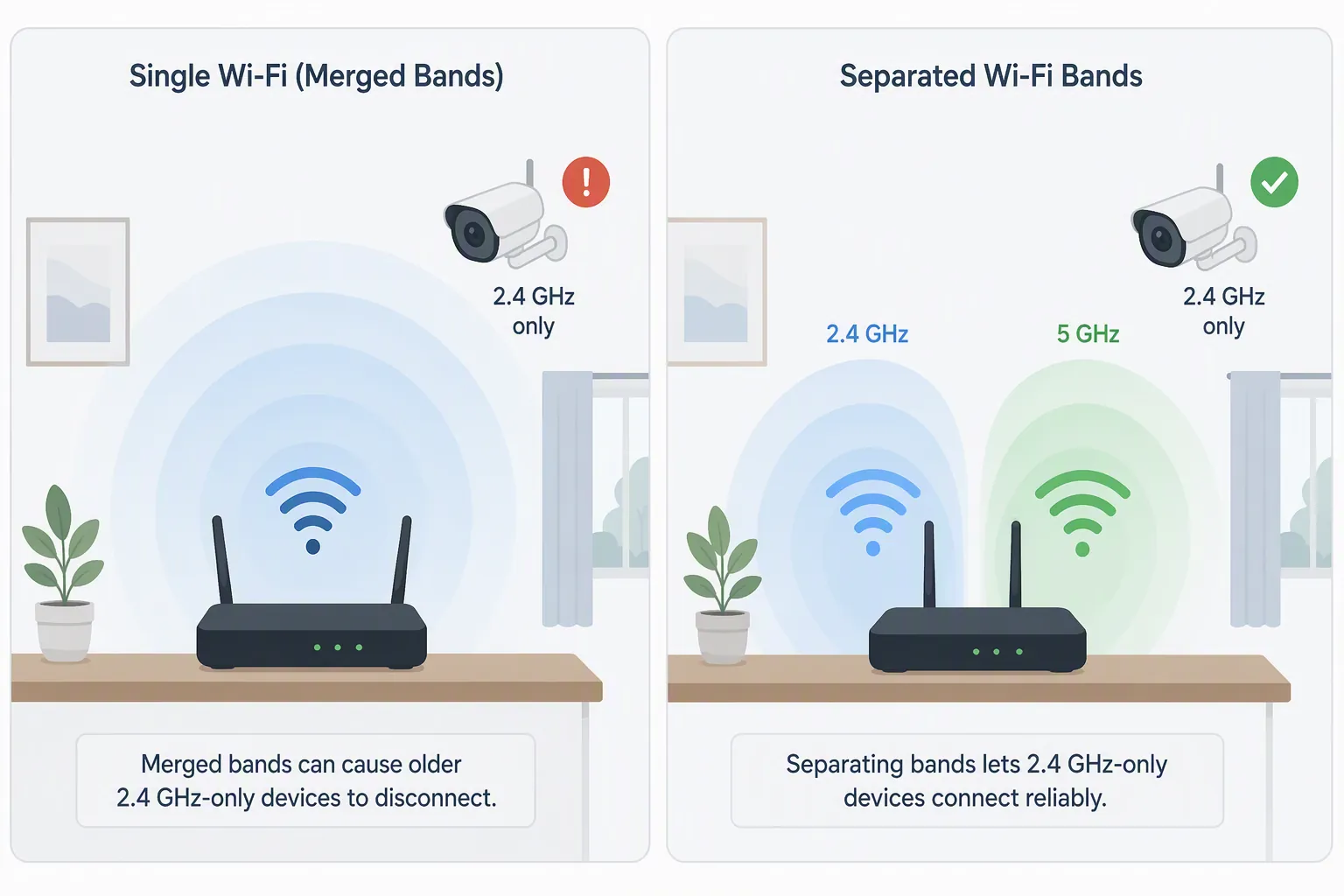
This is why T-Mobile’s T-Life app support for separating 2.4 GHz and 5 GHz is not a minor convenience. It is a compatibility feature. T-Mobile’s support documentation explains how the app can manage home internet networks, including separate network setup that lets a user create a dedicated 2.4 GHz network for devices that need it [9].
In practice, the useful setup is boring: keep a simple 2.4 GHz SSID for IoT devices, avoid special characters that cheap setup apps mishandle, leave the 5 GHz network for phones, laptops, TVs, and tablets, and do the first pairing session near the gateway before moving the device to its final location. If the carrier gateway does not expose enough Wi-Fi control, a separate router or mesh system may be cleaner — but that adds another device to configure and another place for double-NAT confusion.
This is also where local smart-home protocols help. Zigbee, Z-Wave, and Thread devices do not each need to join the carrier gateway’s Wi-Fi. They talk through a hub, controller, or border router. But that hub still needs reliable local networking and internet access for app control, firmware updates, cloud automations, and remote notifications. If you want a deeper fixed-wireless comparison with similar router tradeoffs, NestGrid’s Starlink smart-home setup guide covers the same class of problem through a different last-mile connection.
CGNAT is the hard boundary for remote access
The most important compatibility limit on residential 5G home internet is not speed. It is inbound access.
Residential 5G fixed-wireless service commonly uses carrier-grade NAT, or CGNAT. Instead of giving your home a public IPv4 address that can accept direct inbound connections, the carrier places many customers behind shared network translation. T-Mobile’s own home internet support materials state that port forwarding and static IPs are not supported for its residential service [6]. CompareInternet makes the same practical warning for 5G home internet buyers: port forwarding is one of the features users may lose when switching [10].
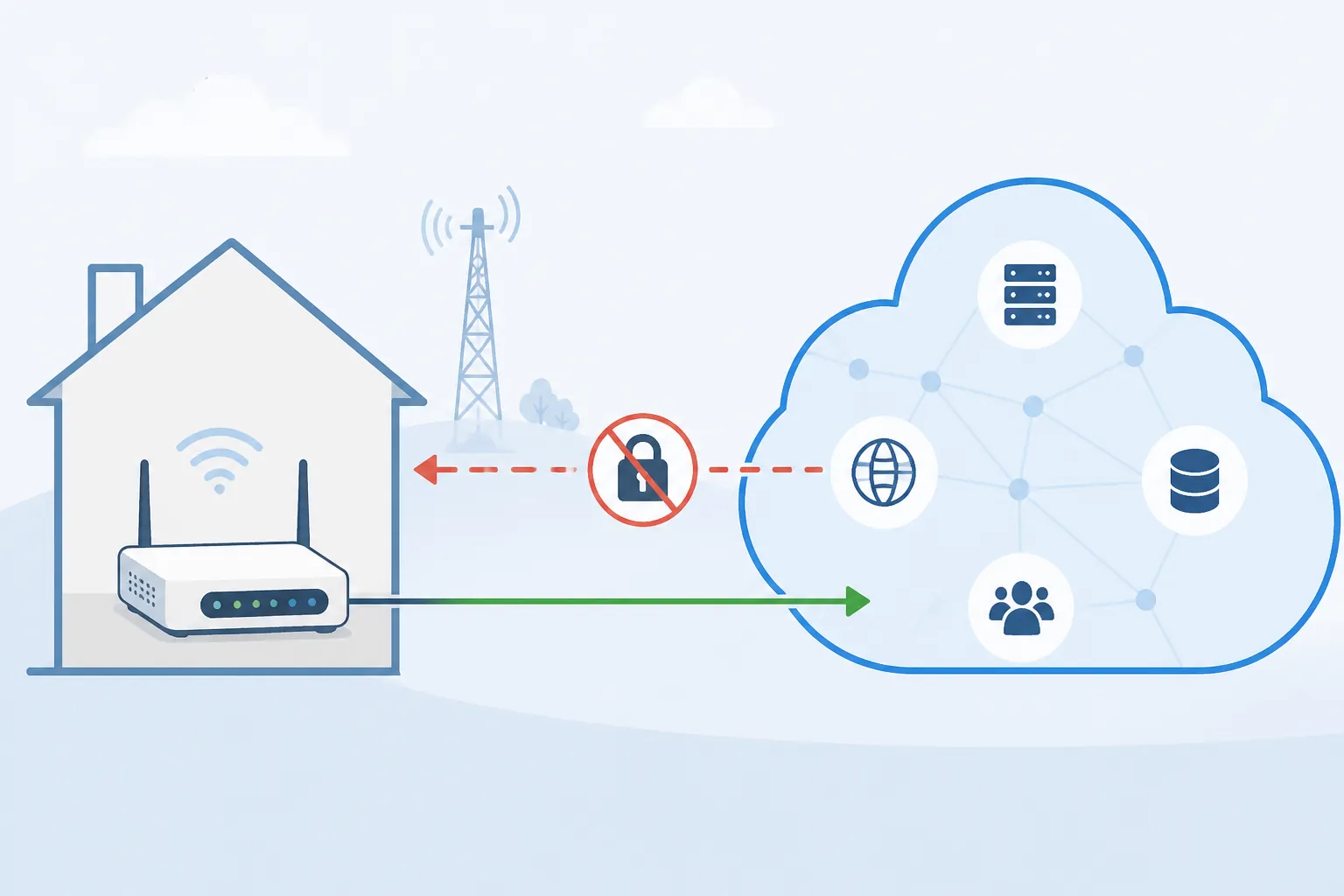
For mainstream smart-home products, that may be invisible. Ring, Nest, Arlo, Wyze, and similar cloud-relay camera systems usually maintain outbound connections from the home to the vendor cloud. Your phone also talks to the vendor cloud. Since the connection is initiated outbound from inside the home, CGNAT does not usually break that model.
For local-control households, CGNAT is not invisible. A port-forwarded camera page, a self-hosted Home Assistant instance, a NAS exposed through router forwarding, or a self-hosted VPN server expects inbound reachability. Home Assistant’s remote-access documentation describes remote access as something that requires either Home Assistant Cloud or manual network configuration such as forwarding, encryption, and DNS work; under residential CGNAT, that manual forwarding path is the part that usually disappears [11]. Vendor tunnel services such as Localtonet describe the same T-Mobile Home Internet port-forwarding problem, but those should be read as workaround vendors explaining a real limitation, not as neutral broadband research [12].
The practical split is clear:
- Likely fine on residential 5G FWA: cloud-relay cameras, smart speakers, cloud thermostats, vendor app control, Matter devices using a normal home Wi-Fi or Thread setup, and hubs that only need outbound internet.
- Do not assume it will work: direct port forwarding to cameras, a NAS, Home Assistant, a self-hosted VPN server, game servers, or any device whose instructions say to open a router port from the public internet.
- Possible workaround territory: Home Assistant Cloud, vendor cloud relay, a mesh VPN that works by outbound connections, or a tunnel service. Those are design choices, not proof that the carrier supports inbound hosting.
This is where a higher tier does not help. Buying Verizon Ultimate instead of Verizon Home, or T-Mobile All-In instead of Rely, does not turn a CGNAT residential service into a clean public-IP connection unless the carrier separately sells and supports that capability for the account. For most residential 5G FWA shoppers, the safer assumption is no port forwarding.
So which plan should a smart-home owner choose?
For most cloud-app smart homes, T-Mobile, Verizon, and AT&T can all be viable if the service address tests well. The devices are not demanding enough to justify chasing a speed tier by itself. The choice should come down to three checks.
- Is the plan unlimited, and is the deprioritization rule acceptable for the whole household’s monthly use?
- Can the gateway or your own router provide a clean 2.4 GHz network for older cameras, plugs, bulbs, and setup apps?
- Do you need direct inbound remote access, or can every important device use cloud relay, Home Assistant Cloud, a mesh VPN, or another outbound tunnel?
T-Mobile has the most obvious smart-home-specific advantage in the available materials because its app-supported band split directly addresses the 2.4 GHz onboarding problem. Its unlimited data and published 1.2 TB congestion threshold are also easy to understand. The catch is the same one that follows every 5G fixed-wireless plan: the result is address-dependent, tower-dependent, and gateway-firmware-dependent [6][9].
Verizon’s plans are easier to separate by published tier: 100 Mbps, 150 Mbps, and 300 Mbps ceilings, with longer price locks on higher tiers and Whole-Home Wi-Fi positioning on Ultimate [7]. That can matter for a larger house or heavier streaming household. It does not, by itself, answer whether your 2.4 GHz-only camera will pair or whether your self-hosted service will be reachable from outside.
AT&T Internet Air sits in the same practical category: the published 90–300 Mbps range and no data cap are enough for ordinary smart-home loads, but the buying decision still depends on local signal, gateway behavior, and remote-access requirements [8]. If everything important is cloud-based and the address tests well, it can be perfectly adequate. If you rely on router-level hosting, treat it with the same CGNAT caution as the others.
Use the trial window like a compatibility test, not a speed-test victory lap
Fixed-wireless home internet is practical precisely because it can be installed quickly. That also means the honest test happens in the house, with the real tower, the real gateway, and the real devices. T-Mobile is commonly described with a 15-day trial period, while Verizon’s 5G Home Internet trial window is 30 days in the available buyer guidance and carrier materials [10][7].
Do not cancel the old connection on installation day. During the return period, test the conditions that usually expose smart-home problems:
- Run speed and latency checks in the evening, not only at noon, because tower congestion is time-dependent.
- Pair at least one 2.4 GHz-only device from scratch, preferably a camera or plug with a fussy setup app.
- Open every camera live view from cellular data while away from home.
- Confirm that automations still run when the internet connection is briefly interrupted, especially if you depend on local hubs.
- Test Home Assistant, NAS, VPN, and any direct remote-access workflow before assuming a tunnel or cloud service will replace port forwarding.
- Walk the farthest camera or doorbell location and check signal stability, not just gateway speed.
If devices go offline after gateway reboots or tower interruptions, troubleshoot that behavior before committing. NestGrid’s guides on smart devices going offline during a T-Mobile outage and rebooting a smart home after a T-Mobile outage are useful for separating gateway recovery problems from device pairing problems.
The right 5G home internet plan is the one that stays boring under those tests. Pick by unlimited data policy, gateway Wi-Fi manageability, and remote-access fit. Do not treat a higher Mbps tier as a fix for 2.4 GHz band steering, CGNAT, or a weak tower at your address.
References
- What Internet Speed Do You Need, T-Mobile.
- How Much Data Do I Need, BroadbandNow.
- 5G is here. Does it matter for your smart home?, CNET, November 2020.
- Fixed Wireless Access, Ericsson.
- T-Mobile Home Internet Plans, T-Mobile.
- Connect with T-Mobile Home Internet, T-Mobile.
- Verizon 5G Home Internet, Verizon.
- Best 5G Home Internet Providers, BroadbandNow.
- T-Life app, T-Mobile.
- Before You Switch to 5G Home Internet, CompareInternet.
- Remote access, Home Assistant.
- T-Mobile Home Internet and Port Forwarding, Localtonet.
Known issues with this device / protocol
Spec-version history
For active regressions on this protocol, see Update Watch.
No linked Update Watch entries yet.