
The 2026 Smart Home Inflection Point: Why Frustrated Adopters Should Look Again
If you bought into the smart home between 2022 and 2024, you probably have a drawer full of hubs you didn't need, a few automations that worked for a month then broke, and a lingering suspicion that the whole category was overhyped. You are not alone. That period was defined by proprietary ecosystems, cloud-dependent routines that lagged by seconds, and sensors that couldn't tell the difference between an empty room and a person sitting still.
The landscape in mid-2026 is fundamentally different. Matter 1.2 adoption reached 40% in 2025, and the protocol has matured past the early-adopter bugs. Thread mesh networks are now common enough that a new device joining your home often strengthens the entire network rather than requiring yet another bridge. And the sensor that changes everything — mmWave presence detection — has dropped in price from a novelty to a practical upgrade.
This article is not another list of 10 routines organized by time of day. It is a targeted upgrade path for people who already own devices and want to know what actually works now that the technology has caught up. We will cover the three breakthroughs that matter, then walk through five automations that demonstrate what those breakthroughs enable. If you have been waiting for the smart home to stop being a hobby and start being a utility, 2026 is the year to rebuild.
What Actually Changed: Three Breakthroughs That Make Automation Work in 2026
Before we get to the automations, it is worth understanding why the same ideas that failed in 2023 now work reliably. Three specific technology shifts are responsible.
1. Matter and Thread: The End of Ecosystem Lock-In
Matter is a universal standard that lets devices from different brands work together across Apple Home, Google Home, and Alexa without requiring each manufacturer's proprietary bridge. Thread, the mesh networking protocol that often pairs with Matter, creates a self-healing network where each new device extends the range and reliability. The practical result: you can buy a smart lock from Yale, a light bulb from Philips, and a thermostat from Ecobee, and control all three from a single routine on any major platform. No more juggling five apps.
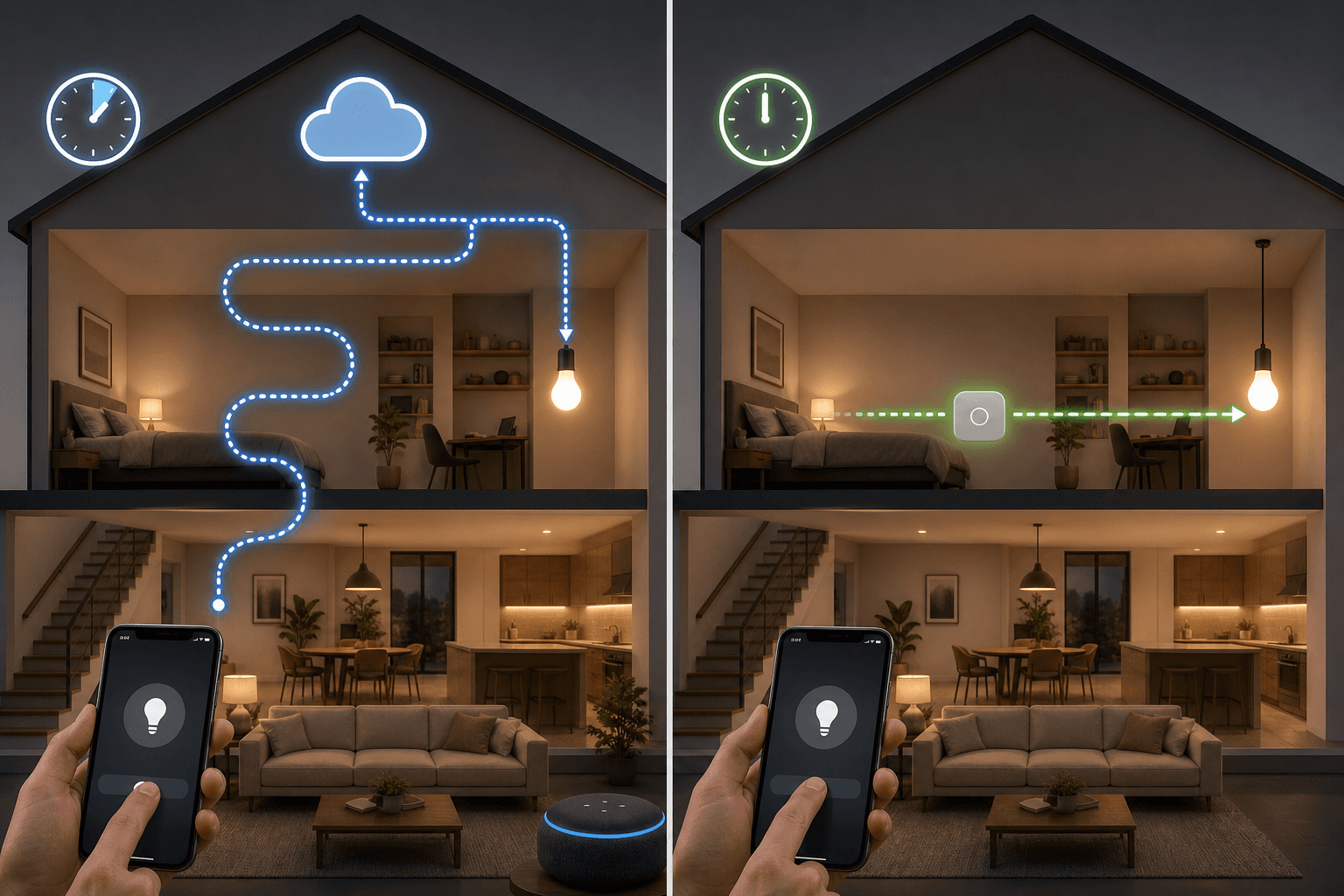
2. Local Control: Routines That Execute in Milliseconds, Not Seconds
The single most important shift is the move from cloud-dependent to local execution. In a cloud-dependent setup, a voice command travels from your speaker to a remote server and back before the light turns on. That round-trip takes 2–5 seconds and fails entirely if your internet goes down. Local control keeps the entire command chain inside your home: the hub processes the trigger, evaluates the condition, and sends the action directly to the device over your local network.
"Going local is the single best upgrade you can make in 2026 — faster routines, better reliability, and fewer privacy compromises." — Paul Lamkin, Forbes, January 2026
3. mmWave Presence Sensors: The End of 'Lights Off While You're Sitting Still'
Traditional PIR (passive infrared) sensors detect large changes in heat — someone walking across a room. They cannot detect a person sitting still, which is why motion-triggered lights have always turned off while you are reading or watching a movie. Millimeter-wave (mmWave) sensors use radar to detect micro-movements like breathing and subtle shifts in body position. They can also detect how many people are in a room and where in the room those people are located. This changes the logic of occupancy-based automation from "did someone move recently?" to "is someone actually here?"
| Capability | PIR Sensor | mmWave Sensor |
|---|---|---|
| Detects stationary person | No — requires movement | Yes — detects breathing and micro-movements |
| Multi-person detection | No | Yes — can count occupants |
| Room-level positioning | No — zone only | Yes — detects exact location within room |
| Typical price (2026) | $15–$30 | $30–$60 |
| Privacy concern level | Low — no detailed data | Low — no camera, no audio |
Automation #1: A Local-Execution Morning Routine That Responds Instantly
The first automation to rebuild is your morning routine — not because it is complex, but because it is the one you will notice most when it works instantly versus when it lags.
A cloud-dependent morning routine works like this: your alarm triggers a command that goes to the cloud, which sends a signal back to your lights, which then start to brighten. If the internet is slow or the cloud service is having a bad morning, you sit in the dark. A local-execution version keeps everything on your hub. The trigger (time of day or alarm completion) is evaluated locally. The command to brighten the lights, adjust the thermostat, and start the news briefing all happen over your local network with no external dependency.
- Trigger: Scheduled time (e.g., 6:45 AM) or sunrise offset
- Action 1: Bedroom lights gradually brighten from 1% to 60% over 15 minutes
- Action 2: Thermostat adjusts from sleep temperature to daytime comfort temperature
- Action 3: Smart speaker plays a news briefing or your morning playlist
- Action 4: Bathroom lights turn on at a warm dim level when you enter (triggered by a door sensor or mmWave presence)
The key difference is that every action in this chain is processed by your local hub. If you use Philips Hue lights with a local-capable hub, the bridge communicates directly with the lights over Zigbee. The hub does not need to check in with a cloud server before telling the lights to brighten. The result is a routine that feels immediate rather than delayed.
Automation #2: mmWave Presence-Based Room Lighting That Follows You
This is the automation that converts skeptical former adopters. If you have ever had a motion-sensor light turn off while you were sitting still — in a bathroom, a home office, or a living room — you know exactly why PIR sensors are not sufficient for occupancy-based lighting.
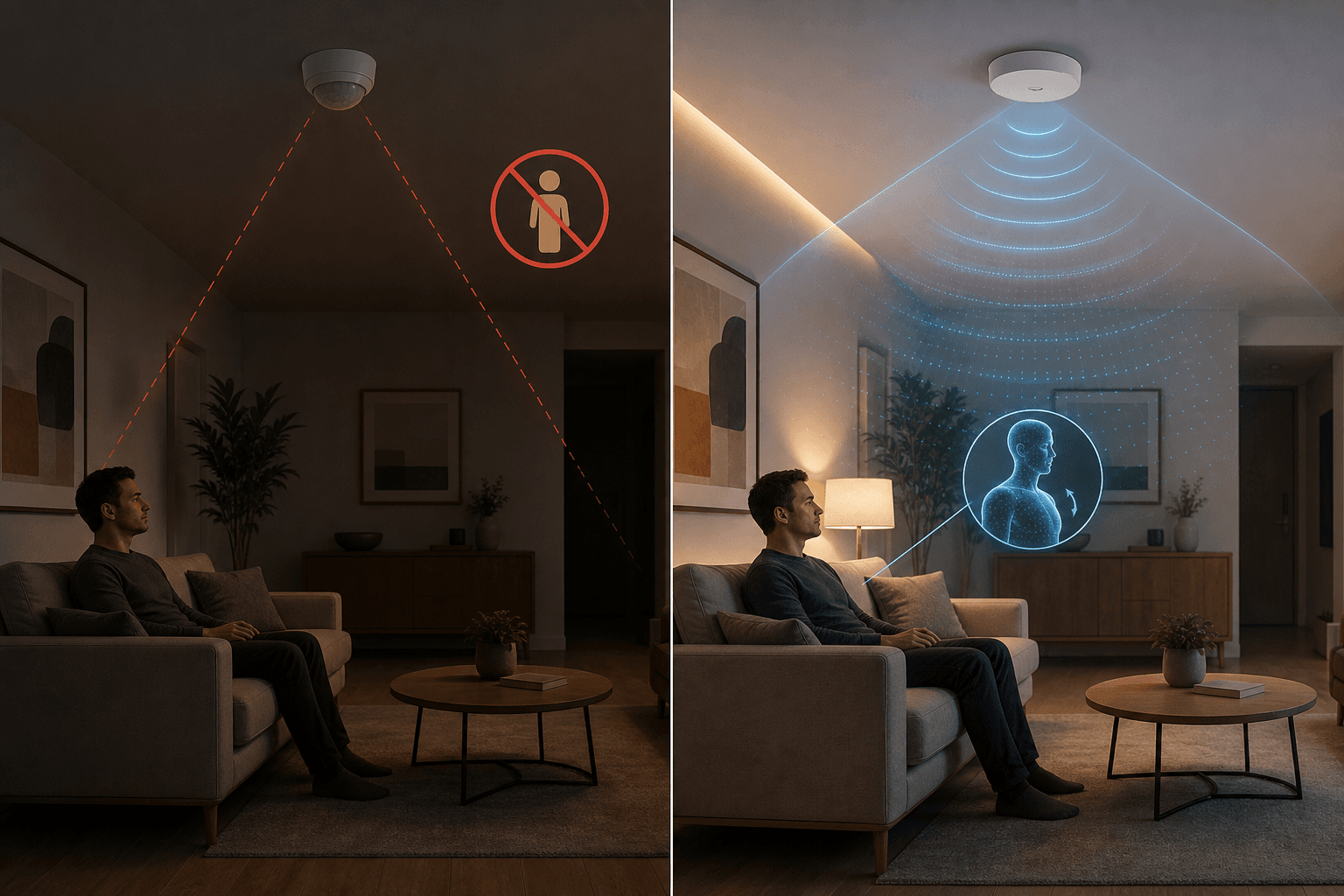
An mmWave sensor mounted in the ceiling or placed on a shelf can detect that you are in the room, that you are sitting in a specific chair, and that you have not left. The automation logic becomes genuinely useful:
- When the sensor detects a person entering the room, the lights turn on at a preset brightness based on time of day (bright during the day, warm dim in the evening)
- While the person remains in the room, the lights stay on — even if the person is completely still
- If the sensor detects multiple people, it can adjust lighting to a brighter, more social level
- When the room is confirmed empty (no micro-movements detected for a configurable timeout, typically 30–60 seconds), the lights turn off
Brands like Aqara, Meross, and SwitchBot now offer mmWave sensors in the $30–$60 range, making this upgrade accessible without a major investment. The sensors integrate with Home Assistant, Apple Home, and SmartThings via Matter, so you do not need a proprietary hub.
Automation #3: Geo-Fenced Energy-Saving Mode That Works Across Platforms via Matter
Energy-saving automations have been a promised benefit of smart homes for years, but they only deliver real savings if they actually trigger reliably. A geo-fenced away mode that fails to set the thermostat to eco because the lock and the thermostat are on different platforms is worse than no automation at all — it gives you a false sense of savings.
Matter solves this by providing a single control layer. A geo-fence trigger on your phone can simultaneously command a Nest thermostat, Philips Hue lights, and a TP-Link smart plug, even though those devices come from different manufacturers and previously required separate routines.
- Trigger: All household members' phones leave the geo-fence (typically 0.5–1 mile radius)
- Action 1: Thermostat switches to eco mode (heat to 62°F / cool to 78°F)
- Action 2: All lights turn off (with a 2-minute delay to avoid triggering if someone forgot something)
- Action 3: Non-essential smart plugs (entertainment systems, space heaters, secondary monitors) power down
- Action 4: Smart lock confirms the door is locked (and locks it if not)
The savings from this automation are measurable. Smart thermostats reduce heating and cooling energy use by an average of 18% per household, and adding geofencing features saves an additional 7–12% compared to manual scheduling alone. When you combine thermostat savings with lighting reductions — smart lighting cuts lighting-related energy consumption by 30% — the total impact on your energy bill becomes significant.
Automation #4: A Local Security Response Chain (Door Sensor → Lights → Camera → Notification)
Security automations are the area where cloud dependency is most dangerous. A cloud-dependent security chain — door opens, signal goes to cloud, cloud sends command to lights, lights turn on — introduces a 2–5 second delay that can be the difference between deterring an intruder and missing the event entirely. Worse, if your internet is down, the entire chain fails.
A local security response chain keeps every step inside your home network:
- Trigger: Door/window sensor opens while the system is armed in away mode
- Action 1 (immediate): All indoor lights on the ground floor turn on at 100% brightness — this is a deterrent, and it happens in under 200 milliseconds because the hub sends the command directly over Zigbee or Thread
- Action 2 (immediate): A local-recording camera (e.g., a camera that records to an SD card or network video recorder) begins capturing footage
- Action 3 (immediate): A loud siren or smart speaker plays an alarm tone
- Action 4 (async): A push notification is sent to your phone — this step may use the internet, but it is not on the critical path for the deterrent actions
The critical design principle here is that the deterrent actions (lights, siren) must not depend on the internet. They should execute even if your ISP is having an outage. Only the notification to your phone requires a cloud connection, and that is acceptable because it is informational rather than protective.
Automation #5: One-Trigger Goodnight Scene That Locks, Lowers, Arms, and Adjusts Climate
The goodnight scene is the ultimate test of a smart home's reliability. It requires multiple device categories — locks, lights, thermostat, security system, entertainment devices — to all execute in sequence from a single trigger. In the pre-Matter era, this meant either staying within a single ecosystem or building fragile multi-platform routines that broke whenever one manufacturer updated its API.
With Matter and Thread, a goodnight scene can span brands and categories reliably:
- Trigger: Voice command ("Goodnight"), button press on a bedside smart button, or scheduled time (10:00 PM)
- Action 1: All exterior doors lock (smart locks from Yale, Schlage, or August)
- Action 2: All lights except designated nightlights dim to off over 30 seconds (no abrupt darkness)
- Action 3: Thermostat switches to sleep temperature (typically 65°F for heating, 72°F for cooling)
- Action 4: Security system arms in night mode (interior sensors active, exterior sensors active, interior motion sensors may be bypassed if someone is home)
- Action 5: Entertainment devices (TV, game console, soundbar) power off
The reliability improvement here is dramatic. In a cloud-dependent setup, each action in the chain introduces a potential failure point. If the cloud service for your locks is slow, the lights may turn off before the doors lock, leaving you in the dark with an unlocked door. In a local setup, the hub sends all commands simultaneously over the local network, and each device confirms receipt before the scene is considered complete.
Platform Recommendations: Which Hub Should You Build Around in 2026?
The five automations above will work on most modern platforms, but the quality of the experience depends heavily on which hub you choose. Here is how the major options compare for the upgrade path described in this article.
| Platform | Local Execution | Matter Support | Best For | Learning Curve |
|---|---|---|---|---|
| Home Assistant | Full — runs entirely on your hardware | Excellent — Matter controller via add-on | Power users who want total control and maximum local execution | Steep — requires YAML or visual automation editor |
| Apple Home (HomeKit) | Full — all HomeKit-certified devices run locally | Good — Matter devices added via HomeKit | Apple households with iPhones, iPads, and HomePods | Moderate — limited to HomeKit-compatible devices |
| SmartThings | Partial — some routines run locally, some require cloud | Good — strong Matter support, Samsung ecosystem | Samsung phone users and households with mixed device brands | Low — app-based setup, good for beginners |
| Homey | Full — runs locally on the Homey hub | Good — supports Matter, Zigbee, Z-Wave, and Wi-Fi | Users who want wide protocol support without advanced configuration | Low to moderate — app-based, but more flexible than SmartThings |
For the upgrade path described in this article — local execution, cross-platform Matter control, and mmWave sensor integration — Home Assistant is the strongest recommendation. It runs on a Raspberry Pi, a used Intel NUC, or a dedicated Home Assistant Green box, and it gives you full control over which devices run locally versus through the cloud. The trade-off is setup complexity: you will spend an afternoon configuring it, and you may need to learn some YAML for advanced automations.
If you are not ready for Home Assistant, Apple Home is the best consumer-grade option for local execution. Every HomeKit-certified device runs locally by default, and Matter devices added through HomeKit inherit that local control. The limitation is device selection: not every smart lock or sensor has HomeKit certification, and you cannot add non-certified devices.
Budget Checklist: What to Buy New vs. What You Can Salvage From Your 2022–2024 Setup
One of the most common questions from frustrated adopters is whether their existing devices are usable in a modern setup. The answer depends on the device type and protocol. Here is a practical salvage guide.
| Device Type | Keep If... | Replace If... | Estimated Replacement Cost |
|---|---|---|---|
| Smart lights (bulbs, strips) | They use Zigbee or Thread and can be paired with a Matter-compatible bridge | They are Wi-Fi-only with no local API (cloud-dependent only) | $15–$50 per bulb for Matter-compatible replacements |
| Smart thermostat | It is ENERGY STAR certified and supports local control via your hub | It requires cloud-only control or is not compatible with your chosen platform | $130–$280 for a new model (see our best smart thermostats buyer guide) |
| Smart lock | It supports Matter or can be integrated via a Matter bridge | It uses a proprietary protocol with no bridge to Matter | $150–$300 for a Matter-compatible smart lock |
| Motion / door / window sensors | They use Zigbee or Z-Wave and can be added to a compatible hub | They are proprietary (e.g., old Iris or Wink sensors) with no bridge path | $15–$40 per sensor for Zigbee/Thread replacements |
| Hub / bridge | It supports Matter and local execution (e.g., Hubitat, Home Assistant, Homey) | It is a cloud-dependent hub from a defunct or sunsetting platform | $100–$300 for a new hub |
| Camera | It supports local recording (SD card, NVR) and ONVIF or RTSP streaming | It requires cloud subscription for all recording and has no local streaming option | $50–$200 per camera for local-recording models |
For thermostat upgrades specifically, the Ecobee Premium vs. Nest Learning Thermostat comparison covers the two leading options for cross-platform households. Both support Matter and local control, but their integration depth with different platforms varies.
Common Upgrade Pitfalls and How to Avoid Them
Rebuilding a smart home setup is not without risks. Here are the mistakes that frustrated adopters most commonly make when upgrading, and how to avoid them.
- Assuming all Matter devices are equal. Matter devices can use Wi-Fi or Thread as their transport layer. Wi-Fi Matter devices work fine but do not benefit from Thread's mesh networking and may consume more power. For battery-powered sensors, always choose Thread Matter over Wi-Fi Matter.
- Buying a hub that does not support local execution. Some hubs marketed as "smart home controllers" still route commands through the cloud for certain device types. Before purchasing, verify that the hub can process triggers and execute actions locally for the specific devices you plan to use.
- Keeping a cloud-dependent bridge as a single point of failure. If you keep an old bridge to support legacy devices, that bridge becomes a single point of failure for those devices. Either migrate all devices to the new hub or accept that those devices will not work during internet outages.
- Over-investing in sensors before choosing a platform. mmWave sensors are excellent, but they are not all compatible with every platform. Buy one sensor first, confirm it works with your chosen hub and automation engine, then scale up.
- Ignoring the 41% adoption rate of routine-based automation. According to SQ Magazine, 41% of smart home users engage in routine-based automation. If you are rebuilding, start with one routine (the morning routine or the goodnight scene), get it working reliably, then add complexity. Trying to rebuild everything at once is the fastest path to frustration.
The smart home of 2026 is not perfect, but it is dramatically better than what was available two years ago. Matter has made cross-platform compatibility real. Local control has eliminated the lag and internet dependency that made early automations unreliable. And mmWave sensors have solved the fundamental detection problem that limited occupancy-based automation. If you have been waiting for the technology to catch up to the promise, the wait is over.
Implementation Notes
Share platform-specific tips, report that a recipe no longer works after a platform update, or contribute variations for different device combinations.
Comments
Join the discussion with an anonymous comment.