
What Siri AI Actually Changes for Smart Home Control in iOS 27
iOS 27's Siri AI brings natural language camera search, AI-generated video summaries, and voice-driven automation creation to HomeKit, but leaves multi-device commands and complex scene execution unreliable. This dated breakdown covers which features work today, which require new hardware or a 2TB iCloud+ plan, and which pain points persist.
As of Q3 2026, the useful question after installing iOS 27 is not whether Siri has been “fixed.” It is narrower: what can you say to Siri or search in the Home app today that you could not before? The answer is clearest around cameras. Siri AI and the iOS 27 Home app can search HomeKit Secure Video footage in natural language, generate written summaries of motion events, group related clips from multiple cameras, and update alerts in real time instead of leaving a pile of separate notifications behind.[1][2][3]
Voice-created automations are also part of the iOS 27 story, but they belong in a different bucket. Natural Language Automation is being described as a way to create Shortcuts and Home automations by saying what you want in plain language, yet beta evidence is thinner than it is for camera search and notifications.[1][2] The old HomeKit frustrations have not disappeared either: mixed commands such as turning off lights and locking a door in one utterance still need a pre-built scene in many reported cases, and complex conditional automation by voice remains unreliable in beta-user reports.[4]
| Status in Q3 2026 | What changed | What to check first |
|---|---|---|
| Strongest confirmed change | Natural language camera search, AI motion summaries, grouped footage, updating notifications | HomeKit Secure Video cameras, supported iPhone, and iCloud+ tier |
| Promising but less proven | Plain-language creation of Shortcuts and Home automations | Whether your exact automation type works in the current iOS 27 beta |
| Still a pain point | Mixed multi-device commands and complex scene execution | Whether a scene or manual automation is still required |
| Hardware-gated | Siri AI processing on supported devices and future home hubs | iPhone 15 Pro or later; current HomePod mini and HomePod are excluded |
| Monitoring item | Home Hub connectivity and Siri AI activation failures reported by some beta users | Whether the issue persists after later beta builds |
The Biggest Everyday Change Is Camera Search
The feature that feels least like old Siri is asking for footage in normal language. Instead of opening a camera timeline, dragging through clips, and guessing whether the relevant alert came from the porch camera or the driveway camera, iOS 27 lets the Home app search for events such as a package being delivered. Reports from the iOS 27 Home app beta also describe the same kind of search working from Spotlight, which matters because it removes one more tap before the useful part starts.[1][2]
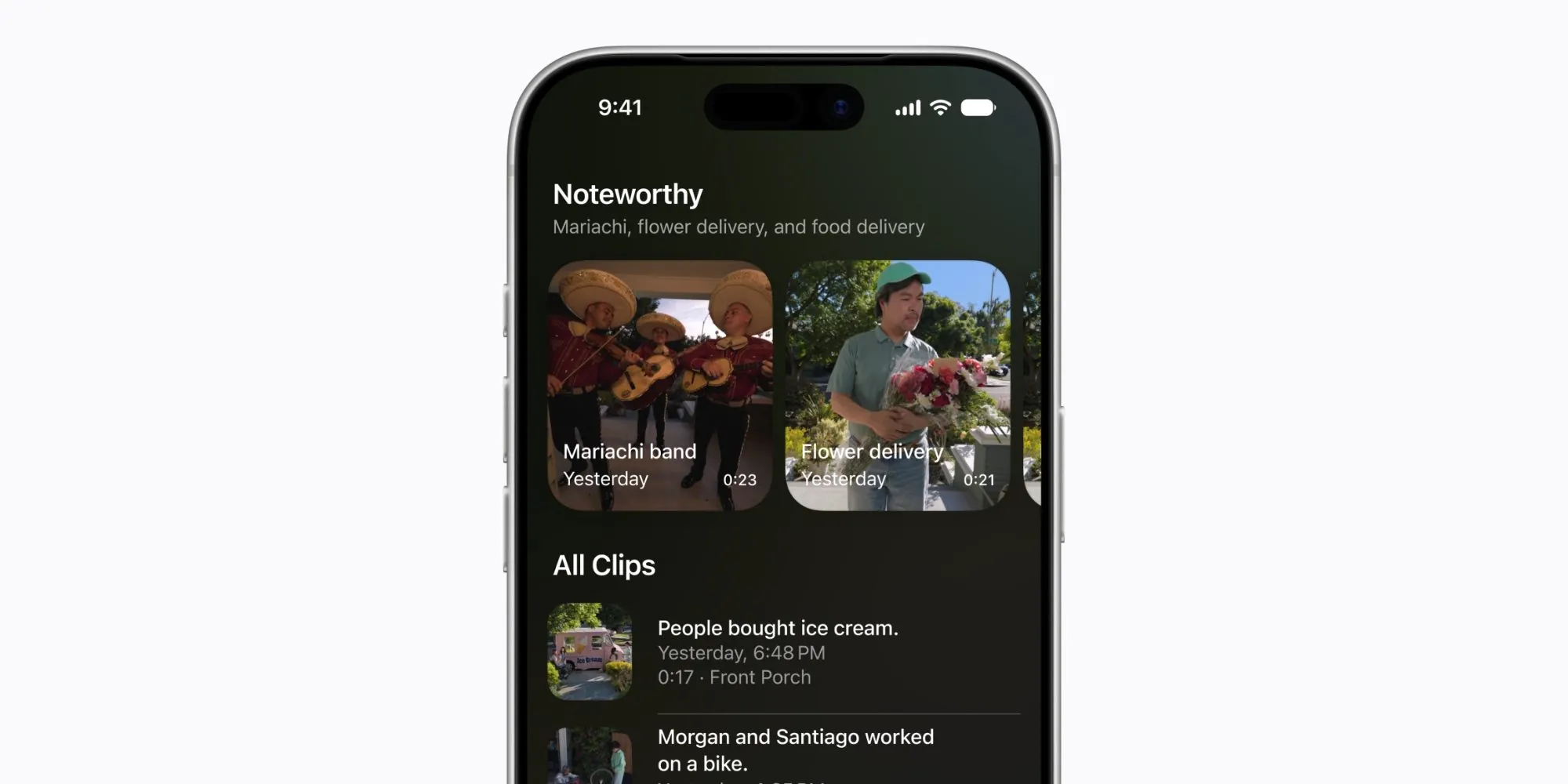
That is a real smart home improvement because it changes the task. Traditional HomeKit Secure Video alerts tell you that motion happened. The new search and summary layer tries to answer what happened. Written summaries can describe motion events in plain terms, such as a person walking through a room or a dog sitting on the floor, rather than forcing the user to open every clip that might be relevant.[1][2]
Grouped footage is the other practical piece. If a person, pet, or delivery moves through the field of view of more than one camera, iOS 27 can stitch related clips into a single timeline instead of treating each camera as a separate little mystery.[1][2] This is the sort of change that sounds small until the day you have ten alerts from three cameras and only want to know whether the package reached the porch, the side gate, or neither.
PCMag’s early coverage singled out the camera and notification changes as the most overlooked smart home improvement in iOS 27, which matches the shape of the beta evidence: this is not merely a more charming Siri voice. It is a reduction in video review work.[3]
Notifications Finally Behave More Like a Live Event
The notification change deserves almost as much attention as search. In older HomeKit use, a moving person or pet could turn into a stack of stale alerts: one notification when motion begins, another when a camera picks up the next angle, another when a slightly different detection label appears. iOS 27 introduces real-time updating notifications, replacing that old pattern with alerts that can update as the event changes.[1][2][3]
This matters most when the phone is locked. A written motion summary on the lock screen can save a trip into the Home app, while an updating alert can keep the event attached to one notification rather than scattering it across several. It does not make the camera smarter in the physical sense; it makes the review loop less irritating.
There is a boundary here that should not be hidden. These are Apple Intelligence Home features layered onto HomeKit Secure Video. If the household has lights, plugs, locks, and thermostats but no compatible cameras, the most impressive part of Siri AI for the Home app may not show up in daily use.
The Gate: iPhone, iCloud+, and Camera Plan
The subscription line is not a footnote. MacRumors reported on July 6, 2026 that Apple Intelligence Home features such as video summaries and camera search require the 2TB iCloud+ plan, priced at $9.99 per month in the U.S.[5] HomeKit Secure Video storage still does not count against iCloud+ storage, but the AI features sit behind the higher tier.[5]
| iCloud+ tier | HomeKit Secure Video support described in the brief | Apple Intelligence Home features |
|---|---|---|
| 50GB, $0.99/month | 1 camera | Not included |
| 200GB, $2.99/month | Up to 5 cameras | Not included |
| 2TB+, $9.99/month | Unlimited cameras | Included for camera search and video summaries |
The hardware line is just as important. Apple’s WWDC 2026 Siri AI announcement described a minimum A17 Pro or M1 chip requirement for standard Siri AI features, with A19 Pro or M3 needed for the advanced on-device model.[6] For iPhone users, the practical floor is iPhone 15 Pro or later.[6]

That means two people can both say they installed iOS 27 and still have very different Home app experiences. One may be using an iPhone 15 Pro with multiple HomeKit Secure Video cameras and a 2TB iCloud+ plan; the other may be on an older iPhone with the same cameras but without the Apple Intelligence Home layer. The second setup did not fail. It simply did not meet the gate.
For a broader platform map, the related Apple HomeKit Platform Overview 2026 is the better place to track how HomeKit, hubs, and protocols fit together. For the immediate buying decision, the important point is simpler: do not price an iOS 27 smart home upgrade by looking only at the phone.
Current HomePods Are Still on the Wrong Side of the Line
Older HomePods need their own reality check because they are easy to over-credit in an Apple Home setup. Macworld’s chip analysis notes that the current HomePod mini uses an S5 chip and the current HomePod uses an S7 chip, leaving both outside the Siri AI requirement described for A17 Pro or M1-class hardware.[7] They can remain useful speakers and Home hubs, but they cannot run Siri AI themselves under the requirements described in the current reporting.[7]
That distinction affects how voice control feels around the house. If the Siri AI-capable device is your iPhone, then the new intelligence is attached to the phone experience. A HomePod in the kitchen does not automatically become the same kind of assistant just because the household upgraded to iOS 27.
Bloomberg and AppleInsider reporting points to a new HomePod mini, a refreshed Apple TV, and an all-new Home Hub with a 7-inch display, with launches expected from October 2026 through early 2027; AppleInsider also reported estimated pricing of $129 for the HomePod mini refresh and $199 for the new Apple TV.[8] Those are not Apple announcements, so they should not be treated like a compatibility guarantee.
Anyone tempted to buy a current Apple TV 4K or HomePod mainly for Siri AI should cross-check the related Should You Buy the Apple TV 4K Smart Home Hub Now or Wait? piece before spending money. The new hub cycle may matter, but the confirmed iOS 27 features do not make today’s excluded HomePod chips suddenly capable.
Natural Language Automation Is Useful If It Stays Narrow
Natural Language Automation is the feature with the most obvious upside and the least settled evidence. The idea is that Siri can help create Shortcuts and Home automations from a plain-language description instead of making the user build every trigger, accessory state, and action manually.[1][2] For people who understand what they want but do not enjoy digging through automation screens, that could remove a real barrier.
The safe way to read it in Q3 2026 is as a simpler creation interface, not as proof that Siri now understands the whole home. A hypothetical good use would be asking for a basic evening automation that turns on a lamp at sunset. A riskier one would be a conditional chain involving several accessory types, presence, camera motion, and exceptions. The current evidence supports the promise of plain-language automation creation, but not a broad claim that complex conditional automation by voice is now dependable.
This is where it helps to keep old scenes and manual automations around. If an automation controls security, locks, garage doors, or anything that carries a consequence when it misfires, the generated result still needs review. A convenient creation step is not the same as reliable execution.
The Command Siri Still Should Understand
The most annoying remaining gap is also the easiest to explain: Siri still struggles with mixed, multi-device commands in one utterance. Beta-user reports cited in the research brief describe commands such as “Turn off the lights and lock the door” failing unless the user has already built a scene for that exact outcome.[4]
This is not an exotic power-user request. It is the kind of thing people assume a smart assistant should do because the sentence is simple. The home graph already knows which devices are lights and which device is the lock. The missing piece is dependable intent splitting and execution across different accessory types without forcing the user to pre-compose the action.
Scenes remain the workaround. “Good night” can still be the reliable way to turn off lights, lock a door, lower a thermostat, and close shades, because the Home app executes the scene rather than asking Siri to improvise a multi-action plan. That is fine for known routines. It is less satisfying when the user wants a one-off command that any human in the room would understand.
Complex scene execution also remains a place to be cautious. Current reports point to persistent reliability problems, not a precise failure rate, so there is no honest number to attach to it. The practical reading is that iOS 27 improves some discovery and creation tasks more than it improves whole-home command reliability.
Beta Problems to Watch, Not Overstate
Siri AI remains in developer beta as of late July 2026, with a wider user-facing beta expected later in 2026 and final release planned for fall 2026.[6] That timing matters when reading reports of Home Hub connectivity problems or Siri AI activation failures. They are worth watching because Home Hub reliability and Siri activation are historically fragile areas, but they are not enough by themselves to judge the final iOS 27 release.
If a home starts misbehaving after the update, the related How to Fix HomeKit Devices Not Working After iOS 27 Update piece is the better troubleshooting companion. This article is about capability boundaries; beta repair steps belong in a separate troubleshooting guide.
The before-and-after comparison with iOS 26.6 is also worth keeping separate. The related How iOS 26.6 Impacts Your HomeKit Devices article can help isolate whether a change is part of the new Siri AI layer, part of Home app behavior, or just the familiar instability that can arrive during a major iOS cycle.
Practical Verdict for iOS 27 HomeKit Users
For Siri smart home control in the iOS 27 Apple Intelligence update, the best-supported improvement is not general conversation with the house. It is finding, summarizing, and organizing camera events. If you have supported hardware, HomeKit Secure Video cameras, and the 2TB iCloud+ plan, the new search and notification features can save real time.
Natural Language Automation may reduce the friction of building simple routines, but it should be treated as beta-stage and scope-limited until more repeatable examples exist. Mixed multi-device commands, complex conditional automation by voice, and reliable whole-home scene execution are not solved just because Siri AI has arrived.
So the upgrade judgment is split. iOS 27 makes Siri meaningfully better at camera search and event review. It may make simple automation creation easier. It does not yet make Siri a reliable command layer for the whole home, and it should not push anyone with older HomePods into assuming their speakers became Siri AI hubs overnight.
References
- Here’s everything new for Apple’s Home app in iOS 27 — 9to5Mac, June 11, 2026
- iOS 27 Home App: 10+ New HomeKit Features — MacRumors
- Forget Siri AI: This Overlooked iOS 27 Update Is the Best Smart Home Feature in Years — PCMag
- iOS 27 beta-user forum reports on Siri smart home control — MacRumors Forums
- Apple Intelligence Home Features Require 2TB iCloud+ Plan in iOS 27 — MacRumors, July 6, 2026
- Apple introduces Siri AI, a profoundly more capable and personal assistant — Apple Newsroom, WWDC 2026
- Apple’s silence about HomePod and Apple TV at WWDC spoke volumes — Macworld
- Apple’s smart home hardware refresh draws closer with Siri AI smarts — AppleInsider, July 28, 2026
Resolution
Protocol background
For general spec/firmware mechanics, see Compatibility & Protocols.
No linked protocol reference for this update yet.