
Troubleshooting
Smart speaker alert fails during network/power loss
Set up a dedicated Zigbee or Z-Wave siren that automatically activates on NWS severe thunderstorm warnings, with severity-based branching and multi-device response that works even when Wi-Fi is down.
The failure mode is usually not the storm itself. It is the cloud speaker that goes quiet right when the router hiccups, the app stops polling, or the power path gets messy. For severe thunderstorm warnings, a dedicated Zigbee or Z-Wave siren is the better last physical layer because it can still be reached through the hub's local mesh while the rest of the network is degrading, as long as the hub itself has backup power.
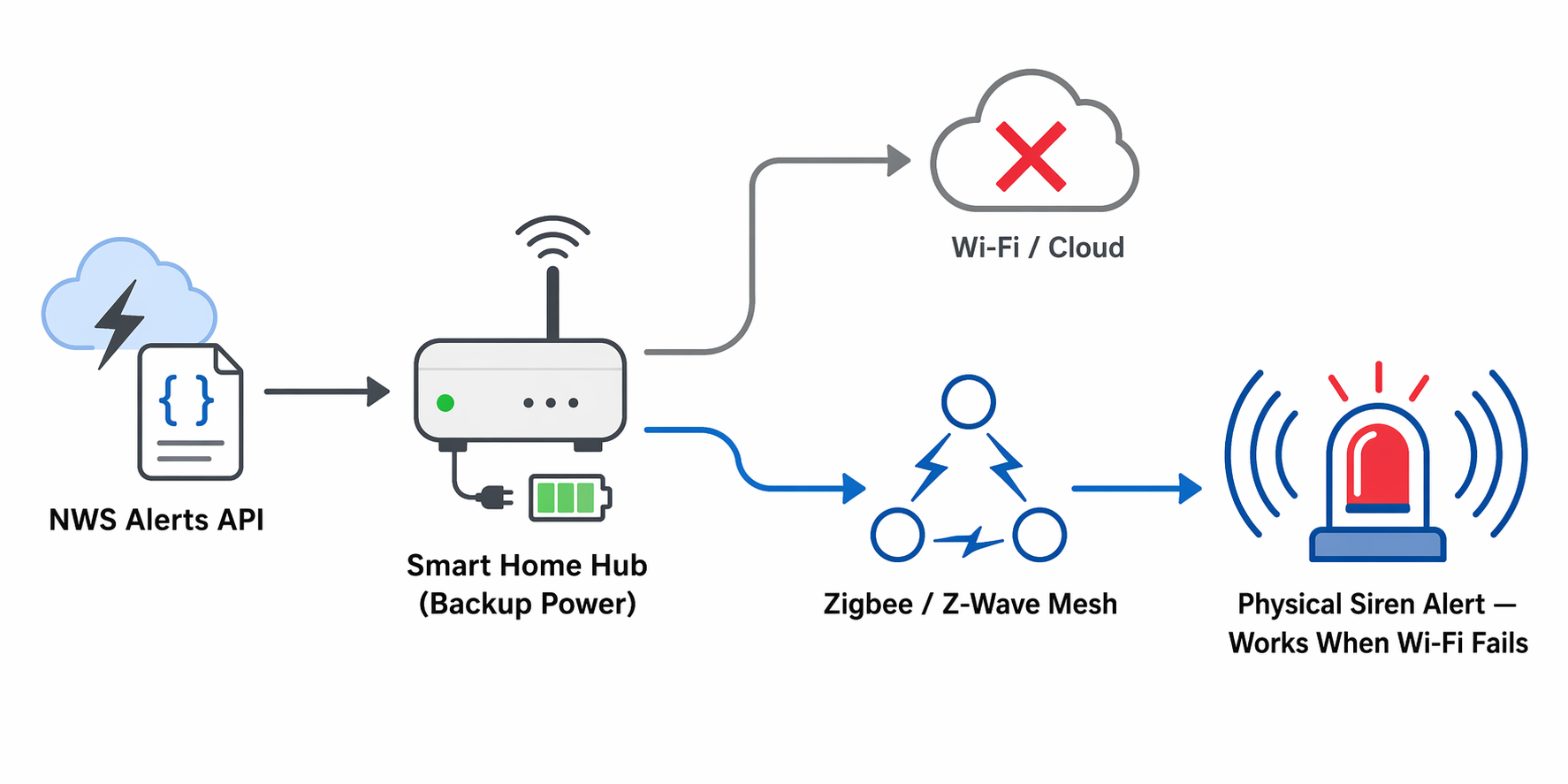
Start With the Right NWS Event
NWS severe thunderstorm warnings are specific. The warning threshold is 58 mph winds and/or 1-inch hail, and NWS's newer damage-threat framing splits the warning into base, considerable, and destructive tiers. Only about 10% of severe thunderstorm warnings reach the destructive tier, the one associated with automatic WEA smartphone alerts.[1][2]
In Home Assistant, the NWS Alerts integration polls the official NWS API every 60 seconds by default, with a 30-600 second range if you want it tighter or looser. It can scope to an NWS zone ID, a GPS location, or a `device_tracker`, and it exposes both a `Severity` attribute and an alert count sensor like `sensor.nws_alerts_alerts` so you can branch on the active alert instead of guessing from a notification title.[3]
The filter that keeps the siren from waking the house for the wrong reason is the CAP event code `SV.W`. That keeps the automation on severe thunderstorm warnings and off unrelated weather notices such as advisories, watches, or statement-level updates.[4]
Turn Severity Into a Response Ladder
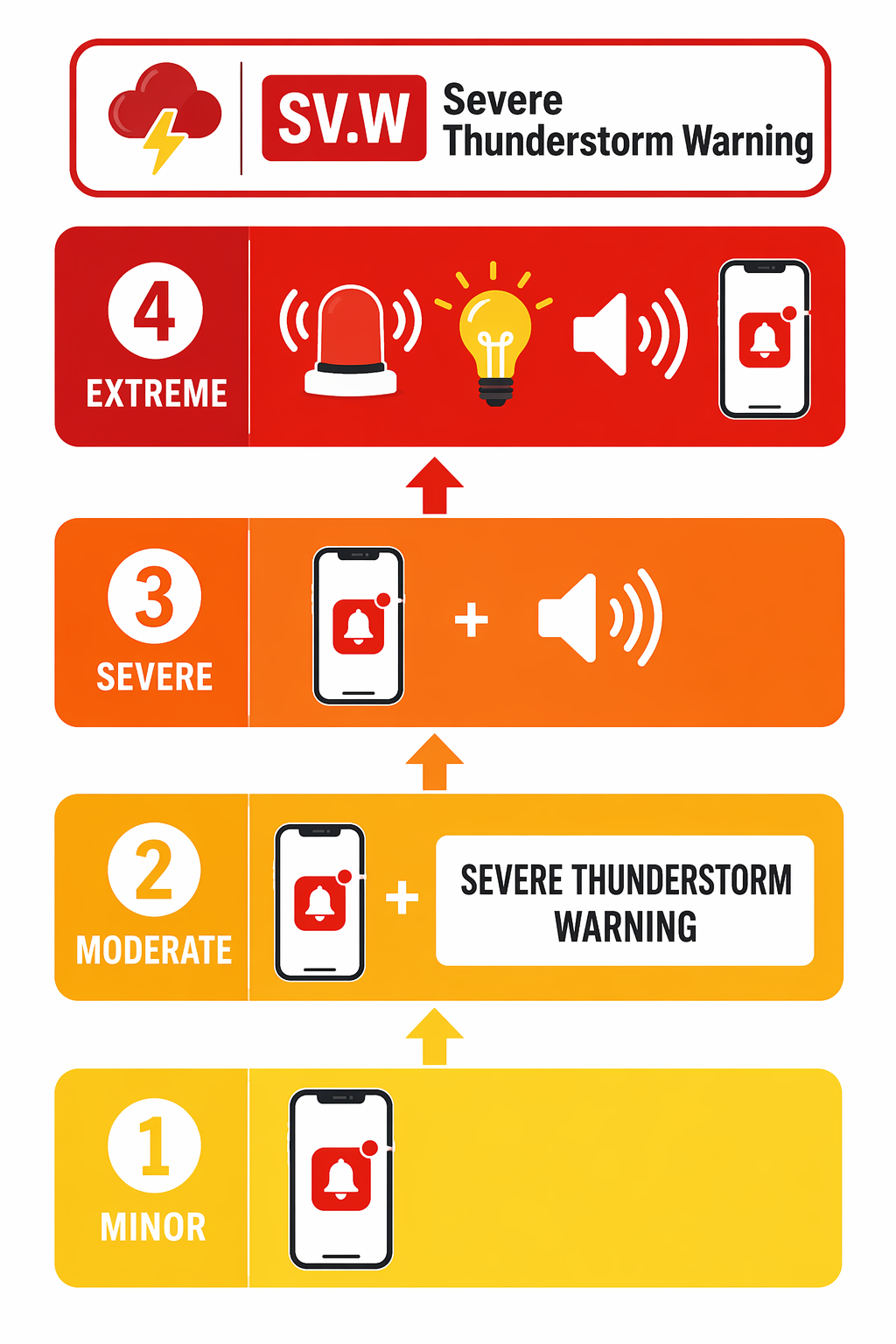
Once the alert source is clean, the severity attribute gives you room to scale the response instead of treating every warning like a housefire. A simple ladder is usually enough, and it is easier to test than a single all-or-nothing rule.
- Minor: send a push notification only.
- Moderate: push plus a stronger headline or banner.
- Severe: add text-to-speech on the speakers you expect to hear while people are awake.
- Extreme: turn on selected lights, speak on every available speaker, and trigger the siren.
That shape matters because most warnings are not destructive-tier events. If every alert hits the siren, you will train yourself to ignore it; if only the upper tiers make noise, the siren keeps its meaning.
Pick the Siren for the Mesh
Brand matters less than protocol and placement. The main question is whether the device is a local siren on Zigbee or Z-Wave, not whether it can talk to a cloud app.
| Model | Useful detail | Best fit |
|---|---|---|
| Aeotec Siren 6 [5] | 105 dB, configurable tones, visual alert | A louder main siren with local control |
| Zooz ZSE50 800LR [6] | Z-Wave Long Range coverage | A siren that sits farther from the hub |
The practical advantage here is not theatrical volume; it is that the siren lives inside the same local control path as the hub. If Wi-Fi drops, the siren still has a route as long as the hub and mesh stay powered.
That is also why cloud speakers are only a secondary layer. One May 2025 Michigan tornado report described battery-backed smart speakers still working after grid power failed, which is useful but still not the same as a local siren on a UPS-backed hub.[7]
Keep Cloud Options Secondary
If you want another option in the stack, the `weatheralerts` custom component is worth a look, especially for dashboard-heavy setups. Treat it as a secondary path, though; the siren recipe stays cleaner when the official NWS feed lands in one local hub and the rest of the house follows from there.[8]
Test the Failure Case Before the Storm
As of July 22, 2026, the quickest non-storm test is to hit `api.weather.gov/alerts/active` with a known active alert, confirm the NWS sensor changes, and watch the matching branch fire in the hub.[9]
Then pull Wi-Fi and repeat the check from the local side. If the siren still sounds and the lights still respond while the hub stays up on backup power, the part that matters is working. If any step still depends on a cloud hop, that is the piece to remove or replace.
Once the warning is scoped to `SV.W`, the severity branches are behaving, and the siren still sounds when Wi-Fi is not, you have the alert path that answers the failure mode that caused the problem in the first place. Keep the hub on backup power and keep the integrations current; it is a compatibility recipe, not life-safety authority.
References
- New Damage Threat Categories for Severe Thunderstorm Warnings — National Weather Service Chicago
- Weather warnings on the go! Wireless Emergency Alerts — National Weather Service
- nws_alerts — GitHub
- Common Alerting Protocol (CAP) — National Weather Service
- Aeotec Siren 6 — Aeotec
- ZSE50 800LR Z-Wave Long Range Siren — The Smartest House
- Using Google Home and Alexa for Tornado & Emergency Safety — Warren Schuitema
- weatheralerts — GitHub
- Easy way to Display Weather Alerts in Home Assistant — Mostly Chris
Report an issue with this fix
If this fix didn't work, is out of date, or the status label looks wrong, tell us — we re-verify before changing a Confirmed label.