
Troubleshooting
Devices malfunction or fail after power outage
Understand the six major causes of power outages—weather, wildlife, equipment failure, vehicle accidents, rolling blackouts, and cyber/physical attacks—and learn which smart home precaution actually protects your setup based on the cause most common in your region. This article maps each cause to a specific strategy, replacing generic advice with targeted protection.
The wrong starting question is “What should I buy for power outages?” For a smart home, the better question is “What kind of outage keeps happening here?” A storm restoration surge, a squirrel-triggered flicker, a failed transformer, a car into a pole, a scheduled rolling blackout, and a rare attack scenario can all put the house in the same visible state: lights out, router down, automations stalled. They do not damage or confuse equipment in the same way.
Weather deserves top billing for major events: Climate Central’s analysis of DOE Form OE-417 data found that 83% of major U.S. outages from 2000 through 2023 were weather-related, with “major” meaning at least 50,000 customers affected or 300 MW of demand lost, not every neighborhood blink on a windy Tuesday.[1] Wildlife is often treated like trivia until a transformer pops; utilities and outage-prevention groups identify animals as a major cause, and public power utilities report wildlife as their most common outage cause.[2][3] Equipment failure is harder to see from the curb, but Liniotech’s March 2026 self-reported data says it was the leading identified cause in its dataset, with restoration averaging 9.2 hours; useful, but not the same as audited federal outage accounting.[4]
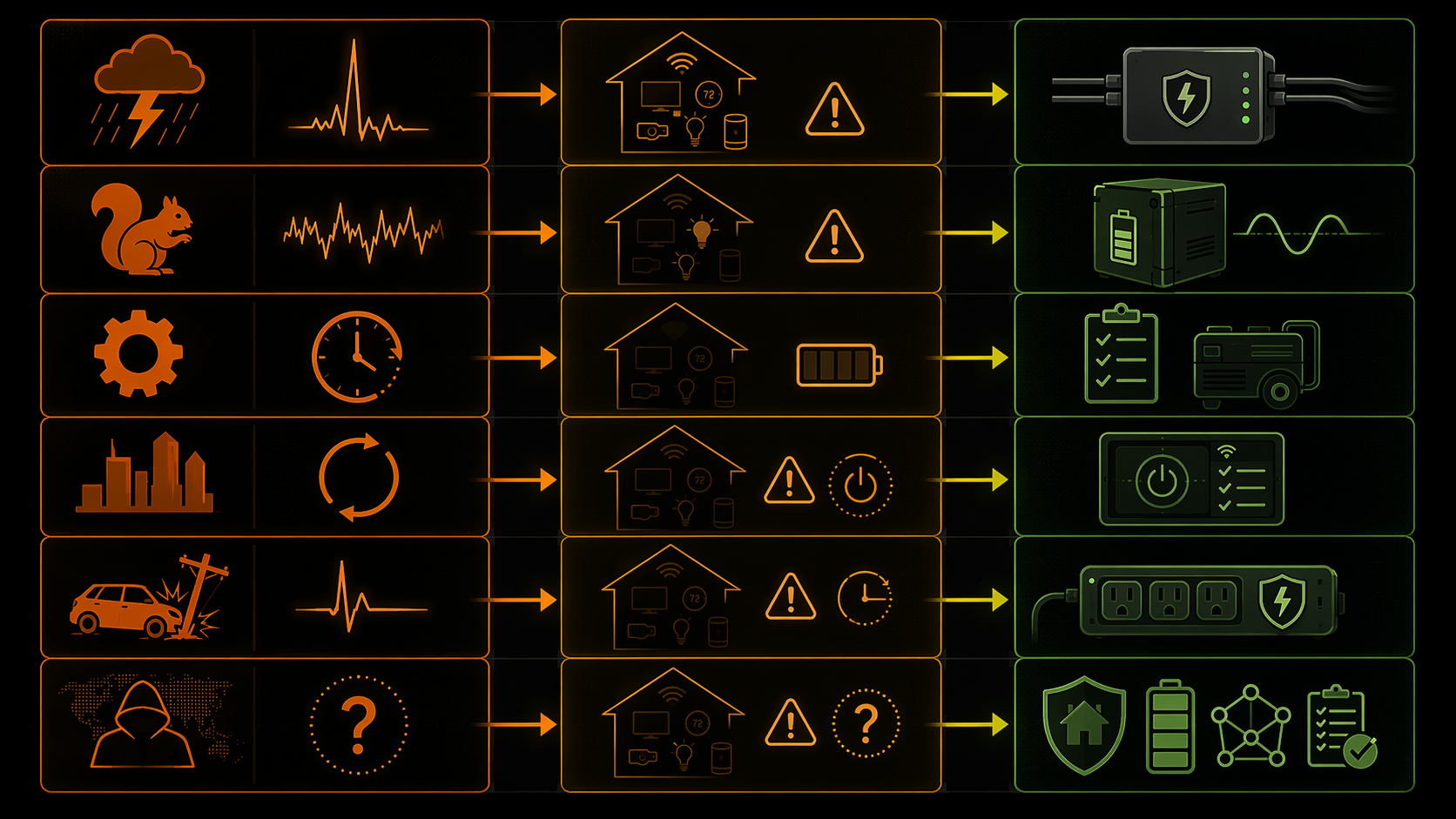
| Likely rank | Cause | What smart-home gear experiences | Best-fit precaution |
|---|---|---|---|
| 1 | Weather | Long outages, restoration surges, wet or wind-damaged utility equipment, and sometimes repeated faults before stable service returns. | Whole-home surge protection first; then a runtime plan for router, hub, security devices, and essential sensors. |
| 2 | Wildlife | Brief interruptions, voltage dips, flickers, and fast restarts that can make hubs, routers, and mesh nodes behave strangely even when nothing looks burned. | UPS units with AVR for networking and hubs; avoid relying on a basic battery that passes poor voltage through. |
| 3 | Equipment failure | A clean-looking outage that simply lasts too long for small UPS units; devices survive but the home loses connectivity, logs, automations, and security availability. | Realistic backup runtime planning; small UPS units are only a bridge unless the outage is short. |
| 4 | High demand / rolling blackouts | Scheduled or semi-scheduled power cycling: off, on, off again. The risk is repeated restart stress and messy recovery, not just total duration. | Controlled shutdown, preemptive unplugging for sensitive gear, and restart sequencing after power returns. |
| 5 | Vehicle accidents | Localized interruption, sometimes with a sharp fault and then a restoration event once crews repair the line. | Standard surge protection plus enough UPS runtime to keep the network and hub alive through short local repairs. |
| 6 | Cyber or physical attacks | Low-probability, high-uncertainty disruption; planning should focus on recovery, local control, and not depending on a cloud path for every basic function. | Resilience: local automations where possible, documented recovery steps, offline access, and backup power only for genuinely necessary devices. |
Why the cause changes the smart-home risk
A connected home does not fail as one object. The fridge may be fine, the lights may come back, and the thermostat may still show a screen while the hub has lost half its mesh, the router has booted before the modem is ready, and a smart switch has quietly stopped responding. The annoyance usually lands after the outage, when the house looks powered but the system is not behaving like a system.
Weather is the broadest bucket, and that is exactly why it needs care. A thunderstorm, hurricane, ice storm, wildfire-related line fault, and wind event can all sit under “weather,” but the common smart-home problem is not merely that power is absent. Restoration can bring voltage spikes, and weather is one of the outage categories associated with the largest surge risk when service returns.[6] That matters for hardwired smart switches, smart panels, garage-door controllers, security equipment, irrigation controllers, and anything else tied into the house rather than politely plugged into one protected strip.
Wildlife outages are smaller in imagination and nastier in practice. A squirrel, bird, snake, or other animal can cause a fault that produces a quick interruption or repeated flicker. That pattern is easy to dismiss because the clocks may not even fully reset. Electronics do not love that middle state. Brownouts and rapid cycling can leave power supplies, hubs, and radios in half-recovered conditions, especially when several devices restart in different orders. The result may be a router that comes back, a hub that comes back, and a few battery or mains-powered nodes that do not rejoin cleanly.
Equipment failure has a different shape. If a transformer, feeder, underground component, or substation element fails, the house may not see dramatic flickering; it may just go dark and stay dark. That is where the 9.2-hour average restoration time in Liniotech’s 2026 dataset is useful as a reality check, with the caveat that it is self-reported and directional.[4] A small UPS that keeps a router alive for a short gap is not a plan for an outage measured in working hours. It buys graceful shutdown time, preserves connectivity briefly, or bridges a momentary transfer. It does not turn a normal smart home into an island.
Rolling blackouts are their own problem because they can be planned, repeated, and still rough on devices. The smart-home risk is not only “how many minutes can the battery last?” It is also what happens when the power returns long enough for every plug, bulb, hub, access point, and appliance controller to boot, then drops again. Repeated cycling can produce a messier recovery than one clean outage, especially in homes where automations depend on cloud services, Wi-Fi devices, and hubs all coming online in a sensible order.
Vehicle accidents and attack scenarios sit lower on the practical planning list for most homes, but they should not be treated the same. A car hitting a pole is usually local and concrete: a line is down, crews repair it, power returns. A cyber or physical attack scenario is rarer and less predictable from a household planning perspective. The smart-home lesson is modest: do not make every lock, light, camera, and sensor useless without cloud access or a single powered hub if those functions matter during a disruption.
The protection layer should match the failure mode
Whole-home surge protection is the plain device that gets skipped because it is not glamorous. Installed at the electrical panel, it is meant to clamp surge energy before it travels through branch circuits. One consumer-facing overview points to 80 kA models around $150, but the important point is not that exact shopping number; it is that panel-level protection reaches hardwired equipment a plug-in strip will never touch.[8] A smart switch in the wall, a wired doorbell transformer, or a garage controller does not care that the TV stand has a nice surge strip.
That makes whole-home surge protection most relevant where weather restoration or line faults are the dominant concern. It is not magic. It does not keep the router on, it does not give a camera battery life, and it does not make a nine-hour outage shorter. Its job is narrower and still worth taking seriously: reduce the chance that a restoration event or nearby electrical disturbance damages devices distributed across the house.
For flickers and brownouts, the better first question is whether the UPS has AVR, or automatic voltage regulation. A basic standby UPS can be useful when power drops cleanly. AVR matters when voltage sags or fluctuates because it can correct under-voltage or over-voltage conditions without immediately switching to battery. That is why wildlife-prone flicker territory and shaky local circuits call for different gear than a once-a-year long blackout plan. The vulnerable devices are usually boring and central: modem, router, mesh base, hub, network switch, and anything that acts as the traffic cop for the rest of the home.
For long weather outages and equipment failures, backup planning has to move from “keep it alive for a bit” to “choose what deserves runtime.” A house full of smart plugs, displays, cameras, speakers, bulbs, and bridges can drain batteries for no useful reason. The practical order is usually network first, then the automation hub, then security or safety devices whose absence changes what the household can do. Readers who have already identified extended outage runtime as the real problem can use How to Power Your Smart Home Through a Blackout as the next layer, because that is where a tiered battery plan belongs.
For planned rolling blackouts, the cleanest precaution may be less heroic: shut down or disconnect sensitive equipment before the scheduled cut, then bring the system back in order. Network gear first. Hubs after the network is stable. High-draw or nonessential smart devices last. If the utility has announced a cycling window, letting every device ride each cut and restart on its own is not always the gentlest option.
Z-Wave and similar mesh systems deserve special mention because their failures can look irrational after power returns. Hubitat and Home Assistant community threads document cases where devices were marked dead or a damaged node disrupted the mesh after a power cut.[9][10] Those threads do not prove this is common across all installations. They do prove the failure mode exists: one device can become the noisy, broken part of the network, and the repair is not solved by staring at the main hub as if it must be the only suspect.
Use your region to narrow the likely cause
National outage data tells you what deserves attention; local patterns tell you what to buy or change first. The broader trend is not comforting: Oak Ridge National Laboratory reported that major outages increased 29% from 2018 to 2024, while average outage duration lengthened from 9.6 to 11.8 hours.[5] That does not mean every home needs the same backup stack. It means outage behavior is now a normal operating condition for connected homes, not an edge case reserved for storm preppers.
Texas is a good example of mixed causes: grid strain can matter, but weather can still be the event that starts the trouble. California adds another wrinkle, because wildfire conditions and public-safety power shutoffs make planned or semi-planned interruptions part of the conversation. In the Southeast, hurricanes and severe storms push weather and long restoration windows higher on the list. These examples are not a substitute for your utility’s outage map, local alerts, or your own logs; they are reminders to sort by mechanism, not by anxiety.
- If your outages arrive with storms and restoration bangs, prioritize surge protection before expanding batteries.
- If your lights flicker and devices half-reboot, put UPS units with AVR on the network and hub path.
- If outages last for hours, stop sizing backup around wishful UPS runtime and decide which devices actually stay on.
- If cuts are scheduled, use the schedule: shut down, unplug sensitive gear if appropriate, and restart deliberately.
- If the outage is rare but disruptive, document recovery steps so the person maintaining the system is not rebuilding from memory.
What to check after power returns
The first few minutes after restoration are when a smart home can fool you. The lights work, the thermostat wakes, and one app shows green, so the outage looks finished. Check the devices that other devices depend on before chasing individual bulbs or sensors: modem, router, mesh nodes, hub, bridge, PoE switch, and any controller that owns automations.
If several Z-Wave or Zigbee devices are dead, do not immediately exclude one damaged or confused node. If Wi-Fi devices are missing, check whether the access point changed channels, booted before internet service returned, or left some devices waiting for DHCP. If automations failed overnight, look for time drift, cloud reconnection delays, and hubs that restarted without all integrations available. These are not glamorous checks, but they prevent the classic mistake: re-pairing devices before identifying the broken layer.
The decision rule is plain. Use major-outage data and your local utility patterns to identify the dominant cause, then protect against that cause’s actual failure mode. Whole-home surge protection matters most when restoration surges are the threat. UPS units with AVR matter when flickers and brownouts are the threat. Extended backup planning matters when restoration time exceeds small UPS runtime. Planned cuts call for controlled shutdown or preemptive disconnect. One device does not solve every outage, and it does not need to.
References
- Weather-related Power Outages Rising, Climate Central.
- Power Outage Stats, Critter Guard.
- Fear the Squirrel: How Wildlife Causes Major Power Outages, The Nature Conservancy, October 29, 2019.
- Why Your Home Loses Power and How Solar Fixes It, Liniotech, March 2026.
- Analysis Shows Power Outages Cost US Electricity Customers Billions, Oak Ridge National Laboratory.
- Causes of Power Outages, Constellation.
- Smart Home Risk Without Surge Protection, Mister Sparky of Fort Myers.
- The Smartest Smart Home Upgrade Is This Dumb Device, How-To Geek.
- [Solved] Z-Wave Network Isn’t Working After Power Cut, Hubitat Community.
- After Power Outage Many Zwave Devices Are Marked Dead but Will Update GUI When Used Manually, Home Assistant Community.
Report an issue with this fix
If this fix didn't work, is out of date, or the status label looks wrong, tell us — we re-verify before changing a Confirmed label.