
Setup
Build a Unified Extreme Weather Mode for Heat Waves and Storms
Stop juggling separate heat wave and storm preparations. This recipe shows how to create a single Extreme Weather Mode virtual sensor in Home Assistant that automatically adjusts your thermostat, blinds, leak sensors, and power-outage responses for whatever weather is coming.
Start with one readable state: Extreme Weather Mode. In Home Assistant, that can be a template binary sensor that turns on when outdoor temperature is at least 30°C, indoor temperature is at least 26°C, or a severe weather alert entity is active. That single state is not the whole automation. It is the control flag that tells the house, “stop normal comfort behavior and run the weather-safe rules.”
The important distinction is this: mode active answers whether the house should enter a protected state. Separate branch sensors answer why: heat, storm, or both. Without that split, a storm alert can accidentally run heat-wave cooling logic, or a hot afternoon can close shutters as if wind were already a threat.
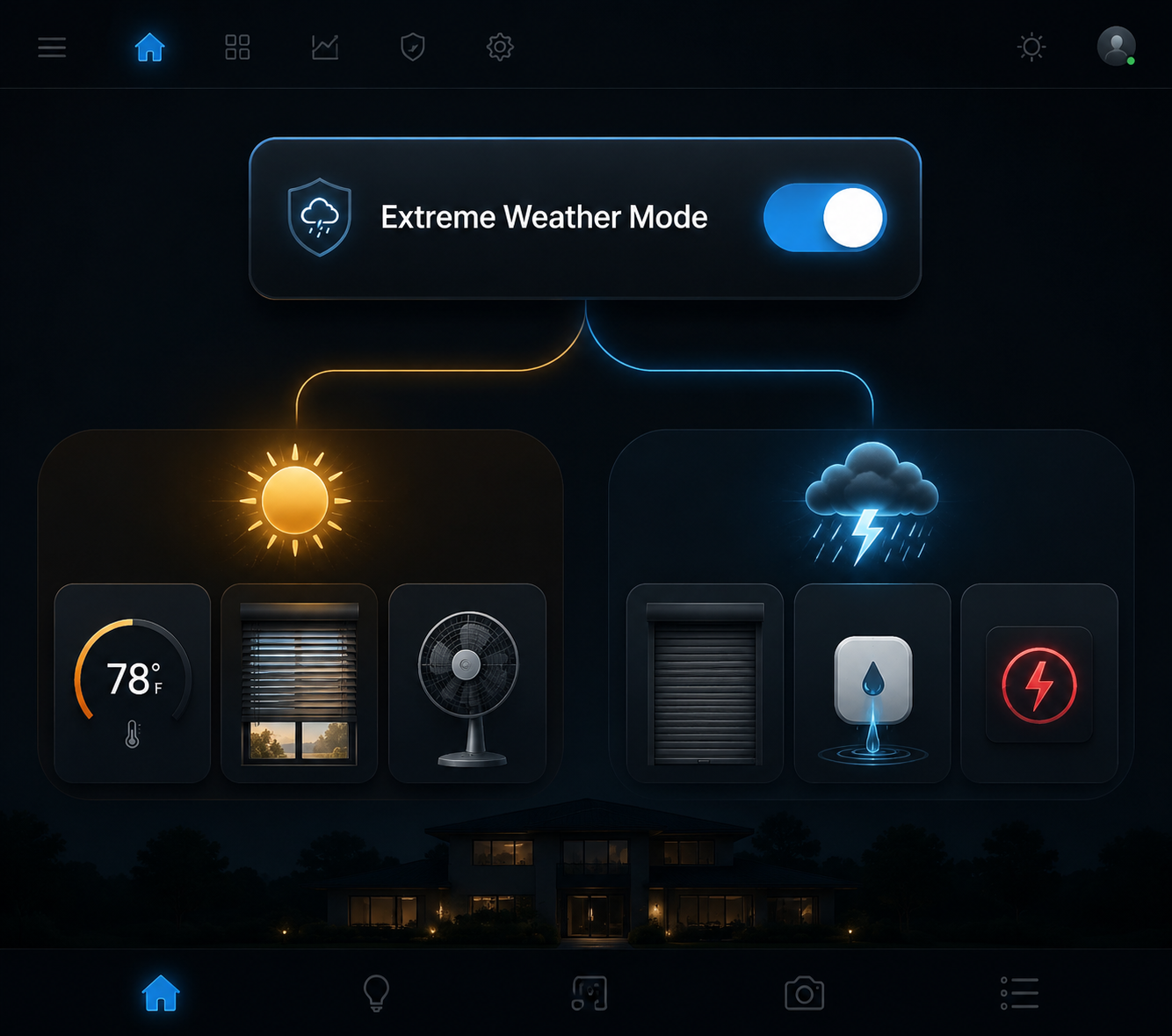
The Control State
A heat-wave mode sensor, free-cooling logic, and fan or AC coordination are already common Home Assistant patterns; Maison et Domotique’s 2026 heat-shield recipe uses this kind of sensor-driven approach for hot-weather response.[1] The storm side is the extension: the same mode listens to weather alerts, then branches into shutter, leak, sump, power, and recovery behavior.
Use helpers or template sensors for the branches. The exact entity IDs will vary, but the structure should stay boring enough that you can inspect it during a watch or warning.
template:
  - binary_sensor:
      - name: "Extreme Weather Heat Branch"
        unique_id: extreme_weather_heat_branch
        state: >
          {{ states('sensor.outdoor_temperature') | float(0) >= 30
             or states('sensor.indoor_temperature') | float(0) >= 26 }}

      - name: "Extreme Weather Storm Branch"
        unique_id: extreme_weather_storm_branch
        state: >
          {{ is_state('binary_sensor.severe_weather_alert', 'on')
             or is_state('binary_sensor.wind_warning', 'on')
             or is_state('binary_sensor.thunderstorm_warning', 'on') }}

      - name: "Extreme Weather Mode"
        unique_id: extreme_weather_mode
        state: >
          {{ is_state('binary_sensor.extreme_weather_heat_branch', 'on')
             or is_state('binary_sensor.extreme_weather_storm_branch', 'on') }}
        attributes:
          heat_branch: "{{ states('binary_sensor.extreme_weather_heat_branch') }}"
          storm_branch: "{{ states('binary_sensor.extreme_weather_storm_branch') }}"
          outdoor_temp_c: "{{ states('sensor.outdoor_temperature') }}"
          indoor_temp_c: "{{ states('sensor.indoor_temperature') }}"
          active_alert: "{{ states('sensor.weather_alert_title') }}"
Those attributes are not decoration. They are the audit trail. If the mode is on, the dashboard should show whether it is on because the house is hot, because a storm alert exists, or because both are true. That is what keeps one virtual sensor from becoming one more mystery toggle.
For the alert entity, use whatever severe-weather integration is reliable in your area. If you already built notification routing from NOAA or another alert source, keep that layer separate; the mode only needs the alert state. NestGrid’s AI-enhanced weather alert automation recipe is a better place to handle speaker announcements, flashing lights, and message wording.
One Automation, Three Branches
The main automation should trigger when Extreme Weather Mode changes, when either branch changes, and when key safety sensors change while the mode is already active. A storm can arrive after a heat trigger. A room can cross the indoor temperature threshold after the shutters are already down. A leak sensor can fire while every other part of the house is behaving correctly.
alias: Extreme Weather Mode Coordinator
mode: restart
trigger:
  - platform: state
    entity_id:
      - binary_sensor.extreme_weather_mode
      - binary_sensor.extreme_weather_heat_branch
      - binary_sensor.extreme_weather_storm_branch
      - binary_sensor.water_leak_any
      - binary_sensor.grid_power_status
      - sensor.ups_status

condition:
  - condition: state
    entity_id: binary_sensor.extreme_weather_mode
    state: "on"

action:
  - choose:
      - conditions:
          - condition: state
            entity_id: binary_sensor.extreme_weather_heat_branch
            state: "on"
        sequence:
          - service: script.extreme_weather_heat_actions

  - choose:
      - conditions:
          - condition: state
            entity_id: binary_sensor.extreme_weather_storm_branch
            state: "on"
        sequence:
          - service: script.extreme_weather_storm_actions

  - choose:
      - conditions:
          - condition: state
            entity_id: binary_sensor.water_leak_any
            state: "on"
        sequence:
          - service: script.extreme_weather_water_response

  - choose:
      - conditions:
          - condition: state
            entity_id: binary_sensor.grid_power_status
            state: "off"
        sequence:
          - service: script.extreme_weather_power_outage_response
Notice that the water and power responses are not hidden inside the storm branch. A pipe leak during a heat wave still matters. A power outage during extreme heat can be more urgent than the alert that originally turned the mode on. Safety branches should be callable whenever their own sensors change.
| State | Meaning | Typical actions |
|---|---|---|
| Extreme Weather Mode on; heat branch on; storm branch off | Heat-wave preparation only | Thermostat schedule, blinds for solar gain, fans, free cooling, AC-window interlock |
| Extreme Weather Mode on; heat branch off; storm branch on | Storm preparation only | Full shutter closure, leak and sump monitoring, water shutoff readiness, outage response |
| Extreme Weather Mode on; heat branch on; storm branch on | Overlapping heat and storm conditions | Storm-safe positions win for exterior protection; cooling continues inside safe constraints |
| Extreme Weather Mode off | Recovery candidate, not immediate reset | Wait for clear conditions, then restore devices in stages |
Heat Actions That Do Not Fight the House
For the thermostat, use setpoints that are explicit enough to verify. The U.S. Department of Energy recommendation reported by Better Homes & Gardens and Real Simple is 78°F when home and 85°F when away during a heat wave.[2][3] That does not mean every household will find those temperatures comfortable or medically safe. It does mean the automation should avoid vague commands such as “eco mode” when what you need before bad weather is a known target.
alias: Extreme Weather Heat Actions
sequence:
  - choose:
      - conditions:
          - condition: state
            entity_id: binary_sensor.home_occupied
            state: "on"
        sequence:
          - service: climate.set_temperature
            target:
              entity_id: climate.main_floor
            data:
              temperature: 78
      - conditions:
          - condition: state
            entity_id: binary_sensor.home_occupied
            state: "off"
        sequence:
          - service: climate.set_temperature
            target:
              entity_id: climate.main_floor
            data:
              temperature: 85

  - choose:
      - conditions:
          - condition: template
            value_template: >
              {{ states('sensor.outdoor_temperature') | float(99)
                 <= states('sensor.indoor_temperature') | float(0) - 1.5 }}
          - condition: state
            entity_id: binary_sensor.storm_branch
            state: "off"
        sequence:
          - service: cover.open_cover
            target:
              entity_id: cover.safe_vent_windows
          - service: fan.turn_on
            target:
              entity_id: fan.whole_house_fan

  - choose:
      - conditions:
          - condition: state
            entity_id: binary_sensor.any_window_open
            state: "on"
        sequence:
          - service: climate.turn_off
            target:
              entity_id: climate.main_floor
          - service: notify.home
            data:
              message: "Extreme Weather Mode paused AC because a window is open."

  - choose:
      - conditions:
          - condition: state
            entity_id: binary_sensor.home_occupied
            state: "on"
        sequence:
          - service: fan.turn_on
            target:
              entity_id:
                - fan.living_room
                - fan.bedroom
The free-cooling rule uses a 1.5°C gap because it needs a real margin: outdoor air must be cooler than indoor air by enough to be worth bringing in. Maison et Domotique uses that style of comparison in its heat-wave automation logic.[1] The storm condition blocks it because opening vents during a wind or thunderstorm alert is exactly the kind of cross-automation mistake a unified mode should prevent.
Reported savings should stay in their lane. Vesternet says automated climate control can save up to 23% on energy, but that is a vendor-reported claim, not a guarantee for this recipe or any specific home.[4] The more reliable reason to automate here is not a headline percentage. It is preventing the thermostat, fans, blinds, and window sensors from working against each other while conditions are changing.
Blinds and Shutters Are the Cleanest Unification
Windows are where the heat-wave and storm recipes overlap without needing two device categories. Real Simple, citing Con Edison, reports that roughly 40% of unwanted heat enters through windows.[3] During heat, motorized blinds or shutters can reduce solar gain. During storm conditions, the same physical opening may need full protection.
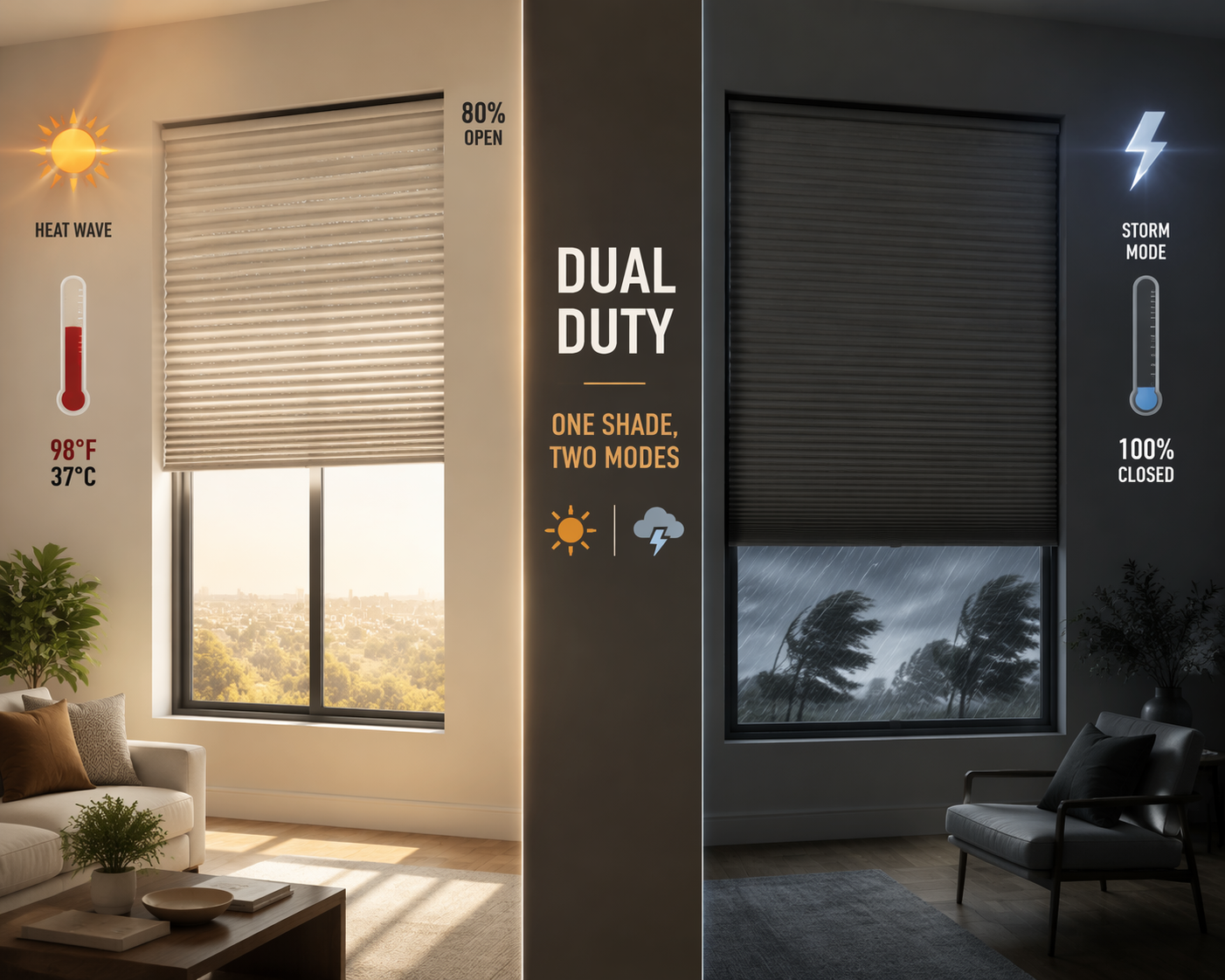
Use one rule for position priority: storm-safe closure beats solar optimization. A dual-use shutter setup can partially close for solar protection and fully close for wind protection; the examples here use the practical split as about 80% closure for heat and 100% closure for storm protection.[1][5]
alias: Extreme Weather Blind And Shutter Actions
sequence:
  - choose:
      - conditions:
          - condition: state
            entity_id: binary_sensor.extreme_weather_storm_branch
            state: "on"
        sequence:
          - service: cover.close_cover
            target:
              entity_id:
                - cover.storm_shutters_south
                - cover.storm_shutters_west
                - cover.storm_shutters_east
          - service: cover.set_cover_position
            target:
              entity_id: cover.interior_blinds
            data:
              position: 0

      - conditions:
          - condition: state
            entity_id: binary_sensor.extreme_weather_heat_branch
            state: "on"
          - condition: template
            value_template: >
              {{ 120 <= state_attr('sun.sun', 'azimuth') | float(0) <= 290 }}
        sequence:
          - service: cover.set_cover_position
            target:
              entity_id:
                - cover.south_blinds
                - cover.west_blinds
            data:
              position: 20
Home Assistant cover positions are often expressed as openness, not closedness. In the example above, position: 20 means roughly 80% closed if your integration follows that convention. Check the device in Developer Tools before trusting the number. A reversed blind position is annoying on a normal day and expensive during an alert.
Water Response Belongs Outside the Storm Silo
Leak detection is often filed under storm prep, but the automation should not care why water is present. If a leak sensor fires while Extreme Weather Mode is active, treat it as a high-priority branch: notify, turn on lights near the leak if power is available, and close the main water valve if you have a compatible shutoff.
Product examples are useful only to clarify device class. PCMag’s June 2026 leak detector roundup lists the Shelly Flood Gen4 at $39.99 with Matter, Wi-Fi, Bluetooth, and Zigbee support, and the Flo by Moen Smart Water Shutoff at $549 with a 7-to-10-day learning period for household water use.[6] Those prices are date-sensitive, but the automation pattern is stable: small leak sensors report presence of water; a shutoff valve can act.
alias: Extreme Weather Water Response
sequence:
  - service: notify.home
    data:
      message: "Water detected during Extreme Weather Mode. Check leak dashboard before reset."

  - service: light.turn_on
    target:
      entity_id:
        - light.utility_room
        - light.basement_stairs

  - choose:
      - conditions:
          - condition: state
            entity_id: binary_sensor.water_leak_any
            state: "on"
          - condition: state
            entity_id: valve.main_water_shutoff
            state: "open"
        sequence:
          - service: valve.close_valve
            target:
              entity_id: valve.main_water_shutoff

  - choose:
      - conditions:
          - condition: numeric_state
            entity_id: sensor.sump_pump_runtime_today
            above: 20
        sequence:
          - service: notify.home
            data:
              message: "Sump pump runtime is high during Extreme Weather Mode. Verify primary and backup pump status."
For sump pumps, keep the automation modest. Wi-Fi battery backup sump pumps can auto-activate when the primary pump fails, according to Home Depot and Consumer Reports product guidance.[7][8] Home Assistant does not need to be the hero in that moment. It needs to expose whether the backup has taken over, whether runtime is unusual, and whether someone should physically check the pit.
Power Outage Behavior Should Be Visible Before It Is Needed
Smart thermostats have already been used as infrastructure signals. During Hurricane Irma in 2017, the U.S. Department of Energy tracked outages using smart thermostat connectivity as an outage sensor, as described in Hive’s hurricane smart-home coverage.[9] That does not make every offline thermostat a perfect power monitor, but it proves the practical point: ordinary smart-home telemetry can reveal outage patterns when the grid is unstable.
For a home automation recipe, use more than one signal if you have it: UPS status, router uptime, thermostat availability, generator state, and a grid-power sensor. HomeTechHacker’s outage preparation guide emphasizes UPS and generator integration as part of making smart-home systems survive outages rather than disappear when they are needed.[10]
alias: Extreme Weather Power Outage Response
sequence:
  - service: notify.home
    data:
      message: "Grid power appears down. Extreme Weather Mode is preserving critical loads."

  - service: switch.turn_off
    target:
      entity_id:
        - switch.decorative_lighting
        - switch.media_rack_nonessential
        - switch.guest_room_plugs

  - service: switch.turn_on
    target:
      entity_id:
        - switch.router_ups_outlet
        - switch.leak_hub_ups_outlet

  - choose:
      - conditions:
          - condition: state
            entity_id: binary_sensor.extreme_weather_heat_branch
            state: "on"
        sequence:
          - service: notify.home
            data:
              message: "Outage plus heat branch active. Prioritize ventilation plan and check thermostat connectivity."

  - choose:
      - conditions:
          - condition: state
            entity_id: binary_sensor.generator_running
            state: "on"
        sequence:
          - service: script.generator_load_shed_profile
The power-restore side matters as much as the outage side. HomeTechHacker notes whole-home surge protectors in the $150 to $400 range as protection for hardwired HVAC and other systems when power returns.[10] That is not a Home Assistant service call, but the automation should still assume restoration is a risky transition: wait, bring loads back in stages, and avoid restarting everything at once.
alias: Extreme Weather Staged Power Restore
trigger:
  - platform: state
    entity_id: binary_sensor.grid_power_status
    from: "off"
    to: "on"

condition:
  - condition: state
    entity_id: binary_sensor.extreme_weather_mode
    state: "on"

action:
  - delay: "00:03:00"

  - service: switch.turn_on
    target:
      entity_id:
        - switch.router_ups_outlet
        - switch.leak_hub_ups_outlet

  - delay: "00:05:00"

  - service: climate.set_hvac_mode
    target:
      entity_id: climate.main_floor
    data:
      hvac_mode: cool

  - delay: "00:10:00"

  - service: switch.turn_on
    target:
      entity_id:
        - switch.critical_appliances

  - service: notify.home
    data:
      message: "Power restored in stages. Review HVAC, sump, leak, and shutter states before clearing Extreme Weather Mode."
Thermostat Blueprints Can Feed the Mode, Not Replace It
If you already use an Ecobee or thermostat blueprint, do not throw it away. A February 2026 Home Assistant Community Blueprint Exchange post for dynamic Ecobee thermostat adjustment already classifies weather sensor states such as extreme_hot and extreme_cold for thermostat behavior.[11] That can be one input into the heat branch. It should not be the entire weather mode, because the thermostat cannot see whether shutters are closed, whether a leak sensor is wet, or whether the UPS is draining.
A good division of labor is simple: thermostat-specific blueprints manage thermostat-specific behavior; Extreme Weather Mode coordinates house state. If the blueprint says conditions are extreme hot, let that support the heat branch. If the storm alert branch is active, let the coordinator decide that shutters and water response need priority.
Recovery Is a Separate Automation
The mode turning off should not instantly undo everything. Alerts expire, temperature readings bounce, and power may return before voltage and equipment behavior feel normal. Treat recovery as staged and inspectable.
alias: Extreme Weather Recovery Candidate
trigger:
  - platform: state
    entity_id: binary_sensor.extreme_weather_mode
    from: "on"
    to: "off"
    for: "00:30:00"

condition:
  - condition: state
    entity_id: binary_sensor.water_leak_any
    state: "off"
  - condition: state
    entity_id: binary_sensor.grid_power_status
    state: "on"
  - condition: state
    entity_id: binary_sensor.manual_storm_hold
    state: "off"

action:
  - service: notify.home
    data:
      message: "Extreme Weather Mode is clear for staged recovery. Verify shutters, HVAC, sump, and leak dashboard."

  - service: cover.set_cover_position
    target:
      entity_id: cover.interior_blinds
    data:
      position: 60

  - delay: "00:10:00"

  - service: climate.set_preset_mode
    target:
      entity_id: climate.main_floor
    data:
      preset_mode: normal

  - delay: "00:10:00"

  - service: script.restore_nonessential_loads
Add a manual hold helper for the cases automation cannot judge well: debris outside a shutter, a utility crew still working nearby, a basement that needs inspection, or a household member who needs a different cooling plan. The point of the unified mode is not to make the house stubborn. It is to make the current state obvious enough that a human can override it cleanly.
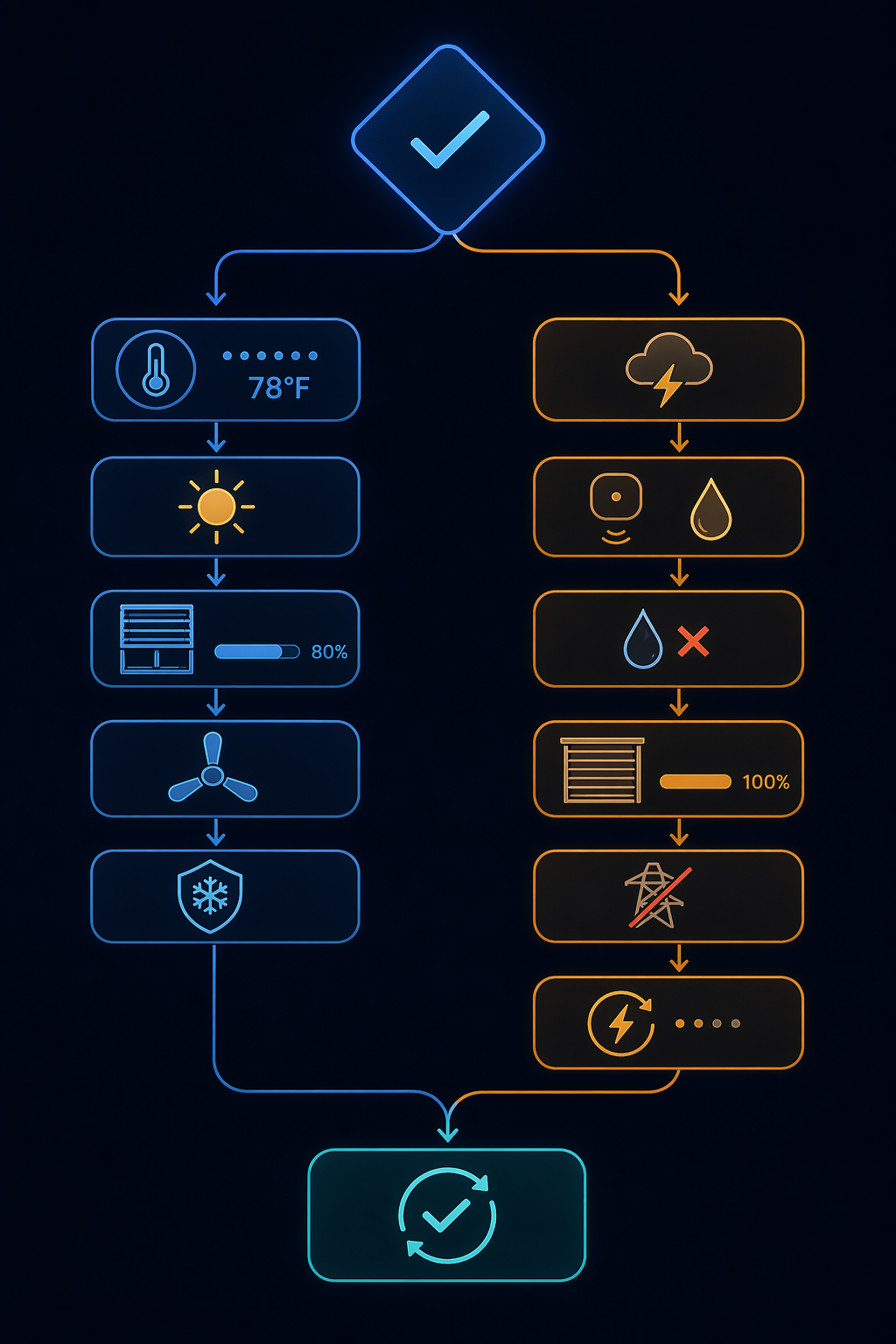
A Dashboard Worth Checking Before the Weather Hits
Before relying on the recipe, put the mode and its branches on one dashboard card. Include the temperatures that drive the heat branch, the alert title or status that drives the storm branch, and the device states that would be painful to discover late.
- Extreme Weather Mode: on/off, with heat and storm branch attributes visible
- Outdoor and indoor temperature readings used by the thresholds
- Current severe weather alert entity and last update time
- Thermostat setpoint, HVAC mode, occupancy state, and open-window status
- Blind and shutter positions, especially any failed or unavailable cover entity
- Leak sensors, main water valve, sump pump status, UPS status, and grid power state
Run at least one dry test with mocked thresholds or temporary helper toggles. Confirm that heat-only mode partially closes blinds and adjusts the thermostat without closing storm shutters. Confirm that storm-only mode closes protection devices without opening windows for free cooling. Confirm that overlap behaves conservatively: exterior protection wins, water and power branches stay available, and recovery waits.
A unified Extreme Weather Mode does not make weather predictable. It makes the home’s response inspectable, repeatable, and less dependent on remembering which separate automation was supposed to fire.
References
- Heatwave and home automation: turn Home Assistant into a heat shield, Maison et Domotique, July 2026
- The Best Temperature to Set Your Thermostat to During a Heat Wave, According to Experts, Better Homes & Gardens
- The Ideal AC Temperature to Set During a Heat Wave, Real Simple, July 2026
- Smart Home Climate Control: A Complete Guide to Automated Comfort Solutions, Vesternet, October 2025
- SmartThings Community discussion on storm shutter automation, SmartThings Community
- The Best Smart Water Leak Detectors, PCMag, June 2026
- Battery Backup Sump Pumps, The Home Depot
- Sump Pump Buying Guide, Consumer Reports
- Smart Home Hurricane Devices, Hive
- Preparing Your Smarthome for Outages, HomeTechHacker, 2019
- Home Assistant Blueprint: Dynamic Ecobee Thermostat Adjustment with Extreme Weather Conditions, Home Assistant Community Blueprint Exchange, February 2026
Report a step that didn't work
Tell us which step failed and on what firmware or app version — we re-verify before changing the recipe.