
Setup
5 AI-Enhanced Weather Alert Automations Beyond Phone Alerts
Learn how to set up five practical automations that use AI weather forecasts to trigger smart home responses — flashing lights for tornado warnings, voice announcements on all speakers, lightning-triggered blind closure, rain-based sprinkler delays, and an AI-enhanced daily weather briefing. Each recipe includes step-by-step instructions for Home Assistant, Google Home, and Alexa.
Phone alerts are a weak single point of failure for weather warnings. Phones get muted, left on chargers, buried in couch cushions, or set to Focus mode by the one person who actually needs to hear them. A smart home can make the warning visible, audible, and mechanical: lights flash, speakers announce the alert, blinds close, sprinklers pause, and the morning briefing gives the house a plan before anyone opens a weather app.
The rule for smart home weather alerts is simple: use official alert systems for immediate danger, and use AI-enhanced forecasts for planning and low-risk comfort automations. Tornado warnings, flash floods, and other urgent hazards should still come from National Weather Service-style alert feeds. AI forecast models are now good enough to make the home more proactive, but they are not the trigger I would trust for a 2 a.m. tornado decision.
The reason AI belongs in this setup at all is that the forecast side has improved fast. GraphCast beat ECMWF’s deterministic model on 90% of 1,380 verification targets, GenCast outperformed the 51-member ECMWF ensemble on 97.2% of 1,320 targets, and Pangu-Weather has been reported as running 10,000 times faster than traditional numerical weather prediction in the benchmark summaries cited for those models.[1] That supports actions like delaying irrigation, preparing a daily household briefing, or nudging blinds and HVAC ahead of expected weather. It does not turn a forecast summary into an emergency siren.

Before You Build: Pick the Right Trigger
Most failed weather automations are not bad because the idea is wrong. They are bad because the trigger is too vague. “Storm likely” is fine for closing blinds before dinner. It is not fine for waking a household. “NWS Tornado Warning for my county or polygon” is a safety trigger. “Rain probability tomorrow morning” is an irrigation trigger. “Lightning detected locally” is a device-protection trigger.
| Use case | Best trigger | Best platform fit | Do not use as |
|---|---|---|---|
| Flashing lights for tornado or severe warnings | Official NWS alert event and severity fields | Home Assistant; IFTTT as a simpler fallback | A generic AI forecast summary |
| Whole-home speaker announcement | Official severe weather alert, then optional rewritten TTS text | Home Assistant; Google Home where native weather announcements are available; Alexa severe weather notifications as a baseline | A chatbot-generated emergency warning |
| Close blinds when lightning is nearby | Local lightning detection from a station such as Tempest | Tempest with Home Assistant or IFTTT | A cloud-only forecast if outages are common |
| Delay sprinklers before rain | Rain probability or rain forecast automation | Tempest, IFTTT, Rachio, or Home Assistant weather entities | A life-safety alert |
| Daily weather briefing | Morning alarm, schedule, or presence trigger plus forecast text | Home Assistant TTS blueprint; Google Home automation action | An emergency alert substitute |
Home Assistant gets the deepest treatment here because it exposes the cleanest trigger and action surface. Google Home is getting better for simple announcements. Alexa is useful for built-in severe weather notifications, but I would not design a finished emergency layer around Alexa+ generative promises while rollout details are still evolving.
Recipe 1: NWS Alert to Flashing Philips Hue Lights
This is the first automation I would build because it solves the “silent phone” problem without asking anyone to interpret a dashboard. If an official warning is active, the room changes. Red or amber lights are not subtle, and that is the point.
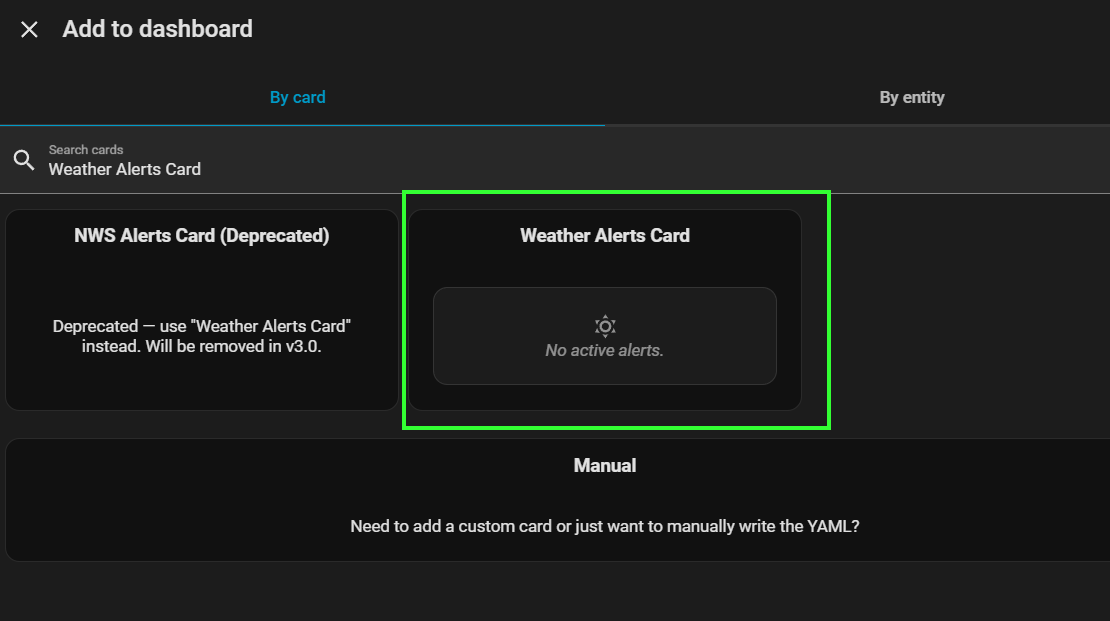
The Home Assistant NWS Alerts custom integration polls alerts.weather.gov every 90 seconds and exposes structured alert arrays, including event, severity, headline, instruction, and area fields that automations can consume.[2] That structure matters. You do not want to parse a long text forecast at 2 a.m. if the integration already gives you an event type and severity.
Home Assistant Setup
- Install the NWS Alerts integration from its GitHub repository or through your preferred custom integration workflow.
- Configure it for your location and confirm the alert sensor appears in Home Assistant.
- Open the entity attributes and identify the fields you want to trust: event, severity, headline, instruction, and area.
- Create a light group for the rooms where warnings need to be seen: bedrooms, hallway, living room, basement stairs, or wherever people actually move during storms.
- Trigger only on high-consequence events such as Tornado Warning, Severe Thunderstorm Warning, or Flash Flood Warning, then add severity as a condition if your household wants fewer interruptions.
alias: Weather Alert - Flash Hue Lights
mode: single
trigger:
  - platform: state
    entity_id: sensor.nws_alerts
condition:
  - condition: template
    value_template: >
      {{ state_attr('sensor.nws_alerts', 'event') in
         ['Tornado Warning', 'Severe Thunderstorm Warning', 'Flash Flood Warning'] }}
action:
  - repeat:
      count: 8
      sequence:
        - service: light.turn_on
          target:
            entity_id: light.weather_warning_lights
          data:
            color_name: red
            brightness_pct: 100
        - delay: '00:00:01'
        - service: light.turn_on
          target:
            entity_id: light.weather_warning_lights
          data:
            color_name: orange
            brightness_pct: 60
        - delay: '00:00:01'
  - service: light.turn_on
    target:
      entity_id: light.weather_warning_lights
    data:
      color_name: red
      brightness_pct: 80
Treat that YAML as a pattern, not a drop-in universal file. Your NWS entity name and attributes may differ, and Hue lights connected through the Hue integration, Matter, or another bridge path may expose different color behavior. The important part is the filter: official alert event first, visible action second.
For testing, do not wait for a real warning. Temporarily replace the condition with a test helper, or create a separate script that flashes the same light group without using the weather trigger. Run it at the worst possible real-world time: lights off, bedroom doors closed, speakers at normal volume, someone trying to sleep. If the automation scares people more than it informs them, adjust color, duration, and rooms before severe weather season.
IFTTT and Hue Shortcut
IFTTT can be a simpler bridge if you do not run Home Assistant. Its Weather Underground applets have run over 1 billion times, and Pro+ subscribers can add filter code for time and day conditions.[3] The trade-off is precision. A broad weather trigger can be useful for “turn porch lights blue when rain starts,” but for tornado and flash flood warnings I would still prefer a structured official alert entity over a generic weather applet.
- Create an IFTTT applet with a Weather Underground weather trigger available in your region.
- Set the action to change a Philips Hue scene, blink compatible lights, or turn on a dedicated warning scene.
- Use filter code, if available on your plan, to suppress low-value triggers during hours or days when the automation is not useful.
- Keep phone alerts and weather radio-style alerts enabled; this is an added household surface, not a replacement.
Recipe 2: Severe Weather Alert to Whole-Home Speaker Announcement
Flashing lights get attention. Speakers explain what is happening. This is where the automation can become either genuinely helpful or instantly hated, because a bad TTS message on every speaker is a household-wide mistake.
Use the same official alert trigger from Recipe 1, then announce the headline and instruction fields. If your alert entity includes a clear instruction, use that instead of inventing advice. If the alert says to move to shelter, the smart home should repeat that plainly. It should not ask an AI model to improvise emergency guidance.
Home Assistant TTS Pattern
A Home Assistant Community blueprint can grab forecast text, optionally pass it through Google Gemini for a more natural TV-meteorologist-style rewrite, and announce it on media_player entities. The AI rewrite is optional; the blueprint works without it, and it is a community contribution rather than an official Home Assistant integration.[4]
alias: Weather Alert - Announce On Speakers
mode: single
trigger:
  - platform: state
    entity_id: sensor.nws_alerts
condition:
  - condition: template
    value_template: >
      {{ state_attr('sensor.nws_alerts', 'event') in
         ['Tornado Warning', 'Flash Flood Warning', 'Severe Thunderstorm Warning'] }}
action:
  - variables:
      alert_headline: "{{ state_attr('sensor.nws_alerts', 'headline') }}"
      alert_instruction: "{{ state_attr('sensor.nws_alerts', 'instruction') }}"
  - service: tts.speak
    target:
      entity_id: tts.home_assistant_cloud
    data:
      media_player_entity_id:
        - media_player.kitchen_speaker
        - media_player.bedroom_speaker
        - media_player.living_room_speaker
      message: >
        Weather alert. {{ alert_headline }}. {{ alert_instruction }}
The announcement should be short enough to understand while half-awake. Put the event first, then the affected area if your entity exposes it, then the official instruction. Avoid conversational filler. The person hearing the alert may not know what entity renamed itself last week or why the bedroom speaker just ducked the white noise machine.
- Set a dedicated emergency volume before the message, then restore normal volume afterward if your speaker platform supports it.
- Announce on shared spaces and bedrooms first; skip children’s rooms or guest rooms only if another alert path covers them.
- Add a cooldown helper so the same alert does not repeat every time the sensor updates.
- Log every trigger to a notification or persistent notification so you can debug false repeats later.
Where AI Belongs in the Announcement
For severe weather, I would use AI only to clean up a non-emergency forecast briefing or simplify wording after the official alert content is already selected. I would not let a generative model decide whether the alert is serious enough to announce. The alert feed decides. The automation routes. The speaker speaks.
For example, an optional AI rewrite can turn a long morning forecast into “Rain is likely after lunch, winds pick up tonight, and tomorrow morning may be slow for the commute.” That is useful. For a Tornado Warning, the message should stay close to the official headline and instruction fields.
Google Home and Alexa Options
Google Home added a native “voice assistant reports weather” automation action in March 2026, which makes simple weather announcements less dependent on custom TTS workarounds. Google notes that supported starters, conditions, and actions can vary by region, device model, and subscription status, so check your own app before designing around it.[5]
- Open Google Home automations and create a household automation.
- Choose a starter such as time, alarm dismissal, presence, or another supported trigger.
- Add the weather announcement action where available.
- Use it for briefings or routine weather checks unless your region and device setup clearly support the alert behavior you need.
Alexa users can enable severe weather alerts under Settings, Notifications, and Weather, which is a useful baseline for homes already using Echo speakers. Alexa+ was announced with more generative AI ambitions, but as of mid-2026 the safer assumption is that built-in severe weather notifications are the dependable layer and generative context is still something to verify before trusting.[6]
Recipe 3: Lightning Detection to Close Motorized Blinds
Closing blinds during nearby lightning is not a life-safety automation in the same way a tornado warning announcement is. It is a protective and comfort automation: reduce glare from flashes, protect rooms where storms blow rain against windows, and make the house feel less exposed. Because the action is reversible and low-risk, this is a good place to use local sensor data.
Tempest is interesting here because it broadcasts lightning strike data over local UDP, so a Home Assistant setup can react without waiting on a cloud round trip. That matters during storms, when internet service is exactly the dependency that may get flaky. The catch is cost: the Tempest Weather System is around $350, so it is not the default recommendation for every apartment or casual smart home.[7]
Home Assistant Setup
- Set up Tempest and confirm Home Assistant can see lightning data from the station or local integration path.
- Create a cover group for the blinds or shades you want to close during lightning.
- Trigger when the lightning strike count or latest strike sensor changes from idle to active.
- Add a condition that the blinds are open, or that the sun is below your chosen glare threshold if you only care about occupied evening rooms.
- Close the blinds, send a quiet notification, and avoid repeating the action on every strike.
alias: Lightning Detected - Close Storm Blinds
mode: single
trigger:
  - platform: state
    entity_id: sensor.tempest_lightning_strike_count
condition:
  - condition: template
    value_template: "{{ trigger.from_state.state != trigger.to_state.state }}"
  - condition: state
    entity_id: cover.storm_side_blinds
    state: open
action:
  - service: cover.close_cover
    target:
      entity_id: cover.storm_side_blinds
  - service: notify.mobile_app_phone
    data:
      message: Lightning detected nearby. Closing storm-side blinds.
If you do not own a local station, do not buy one just because this recipe exists. Use an official severe thunderstorm warning from the NWS alert recipe to close blinds instead, or skip the automation. Local lightning is better for this specific trigger, but a $350 dependency should earn its place.
IFTTT Version
Tempest also promotes IFTTT applets as a way to connect weather station data to smart home actions.[7] If your blinds, curtain controller, or hub has an IFTTT action, the logic is straightforward: Tempest detects lightning, IFTTT calls the blind-close action, and a cooldown prevents repeated commands.
Recipe 4: Rain Forecast to Delay Rachio Sprinklers
Irrigation is one of the safest places to let forecast improvements do real work. If the forecast is wrong, the consequence is usually a lawn that gets watered later or a garden that needs manual attention. That is a very different risk profile from a missed tornado warning.
Tempest describes using its local API rain probability data with IFTTT applets that can convert forecast conditions into Rachio sprinkler delay commands.[7] This is exactly the kind of cross-platform glue IFTTT is good at: one weather source, one irrigation service, one simple action.
- Choose the rain trigger: Tempest rain probability, a Home Assistant forecast entity, or an IFTTT Weather Underground trigger.
- Set the action to delay a Rachio schedule rather than permanently disabling watering.
- Add a time condition so the automation runs before the normal irrigation window, not after the sprinklers have already finished.
- Notify the household or garden owner when watering is skipped, especially if anyone manually tracks plants, seed, or new sod.
- Review the first few triggers manually before letting it run unattended for a full season.
alias: Rain Expected - Delay Sprinklers
mode: single
trigger:
  - platform: time
    at: '20:00:00'
condition:
  - condition: numeric_state
    entity_id: sensor.tomorrow_rain_probability
    above: 60
action:
  - service: rachio.pause_zone
    target:
      entity_id: switch.front_yard_irrigation
    data:
      duration: 86400
  - service: notify.mobile_app_phone
    data:
      message: Rain is likely tomorrow, so the front yard irrigation schedule was delayed.
That example uses placeholder entities and a simple probability threshold. Your Rachio integration may expose schedule, zone, or standby actions differently. The behavior to preserve is the same: forecast before schedule, delay instead of disable, notify the person who will notice dry soil first.
If you also have smart windows or leak-prone skylights, the same rain forecast can close them before the irrigation action runs. Keep that branch conservative. Closing a window is low drama. Locking out ventilation every time a weak forecast mentions drizzle is how automations get turned off.
Recipe 5: Wake-Up Alarm to AI-Enhanced Daily Weather Briefing
The daily briefing is where AI weather feels most natural. It does not need to decide whether anyone is safe. It needs to translate a forecast into household consequences: umbrella by the door, stroller cover in the car, sprinklers paused, blinds closed this afternoon, garage heater not worth running tonight.
The Home Assistant community blueprint for weather forecast TTS can optionally use Gemini to rewrite forecast text into a more natural spoken briefing, and it can also work without the AI rewrite.[4] That optionality is important. A clear robotic briefing is better than a charming one that depends on a cloud AI service you have not tested.
Home Assistant Morning Flow
- Pick the trigger: a fixed morning time, a motion sensor in the kitchen, an alarm webhook, or an iPhone Shortcuts webhook.
- Collect the forecast text, current conditions, and any active alert fields you want included.
- Optionally send the forecast through the AI Task entity or a Gemini-backed step if your setup supports it.
- Announce only on the rooms that are actually occupied in the morning.
- Keep active severe alerts separate from the casual briefing so urgent messages do not get softened into morning-radio patter.
alias: Morning Weather Briefing
mode: single
trigger:
  - platform: time
    at: '07:00:00'
action:
  - variables:
      forecast_summary: "{{ states('sensor.daily_weather_summary') }}"
      active_alert: "{{ state_attr('sensor.nws_alerts', 'headline') }}"
  - service: tts.speak
    target:
      entity_id: tts.home_assistant_cloud
    data:
      media_player_entity_id: media_player.kitchen_speaker
      message: >
        Good morning. Today's weather: {{ forecast_summary }}.
        {% if active_alert %} Active weather alert: {{ active_alert }}. {% endif %}
A more advanced version can add household state: whether the sprinkler automation delayed watering, whether storm-side blinds are already closed, or whether a door sensor shows the patio door open before rain. That is where smart home context beats a normal forecast app. The house can say what it already did.
Google Home Version
On Google Home, use the native weather announcement action if it is available in your region and device setup.[5] The cleanest version is a morning household automation: when an alarm is dismissed, when someone enters the kitchen, or at a scheduled time, Google reports the weather over the selected speaker.
The Google Home version is less customizable than a full Home Assistant briefing, but that is not always bad. For a shared household, a stable native action that says the weather correctly every morning may be better than a heavily customized briefing that breaks when one helper entity is renamed.
Testing Without Waiting for Bad Weather
Weather automations need dry-run testing because the first real trigger may happen when everyone is tired, the internet is unstable, and the dog is already upset. Test the action path separately from the weather trigger. A script that flashes the lights, a script that speaks the message, and a script that closes the blinds are easier to debug than one giant automation that only runs during a storm.
| Automation | Safe test method | What to watch |
|---|---|---|
| Hue warning lights | Run the flash script manually | Too bright, too long, wrong rooms, lights left in warning color |
| Speaker alert | Send a fake test message through the same media players | Volume, duplicated speakers, unintelligible TTS, sleeping rooms |
| Lightning blinds | Call the blind-close script manually | Blocked blinds, pets near windows, manual override behavior |
| Sprinkler delay | Temporarily lower the rain threshold or use a test helper | Wrong zone, excessive delay, missing notification |
| Daily briefing | Run the automation from the UI | Too long, wrong forecast entity, AI rewrite adding unwanted flourish |
Also test the failure modes. What happens if the AI rewrite service is unavailable? What happens if the Tempest station is offline? What happens if the speaker group is unreachable? For safety-facing alerts, the answer should be boring: official phone alerts, weather radio-style alerts, or platform-native severe weather notifications still exist, and the smart home layer simply fails to add extra surfaces.
What I Would Actually Trust
I would trust NWS alert entities to flash lights and drive concise speaker announcements. I would trust local lightning data to close blinds if the hardware is already there. I would trust AI-enhanced forecasts to shape irrigation, morning briefings, and other planning automations where a wrong call is inconvenient rather than dangerous.
I would not trust an AI weather summary as the sole source for tornado immediacy. I would not build a safety routine that only one phone can receive. I would not make every speaker in the house recite a long forecast when the official alert instruction is the only sentence that matters.
AI-enhanced weather data is now useful enough to make the smart home proactive. The durable setup is layered: official warnings for immediate safety, local sensors where outages matter, and AI summaries for planning, context, and daily convenience.
References
- AI Weather Forecasting 2026: Models, Accuracy & Results
- Weather Alerts v2026.5.0, GitHub
- Best weather automations for your home and phone in 2026, IFTTT
- [Blueprint] Weather Forecast Alerts TTS + Optional AI, Home Assistant Community
- Supported automation starters, conditions & actions, Google Home Help
- Your Family's Lifeline: Using Google Home and Alexa for Tornado & Emergency Safety, Warren Schuitema
- Elevate Your Smart Home With Tempest & IFTTT, Tempest News
Report a step that didn't work
Tell us which step failed and on what firmware or app version — we re-verify before changing the recipe.