
The easiest mistake in smart home lightning storm safety is protecting only the power outlets you can see. A smart home usually has more than one doorway for a surge: the electrical service, the cable or fiber handoff, coax to a modem or TV equipment, Ethernet between rooms, and outdoor low-voltage runs feeding cameras or access points. Once those paths meet at a router, switch, hub, TV, appliance, or bridge, one surge can stop being one damaged device and become an evening of discovering what else died.
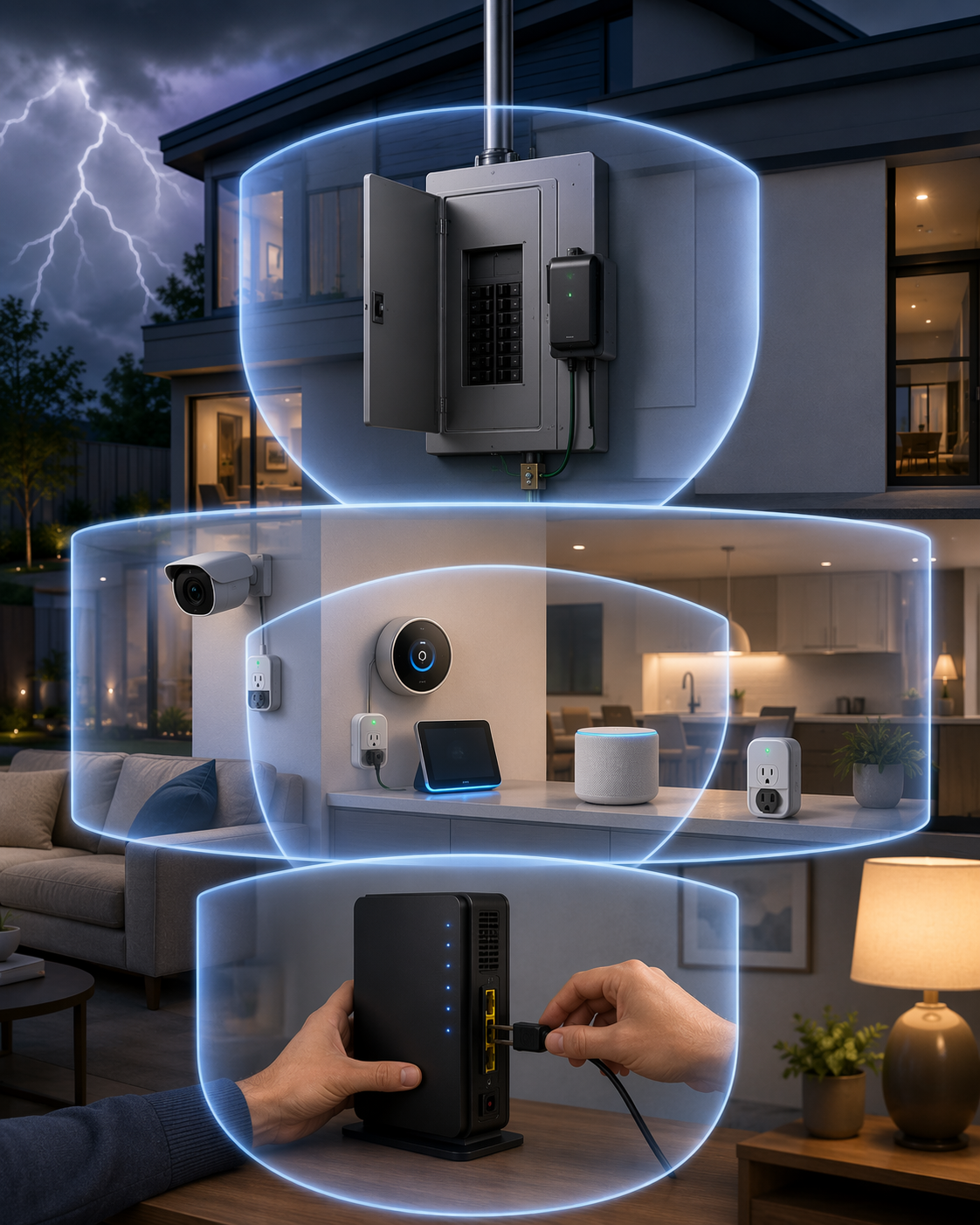
That is why the useful plan has three layers: surge protection at the panel, point-of-use protection at sensitive electronics, and a short pre-storm unplugging routine for the network anchors you would hate to rebuild. The cost side is not theoretical. U.S. lightning-related property damage claims averaged $26,616 in 2025, up 42.8% from 2024, with total claims reaching $1.65 billion; state averages and individual losses vary, but the direction is clear enough to take seriously. [1]
Why Smart Homes Fail in Cascades
A traditional home can still lose electronics in a storm, of course. The difference in a connected home is the number of devices that are electrically and logically tied together. A modem feeds a router. The router feeds a switch. The switch feeds cameras, access points, hubs, and sometimes a smart TV or game console. A smart appliance may sit on the same branch circuit as a networked display. Coax, Ethernet, and power are no longer separate worlds once they meet inside the same equipment stack.
Exponent’s 2021 analysis is the important clue here: smart homes can suffer more expensive damage because a surge may travel through interconnected power, Ethernet, and coax lines, damaging hubs, cameras, appliances, and other connected devices in a single event. The same analysis pointed to smart-device adoption as a growing exposure, with projections that 57% of U.S. homes would have smart devices by 2025. [2]
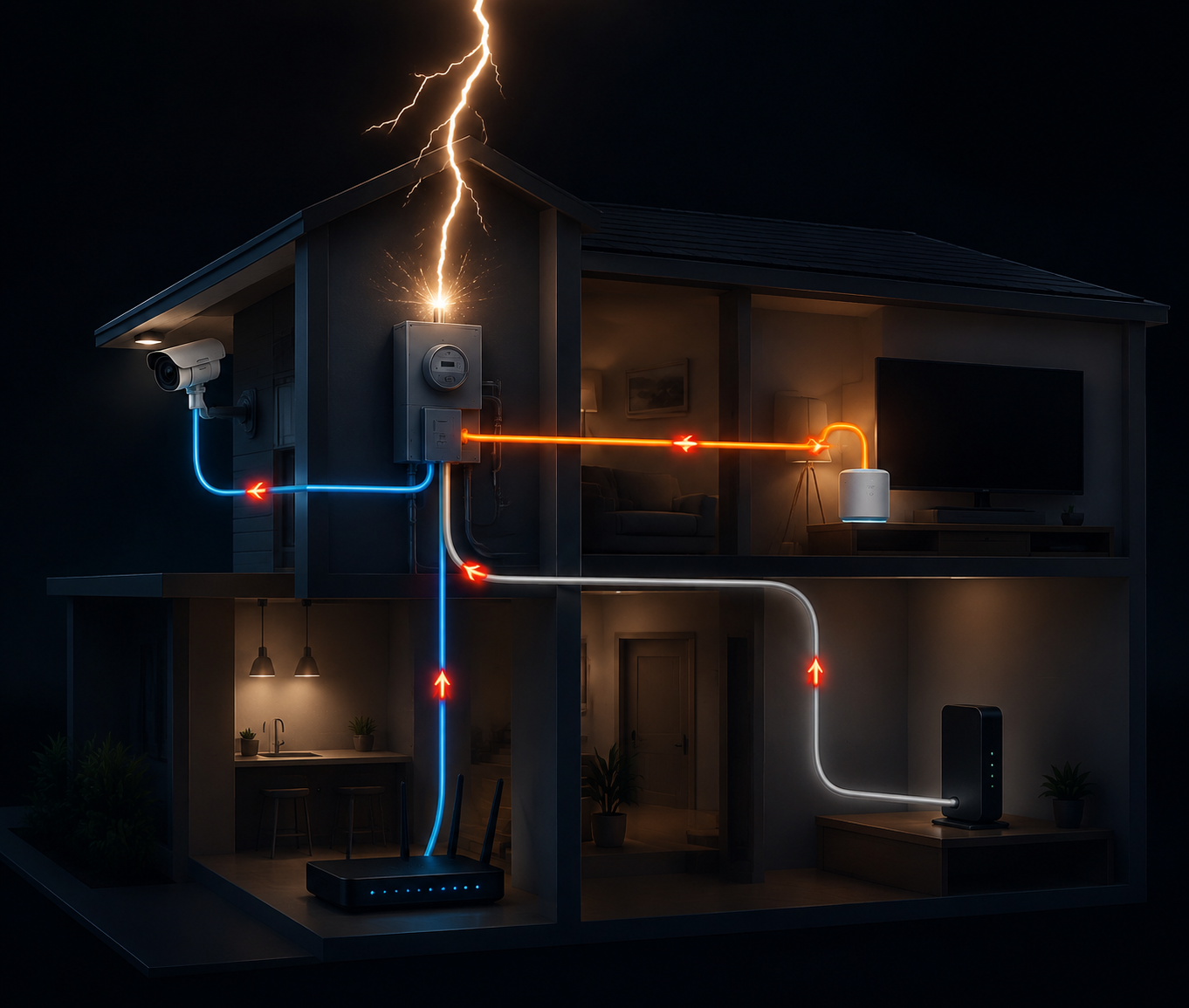
The practical consequence is simple: the router closet, media cabinet, and network switch are not just convenient places to plug things in. They are convergence points. If a surge comes in on one path and finds another path out, the device in the middle may be the thing that burns the bridge between them.
Layer 1: Put Surge Protection at the Panel
Panel-level surge protection is the first layer because it reduces the surge before it spreads through branch circuits. It does not make the house lightning-proof, and it is not a reason to leave every expensive device connected during a severe storm. It is the part of the plan that tries to keep a large outside event from becoming a house-wide electronics event.
Leviton’s Type 1, Type 2, and Type 3 taxonomy is a useful way to talk about the layers, even though other manufacturers use similar language with their own product lines. In that framework, Type 1 devices are installed at the service entrance, Type 2 devices are installed at the panel, and Type 3 devices are point-of-use protectors near connected equipment. The same manufacturer guidance places installed Type 2 devices in a typical $200 to $700 range and plug-in Type 3 strips around $15 to $50. [3]
For existing homes, this is usually electrician territory. The question to ask is not “Which surge strip should I buy for my router?” but “Does the service panel have a properly installed surge protective device, and is the grounding and bonding in good condition?” A strip in the office cannot compensate for a bad grounding system at the house.
There is also a code detail worth keeping straight. NEC 2020 section 230.67 requires surge protection for new dwelling units, which gives panel-level surge protection more weight in new construction and major renovation discussions. It does not mean every older home was automatically required to be retrofitted when that code arrived. [3]
Layer 2: Protect the Devices That Sit at Network Crossroads
Point-of-use surge protectors still matter. They are especially useful around the equipment that concentrates your smart home: router, modem, mesh node, smart hub, NVR, PoE switch, NAS, gaming console, smart TV, and desktop computer. If those devices fail, the damage is not just the price of a replacement box. It is re-pairing devices, recreating automations, checking camera recordings, and figuring out which “offline” alerts are a cloud problem and which are a fried-port problem.
The limitation is just as important. Schneider Electric notes that most plug-in surge protectors are designed for smaller internal surges, while a whole-house surge protective device is needed for larger lightning-scale events. That makes a surge strip useful as a second layer, not a substitute for the first one. [4]
Surge strips also age. Consumer Reports advises that surge protectors have a finite service life, commonly in the three-to-five-year range depending on use and surge exposure, and that they should be replaced after absorbing a major surge. The indicator light on a strip is worth checking, but the older the strip and the more storms it has seen, the less confidence it deserves. [5]
| Equipment | Protection priority | Why it matters |
|---|---|---|
| Router, modem, fiber gateway | High | They connect power and outside data service, and their failure can take the whole smart home offline. |
| Smart hub or bridge | High | It may hold device pairings and automations that are tedious to rebuild. |
| PoE switch or NVR | High | It concentrates camera and Ethernet runs, including possible outdoor paths. |
| Smart TV and media cabinet | Medium to high | Power, HDMI, Ethernet, and coax often meet in one crowded equipment stack. |
| Smart bulbs and plug-in modules | Lower unless network-critical | They are usually cheaper and less likely to become the path that damages many other devices. |
This is where neat product advice gets people in trouble. A $20 strip behind the TV may be fine for ordinary surges, but it does not solve the coax line going into the cable box, the Ethernet line returning to a switch, or the HDMI path into the television. If a device has multiple cables, each cable deserves a moment of suspicion.
The Outdoor PoE Camera Problem
Outdoor PoE cameras are the detail many generic storm guides miss. The camera may be low-voltage, but the Ethernet run is often outside, high on an eave, along a soffit, through an attic, or down an exterior wall. That cable can become a path back to the switch that powers multiple cameras.
FASTCABLING’s guidance is blunt on the point: outdoor PoE camera runs should use surge protection on both ends of every Ethernet cable run. One protector near the camera helps with the exposed end; one near the switch helps keep the surge from walking into the rest of the network. [6]
That does not mean a PoE surge protector can save a camera from every direct strike. It means the cable deserves to be treated as an exterior entry path, not as harmless networking wire. If the run is long, exposed, or attached to a detached structure, it deserves even more scrutiny from a qualified installer.
Layer 3: Unplug the Gear That Would Hurt Most to Lose
When a strong storm is imminent, physical disconnection is the layer you control directly. It is not elegant, and it does not impress anyone on a product spec sheet. It works because the surge cannot travel through a cable that is no longer connected.
The goal is not to run around the house unplugging every lamp module and smart bulb. Southern Living’s 2025 smart-home guidance puts the priority on smart hubs, routers, smart TVs, and outdoor cameras: the devices that are harder to replace, likely to sit on multiple paths, or able to take other gear down with them. [7]
For a connected home, “unplug” often means more than pulling one power cord. A modem may need power and coax disconnected. A router may need power and Ethernet disconnected. A PoE switch may need power removed and exterior camera runs unplugged if it is safe and practical to do so before the storm arrives. A smart TV may have power, Ethernet, coax, HDMI, and antenna connections feeding into it.
- Router, modem, fiber gateway, and mesh base station: disconnect power, and disconnect coax or Ethernet service lines where applicable.
- Smart hub, bridge, or home automation controller: disconnect power and Ethernet so device pairings and automations are not riding out the storm on a live network path.
- PoE switch, NVR, and outdoor camera runs: disconnect power, and unplug exterior Ethernet runs when they are accessible without going outside during the storm.
- Smart TV and media cabinet: disconnect power plus coax, Ethernet, antenna, and other outside-linked cables where practical.
- Hard-to-replace network anchors: include NAS boxes, security base stations, specialty bridges, and any controller that would take hours to rebuild.
Do this before the storm is on top of the house. Once lightning is close, broad personal-safety rules take over: stay inside, avoid plumbing and corded equipment, and do not go outside to rescue a camera cable. The smart home can wait; the person holding the cable cannot.
The Insurance Folder Nobody Wants Until Afterward
There is a dull piece of storm preparation that becomes very interesting after the router is dead: documentation. Smart homes are often built slowly, device by device, which means receipts live in email, apps, retailer accounts, and cardboard boxes that disappeared two years ago. Funari Public Adjusters’ 2025 guidance highlights the documentation challenge after smart-home storm losses, where homeowners may need to show what was damaged and what it cost. [8]
Before storm season, take photos of the network cabinet, panel, media cabinet, camera gear, hubs, bridges, and major smart appliances. Save receipts for expensive devices and installed surge protection. Keep a simple list of model numbers for network anchors. None of this prevents damage, but it shortens the ugly part after the storm when you are trying to prove that the little black box on the shelf was the reason half the house worked.
A Practical Pre-Storm Checklist
The three layers work best when they are planned before thunder is in the forecast. Panel protection is the slow layer: schedule it, install it, and inspect the grounding. Point-of-use protection is the room-by-room layer: put the right suppressors at the equipment clusters and replace tired strips. Unplugging is the storm-day layer: short, specific, and realistic enough that someone will actually do it.
- Confirm whether the electrical panel has a whole-house surge protective device, especially after renovations or service upgrades.
- Use quality point-of-use surge protectors at the router, modem, hub, PoE switch, NVR, smart TV, and media cabinet.
- Replace old surge strips, failed indicator-light strips, and strips that absorbed a major surge.
- Add Ethernet surge protection for outdoor PoE camera runs, with protection at both the camera end and the network end.
- Before an imminent storm, unplug the router/modem, smart hubs, smart TVs, PoE/network camera equipment, and other hard-to-replace network anchors.
- Keep photos, receipts, model numbers, and installer records for smart-home equipment and surge protection.
Weather alerts and storm-mode automations can help remind you when to start the routine, but they are an enhancement, not the protection itself.
No three-layer plan makes a smart home invulnerable to lightning. A direct strike can overwhelm protection. But layered surge protection and a disciplined unplugging list greatly reduce the odds that one surge becomes a whole-home device failure.
References
- Insurance Information Institute lightning-related property damage claims, WWSB, June 2026, link
- Smart home interconnected vulnerability analysis, Exponent, 2021, link
- Type 1/2/3 SPD network taxonomy and NEC 2020 reference, Leviton, link
- Whole-house vs. point-of-use surge protector trade-offs, Schneider Electric Blog, link
- When to unplug and surge protector lifespan, Consumer Reports, link
- PoE surge protectors on both ends of Ethernet runs, FASTCABLING, link
- Smart-home-specific unplugging guidance, Southern Living, 2025, link
- Insurance documentation challenges for smart homes, Funari Public Adjusters, 2025, link