The expensive mistake is buying smart home devices for renewable energy savings as if “works with solar” means “understands my panels, battery, inverter, utility rate, and loads.” A smart plug can be perfectly good and still know nothing about your battery. An energy monitor can read the main panel and still miss what is happening on the DC side of a hybrid inverter. A thermostat can save energy in ordinary operation and still fail to coordinate with excess solar unless something else tells it when that solar exists.
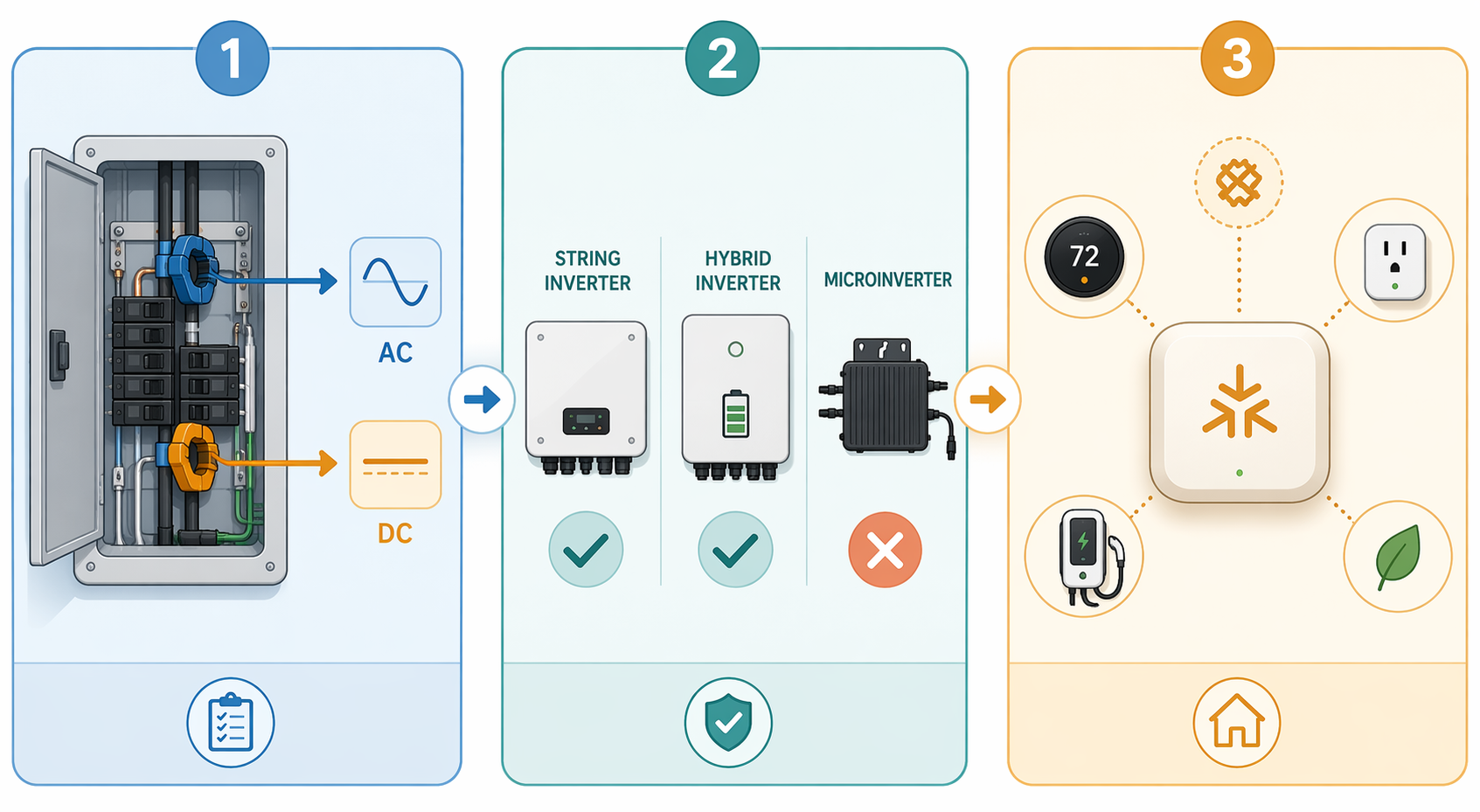
Before buying, the compatibility check is narrower than the marketing copy. Ask three questions first: what does the device actually measure, which inverter or battery architecture does it support, and what hub or protocol will let other devices act on that information?
The Three Checks That Matter Before Any Device Goes in the Cart
| Compatibility question | What it decides | Where buyers get tripped up |
|---|---|---|
| AC monitoring or direct inverter/battery integration? | Whether the device sees panel-level current, solar backfeed, grid import/export, or deeper battery state. | A CT-based monitor may work well at the electrical panel without reading DC battery behavior. |
| Which inverter architecture is installed? | Whether the monitor can interpret the home’s energy flow at all. | Hybrid and all-in-one inverters can break assumptions that work on simpler grid-tied solar. |
| Which hub, protocol, or ecosystem coordinates the loads? | Whether plugs, EV chargers, and thermostats can respond to solar surplus or peak rates. | Matter or Thread support helps device control, but it does not magically expose every battery metric. |
That order matters. If the monitor cannot see the right energy flow, the rest of the automation stack is guessing. If the inverter architecture is unsupported, a polished app will not fix the data problem. If the hub cannot pass a usable signal to the loads, the home may still save energy in isolated ways, but it will not behave like a coordinated solar-and-battery system.
Energy Monitors: Same Label, Very Different Compatibility Boundaries
Energy monitors are the first place to slow down. Two products can both sit in the “home energy monitor” category while relying on very different assumptions about the electrical system. The key distinction is whether the device is measuring AC current at the panel, usually with CT clamps, or whether it needs a more direct conversation with the inverter or battery system.
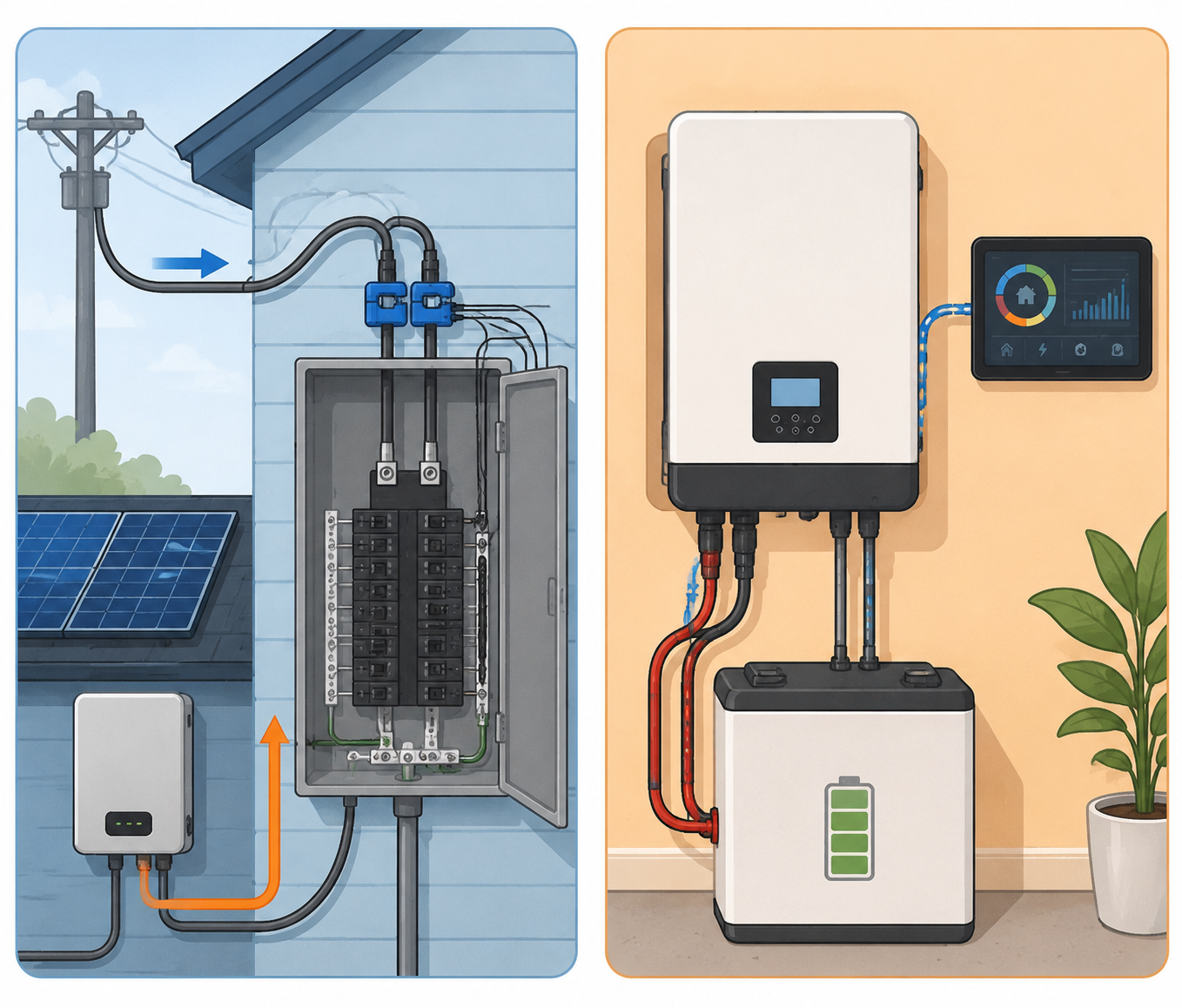
Emporia’s Vue sits on the broad AC-side side of that divide. Emporia says its excess solar management works with “virtually every grid-tied residential solar installation,” with any inverter brand, using line-tapped or breaker-fed monitoring paths.[1] That is a useful claim for a homeowner with a conventional grid-tied system because the Vue is not asking the inverter to expose a proprietary data stream before it can measure household flow.
Read the claim in its proper box, though. It supports AC-side monitoring compatibility for grid-tied residential solar. It does not prove that every battery gateway, hybrid inverter mode, islanding state, or manufacturer-specific battery metric will be visible. If the automation you want only needs to know whether the house is exporting power, AC monitoring may be enough. If you need exact battery state of charge, reserve mode, or inverter operating mode, the question shifts to direct integration.
Sense is the cautionary counterexample because the trouble shows up where many battery buyers now live: hybrid and all-in-one inverter systems. DIY Solar Forum users have reported Sense failing with SolArk, EG4, and Luxpower all-in-one hybrid inverters.[2] Those reports are not the same as an official compatibility matrix or controlled lab test, but they are exactly the kind of field failure worth checking before purchase, especially if your system uses one box to manage solar, battery, and grid interaction.
The practical distinction is this: a monitor that can clamp around AC conductors can often tell you whether power is moving through a panel feed. A monitor or automation that depends on inverter semantics needs the inverter, gateway, cloud API, or local integration to cooperate. Hybrid inverters make this harder because the same enclosure may blend solar conversion, battery charging, backup loads, grid import, and export limiting in ways a simple panel monitor was never designed to interpret.
What to Confirm on the Monitor Spec Sheet
- Whether solar support means AC current measurement, inverter API integration, or both.
- Whether the product names your inverter family, not just “solar” or “battery” in general.
- Whether the monitor can distinguish grid import, grid export, household load, and solar production in your panel layout.
- Whether battery state of charge is required for your automation, or whether export/import data is enough.
- Whether backup-load subpanels, line-side taps, or breaker-fed solar circuits change where CT clamps must be installed.
Smart Plugs and EV Chargers Depend on the Monitor Layer
A smart plug does not become solar-aware because it is sitting in a solar home. It needs either a platform telling it when to turn on or an ecosystem that already understands the home’s excess production. That is why plugs and chargers should be evaluated after the monitoring decision, not before it.
The TP-Link Kasa KP125M is a Matter smart plug rated at 15A, which makes it attractive when the goal is broad controller compatibility rather than a single-vendor energy stack. Eve Energy uses Thread and Matter and is especially relevant in Apple Home setups. Emporia’s Smart Plug belongs most naturally in the Vue ecosystem, where it can be coordinated with Emporia’s measurement and control layer. Those are three different compatibility bets: protocol-first, Thread/Apple-leaning, and ecosystem-linked.
For EV charging, the same rule applies at higher amperage and with larger consequences. Emporia describes its Pro EV Charger as supporting excess solar management and time-of-use scheduling.[3] That can be a very concrete savings tool if the monitor sees export clearly and the charger is allowed to respond. If the home’s energy data is wrong or unavailable, the charger can still follow a time schedule, but it is no longer truly chasing surplus solar.
For step-by-step load shifting, see How Smart Home Automation Boosts Solar Battery Savings. Before that setup can work, the devices have to share enough information to make the trigger real.
Matter and Thread Help With Control, Not With Every Solar Data Problem
Matter and Thread are useful because they reduce the number of brand-specific bridges and cloud dependencies involved in controlling devices. Matter 1.5+ and Thread networking are part of the 2026 cross-brand smart home landscape for load shifting and coordination, while Home Assistant remains the more flexible DIY route when the owner wants deeper control across integrations.[4]
But protocol support is not the same as solar intelligence. A Matter plug can expose on/off control to a hub. It may expose energy reporting if the device and platform support it. That still does not mean the plug knows whether a battery is at 38%, whether the inverter has entered backup mode, or whether the utility has started a peak period. Those facts have to come from a monitor, inverter integration, utility-rate automation, or battery platform.
Home Assistant gets respect here because it can stitch together devices that vendors did not design as one system. It can also become the least forgiving option in the house. Local integrations, helper sensors, automations, and dashboards are powerful when someone is willing to maintain them. For a household that wants one dependable app and no weekend debugging, a narrower vendor ecosystem may be the more realistic choice.
If Matter readiness is the question, start with device-category reliability rather than assuming the logo solves everything. A category-by-category check such as what works with Matter in 2026 is a better companion than a generic promise of interoperability. For traffic-light style readiness by device type, use the Matter device readiness guide before buying plugs, sensors, and controllers.
Thermostats Can Save Energy Without Being Solar-Aware
Smart thermostats are worth separating from solar integration. A thermostat can reduce heating or cooling use through scheduling, occupancy sensing, learning behavior, or demand-response features. That does not automatically mean it will charge a battery less, pre-cool only on excess solar, or avoid drawing from stored energy during a peak window.
The savings numbers are still useful as context. EPA ENERGY STAR estimates smart thermostats can save about $100 to $300 per year.[5] Smart Eco Home’s 2026 testing reported 26% heating savings for Ecobee SmartThermostat Premium versus a programmable thermostat in a 30-day test across more than 200 UK/EU homes, and 22% heating savings for the tado° Wireless Smart Thermostat X in the same testing context.[6] The same source cites ENERGY STAR data for Nest Learning Thermostat at 10% to 12% heating savings and 15% cooling savings.[6]
Those figures should not be stretched too far. The Ecobee and tado° numbers come from one UK/EU testing source, so they may not map cleanly to U.S. climate zones, building shells, HVAC types, or household schedules. They say a thermostat can matter. They do not prove that any thermostat will coordinate with a specific solar battery system.
For a solar-and-battery home, the thermostat compatibility question is usually platform-level: can your hub or energy platform tell the thermostat to pre-cool, relax a setpoint, or avoid a peak-rate window? If the answer is yes, then thermostat settings become part of a larger load-shifting plan. If the answer is no, the thermostat may still save money as a standalone efficiency device, just not as a solar-aware load.
For temperature targets and schedule-level choices, use a thermostat-specific guide such as smart thermostat settings to lower an AC bill. The pre-purchase check here is simpler: make sure the thermostat can be controlled by the same platform that knows your solar, battery, or time-of-use condition.
Battery Systems Set Boundaries More Than They Expand Device Choice
Battery systems are often sold as the center of the home energy story, but they do not automatically make every smart device smarter. A battery gateway may know state of charge, backup reserve, solar charging status, grid outage status, and utility export limits. Whether the rest of the smart home can use that information depends on what the manufacturer exposes and what the hub can read.
Cost also varies too much to treat a battery as a simple add-on to a smart home shopping list. EnergySage’s 2026 solar battery guide lists Tesla Powerwall 3 at $998 per kWh, but that is a market average and can vary by installer and region.[7] That number is useful mainly as a reminder: when the storage system is a five-figure project, a $50 plug or $200 monitor is not where to rely on assumptions.
If backup behavior is part of the goal, compatibility gets stricter. A plug that happily turns on a dehumidifier during normal solar export may be the wrong load during an outage. An EV charger that follows a cheap overnight schedule may pull from the battery unless it receives a better signal. A thermostat pre-cool routine may help during a sunny afternoon and hurt during a storm reserve period. The device choice is only half of the decision; the available battery data decides how safe the automation can be.
For broader battery comparisons and grid-backup tradeoffs, a guide such as home energy solutions for a grid crisis is the better place to go deeper. Here, the main buying rule is to decide whether your smart devices need battery state, solar export, utility price, or simple schedule control.
A Practical Compatibility Map by Device Type
| Device class | Usually works best when | Do not assume |
|---|---|---|
| AC energy monitor | Your goal is to measure grid import/export, solar backfeed, and circuit-level load from the electrical panel. | That it can read battery state of charge or hybrid inverter modes. |
| Hybrid inverter or battery integration | Your automation needs battery reserve, state of charge, backup status, or inverter operating mode. | That generic “solar compatible” monitors support your inverter family. |
| Matter smart plug | You need cross-brand on/off control and your hub has a reliable energy trigger from elsewhere. | That Matter support alone supplies solar or battery data. |
| Ecosystem smart plug | The monitor, plug, and automation rules live in the same vendor ecosystem. | That it will coordinate cleanly outside that ecosystem. |
| EV charger | It can receive excess-solar or time-of-use instructions from a supported monitor or platform. | That a charging schedule is the same as solar-surplus charging. |
| Smart thermostat | It can be controlled by the same hub or platform that knows solar, battery, or rate conditions. | That thermostat energy savings equal solar battery optimization. |
The Pre-Purchase Checklist
- Identify your inverter type first: string inverter, microinverter, hybrid inverter, or all-in-one inverter.
- Decide what your automation needs to know: AC import/export, solar production, circuit load, battery state of charge, backup status, or utility price.
- Match the monitor to that need: CT-based AC monitoring for panel-level flow, direct inverter or battery integration for deeper storage behavior.
- Check named inverter and battery support instead of relying on broad “solar compatible” language.
- Confirm the control layer: Matter, Thread, Home Assistant, Apple Home, Google Home, Alexa, or a vendor app.
- Buy plugs, chargers, and thermostats only after you know which platform will send them reliable energy conditions.
If the device only needs to move a small load into sunny hours, AC export data may be enough. If the device must protect backup reserve, respond to battery state, or behave differently during grid outages, require a real battery or inverter integration before buying. That one distinction prevents most of the expensive disappointment.
Once the compatibility is settled, the automation work can start: solar-battery load shifting, dynamic pricing automation, EV charging, thermostat pre-cooling, and plug-level controls. But those recipes come after the electrical reality is mapped, not before.
References
- Emporia Excess Solar Management — Emporia
- Sense monitor incompatibility with hybrid inverters — DIY Solar Forum
- Emporia Pro EV Charger — Emporia
- Matter 1.5+ and Thread protocol guides
- ENERGY STAR Smart Thermostats — EPA ENERGY STAR
- Smart Thermostat Testing 2026 — Smart Eco Home, 2026
- Best Solar Batteries 2026 — EnergySage, 2026