Start with the hub you already own. A flood sensor can have a perfectly good probe, loud local alarm, and long claimed battery life, and still be the wrong purchase if its radio cannot join your network or if it only reports inside an app you do not use. When you are buying smart home flood sensors for flood preparation, the first filter is protocol compatibility; everything else comes after the sensor can actually pair.
| Your hub or ecosystem | Flood sensor protocols that realistically fit | Watch before buying | Verified |
|---|---|---|---|
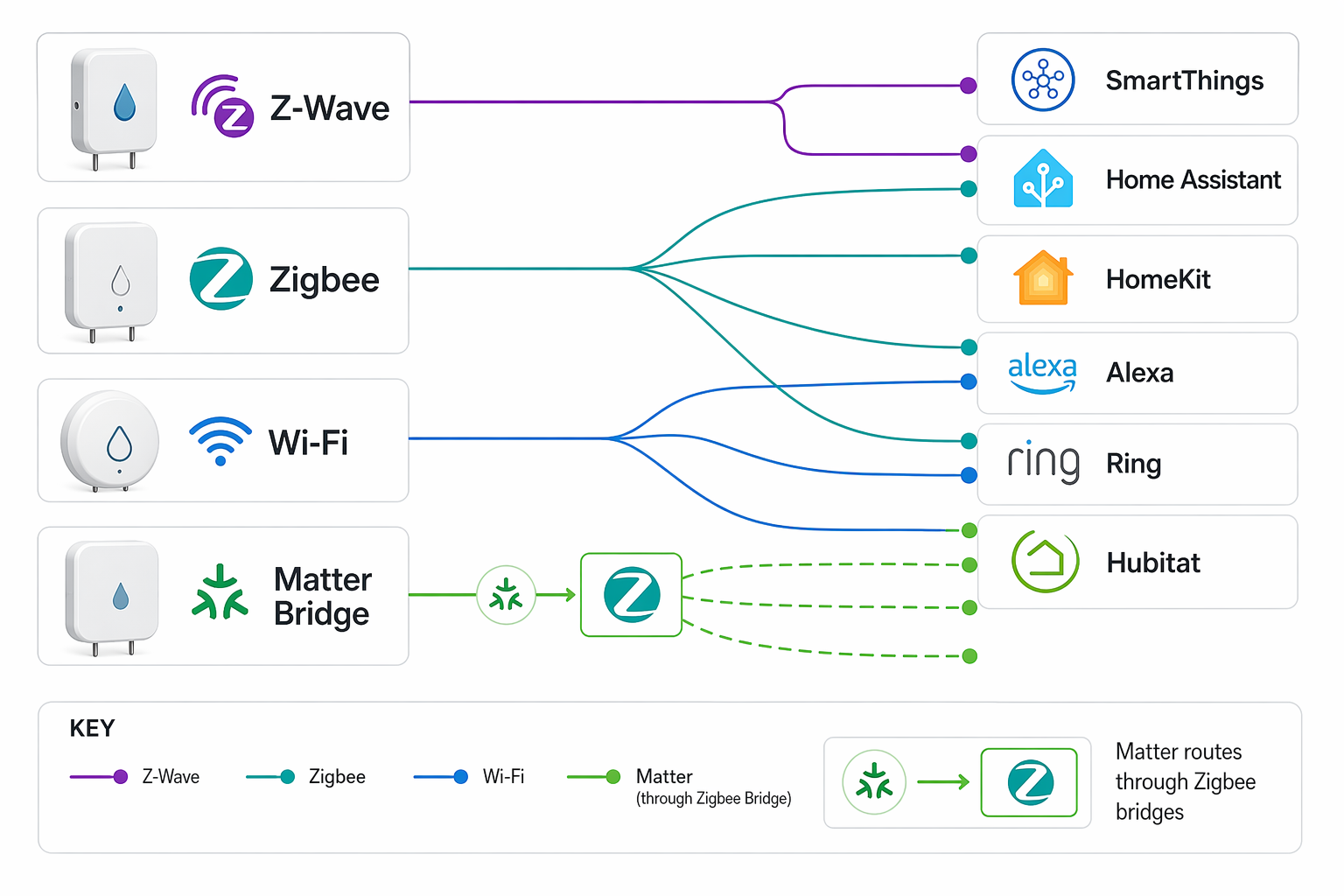
| SmartThings | Z-Wave, Zigbee, some Matter bridge-routed sensors through supported bridges | Matter flood sensors in the available mid-2026 records still route through bridges, not native Matter-over-Thread devices. Check whether the exact bridge is supported. | July 20, 2026 [1] |
| Home Assistant | Z-Wave with a Z-Wave controller; Zigbee with a supported coordinator; some bridge-routed Matter paths if your Matter setup supports the bridge | Do not assume a Zigbee flood sensor is universal. Aqara Water Leak Sensor T1 requires an Aqara hub and is not listed as compatible with other brands' Zigbee coordinators. | July 20, 2026 [1][2] |
| Hubitat | Z-Wave and Zigbee devices supported by Hubitat's drivers and integrations | Prefer devices with documented hub support. Z-Wave leak sensors can also matter for offline shutoff automations if the valve and sensor support direct association. | July 20, 2026 [3][4] |
| Ring Alarm | Ring Flood & Freeze Sensor through the Ring Alarm ecosystem | A Ring sensor is not a general-purpose Z-Wave leak sensor for every hub just because Ring uses Z-Wave-class hardware. Buy it for Ring Alarm, not as a universal part. | July 20, 2026 [3] |
| Apple Home / HomeKit | Matter bridge-routed sensors where the bridge exposes the sensor correctly; some proprietary HomeKit paths depending on vendor | The important missing item is native Matter-over-Thread flood sensing. The mid-2026 Matter list still points to Zigbee devices exposed through bridges. | July 20, 2026 [1] |
| Alexa | Selected Wi-Fi/app sensors for alerts; Matter bridge-routed options where supported; hub-dependent Zigbee paths vary | Alexa compatibility on a product page does not automatically mean the sensor can trigger the automation you want. Check the actual integration path. | July 20, 2026 [1][5] |
| Abode | Abode-compatible sensors and automations inside the Abode system | Use Abode's own guidance as placement planning, not as proof that unrelated third-party sensors will pair. | July 20, 2026 [6] |
| No hub / phone-only setup | Wi-Fi or proprietary app-based sensors such as First Alert L1, Moen Smart Water Detector, or Phyn | This can be fine for push alerts, but the cited reviews describe these as having no third-party smart-home integration for automations. | July 20, 2026 [5][7] |
| Orbit B-hyve | Orbit B-hyve sensors with the correct Orbit hub generation | Orbit B-hyve flood sensors do not work with Gen 1 hubs; PCMag reports they require a Gen 2 hub. | July 20, 2026 [5] |
That table is deliberately less exciting than a best-of list. It is also less likely to waste your Saturday. A flood sensor that cannot join your existing hub is not waiting for a clever automation; it is waiting for a return label.
Matter is not the shortcut yet
Matter is the label most likely to be misread in this category. The available mid-2026 Matter-compatible water leak sensor guide lists devices that reach Matter through bridges such as Aqara Hub, THIRDREALITY Hub, or SmartThings Hub; it does not confirm a native Matter-over-Thread flood sensor that can simply join a Thread border router on its own [1].
That distinction matters at the exact moment people tend to hurry: before a trip, after a near-miss under a sink, or while setting up a shutoff routine. A bridge-routed Matter sensor may be useful if you already own and accept that bridge. It is not the same purchase as a battery sensor that speaks Matter over Thread directly to Apple Home, SmartThings, Home Assistant, or another Matter controller.
For now, treat Matter flood sensor support as a bridge compatibility question. Ask which bridge the sensor needs, whether that bridge exposes leak events to your platform, and whether your automation platform can act on that event. If the product page only says “Matter compatible” and hides the required bridge until the setup instructions, keep moving.
Z-Wave sensors: best when you already run a Z-Wave hub
Z-Wave flood sensors belong with Z-Wave hubs: SmartThings with Z-Wave support, Hubitat, Home Assistant with a Z-Wave controller, Ring Alarm for Ring's own sensor, and similar systems. The practical appeal is not that Z-Wave is fashionable. It is that Z-Wave devices are built for low-power sensor networks, and the Z-Wave Alliance describes Z-Wave Long Range as reaching up to 1,300 feet in suitable conditions [3].
The other Z-Wave advantage is less visible on a retail shelf: direct association. The Z-Wave Alliance describes flood protection setups where sensors can directly trigger shutoff valves, allowing local action even when internet service is unavailable, assuming the specific devices and configuration support it [3]. That is not a magic property of every Z-Wave leak sensor, but it is a real reason hub owners keep choosing the protocol for water shutoff work.
| Sensor example | Protocol | Hub or ecosystem fit | Compatibility note |
|---|---|---|---|
| Zooz ZSE42 Water Leak XS Sensor | Z-Wave | Z-Wave hubs and controllers | Zooz lists the ZSE42 as a Z-Wave water leak sensor; buy it only if your hub has Z-Wave support or you are adding a Z-Wave controller [4]. |
| Ecolink FLF-ZWAVE5 | Z-Wave | Z-Wave hubs and controllers | Fits the same basic buying rule: confirm Z-Wave support on the hub before comparing probe shape or alert style [3]. |
| Ring Flood & Freeze Sensor | Ring ecosystem | Ring Alarm | Treat it as a Ring Alarm accessory rather than a generic sensor for another Z-Wave network [3]. |
The Zooz ZSE42 is the cleanest example of how to read these listings. The interesting line is not the size of the shell or the promise of app alerts; it is the Z-Wave requirement. If your hub does not speak Z-Wave, the sensor has no path in. If your Home Assistant server has only Wi-Fi and Bluetooth radios, the missing part is not patience. It is a Z-Wave controller.
Zigbee sensors: cheap, useful, and not automatically universal
Zigbee flood sensors can be excellent in a home that already has a reliable Zigbee coordinator or the correct proprietary bridge. The trap is the word “Zigbee” doing too much work. A sensor can use Zigbee radio and still require its own bridge, its own device handler, or its own ecosystem rules.
Aqara's Water Leak Sensor T1 is the warning label here. Aqara support states that the T1 requires an Aqara hub and is not compatible with other brands' Zigbee coordinators [2]. That is exactly the sort of detail that gets missed when a product title says Zigbee and the buyer assumes it will join any Zigbee mesh.
| Sensor example | Protocol path | Required hub or bridge | What to verify |
|---|---|---|---|
| Aqara Water Leak Sensor T1 | Zigbee to Aqara hub | Aqara hub | Do not buy for a non-Aqara Zigbee coordinator unless current Aqara documentation says that exact setup is supported [2]. |
| Matter-exposed Aqara leak sensor setups | Zigbee to Aqara hub to Matter | Aqara Matter-capable hub | Matter support is bridge-routed in the mid-2026 materials, so the hub remains part of the installation [1]. |
| THIRDREALITY Matter-compatible setup | Zigbee to THIRDREALITY Hub to Matter | THIRDREALITY Hub | The Matter path depends on the bridge, not on a native Thread flood sensor [1]. |
| SmartThings bridge-routed setups | Zigbee to SmartThings Hub to Matter | SmartThings Hub | Check whether the exact sensor and hub firmware expose leak events to the platform you use [1]. |
This is also where troubleshooting usually gets clearer. If a Zigbee flood sensor will not pair, stop resetting it long enough to confirm whether the coordinator is actually supported. Many pairing failures that feel like bad hardware are just a sensor advertising one layer of compatibility while depending on a bridge the buyer did not intend to own.
Wi-Fi and app-only sensors: acceptable for alerts, weak for automations
Wi-Fi flood sensors are the simplest to explain to a non-hub household: install the app, join the sensor to Wi-Fi, get a phone alert. That can be enough for a laundry room, vacation home check-in, or a renter who cannot install a shutoff valve. It is not the same as a sensor that can participate in your existing hub's automations.
PCMag's 2026 leak detector testing identifies First Alert L1, Moen Smart Water Detector, and Phyn as having no third-party smart-home integration, meaning they are app-alert products rather than automation parts for another platform [5]. WIRED's 2026 guide also covers app-centric leak detector choices such as Moen and Phyn in that broader consumer category [7].
| Sensor example | Connection style | Best fit | Tradeoff |
|---|---|---|---|
| First Alert L1 | Wi-Fi / app alerts | Households that want phone notifications without a hub | No third-party smart-home integration in PCMag's 2026 testing [5]. |
| Moen Smart Water Detector | Wi-Fi / app ecosystem | Moen-centered water monitoring | Useful as an app product, but not a general hub sensor in the cited reviews [5][7]. |
| Phyn | Wi-Fi / app ecosystem | Phyn-centered water monitoring | Treat as app-first unless current documentation proves the automation path you need [5][7]. |
App-only is not an insult. A loud push alert at the first sign of water is far better than discovering damage days later. The problem is buying an app-only sensor when the actual plan was “if water is detected, close my existing smart valve, turn on basement lights, and notify the household through my hub.” Those are different jobs.
Proprietary and generation-locked sensors need the loudest labels
The Orbit B-hyve case is the kind of compatibility footnote that should be printed on the front of the box. PCMag reports that Orbit B-hyve leak sensors work only with Gen 2 B-hyve hubs and do not work with Gen 1 hubs [5]. That is not a minor feature difference. It is a pairing boundary.
Generation locks are especially irritating because the buyer may already own the brand's hub and reasonably assume brand match is enough. Here it is not. The question is not “Do I have Orbit?” but “Do I have the specific hub generation this sensor requires?”
LoRa and other proprietary long-range systems deserve the same treatment: potentially useful in the right ecosystem, poor impulse buys outside it. The research materials here do not provide enough confirmed LoRa flood sensor compatibility records to build a general recommendation, so the safe rule is narrow: buy only when the vendor documents the exact gateway, region, and integration path you will use.
What to check on the product page before you compare features
- Protocol: Z-Wave, Zigbee, Wi-Fi, proprietary RF, LoRa, or Matter through a bridge. If it only says “smart home compatible,” keep looking.
- Required hub: the exact bridge, hub model, or controller generation. “Works with Aqara Hub” and “works with any Zigbee coordinator” are not the same claim.
- Automation exposure: whether leak detected, leak cleared, temperature, battery, and tamper states appear in your platform as usable triggers.
- Local behavior: whether the sensor has an onboard alarm, whether it can trigger a valve locally, and what still works when the internet is down.
- Cable or probe support: whether the sensor only detects water under its body or supports a remote cable for tight spaces behind appliances.
- Verification date: especially for Matter and hub integrations, because support can change with bridge firmware, hub firmware, and platform policy.
A hypothetical example is enough to show why the order matters. If someone owns Home Assistant with no Zigbee or Z-Wave radios, a Z-Wave leak sensor and an Aqara T1 can both be wrong purchases for different reasons. The Z-Wave sensor needs a Z-Wave controller. The Aqara T1 needs the Aqara hub path documented by Aqara. The sensor features did not fail; the buying question started too late.
Battery life, sensor count, and insurance belong after compatibility
Battery-life claims in this category are usually manufacturer estimates, often in the one-to-three-year range in product listings and reviews [5]. Treat them as planning numbers, not guarantees. Cold utility rooms, weak signal, repeated alerts, and reporting settings can all shorten real life, and the research materials do not support a single universal runtime.
Sensor count guidance is also a recommendation, not a law of plumbing. Abode's 2026 guide suggests three to four sensors for basic coverage and six to eight for more comprehensive coverage [6]. In practice, the first placements are usually the boring ones: water heater, washing machine, dishwasher, under-sink plumbing, sump area, and any previous leak site.
The financial case for leak detection is real enough without turning every sensor choice into an insurance brochure. RubyHome's water damage statistics cite average claim amounts of $12,514 to $13,954 and report that one in 60 insured homes files a water damage or freezing claim annually, using Insurance Information Institute data for the 2024-2025 period [8]. The Z-Wave Alliance and SafeWise also cite insurer discount programs, with examples including State Farm, USAA, Liberty Mutual, Nationwide, Allstate, Farmers, Amica, and Travelers; availability still depends on insurer, policy, location, and the qualifying device or system [3][9].
Those numbers justify taking water detection seriously. They do not tell you whether the sensor in your cart will join your hub.
The practical buying rule
Buy the flood sensor that matches the protocol your hub already supports. For a Z-Wave house, start with Z-Wave sensors and confirm any valve-association plan device by device. For a Zigbee house, confirm the exact coordinator or bridge instead of trusting the word Zigbee by itself. For a phone-only house, a Wi-Fi app sensor can be enough, as long as app alerts are the actual goal. For Matter, read the bridge requirement before you read anything else.
Reject any sensor that requires a bridge you do not want, an app lock-in you did not plan for, or a hub generation you do not own. Then re-check the verification date before buying. Flood preparation has enough messy work already; pairing failure should not be one of the chores.
References
- The best Matter-compatible water leak sensors right now — Matter Alpha
- Water Leak Sensor T1 — Aqara Support
- Don't Get Soaked: Embrace Smart Flood Protection — Z-Wave Alliance
- ZOOZ ZSE42 WATER LEAK XS SENSOR — Zooz
- The Best Smart Water Leak Detectors We've Tested for 2026 — PCMag
- Water Leak Detection Smart Home Guide 2026 — Abode
- Best Water Leak Detectors (2026): Moen, Phyn, TP-Link — WIRED
- Water Damage Statistics (2026) — RubyHome
- Best Water Leak Sensors of 2026 — SafeWise