The best free streaming setup for a smart TV starts with the TV you already own. A Samsung or Roku TV can lean hard on its built-in free channel guide before you install anything. Google TV and Fire TV are better when you want the widest app shelf. LG is comfortably in the middle: LG Channels plus the usual free apps gets most households a clean zero-subscription setup. Vizio needs the most caution, not because WatchFree+ is useless, but because SmartCast has the narrowest app library among the major platforms.
The baseline is simple: install Tubi, Pluto TV, Plex, and YouTube if they are not already on the home screen. Those four are available across the major smart TV platforms covered here, which makes them the safest starting stack for Samsung Tizen, LG webOS, Google TV, Roku OS, Amazon Fire TV, and Vizio SmartCast owners.[1][2] Then add your TV maker’s built-in free channel service, because Samsung TV Plus, LG Channels, The Roku Channel, Vizio WatchFree+, and TCL Channel are designed to work immediately after the TV is connected to the internet, with no separate app hunt in many cases.[3][4]
One housekeeping note matters in 2026: do not look for Amazon Freevee as a standalone app. Amazon folded Freevee into Prime Video’s free tier in 2025, so current setups should treat it as free content inside Prime Video, not as a separate tile to install.[5]
Quick Verdict by Smart TV Platform
| Smart TV platform | Start with this | Add next | Watch-outs |
|---|---|---|---|
| Samsung Tizen | Samsung TV Plus | Tubi, Pluto TV, Plex, YouTube | Good built-in free channel experience; check picture-quality limits service by service |
| LG webOS | LG Channels | Tubi, Pluto TV, Plex, YouTube | Solid free setup, though app breadth is not the main advantage compared with Google TV or Fire TV |
| Google TV | Google TV home screen and free apps | Tubi, Pluto TV, Plex, YouTube, Prime Video free tier, library apps where available | Strongest choice when app availability matters more than a manufacturer channel guide |
| Roku OS | The Roku Channel | Tubi, Pluto TV, Plex, YouTube, Sling Freestream | Excellent free-channel depth; Roku OS lacks Twitch according to PCMag’s platform guide |
| Amazon Fire TV | Fire TV home screen and Prime Video free tier | Tubi, Pluto TV, Plex, YouTube, Sling Freestream | Very broad app support; free Amazon content now lives inside Prime Video |
| Vizio SmartCast | Vizio WatchFree+ | Tubi, Pluto TV, Plex, YouTube | Smallest app library among the major platforms; consider a streaming stick sooner |
This is why a generic “best free streaming services” list can send people in circles. A free app can have a huge catalog and still be the wrong first move if your TV already has hundreds of built-in channels one button away. The reverse is also true: a built-in channel guide can be convenient, but it does not replace a deep on-demand app when you want to choose a movie instead of joining a live channel halfway through.
The Compatibility Matrix That Actually Matters
The broad app picture is less chaotic than it looks from the home screen. Tubi, Pluto TV, Plex, and YouTube are the dependable cross-platform layer.[1][2] The larger differences show up around built-in channel services, library-card apps, Sling Freestream, and whether Prime Video’s free tier is easy to reach from your TV.
| Service | Samsung Tizen | LG webOS | Google TV | Roku OS | Amazon Fire TV | Vizio SmartCast |
|---|---|---|---|---|---|---|
| Built-in free channels | Samsung TV Plus, 300+ channels | LG Channels, 300+ channels | Varies by TV brand; TCL Channel on TCL sets has 350+ channels | The Roku Channel, 500+ channels | Fire TV free content hub; Prime Video free tier | Vizio WatchFree+ |
| Tubi | Available | Available | Available | Available | Available | Available |
| Pluto TV | Available | Available | Available | Available | Available | Available |
| Plex | Available | Available | Available | Available | Available | Available |
| YouTube | Available | Available | Available | Available | Available | Available |
| The Roku Channel | Best on Roku; availability can vary off-platform | Best on Roku; availability can vary off-platform | Best on Roku; availability can vary off-platform | Native | Best on Roku; availability can vary off-platform | Best on Roku; availability can vary off-platform |
| Sling Freestream | Check current app store | Check current app store | Good fit because Google TV has broad app support | Good fit for a larger free-channel lineup | Good fit because Fire TV has broad app support | Check current SmartCast support |
| Kanopy | Check current app store and library support | Check current app store and library support | Best treated as a bonus library-card app | Best treated as a bonus library-card app | Best treated as a bonus library-card app | Check current SmartCast support |
| Hoopla | Check current app store and library support | Check current app store and library support | Best treated as a bonus library-card app | Best treated as a bonus library-card app | Best treated as a bonus library-card app | Check current SmartCast support |
| Prime Video free tier | Use through Prime Video | Use through Prime Video | Use through Prime Video | Use through Prime Video | Native Fire TV advantage | Use through Prime Video if available |
The cautious wording in that table is intentional. A service can be “on smart TVs” and still be unpleasant to reach on a specific model, region, or older TV generation. For the living room, the test is not whether a service exists somewhere. It is whether it launches from your TV’s app store, responds well to the remote, and plays at a quality ceiling that makes sense on the screen you bought.
What to Install First on Each TV
Samsung Tizen: Use Samsung TV Plus Before You Fill the App Row
On a Samsung TV, the no-effort free lineup starts with Samsung TV Plus. Its biggest advantage is not that every channel is essential; it is that the service is already shaped around the Samsung remote and guide experience. With 300+ channels cited in 2026 free-streaming roundups, it gives you a live-TV surface before you have typed a single password.[3][4]
After that, install Tubi for on-demand movies and TV, Pluto TV for a familiar live-channel grid, Plex for another free live and on-demand layer, and YouTube because it remains the universal catchall. If you use Prime Video already, look for the free tier there rather than a Freevee app. Kanopy and Hoopla are worth checking only if your library card supports them and the app experience on your specific Samsung model is acceptable.
LG webOS: LG Channels Plus the Universal Four Is Enough for Most Rooms
LG’s free setup is similarly straightforward. Start with LG Channels, which is listed with 300+ channels in current smart-TV app coverage.[3][4] Then add Tubi, Pluto TV, Plex, and YouTube. That combination gives LG owners a clean split: LG Channels and Pluto TV cover channel-surfing, while Tubi and Plex handle the “find something specific enough to choose” side of the night.
LG is not where I would spend the most time chasing obscure free apps. If the TV is responsive and those core services launch quickly, the native OS is doing its job. Save the streaming-stick decision for a real gap: an app your household uses often, a sluggish interface, or an older model that stops receiving the apps you care about.
Google TV: Choose It When App Breadth Matters
Google TV is the safest native platform when you care about app selection. PCMag’s smart TV platform guide puts Google TV, common on brands such as Sony, TCL, and Hisense, among the widest app-library options.[6] That matters for free streaming because the useful setup often extends beyond one manufacturer’s live-channel app.
The practical Google TV lineup is Tubi, Pluto TV, Plex, YouTube, Sling Freestream if you want a bigger live-channel pool, Prime Video for Amazon’s free tier, and Kanopy or Hoopla if your library card supports them. If you own a TCL Google TV, TCL Channel may also be part of the built-in free mix; 2026 smart-TV app coverage lists TCL Channel at 350+ channels.[4]
Roku OS: The Roku Channel Is the Anchor, Not Just Another App
A Roku TV has the cleanest argument for starting with the platform’s own free service. The Roku Channel is cited at 500+ live channels, and its placement on Roku hardware makes it feel less like an add-on and more like part of the TV.[3][7] It also includes a premium subscription hub, which is useful to know even if the goal here is to stay free.[7]
Add Tubi, Pluto TV, Plex, and YouTube, then decide whether Sling Freestream adds channels you will actually watch. Roku OS is not the widest app platform in every category; PCMag notes that Roku lacks Twitch.[6] For this particular free-TV setup, that is not fatal, but it is a reminder that Roku’s strength is the living-room streaming appliance experience, not every niche app under the sun.
Amazon Fire TV: Broad Apps, Prime Video Free Content, and a Busy Home Screen
Fire TV is also one of the strongest choices for app breadth.[6] If your TV runs Fire TV, or you use a Fire TV Stick on another brand’s HDMI port, the free stack should include Tubi, Pluto TV, Plex, YouTube, Sling Freestream, and Prime Video’s free tier. The Prime Video piece is especially important because Freevee’s old identity now lives inside that environment.[5]
The trade-off is the home screen. Fire TV can surface a lot of Amazon content and recommendations, which some households like and others immediately try to tame. If the apps you use are pinned and easy to launch, Fire TV is one of the least fussy ways to patch the gaps in an older Samsung, LG, or Vizio set.
Vizio SmartCast: Start with WatchFree+, but Do Not Fight the Platform
Vizio owners should start with WatchFree+ and the universal apps: Tubi, Pluto TV, Plex, and YouTube. That gives the TV a legitimate free lineup without any extra hardware. The caution is app depth. PCMag’s platform guide describes Vizio SmartCast as having the smallest app library among the major smart TV platforms and notes missing apps such as Crunchyroll and Twitch.[6]
That does not mean every Vizio needs a streaming stick on day one. It means the threshold is lower. If your missing app list has more than one service on it, or if the interface makes people in the house avoid using the free apps at all, stop troubleshooting SmartCast and add Roku or Fire TV over HDMI.
The Service Trade-Offs Behind the App Icons
The app icon does not tell you the viewing compromise. Three services can all be free, all be popular, and still solve different living-room problems.
| Service | Best use | Key trade-off |
|---|---|---|
| Tubi | Large on-demand browsing library | Around 300K titles, but streaming is capped at 720p |
| Pluto TV | Live-channel viewing | 250+ live channels at 1080p |
| The Roku Channel | Roku-first free live TV and mixed free content | 500+ live channels, strongest on Roku devices |
| Sling Freestream | Maximum free live-channel volume | 600+ live channels, 40K+ on-demand titles, and free 10-hour DVR; channel counts vary by source and update |
| Kanopy | Ad-free library-card movies and documentaries | Excellent for eligible viewers, less universal as a TV default |
| Hoopla | Ad-free library-card borrowing | Useful bonus if your library and TV app support line up |
| Plex | Extra free live and on-demand layer | Good baseline app, especially if you also use personal media features |
| YouTube | Universal video access | Not a FAST replacement by itself, but belongs on every TV |
| Prime Video free tier | Amazon’s free ad-supported catalog after Freevee consolidation | Reached through Prime Video rather than standalone Freevee |
Tubi’s strength is volume. Cord Cutters News cites Tubi at roughly 300K on-demand titles, which is the kind of number that makes it the app to open when someone says, “Let’s just find a movie.” The catch is quality: that same comparison lists Tubi’s resolution cap at 720p.[7] On a smaller bedroom TV, that may be fine. On a 65-inch 4K living-room set, the cap is easier to notice, especially if you are close to the screen.
Pluto TV is a different animal. It is more convincing as a free replacement for channel flipping, with Cord Cutters News listing 250+ live channels and 1080p streaming.[7] That does not automatically make it better than Tubi. It makes it better for the person who wants a guide, a channel number feeling, and a show already in progress.
The Roku Channel belongs in the same conversation, especially on Roku TVs and Roku streaming players. Its cited 500+ live-channel count gives it a larger live-channel surface than Pluto TV in the Cord Cutters News comparison, though the experience is naturally most compelling inside Roku OS.[7]
Sling Freestream is the one to notice if you want the biggest free live bundle. Cord Cutters News cites 600+ live channels, 40K+ on-demand titles, and a free 10-hour DVR.[7] The DVR is the unusual part; most free services train you to watch what is available now. The caveat is that Sling Freestream channel counts have been reported with some variation, including 600+ and 650+ figures depending on timing, so treat the exact number as a moving service claim rather than a permanent spec.
Kanopy and Hoopla deserve a different kind of respect. They are ad-free and library-card-based, and PCMag rates Kanopy highly at 4.5 out of 5 in its free-streaming service coverage.[3] Tom’s Guide also frames library-card services such as Kanopy and Hoopla as ad-free options.[2] For a living-room setup, though, they are best treated as bonus apps after you confirm that your library participates and your TV platform supports the app cleanly. They are excellent when the pieces line up; they are not as universal as Tubi or Pluto TV.
Why Free Streaming Is No Longer a Side Drawer
Free streaming is not just filler for people who refuse to subscribe to anything. Nielsen data cited for May through November 2025 put streaming at 44.8% of total U.S. TV usage, with The Roku Channel at 2.9%, Tubi at 2.1%, and Paramount, including Pluto TV, at 2.3%.[8] Those are usage shares, not proof that every free channel is good. They do show that free ad-supported services have moved into normal TV behavior.
That matters for setup because it changes how much patience these apps deserve. Five years ago, a clumsy free app felt like a novelty. In 2026, if a free app launches slowly, hides the guide, or buries search under promotions, it is wasting a real evening. The service does not get extra credit for being free if everyone backs out and opens a paid app instead.
Picture Quality, Ads, and the Remote-Control Test
A smart TV comparison has to care about resolution because the screen is usually the most expensive part of this whole setup. Tubi’s 720p cap is the clearest example: it may still be the best free on-demand library for many people, but it is not showing off a 4K panel.[7] Pluto TV and Kanopy reaching 1080p gives them a visible advantage for some content, especially on larger TVs.[7][3]
Ad load is harder to compare cleanly because it changes by title, channel, device, and service update. The safer living-room rule is behavioral: if an app’s ad breaks make people abandon the show, move that app down the row. Free services can be genuinely useful, but the winning lineup is the one your household will actually keep using.
The remote-control test is just as important. Can a guest open the guide? Can a parent find the app without asking where it went? Does the service resume without spinning? A free app that technically exists but takes too much coaching is not part of a good smart-TV setup.
When a Streaming Stick Is the Better Fix
A cheap streaming stick is not a defeat. It is often the cleanest way to stop negotiating with a weak TV platform. CableCompare points to $25–$50 devices such as Roku Express and Fire TV Stick Lite as a way to fill smart-TV app gaps with a secondary operating system.[5]
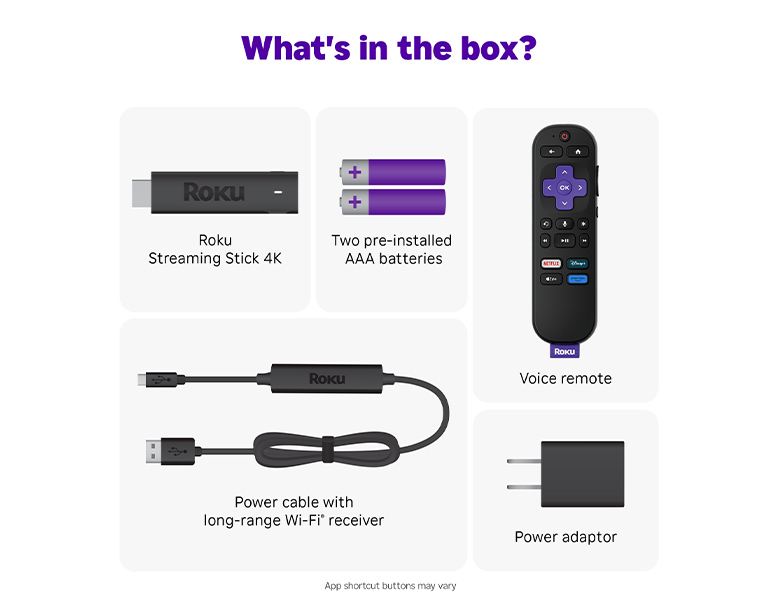
Use the TV’s native OS if the built-in free channel service is strong, the universal app stack is present, and the interface is fast enough that no one avoids it. Add a Roku or Fire TV stick if your TV misses an app you care about, if the free services feel buried or sluggish, or if your household needs a simpler remote path than the TV manufacturer provides.
This is especially true for Vizio SmartCast owners, older smart TVs, and any set where the app store feels frozen in time. It can also help on perfectly good Samsung or LG TVs if someone in the house strongly prefers Roku’s guide or Fire TV’s app selection. Spending $25–$50 once is usually better than spending months trying to make a limited TV platform behave like a different one.
A Practical Zero-Subscription Lineup
| If your TV is... | Use this free lineup first | Add hardware if... |
|---|---|---|
| Samsung | Samsung TV Plus, Tubi, Pluto TV, Plex, YouTube, Prime Video free tier if you use the Prime Video app | An app you rely on is missing or the interface feels slow |
| LG | LG Channels, Tubi, Pluto TV, Plex, YouTube, Kanopy or Hoopla if supported by your library and TV | You want a wider app store or a cleaner guide experience |
| Google TV | Tubi, Pluto TV, Plex, YouTube, Sling Freestream, Prime Video free tier, library-card apps where supported | Rarely for app breadth; more often for personal remote preference |
| Roku TV | The Roku Channel, Tubi, Pluto TV, Plex, YouTube, Sling Freestream | You need a specific missing niche app such as Twitch |
| Fire TV | Prime Video free tier, Tubi, Pluto TV, Plex, YouTube, Sling Freestream | The home screen bothers you enough to prefer Roku |
| Vizio | WatchFree+, Tubi, Pluto TV, Plex, YouTube | SmartCast lacks services you use or makes the free apps feel like work |
Some households will still pair free apps with paid subscriptions. A practical version is two paid services plus four free apps, which can keep monthly streaming costs around $20–$35 depending on the paid choices.[5] But the free side should not be an afterthought. On the right smart TV platform, the built-in channel service plus Tubi, Pluto TV, Plex, and YouTube is already enough to cover casual channel surfing, background TV, older movies, news clips, and the nights when nobody wants to browse a paid catalog.
If the native TV setup gives you those apps quickly and clearly, stay with it. If it does not, buy the $25–$50 stick and move on.
References
- Best Streaming Apps for Smart TVs in 2026 — ShaamTV
- The best free streaming services — Tom's Guide
- The Best Free Video Streaming Services for 2026 — PCMag
- Best Streaming & Smart TV Apps [2026] — HighSpeedOptions
- How to Watch TV for Free in 2026 — CableCompare
- The Complete Guide to Smart TV Platforms — PCMag
- The Roku Channel vs Pluto TV vs Tubi — Cord Cutters News
- Free ad-supported streaming television — Wikipedia