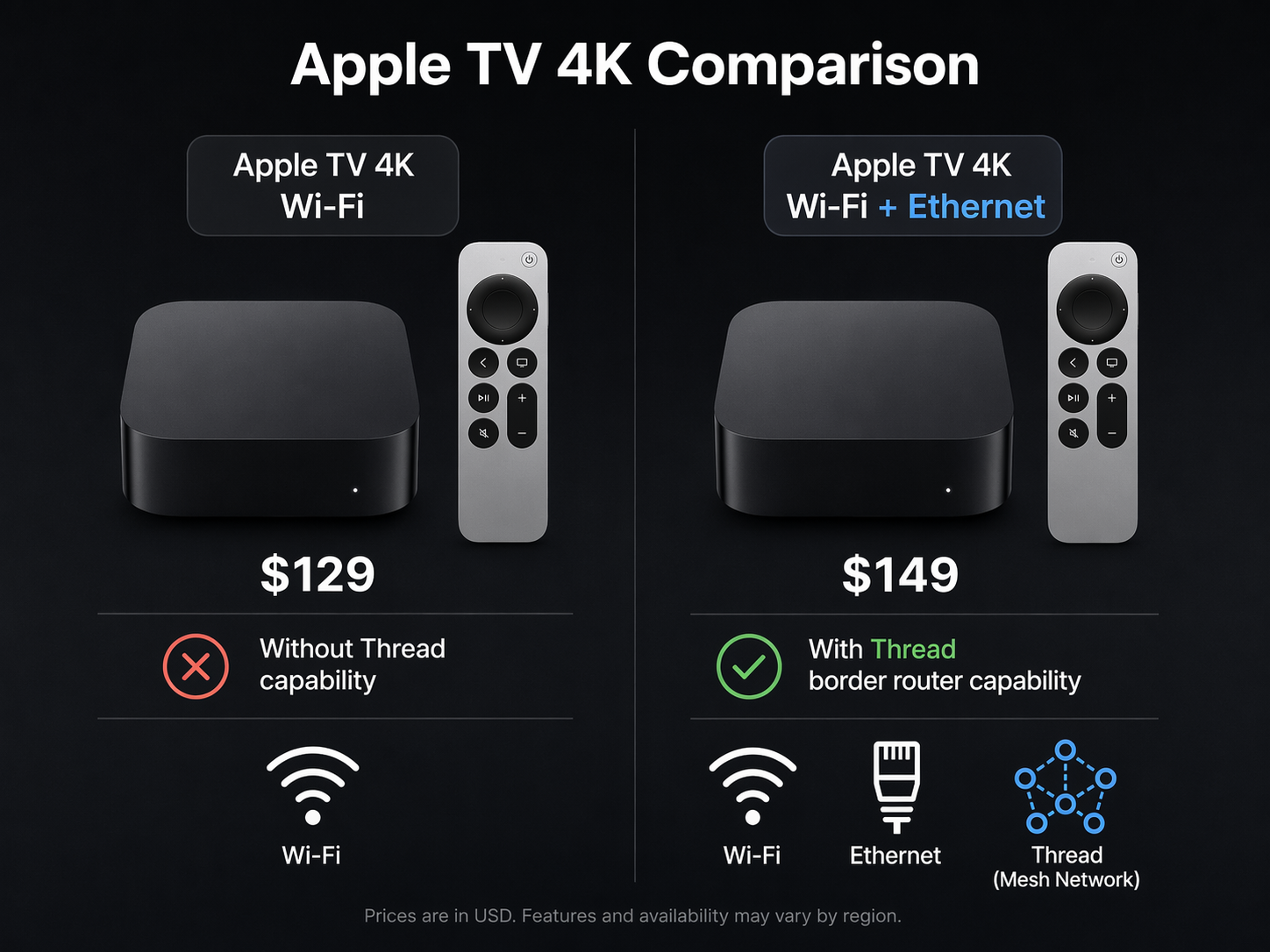
The Apple TV 4K can be the right smart home hub for an Apple Home setup, but the model split matters more than Apple’s product page makes it feel. The $129 Apple TV 4K Wi-Fi model is not the safe default if you plan to buy Thread accessories. The $149 Apple TV 4K Wi-Fi+Ethernet model is the one with Ethernet and Thread support, and Apple’s own support documentation says the Wi-Fi-only model can show a “Thread Border Router Required” alert when pairing Thread accessories.[1][2]
For most smart home buyers, that $20 difference decides the purchase. Both current Apple TV 4K models can work inside Apple Home. Both can act as Matter controllers for compatible accessories. Only the Wi-Fi+Ethernet version of the current 3rd-generation Apple TV 4K has the Thread radio needed to serve as a Thread border router.[1][2]
| Model | Price | Ethernet | Thread border router | Best smart home use |
|---|---|---|---|---|
| Apple TV 4K Wi-Fi | $129 | No | No | Apple Home hub for Wi-Fi-based accessories and Matter-over-Wi-Fi devices |
| Apple TV 4K Wi-Fi+Ethernet | $149 | Yes | Yes | Primary Apple Home hub for HomeKit, Matter-over-Wi-Fi, Matter-over-Thread, automations, and cameras |
| HomePod mini | $99 | No | Yes | Cheaper hub or supplemental Thread node, especially away from the TV |
If you want the short version of this Apple TV 4K smart home features review: buy the $149 Wi-Fi+Ethernet model unless you are certain your home will stay Wi-Fi-only. A smart home usually grows in small purchases: a lock here, a motion sensor later, a Matter light switch when the old one fails. Thread is exactly the kind of feature that looks optional until the accessory in your hand requires it.
What “Apple TV as a Hub” Actually Means
In Apple Home, a hub is not just a box that appears in the Home app. It is the device that keeps automations running when your iPhone is not home, lets you control accessories remotely, enables home sharing with other people, bridges certain local smart home traffic, and handles HomeKit Secure Video processing when cameras are involved.[3]
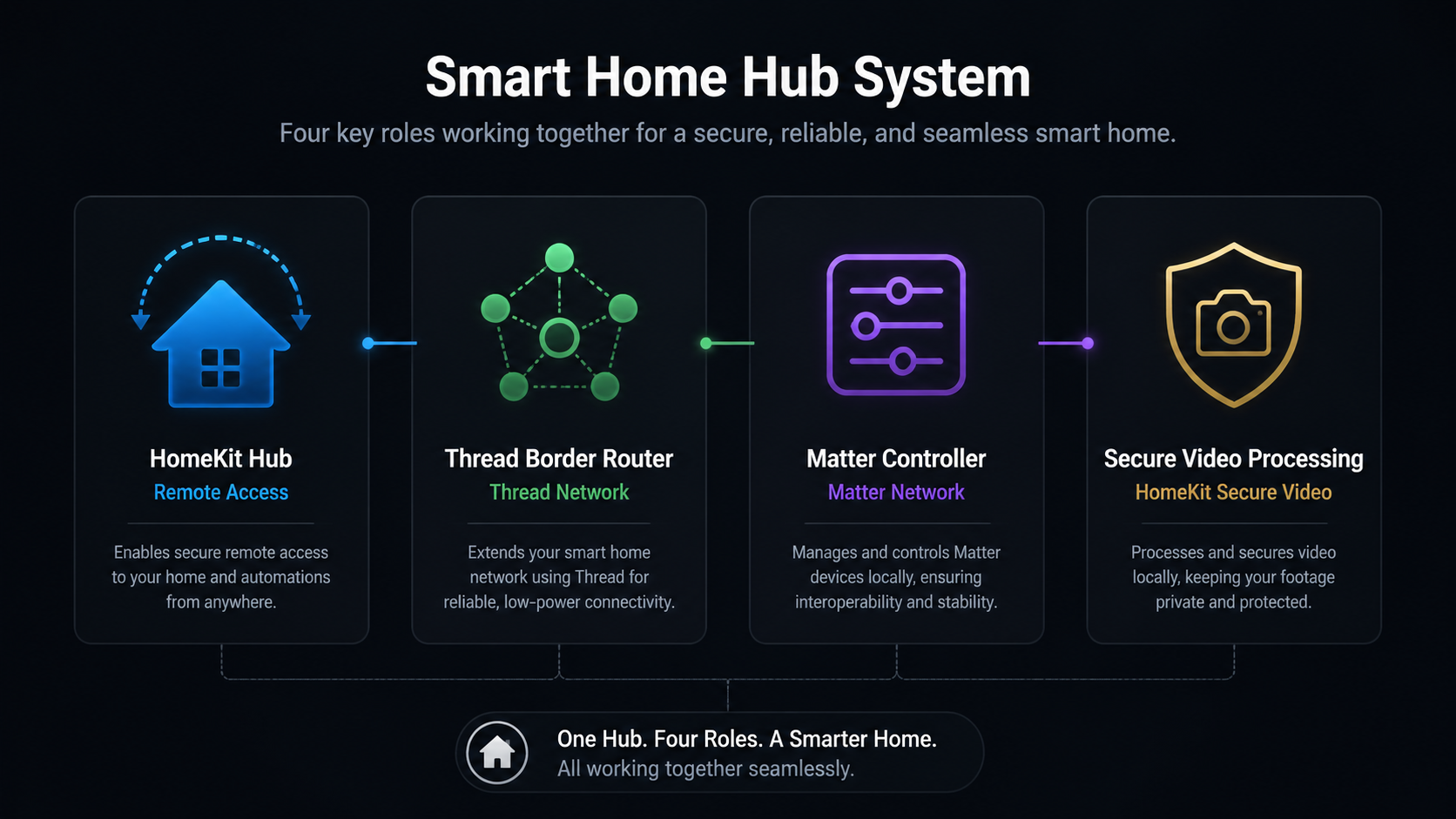
The Apple TV 4K can fill four useful roles in that setup:
- HomeKit home hub: keeps Apple Home automations, remote access, and shared-home control available through Apple’s Home app.[3]
- Thread border router: connects low-power Thread accessories to the rest of the home network, but only on the Apple TV 4K models that include Thread.[1][2]
- Matter controller: adds and controls Matter accessories in Apple Home, with the important split between Matter-over-Wi-Fi and Matter-over-Thread.
- HomeKit Secure Video processor: analyzes supported camera video locally, encrypts it, and uploads clips to iCloud+ when that service is enabled.[4]
Those roles do not matter equally to every buyer. If you only need remote control for a few Wi-Fi plugs and lights, the cheaper model can still do useful work. If you are building a more durable Apple Home setup, the Thread and Ethernet model is the one that avoids the first avoidable compromise.
Matter Support Does Not Automatically Mean Thread Support
The most common mistake is reading “Matter” as one capability. Matter is the smart home standard. It can run over more than one network type. A Matter smart plug may use Wi-Fi. A Matter door sensor, lock, or motion sensor may use Thread. Apple TV 4K model names do not make that distinction obvious, but the accessories will.
The $129 Wi-Fi-only Apple TV 4K can control Matter-over-Wi-Fi accessories through Apple Home. It cannot act as the Thread border router for Matter-over-Thread accessories. Apple’s support page is blunt enough: when setting up Thread accessories with an Apple TV 4K Wi-Fi model, users may see a “Thread Border Router Required” alert.[2]
The $149 Wi-Fi+Ethernet model avoids that warning because it includes Thread. So does the 2nd-generation Apple TV 4K. If you want the detailed model-by-model compatibility chart, the narrower Apple TV Matter hub model breakdown is the better place to check every version. For this buying decision, the current rule is simple: the cheaper 3rd-gen box is missing the Thread radio.
This is also why broad “Apple TV 4K supports Matter” language can be technically true and still not helpful enough. A buyer trying to pair a Thread-based Matter lock does not need a philosophical answer about the standard. They need a Thread border router in the house.
Why the Ethernet Model Is the Better Primary Hub
Ethernet is not about winning a speed test for a light bulb. It is about giving the hub a boring, steady path back to the network. Automations fail in irritating ways: a door sensor arrives late, a camera notification lags, a scene works from the phone but not from the scheduled automation. A wired Apple TV does not remove every smart home problem, but it removes Wi-Fi from the hub side of the equation.
Data Wire Solutions identifies the hardwired Apple TV 4K Wi-Fi+Ethernet model as the most stable Apple home hub option and describes it as more reliable for automations than Wi-Fi-only HomePods.[5] That conclusion is not a controlled lab result across every home layout, but it matches the practical hierarchy most Apple Home households eventually discover: the hub that is powered, wired, and near the router is usually the hub you want in charge.
Apple made that easier with the September 2025 Home app update. In iOS 26 and later, users can manually select a preferred home hub instead of leaving the Home app to choose automatically.[3] That matters because a home with an Apple TV, a HomePod mini in the kitchen, and another HomePod in a bedroom no longer has to accept whichever device Apple decides should be active that day.
The better setup is to wire the Apple TV 4K Wi-Fi+Ethernet model to the router or a reliable network switch, then set it as the preferred hub in Home. If the home has Thread devices at the edges of coverage, a HomePod mini can still help as another Thread border router node. It just does not need to be the primary brain when a wired Apple TV is available.
If you already own the right model and want the setup sequence, use the Apple TV Thread smart home setup guide. If the Home app keeps picking the wrong hub or accessories keep going unresponsive, the more useful next read is the Apple HomeKit hub troubleshooting guide.
HomeKit Secure Video Is Where Apple TV Hardware Starts to Matter
HomeKit Secure Video is easy to reduce to “camera clips in iCloud,” but the Apple TV’s job starts before storage. Supported cameras send video for local analysis by the home hub. Apple TV hardware can process activity detection, face recognition, and activity zones locally, then encrypt and upload the relevant clips to iCloud.[4]
The iCloud+ plan determines how many cameras can use HomeKit Secure Video: the 50GB plan supports one camera, the 200GB plan supports five cameras, and the 2TB plan supports unlimited cameras. Clips are available for a 10-day history, and those clips do not count against the iCloud storage limit.[4]
The Apple TV 4K has one advantage a HomePod mini cannot copy: it is connected to the television. Live camera feeds can appear on the TV, which is useful for doorbells, driveway cameras, nurseries, and quick checks without opening the Home app on an iPhone. Digital Trends highlights that difference in its HomePod mini versus Apple TV 4K comparison: the HomePod mini can be a hub, but it cannot show video.[6]
For a home with one camera, either Apple hub may be enough. For a home with several cameras, doorbell alerts, and automations tied to motion, the Apple TV 4K becomes more than a streamer that happens to be signed into iCloud. It is the device doing local video work while also staying available as the automation hub.
Apple TV 4K Versus HomePod mini
The HomePod mini is still a good smart home product. It costs $99, includes Thread, works as an Apple Home hub, and makes sense in rooms where you want Siri, audio, or another Thread node.[5][6] It is especially useful in larger homes where a single Thread border router near the TV does not reach every sensor cleanly.
As the main hub, though, the HomePod mini has three practical disadvantages. It is Wi-Fi-only. It cannot display cameras on a television. And if multiple hubs are available, it is not the device most people would choose to run automations when a wired Apple TV 4K can sit next to the router.
| Question | Apple TV 4K Wi-Fi+Ethernet | HomePod mini |
|---|---|---|
| Can it be wired? | Yes | No |
| Can it act as a Thread border router? | Yes | Yes |
| Can it show camera feeds on a TV? | Yes | No |
| Best role | Primary Apple Home hub | Cheaper hub or supplemental Thread node |
If the budget is tight and there is no TV location near the router, the HomePod mini is a reasonable entry point. If the goal is a serious Apple Home backbone, the better combination is a wired Apple TV 4K Wi-Fi+Ethernet as the preferred hub, with one or more HomePod minis placed where Thread coverage or Siri access is useful. For a deeper side-by-side decision, see HomePod Mini vs Apple TV 4K.
The Real Limits: Matter Gaps and Model Confusion
Apple TV 4K is one of the better Apple Home hub choices, but it does not make Matter painless. Terry White’s May 2026 Matter assessment documents ongoing fragmentation, including cases where Matter spec updates reached other platforms before Apple Home. One example he cites is Matter 1.5 camera support appearing on SmartThings months before Apple Home.[7]
That is a compatibility expectation, not a reason to dismiss the Apple TV. Buy accessories that clearly list Apple Home support, check whether they use Wi-Fi or Thread, and avoid assuming that “Matter” on the box means every feature will appear in every app on day one. The broader Apple Home and Matter 2026 guide is the better place to track those platform gaps.
The other limit is Apple’s own product segmentation. A buyer can see two boxes called Apple TV 4K, separated by $20, and reasonably assume the difference is storage, Ethernet, or streaming convenience. In smart home terms, the difference is also Thread. That is the part worth checking before checkout.
Should You Wait for a 2026 Apple TV Refresh?
There is a reasonable caveat in Q3 2026: MacRumors reported on July 15, 2026 that Apple’s rumored smart home lineup may include a new Apple TV with an A17 Pro chip and Wi-Fi 7.[8] That report is unconfirmed, and Apple has not announced a replacement.
If you are buying mostly for streaming performance and can wait, the rumor may matter. If you need a hub now for Thread accessories, cameras, and automations, the known current answer is still the $149 Wi-Fi+Ethernet Apple TV 4K. A possible future chip does not make the current Wi-Fi-only model a Thread border router.
Device Profile
| Field | Apple TV 4K smart home profile |
|---|---|
| Device category | Streaming box and Apple Home hub |
| Supported protocols | HomeKit, Matter, Wi-Fi, Bluetooth, Thread on Wi-Fi+Ethernet model |
| Compatible platform | Apple Home |
| Hub required | No separate hub required; Apple TV acts as the hub |
| Subscription required | iCloud+ required for HomeKit Secure Video |
| Price range | $129–$149 |
| Installation type | Plug-in |
| Best model for smart home use | Apple TV 4K Wi-Fi+Ethernet |
Buying Recommendation
Buy the $149 Apple TV 4K Wi-Fi+Ethernet model if you want the most complete and stable Apple Home hub. It gives you Ethernet, Thread, Matter control, HomeKit hub features, HomeKit Secure Video processing, and the option to make a wired device the preferred hub in iOS 26 and later.[1][2][3]
Consider the $129 Wi-Fi-only Apple TV 4K only if you do not care about Thread accessories and are comfortable limiting your setup to Wi-Fi-based HomeKit and Matter devices. That can be fine for a simple apartment with a few lights and plugs. It is the wrong default for a growing Apple smart home.
Consider the HomePod mini if you want the cheapest Apple Home hub, want Siri in another room, or need a supplemental Thread node. Do not treat it as the better primary hub when a wired Apple TV 4K Wi-Fi+Ethernet model can sit on the network and handle cameras, automations, Thread, and TV display duties from one box.
After choosing the right model, the next useful checks are narrower: confirm accessory compatibility in the Matter device buying guide, follow the Apple TV Thread setup guide, and use the HomeKit troubleshooting guide if the hub does not behave the way the hardware says it should.
References
- Apple TV 4K Official Specs, Apple
- Apple Support — Thread Border Router Required, Apple Support, Jan 13, 2026
- Apple Support — Set up home hub, Apple Support, Sep 15, 2025
- Apple TV 4K 2022 review: Getting more for less, Stacey on IoT
- HomePod vs Apple TV for Matter & Thread, Data Wire Solutions, 2026
- HomePod mini vs. Apple TV 4K: Which is the better HomeKit hub?, Digital Trends
- Why Matter Still Sucks in 2026, Terry White, May 2026
- Apple's 2026 Smart Home Lineup rumors, MacRumors, July 15, 2026