
We tested the UGREEN DXP4800 GT NAS as a home server
A tested home-server review of the UGREEN DXP4800 GT that judges the buy decision by four compatibility gates: eMMC system storage and third-party OS support, ECC memory, U.2/M.2 layout, and the real cost of dual 10GbE. Every finding is dated, tied to a specific tester and configuration, and marked Confirmed, Workaround, or Investigating.
Last updated
Dated buy verdict: four gates before the drives
As of August 3, 2026, the UGREEN NASync DXP4800 GT is one of the rare four-bay NAS boxes where the hardware makes the price feel almost suspicious in a good way. UGREEN lists the DXP4800 GT at $659.99, while Dong Knows Tech tracked launch-window street prices around $527.99 to $589.99, ranked it No. 2 on its best NAS list, and TechRadar called it the best-value four-bay 10GbE NAS it had tested so far.[1][2][3][4]
That is the temptation: a Ryzen Embedded R2514 box with dual 10GbE, two U.2-capable front bays, M.2 NVMe slots, Docker and VM ambitions, and a price that lands closer to ordinary enthusiast NAS money than most 10GbE-ready home-server builds. The buy decision, though, does not sit in the CPU line of the spec sheet. It sits in four compatibility gates.
| Gate | Status on August 3, 2026 | Home-server decision |
|---|---|---|
| 64GB eMMC and third-party OS support | Confirmed: UGOS Pro runs from internal eMMC. Workaround: TrueNAS/Unraid-style paths are community-reported on other UGREEN DXP eMMC units, not cleanly outlet-verified on the GT as a supported appliance path. | Buy only if you are comfortable staying on UGOS Pro for now or accepting a warranty-voiding workaround. |
| ECC memory | Confirmed: the platform supports ECC, but the shipping 8GB DDR4 module is non-ECC. | Budget for ECC yourself if data integrity is part of the reason you are buying a NAS instead of a mini PC. |
| U.2 and M.2 storage layout | Confirmed: U.2 works in front bays 1-2 at PCIe 3.0 x4 and replaces SATA in those bays; the M.2 slots are PCIe Gen3 x2. | Plan the pool before buying drives. The fast slots are useful, but they are not free extra bays. |
| Real dual-10GbE use | Confirmed: the ports are there. Conditional: meaningful gains require a 10GbE switch or adapter path, cabling, and a storage pool that can feed the link. | Do not price the NAS alone. Price the network and the drives. |

Why the DXP4800 GT gets attention

The strongest case for the DXP4800 GT is not subtle. Dual 10GbE in a compact four-bay desktop NAS at this launch-window price changes what a home rack can look like. It gives a family file server enough network headroom for fast workstation backups, media movement, and heavier local services without immediately stepping into a rackmount machine.
The rest of the hardware is unusually ambitious for the class. UGREEN lists four SATA bays, maximum storage up to 144TB, dual 10GbE networking, two U.2-capable front bays, and memory expansion up to 64GB.[1] Club386 also verified the unusual storage mix in its review: U.2 support in bays 1 and 2, plus two M.2 NVMe slots running at PCIe Gen3 x2.[6]
That is enough to make the GT feel less like a sealed storage appliance and more like a quiet infrastructure box: media server, backup target, Docker host, Home Assistant machine, camera recorder, Time Machine destination, and the thing everyone blames when files open slowly. The catch is that each of those jobs leans on a different part of the system, and the weakest match is not always obvious before checkout.
Gate 1: the 64GB eMMC decides how brave your OS plan can be
Confirmed: the DXP4800 GT uses 64GB of internal eMMC for its system storage, and the supported path is UGREEN’s UGOS Pro. NASCompares highlighted that eMMC detail as the caveat that separates the GT from some other UGREEN models where alternate OS experiments are physically cleaner.[5]
UGOS Pro is usable, and it is improving, but the version matters. Dong Knows Tech reviewed the unit on UGOS Pro 1.16.0.0089 and still found gaps that matter to a home-server buyer: no native Plex package, no ZFS, no flexible RAID, and features such as encrypted pools and WORM not yet delivered in the way buyers may expect from more mature NAS platforms.[2] Club386 separately noted a 31-app App Center, native Jellyfin, and Plex via Docker rather than as a first-party package.[6]
That makes the OS gate the one to settle before you think about drives. If you are happy to run UGOS Pro, use its Docker and VM features, and accept that the app ecosystem is younger than Synology or QNAP, this gate can close cleanly. If your plan is “I’ll just install TrueNAS” or “I’ll just run Unraid,” the word “just” is doing too much work.
- Confirmed: UGOS Pro is the supported operating system path on the DXP4800 GT.
- Confirmed: the GT’s system storage is eMMC, not a simple user-replaceable boot SSD path documented as a supported alternative-OS target.
- Workaround: third-party OS installs on UGREEN DXP eMMC units are community-reported, including steps such as disabling the watchdog and handling fan control through IT87/lm-sensors paths, but that is not the same as a vendor-supported GT TrueNAS or Unraid appliance.
- Confirmed risk: Need to Know IT and Unraid forum discussion both treat alternate-OS installs on these UGREEN systems as warranty-voiding territory.[8][9]
The difference between “possible” and “compatible” matters here. A home-lab owner can often make hardware do something clever on a weekend. A home server has to survive the Tuesday night after an update, when the fans do not behave as expected, the watchdog reboots the box, or a family photo share is suddenly offline. I would treat TrueNAS or Unraid on the GT as Workaround/community-reported until a GT-specific install path is independently verified with firmware, fan behavior, updates, and warranty implications stated plainly.
Gate 2: ECC is supported, but it is not in the box
Confirmed: the AMD Ryzen Embedded R2514 platform supports ECC memory, and UGREEN lists the DXP4800 GT with two memory slots and support up to 64GB.[1] Also confirmed: the unit ships with an 8GB non-ECC DDR4 module, so ECC is a second purchase rather than part of the base configuration.[2]
This is not a scandal; it is a budget line. If the box is only a media cache, a Docker playground, or a fast scratch share, the shipping memory may be enough to begin testing. If the DXP4800 GT is going to hold the only live copy of family documents before backup, run always-on databases, or become the place where every laptop quietly lands its files, ECC belongs in the initial cost calculation.
UGREEN’s compatibility page should also be part of that purchase, not something discovered after the DIMM arrives. The page lists compatible drives, RAM, and UPS options; it does not turn every DDR4 ECC module on the market into a tested part.[7]
Gate 3: U.2 and M.2 are useful, but the layout has consequences
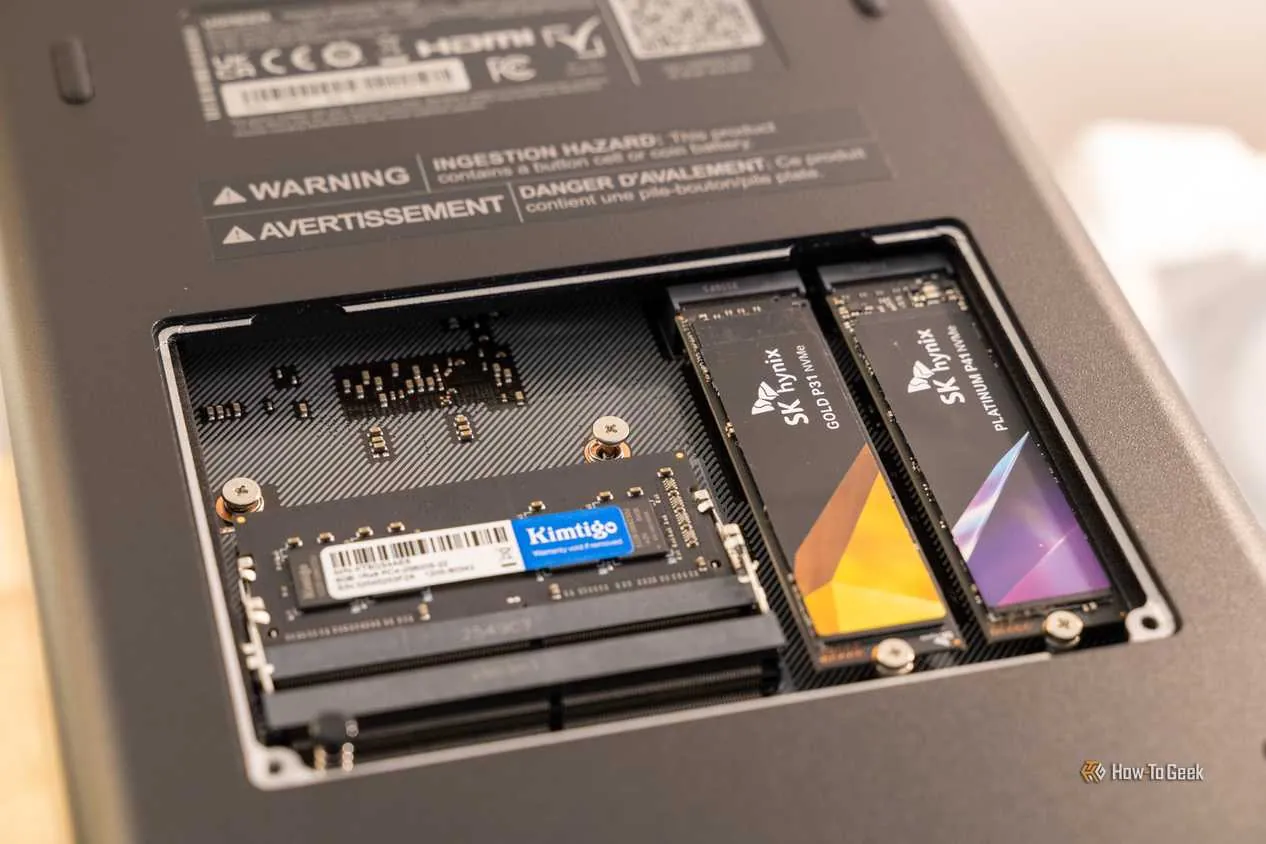
Confirmed: U.2 support lives in front bays 1 and 2, runs at PCIe 3.0 x4, and replaces SATA use in those bays.[1] Club386’s teardown-level review matches that interpretation and adds the practical detail that the two internal M.2 slots are PCIe Gen3 x2, not full x4 lanes.[6]
That makes the GT more flexible than an ordinary four-SATA-bay NAS, but not in the magical “four HDDs plus two U.2 drives plus two full-speed M.2 drives with no compromises” sense. A U.2 drive in bay 1 or 2 is a storage choice that displaces a SATA drive. The M.2 slots are still useful for SSD pools, containers, VMs, and cache-like workloads, but their Gen3 x2 link is part of the performance ceiling.
I would not buy the DXP4800 GT expecting SAS-like expansion either. UGREEN’s compatibility list has drive, RAM, and UPS categories, but no SAS category, so the safer reading is the official one: SATA bays, U.2 in the first two bays, and M.2 slots on the board.[7]
Gate 4: dual 10GbE is not one purchase
Confirmed: the DXP4800 GT has dual 10GbE. Conditional: seeing 10GbE-class results depends on the rest of the house. TechRadar’s review is useful here because it separates the NAS from the surrounding bill: 10GbE needs a matching switch or direct adapter path, suitable cabling, and storage fast enough to feed the link.[4]
| Tester | Configuration context | Measured result | What it proves |
|---|---|---|---|
| NASCompares | Four SATA SSDs, then M.2 RAID 0 testing | About 1.3GB/s read and 600-700MB/s write on four SATA SSDs; about 1.45GB/s read and 1.1GB/s write on M.2 RAID 0.[5] | The network can be fed, but pool layout changes the result. |
| TechRadar | RAID 5 over 2.5GbE, then AJA over 10GbE | 272.96MB/s read and 268.35MB/s write over 2.5GbE; about 1034MB/s read and 585MB/s write over 10GbE.[4] | The same NAS looks ordinary on a 2.5GbE path and much faster on a 10GbE path. |
| Club386 | 10GbE bench | 1.11GB/s in both directions.[6] | The box can deliver roughly 10GbE-class transfers in a favorable bench setup. |
| AppleInsider | Media playback workload | Six 4K60 direct-play streams and five transcoded streams.[10] | Media serving is strong, but streaming tests are not the same as file-copy saturation. |
Those numbers are encouraging, but they should not be blended into one universal speed claim. A 10GbE NAS connected to a 1GbE router is a fast box waiting in traffic. A 10GbE NAS filled with slow or parity-limited storage may also wait on disks. A workstation with no 10GbE adapter will not care how many 10GbE ports are on the NAS.
For a normal home network, the honest budget may include at least one 10GbE switch or direct 10GbE adapter, appropriate cabling, client-side adapters where needed, and a storage layout built for the workload. If your smart-home setup already treats the LAN as infrastructure rather than a single router box, this is the same kind of compatibility thinking used in hub-centered network planning, whether you are mapping a NAS, a Home Assistant server, or a local AI box.
Daily home-server reality: media, apps, cameras, and the always-on bill
For media, the DXP4800 GT is in a good place on hardware and a more mixed place on software. AppleInsider reported hardware-accelerated 4K transcoding via the Vega 8 iGPU, while Club386 noted that AV1 is not part of that capability picture.[10][6] Jellyfin is available natively, while Plex is a Docker route rather than a native package as of these launch-window reviews.[6]
For Docker and VM workloads, the GT’s CPU, memory ceiling, NVMe options, and network ports make more sense than they would on a lighter appliance NAS. Home Assistant belongs in that bucket for me: possible as a container or VM-style home-server workload, but not something I would migrate blindly until backups, USB device passthrough needs, add-ons, and recovery steps are tested on your exact setup. If your smart home already depends on local control, the NAS becomes infrastructure, not a toy service host.
Cameras are still Investigating. UGREEN claims ONVIF support through Surveillance Center, but TechRadar could not test that feature because a camera compatibility list was not available at review time.[1][4] That is not the same as saying it does not work. It means I would not buy the GT primarily as a camera NVR until the camera list and real ONVIF behavior are confirmed for the models you own.
Power and noise also deserve real numbers because this is an always-on box. NASCompares measured 25W idle with M.2-only storage, about 45W under a four-HDD light load, 70-77W peak, 36-38dBA at idle, and 45-50dBA at maximum fan speed.[5] Club386 measured 27W idle, 65W load, 33dBA, and 52dBA in its own setup.[6] UGREEN’s own figures list 42.36W during drive access and 18.12W in hibernation.[1]
I would not average those into a fake single answer. The drives, fan curve, room temperature, SSD/HDD mix, and workload all matter. For UPS planning, treat the GT as a real always-on load and leave headroom for the switch and any modem, router, or automation hub that needs to stay alive with it. If you are sizing backup power, the same practical questions apply as in a broader UPS or power-station plan: what must stay up, for how long, and what shuts down first.
Who should buy it, and who should wait
Buy the UGREEN DXP4800 GT if you clear the gates rather than merely like the headline. The best fit is someone who wants a compact home-server NAS, plans to run UGOS Pro for now, is willing to use Docker for apps such as Plex, can add ECC if the data role justifies it, understands that U.2 consumes bays 1 and 2, and either already owns or is ready to build the 10GbE network and storage stack around it.
Skip it, or at least wait, if you expected a clean TrueNAS or Unraid appliance with no warranty anxiety, included ECC, SAS-like expansion, mature first-party apps, confirmed camera compatibility, or cheap 10GbE gains from an unchanged home network. The GT is not weak hardware. It is hardware strong enough that the hidden second purchases and workaround paths matter more.
That is the conditional recommendation. If any one of those gates sounds like a surprise, let the firmware, compatibility lists, and third-party OS reports mature before making the DXP4800 GT the quiet box everything else in the house depends on.
References
- UGREEN NASync DXP4800 GT 4-Bay NAS Storage, UGREEN
- UGREEN NASync DXP4800 GT Review, Dong Knows Tech
- Best NAS Servers, Dong Knows Tech
- UGREEN NASync DXP4800 GT NAS review, TechRadar
- UGREEN DXP4800GT NAS Review, NASCompares, June 8, 2026
- UGREEN NASync DXP4800 GT review, Club386
- Compatibility, UGREEN
- TrueNAS/Unraid on UGREEN DXP, Need to Know IT
- UGREEN NASSync, Unraid Forums
- UGREEN NASync DXP 4800 GT review: The best NAS price to performance in 2026, AppleInsider, June 9, 2026
Known issues with this device / protocol
Spec-version history
For active regressions on this protocol, see Update Watch.
No linked Update Watch entries yet.