
Will Starlink home internet work with your smart home?
Switching to Starlink rarely breaks an existing smart home: Matter, Zigbee, Z-Wave, and Thread run on your hub and LAN, not the satellite connection. The real friction is onboarding 2.4GHz-only WiFi devices on the included router's combined band and away-from-home remote access, with a device-type checklist so you know what to verify before you commit.
Last updated
Yes, Starlink home internet should work with most existing smart homes. If your lights, sensors, locks, thermostats, and automations already run through Matter, Thread, Zigbee, Z-Wave, Home Assistant, Apple Home, Google Home, Alexa, SmartThings, Hubitat, or another hub-centered setup, the satellite connection is usually not the part deciding compatibility.
The two things to check before switching are narrower: whether your 2.4GHz-only WiFi devices can be onboarded cleanly with the Starlink router, and whether any away-from-home access depends on inbound port forwarding. Those are real issues. They are also not the same issue.
Stop treating “Starlink” as one compatibility layer
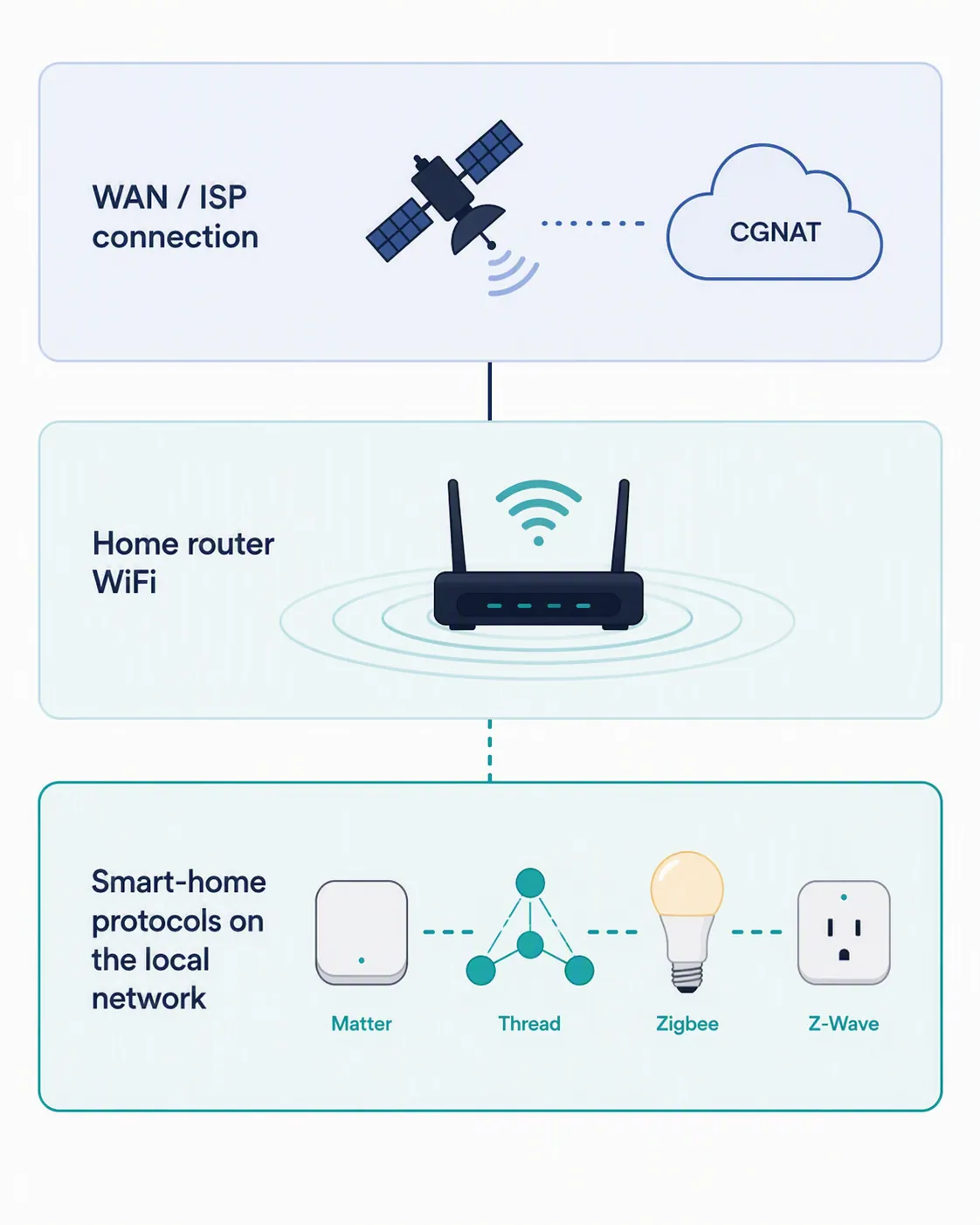
A smart-home switch to Starlink has three separate layers. Mixing them together is how a harmless internet change starts to look like a protocol disaster.
| Layer | What it decides | What it usually does not decide |
|---|---|---|
| WAN / satellite internet | Internet access, cloud services, remote access behavior, CGNAT limitations | Whether a Zigbee sensor can talk to its hub inside the house |
| Starlink router WiFi | SSID behavior, 2.4GHz and 5GHz band handling, WiFi-only device onboarding | Whether Matter, Thread, Zigbee, or Z-Wave are compatible as protocols |
| Local smart-home protocol layer | Hub radios, border routers, LAN communication, local automations | Whether the ISP is fiber, cable, 5G home internet, or Starlink |
That third row is the reason the answer is calmer than many pre-purchase checks make it sound. Matter uses IP networking, including IPv6, and Thread devices reach the home network through a Thread border router that bridges the Thread mesh to the local WiFi or Ethernet network.[1] Zigbee and Z-Wave devices are even less interested in the ISP: they talk over their own hub radios first, then the hub decides what needs the LAN or cloud.
The protocol layer: where most smart-home compatibility is actually decided
If a motion sensor triggers a Zigbee light through a hub, Starlink is not in that path. If a Z-Wave lock reports to a hub, the satellite dish is not translating Z-Wave. If a Matter-over-Thread bulb is reachable through a border router, the important pieces are the bulb, the Thread mesh, the border router, and the local network. The ISP matters only when the system needs something outside the house.
That distinction matters for Apple Home, Google Home, Alexa, SmartThings, Hubitat, and Home Assistant users because the scary word in the product page is “satellite,” while the working part of the smart home is often “hub.” A hub can still run local automations. A border router can still bridge Thread. A Zigbee or Z-Wave coordinator can still hear its devices. Starlink does not turn those radios into WiFi devices.
Matter-over-WiFi devices are slightly different because they do use the home WiFi network, but they still do not become satellite-dependent for basic local reachability. The Starlink router may affect onboarding or signal quality. It does not change what Matter is.
This is also why replacing a cable or fiber ISP with Starlink is not the same as replacing your hub, your Matter controller, your Thread border router, or your Zigbee/Z-Wave coordinator. If those pieces stay in place and your LAN stays coherent, most protocol-based devices have no reason to care who supplies the internet connection.
The connection itself is usually not the smart-home bottleneck
Ordinary smart-home control traffic is small compared with general home internet traffic. A command to turn on a bulb, a sensor state update, or a hub checking in with a cloud service is not competing in the same class as multiple video streams or large file uploads.
For context, PCMag’s review of the Starlink Dish V4 and Router Gen 3 reported roughly 150 Mbps mean download speed and about 29 ms mean latency in its testing.[2] That does not guarantee your address will see the same numbers, and it does not prove every camera-heavy home will be happy. It does help dismiss the wrong fear: basic smart-home control is rarely limited by raw Starlink throughput.
Starlink’s 2026 Residential lineup also gives buyers more plan labels to sort through: Residential 100, Residential 200, and Residential Max were reported as unlimited tiers, with Max bundling the Gen 3 Router and a Router Mini mesh node in July 2026 reporting.[3] Treat those plan details as buyer context, not as compatibility proof. A faster tier does not make Zigbee more compatible, and a plan name does not remove a 2.4GHz onboarding problem.
The router layer: 2.4GHz-only devices are the main annoyance
The most practical pre-purchase question is not “Can Starlink run smart homes?” It is “How many of my devices are 2.4GHz-only WiFi products that still need to be paired or re-paired?”
Many low-cost smart plugs, bulbs, switches, diffusers, garage-door add-ons, and older cameras only join 2.4GHz WiFi. The Starlink router presents WiFi in a way that can steer devices between bands, and that can confuse onboarding apps that expect the phone and device to be sitting plainly on 2.4GHz during setup.
Starlink’s own WiFi troubleshooting material gives the important fix: split the 2.4GHz and 5GHz networks when a device does not support 5GHz.[4] That makes this a documented workaround, not just forum folklore. It is still a workaround, though, and it is the kind of work that lands on the person who has to re-onboard six smart plugs after dinner.
There is also community evidence in the same direction. A Starlink Community Forums thread describes Gosund 2.4GHz-only plugs pairing only after the user split the bands.[5] That is useful as a Workaround/Investigating note. It is not a confirmed NestGrid result, and it should not be stretched into “all Gosund plugs” or “all 2.4GHz devices.”
Router capacity claims should be handled with the same restraint. Speedcast’s Starlink router comparison lists device-capacity figures such as 128 devices for the Gen 2 router and 235 for the Gen 3 and Mini routers.[6] Those are vendor-style specifications, not independently verified ceilings for a noisy smart home full of plugs, speakers, cameras, and phones. They are a rough planning signal, not a lab result.
The WAN layer: CGNAT affects remote access assumptions, not local control
Starlink residential service commonly sits behind carrier-grade NAT, or CGNAT. The practical consequence is that you generally should not assume you have a public IPv4 address or can simply forward inbound ports to something inside your home network.[7][8]
That does not break local smart-home control. A hub sending a command to a light on your LAN is not waiting for an unsolicited inbound connection from the public internet. A Thread border router, Zigbee coordinator, or Z-Wave hub does not need inbound IPv4 port forwarding to talk to nearby devices.
CGNAT does matter if your remote access model is self-hosted and inbound. A self-hosted Home Assistant instance, an NVR, a WireGuard server, or a dashboard that you currently reach by opening ports on your router may need a different access design after switching to Starlink. That is a remote-access design issue, not a verdict that the local smart home is incompatible.
Community reports are reassuring but should stay in their lane. In an April 2026 Hubitat Community discussion, users reported Apple Home and Hubitat Remote Access continuing to work over Starlink CGNAT, while a self-hosted inbound WireGuard setup was the concern.[9] That supports the distinction between cloud-mediated or relay-style access and self-hosted inbound access. It does not create an official guarantee for every ecosystem, firmware version, or account configuration.
Device-by-device compatibility check before you switch
Use this table before ordering hardware or canceling your current ISP. The point is to identify which layer decides whether each device type keeps working.
| Device type | Layer that decides the outcome | Pre-purchase verdict |
|---|---|---|
| Zigbee sensors, bulbs, buttons, and locks | Protocol / hub radio layer | Usually fine if the same hub or coordinator stays online. Starlink is not part of the Zigbee radio path. |
| Z-Wave switches, locks, sensors, and relays | Protocol / hub radio layer | Usually fine if the Z-Wave hub remains in place. Check hub internet features separately, not the device radio compatibility. |
| Matter-over-Thread devices | Protocol layer plus Thread border router | Usually fine if you keep a working Matter controller and Thread border router. The Thread mesh reaches the LAN through that border router. |
| Matter-over-WiFi devices | Local WiFi plus Matter controller | Usually fine after joining the new WiFi network. If the device is 2.4GHz-only, treat onboarding as the risk point. |
| WiFi smart plugs, bulbs, switches, and appliances | Starlink router WiFi layer | The main friction category. Inventory 2.4GHz-only devices and be ready to split 2.4GHz and 5GHz during setup. |
| Smart cameras and video doorbells | WiFi layer plus WAN/cloud behavior | Basic joining depends on WiFi. Remote viewing, clips, and uploads depend on the camera vendor’s cloud model and your connection quality. |
| Home Assistant, Hubitat, SmartThings, Apple Home, Google Home, Alexa hubs/controllers | LAN/protocol layer for local control; WAN layer for cloud and remote features | Local automations are the safer part. Verify away-from-home access if you currently rely on inbound ports or a self-hosted VPN. |
| WiFi-only IoT devices with old setup apps | Router WiFi layer | Higher chance of onboarding annoyance. Check whether the app requires the phone to be on a visible 2.4GHz SSID. |
The table is deliberately uneven. Zigbee and Z-Wave do not deserve the same anxiety as a cheap 2.4GHz-only plug with a brittle setup app. A Thread device with a healthy border router is a different problem from a camera that uploads video clips all day. Put each device in the right layer before deciding whether Starlink is a risk.
What to verify before committing
- Count your 2.4GHz-only WiFi devices. If the list is long, assume you may spend time splitting bands and re-onboarding devices.
- Identify anything you access from outside the home through port forwarding. That is the CGNAT-sensitive group.
- Separate local automations from cloud features. A local motion-to-light automation and a remote camera feed do not depend on the same path.
- Check which devices depend on hubs, Matter controllers, Thread border routers, Zigbee coordinators, or Z-Wave radios. Those pieces matter more than the ISP for local compatibility.
- Do not use Starlink plan tier alone as a smart-home compatibility shortcut. A higher plan can help household internet capacity, but it does not fix a bad onboarding app or a self-hosted inbound access design.
If you have already decided to switch and need the configuration work, use the Starlink smart-home setup guide next. That is the place for camera bandwidth planning, CGNAT workarounds, third-party routers, and VLAN decisions. This compatibility check stops earlier: it tells you whether the switch is likely to break the smart home you already own.
If you are still choosing the ISP, compare Starlink with fixed wireless in the T-Mobile 5G Home Internet vs. Starlink smart-home guide, and keep the Amazon Leo smart-home connectivity comparison nearby if you are comparing satellite-ISP paths rather than only today’s Starlink service.
Apple Home users with Matter or Thread hardware should also separate ISP questions from controller and border-router requirements; the Apple Home and Matter hardware setup guide goes deeper on that side. For outage and remote-recovery planning, the T-Mobile outage smart-home reboot guide is the closer sibling topic.
The pre-purchase verdict is straightforward: if your smart home is mostly hub-based or protocol-based, Starlink is unlikely to be the thing that breaks it. If your home is full of 2.4GHz-only WiFi devices or depends on self-hosted inbound remote access, verify those two areas before switching.
References
- Thread and IPv6 — Matter primer — Google Home Developers
- Starlink Dish V4 and Router Gen 3 Review — PCMag
- Starlink Revamps Residential Plan Lineup With Three Service Tiers — RV Mobile Internet
- Starlink Mini - WiFi Troubleshooting — Starlink Help Center
- Starlink Device Connecting Issues? — Starlink Community Forums
- Starlink Router Comparison (Gen 2 vs Gen 3 vs Mini Router) — Speedcast
- Bypass Starlink CGNAT: Secure Port Forwarding Alternative — NoPorts
- Seamless Inbound Remote Access via Starlink — Agilicus
- Starlink with Unifi - Will CGNAT Cause Me Issues? — Hubitat Community, April 2026
Known issues with this device / protocol
Spec-version history
For active regressions on this protocol, see Update Watch.
No linked Update Watch entries yet.