
Which Kid-Safe Smartphones Can Control Smart Home Devices?
Not all kid-safe smartphones can control smart home devices. This guide compares Bark, Pinwheel, Gabb, standard Android with Family Link, and iPhone with Screen Time across Google Home, Alexa, and Apple HomeKit so parents can choose the right combination.
Last updated
A child’s phone is only useful as a smart-home controller if the permission model behind it holds up. The phone has to be able to install the right home app, but the home platform also has to recognize a child account in a way that lets a parent draw boundaries. Those are separate gates.
As of July 24, 2026, the cleanest mainstream path is Google Home with a supervised Google Account managed through Family Link. Apple HomeKit can work, but its sharing roles are broad. Alexa is the difficult one: Amazon’s child-facing materials describe music, questions, calling, and kid controls, but not child smart-home control, and unresolved user reports describe child profiles being unable to control devices such as lights.[1][2]
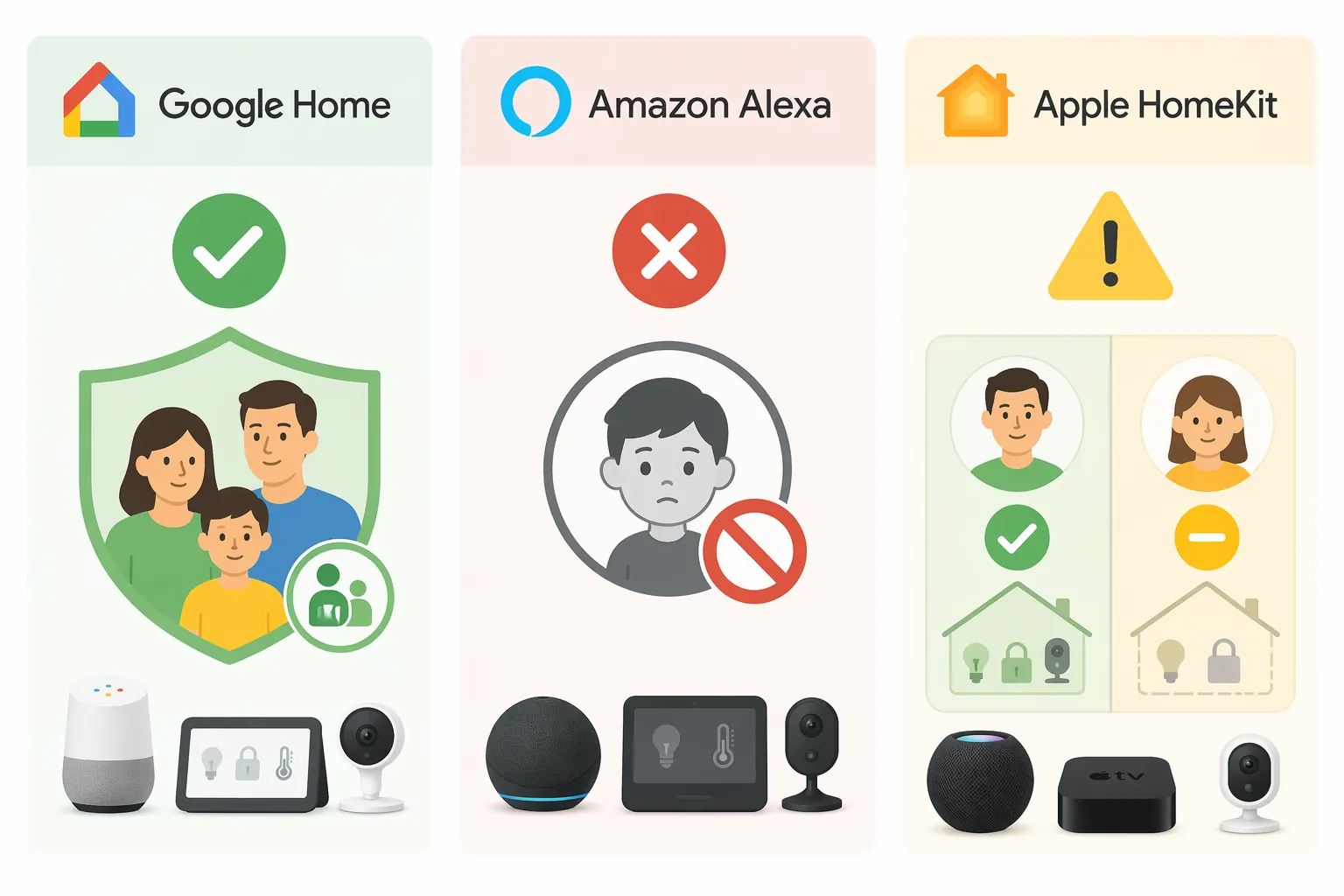
| Smart home platform | Child smart-home control status | What that means before buying a phone |
|---|---|---|
| Google Home | Best parent-managed route | A supervised child Google Account can be added to the home, and Google documents child Assistant setup, Voice Match, parental controls, and Downtime behavior.[3][4] |
| Amazon Alexa | Not a good child-controller route under current child profiles | Amazon’s official child-feature materials do not document smart-home control for kids, and user reports describe the feature as blocked.[1][2] |
| Apple HomeKit | Works only if broad sharing roles are acceptable | A child can be invited into the home, but Apple’s roles are Resident or Guest rather than per-device or per-room child permissions.[5] |
The Compatibility Question Parents Actually Need Answered
The useful question is not “Can this kid phone control smart devices?” in the abstract. It is narrower: can this child, on this phone, using this account type, control the right devices without also gaining access to the wrong ones?
A phone can be kid-safe because it limits apps, browsers, contacts, messages, or screen time. Those limits do not automatically make it a good smart-home remote. A tightly curated app store may be exactly why a parent likes the phone, and exactly why the Google Home app or Alexa app is not reliably available. A standard Android phone may look less “kid phone” on the box, but it gives a parent a more predictable route through Family Link and Google Home.
Locks deserve a different level of caution than bedroom lights. A child turning off a lamp from bed is a convenience problem. A child unlocking a front door from a phone is a household security decision. The platforms do not all let parents separate those two actions neatly.
Google Home Is the Strongest Route for Parent-Managed Child Access
Google Home is the only one of the three mainstream platforms here that plausibly matches the way many parents think about a first phone: give the child some independence, keep the account supervised, and make the controls visible enough that the parent can check what is allowed.
Google documents a path for children to use Google Assistant on shared devices: a parent adds the child’s Google Account, sets up Voice Match, and manages the child through Family Link.[4] Google also documents parental controls and Digital Wellbeing controls for devices in the home, including Downtime.[3] That matters because it gives the parent actual surfaces to inspect, not just a vague promise that the phone is safe.
The counterintuitive part is Downtime. Google says smart home control commands can still work during Downtime.[3] A parent who expects Downtime to mean “nothing works” may find that surprising. For a smart-home controller, though, it is not automatically a flaw. If the reason for the phone is partly household function, a bedtime block that still lets a child turn off a light or adjust a fan can be the practical compromise.
Treat that behavior as intentional, not accidental. Downtime can reduce distractions without necessarily cutting off every home command. That is useful only if the parent understands it before setup and does not assume the screen-time rule has also removed smart-home access.
Where Standard Android and Bark Fit
A standard Android phone with Family Link is the control comparison for Google Home. It is not the most boutique “kid phone” answer, but it has the fewest compatibility surprises: Google account supervision, Google Home app access, and Google Assistant setup all live in the same ecosystem.
Bark Phone is the most favorable dedicated kid-phone option for a Google Home household because it is Android-based and does not depend on a heavily sealed app environment in the same way as the strictest kid-phone brands. The practical question to confirm at purchase is whether the child’s plan and parent settings allow the Google Home app and the account setup needed for Family Link and Assistant.
That is the difference between a phone that is broadly child-monitored and a phone that can actually act as a supervised smart-home controller. The Google Home app has to be present, the supervised Google Account has to be usable, and the parent has to complete the home and Assistant setup rather than handing the child a generic login.
Pinwheel and Gabb Are More Conditional
Pinwheel should be treated as possible but not automatic for Google Home. Its Android base makes Google Home compatibility plausible, and parent-enabled Play Store access may create a route. But Pinwheel’s curated app model and no-browser posture are central to why families choose it. If a parent has to loosen the app environment substantially just to make smart-home control work, that tradeoff should be made knowingly.
Gabb is the least natural fit for this particular job. That is not a judgment on it as a first phone; it is a compatibility judgment for smartphone-based smart-home control. A more limited app ecosystem works against a use case that depends on installing and signing into a major home-control app.
For Pinwheel or Gabb, the pre-purchase question should be blunt: can this exact model, on this exact plan, install and run Google Home under the child’s managed account? If the answer comes back as “maybe,” it is not a stable enough answer for a phone whose household job includes lights, thermostats, or locks.
Alexa Is the Weak Choice for a Child Smart-Home Controller
Alexa is frustrating because the answer parents need is not presented as cleanly as it should be. Amazon’s official parent-facing explanation of Alexa for kids discusses kid-friendly questions, music, calling, announcements, bedtime routines, explicit-song filtering, and parental controls, but it does not document a child permission path for controlling smart-home devices.[1]
User reports fill in the missing practical picture: child profiles have been reported as unable to control devices such as lights, with the issue unresolved in Amazon’s forum thread.[2] That is not as satisfying as an official “this is prohibited” support page. But for buying advice, the distinction does not help much. A parent should not buy a child’s phone on the assumption that Alexa child profiles will behave as flexible smart-home remotes.
This also means the phone model matters less in an Alexa household. A standard Android phone, iPhone, Bark Phone, Pinwheel, or Gabb device may each have different app availability, but the child-profile restriction is the platform-level problem. If the child cannot control the devices under the child identity, a better phone does not solve the permission design.
HomeKit Works, But the Sharing Roles Are Broad
Apple HomeKit is cleaner than Alexa in one way: Apple documents how to share control of a home. The issue is that the documented roles are not granular enough for many child-use cases. A person can be added as a Resident, or access can be handled as Guest access with narrower conditions.[5]
Resident access is broad. For a child, that can mean the phone becomes a powerful remote for the whole home rather than a limited controller for a bedroom or a small set of safe devices. Guest access is narrower, but Apple describes it around local-only access and scheduling, especially for locks, garage doors, and security systems.[5] That can be useful for a visitor or a limited-entry scenario, but it is not the same as saying, “This child can control only the bedroom light and upstairs fan from anywhere.”
A standard iPhone with Screen Time can still be a reasonable child phone in an Apple household. Screen Time can manage many phone behaviors. But Screen Time is not a per-accessory HomeKit permission system. If the household accepts Apple’s sharing roles, the iPhone path is predictable. If the parent wants room-by-room or device-by-device child permissions, HomeKit is a poor fit under the documented model.
Phone-by-Phone Compatibility Translation
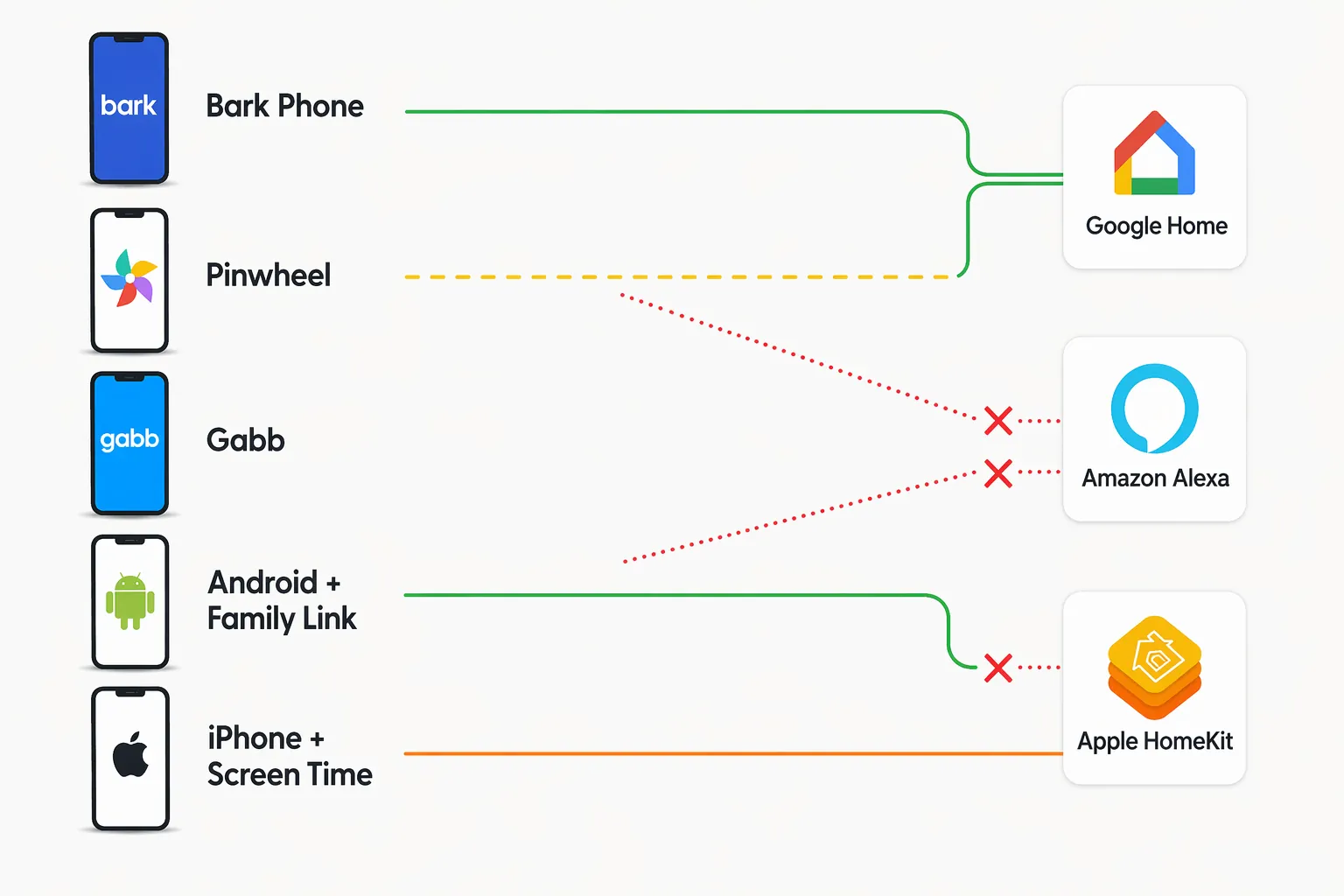
| Phone option | Best smart-home fit | Compatibility judgment |
|---|---|---|
| Standard Android with Family Link | Google Home | Most predictable route for supervised Google Account setup, Google Home app access, Assistant, Voice Match, and Downtime behavior. |
| Bark Phone | Google Home | Strongest dedicated kid-phone fit, assuming Google Home app access and the needed Google account setup are available on the chosen plan. |
| Pinwheel | Possibly Google Home | Conditional. Android makes compatibility plausible, but the curated app model and no-browser approach mean parents should verify Google Home availability before purchase. |
| Gabb | Weak fit for this use case | A tightly limited app ecosystem works against smartphone-based control through Google Home, Alexa, or Apple Home. |
| Standard iPhone with Screen Time | Apple HomeKit | Predictable for Apple households, but only if Resident or Guest sharing is acceptable rather than per-device child permissions. |
The dedicated kid-phone brands are easiest to misunderstand because their safety features are real, but not always aligned with smart-home control. A parent buying for calls, location, contacts, and reduced internet exposure may rank the phones differently than a parent buying a first phone that also has to operate bedroom lights and household automations.
For this specific use case, app availability is not a minor feature. It is the hinge. If the phone cannot reliably install and run the home-control app, the child account permissions inside Google, Amazon, or Apple never get a chance to matter.
The Safety Tradeoff Is Mostly About Locks and Scope
The safest workable setup is usually boring: a supervised child account, a clearly supported home platform, and a small set of devices the parent is comfortable letting the child control. Lights, fans, and maybe a thermostat create different consequences than door locks, garage doors, and security systems.
The practical purchase rule is simple enough: choose standard Android with Family Link, or Bark if a dedicated kid phone is preferred, when Google Home child control is the goal. Do not choose Alexa as the basis for a child smart-home controller under current child profiles. Choose iPhone with HomeKit only if the household is comfortable with Apple’s Resident-versus-Guest sharing model.
References
- How parents can use Alexa devices with their kids, About Amazon.
- Why won't Alexa allow my kid to control devices, like lights?, Amazon Forum.
- Set up Parental controls & Digital wellbeing on devices in your home, Google Help.
- Let your child use Google Assistant on your devices, Google Help.
- Share control of your home, Apple Support.
Known issues with this device / protocol
Spec-version history
For active regressions on this protocol, see Update Watch.
No linked Update Watch entries yet.