
Does the iPhone 18 Pro Max Qualcomm modem affect HomeKit?
Concerned the Qualcomm modem in the US iPhone 18 Pro Max will disrupt Apple Home? It won't — local HomeKit and Matter traffic runs over Wi-Fi and Thread on the phone's dedicated wireless chip, so the modem isn't a factor in HomeKit connectivity.
Last updated
No: the rumored Qualcomm modem in the U.S. iPhone 18 Pro Max does not affect HomeKit compatibility because local Apple Home and Matter control does not ride on the cellular modem. For the iPhone 18 Pro Max Qualcomm modem HomeKit connectivity impact question, the useful split is simple: cellular is one path; Wi-Fi and Thread are another.
That distinction matters because “connectivity” gets used too loosely around phones. A cellular modem is responsible for cellular network access. Apple Home and Matter devices inside the home are controlled locally over Wi-Fi and Thread, and the reported iPhone 18 Pro Max hardware separates those jobs. MacRumors reported on July 10 that the phone’s Wi-Fi 7, Bluetooth 6, and Thread support sit on a separate N2 wireless chip, while the U.S. cellular modem is the Qualcomm part.[1]

Trace the command path, not the rumor
When you tap a light tile in Apple Home while you are on the same home network, the interesting question is not which cellular modem is inside the phone. The question is which local radio path carries the command from the iPhone into the home network and onward to the accessory.
| Traffic or function | Relevant path | Why the Qualcomm modem is not the deciding part |
|---|---|---|
| Cellular data | iPhone to carrier network | This is the modem’s job, but it is not the local HomeKit or Matter control path. |
| Wi-Fi smart-home traffic | iPhone to home Wi-Fi network | This belongs to the phone’s Wi-Fi system, reported as part of the separate N2 wireless chip. |
| Thread smart-home traffic | Thread-capable Apple Home or Matter network path | This belongs to Thread support, also reported as part of the separate N2 wireless chip. |
That table is the whole compatibility argument. A Qualcomm cellular modem can matter a great deal for cellular performance. It can matter for signal behavior on a carrier network, for mobile data, and for the phone’s connection outside Wi-Fi. It is not the component carrying a local Wi-Fi or Thread command to a HomeKit or Matter device.
So if a HomeKit lamp responds slowly, a Matter lock drops from the Home app, or a Thread accessory starts behaving badly after a phone change, the modem is the wrong first suspect. The local path points elsewhere: the home Wi-Fi network, Thread routing, the Apple Home hub setup, the accessory firmware, Matter pairing state, or the way Apple Home is brokering the device.
This is not brand reassurance. It is routing. If the component is not in the path used by the traffic, it should not be credited or blamed for that traffic.
What the modem can explain
The Qualcomm modem can explain cellular behavior. If the iPhone is away from Wi-Fi and using mobile data, then modem performance can affect how well the phone reaches the internet. That is a cellular access question.
It still does not turn the modem into a HomeKit compatibility layer. A local accessory does not become more or less Matter-compatible because the phone’s carrier modem changed. A Thread device does not join a different mesh because the modem supplier changed. A Wi-Fi device does not suddenly speak cellular because the phone contains a Qualcomm part.
There is one practical edge case worth separating cleanly: remote access. If you are outside the home and your phone’s cellular connection is poor, the Home app may feel slow because the phone itself has weak internet access. That is not the same as the modem causing a HomeKit or Matter compatibility problem inside the home. Once the command reaches the Apple Home architecture, the local device side still depends on the home network and the relevant smart-home radios.
What to evaluate instead
For local Apple Home performance on the iPhone 18 Pro Max, the hardware question belongs around Wi-Fi and Thread behavior, not around the cellular modem. The reported N2 wireless chip is the more relevant part of the phone for this category because it is the chip associated with Wi-Fi, Bluetooth, and Thread support.[1]
That does not mean every future Apple Home problem would be solved by saying “N2.” It means the diagnostic tree should start on the correct side of the device. If a Matter-over-Wi-Fi accessory is flaky, look at Wi-Fi conditions, router behavior, accessory firmware, and Apple Home state. If a Thread accessory is flaky, look at Thread coverage, border-router behavior, device placement, and the accessory’s own implementation. If the symptom appears only when the phone is away from home, then cellular reachability can be part of the user experience, but that is a remote-access symptom rather than a local compatibility failure.
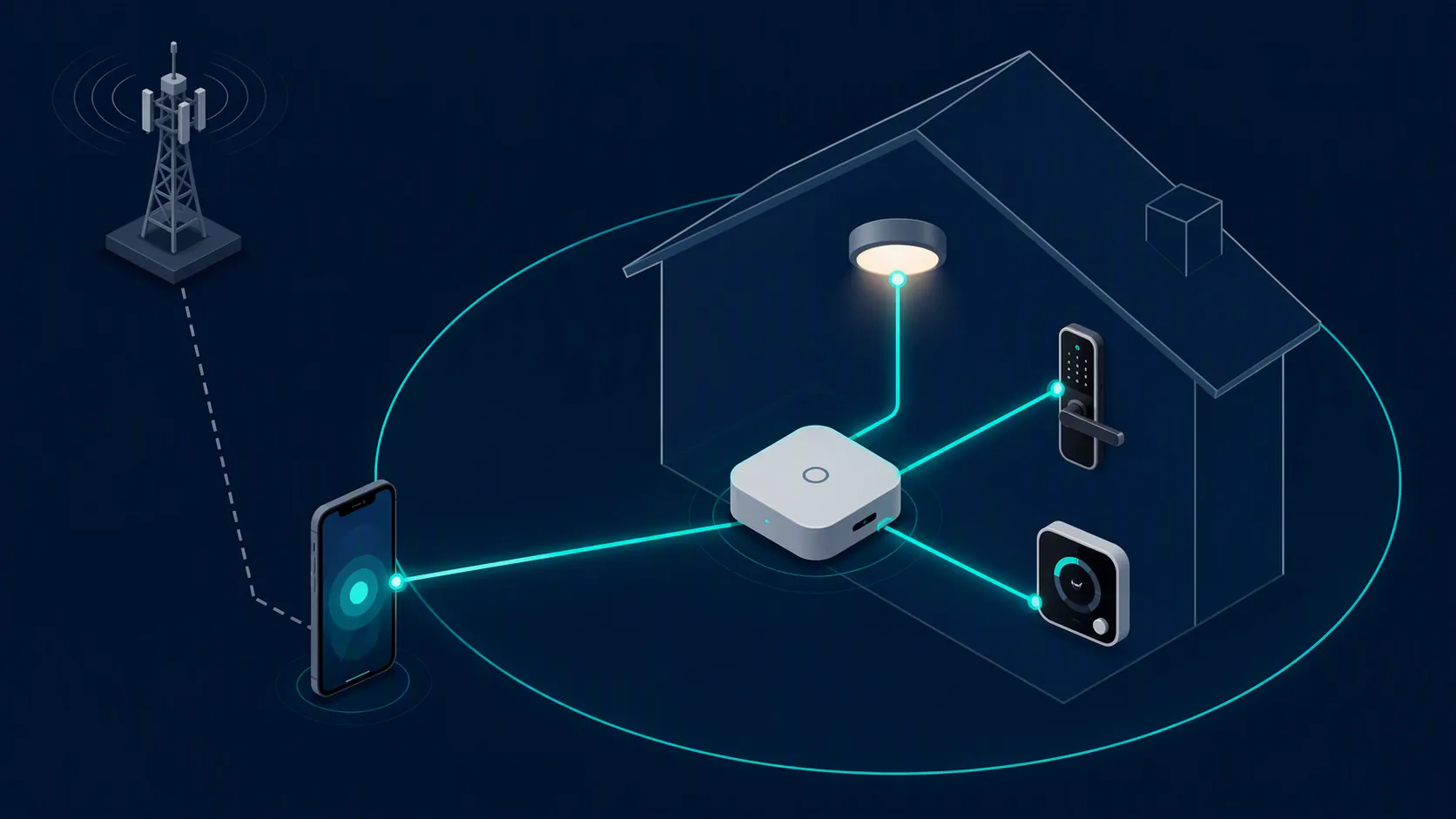
This is the point that tends to get lost in rumor shorthand. A phone contains several wireless systems. Saying “the iPhone has a Qualcomm modem” tells you something about the cellular side. It does not describe the Wi-Fi radio, the Thread radio, the Apple Home stack, or the Matter accessory path.
Why the confusion is understandable
Smart-home users have been trained, often painfully, to distrust vague update promises. A router update breaks discovery. A hub update changes Thread behavior. A firmware update makes a lock vanish and reappear. So when a new iPhone rumor mentions a different wireless supplier, the worry is not irrational.
The correction is narrower: the feared part is not the part doing the feared job. “Wireless” is not one shared pipe inside the phone. Cellular, Wi-Fi, Bluetooth, and Thread are separate responsibilities, and the reported iPhone 18 Pro Max split keeps the cellular modem out of the local Apple Home and Matter control path.
Compatibility judgment
Do not treat the rumored Qualcomm modem in the U.S. iPhone 18 Pro Max as a HomeKit risk factor. Based on the reported chip roles and the way local Apple Home and Matter traffic is routed, the modem cannot cause or fix local HomeKit connectivity problems.
If Apple Home behaves badly on this phone, troubleshoot the path the command actually uses: Wi-Fi, Thread, Matter/Home architecture, home hubs, accessory firmware, and the relevant Apple Home setup state. The cellular modem belongs in a different diagnostic box.
References
- MacRumors report on the iPhone 18 Pro Max modem and N2 wireless chip — MacRumors — July 10
Known issues with this device / protocol
Spec-version history
For active regressions on this protocol, see Update Watch.
No linked Update Watch entries yet.