
Can the Garmin Fenix 9 Pro control your smart home?
A dated, status-labeled compatibility check of the Garmin Fenix 9 Pro's smart-home control paths: which routes work through the paired phone's voice assistant and Connect IQ apps, which households get a usable path, and which claims are still unverified.
Last updated
Status checked: August 25, 2026. The Garmin Fenix 9 Pro can be used as a smart-home trigger only by relaying the command through another system: the paired phone’s voice assistant or a third-party Connect IQ app. It is not itself a Matter controller, Thread border router, Zigbee hub, Z-Wave controller, HomeKit accessory, or SmartThings hub. Launch materials and spec coverage list the watch’s relevant connectivity as Bluetooth, ANT+, Wi-Fi, and optional LTE on inReach variants, with pricing starting at $1,099.99 in the U.S.; they do not describe built-in smart-home radios or Matter/HomeKit certification.[1][2][3]
That makes the short answer to “Can the Garmin Fenix 9 Pro control your smart home?” fairly narrow: if your phone assistant can already control a light, lock, plug, thermostat, or scene, the Fenix 9 Pro may give you a wrist-based way to ask for that action. If you expect the watch to join Apple Home, Google Home, Alexa, SmartThings, or Home Assistant as a native controller, this is the wrong architecture.
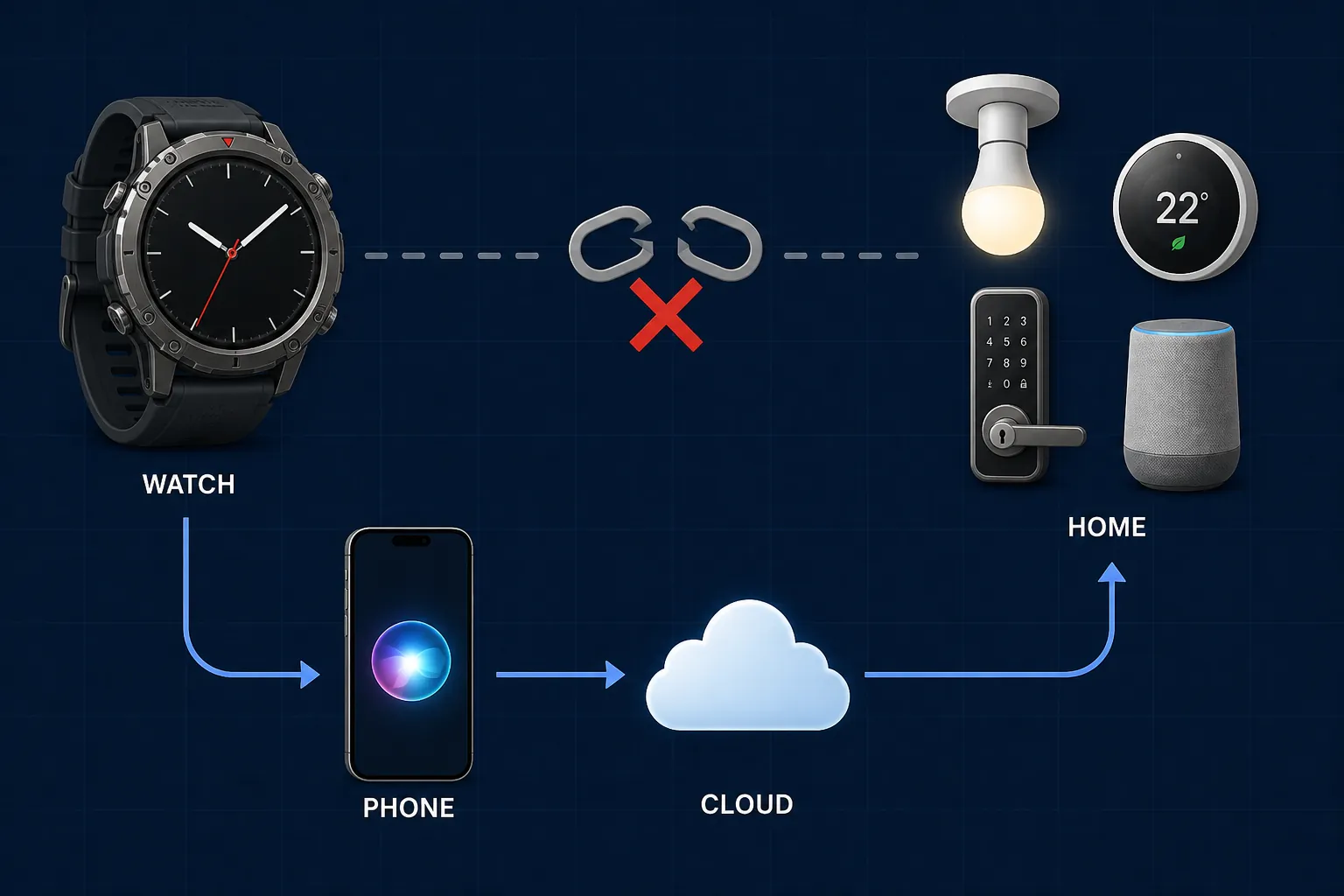
Control-path map for the Fenix 9 Pro
| Path | Status on August 25, 2026 | What the watch is actually doing | Main caveat |
|---|---|---|---|
| Matter, Thread, Zigbee, Z-Wave | Confirmed absent | No native smart-home radio path is documented in launch specs. | Do not buy it expecting local device pairing or hub behavior.[1][2][3] |
| Apple Home / HomeKit certification | Confirmed absent at capability level | The watch can invoke Siri through the paired phone route, but it is not documented as a HomeKit-certified controller or accessory. | Siri must already be able to control the Apple Home device or scene from the phone. |
| Garmin Phone Assistant | Confirmed first-party route | The watch launches the paired phone’s assistant; Garmin describes this route as able to control smart-home devices through Bixby, Google Assistant, Gemini, Siri, or Alexa, depending on the phone setup. | The command succeeds only if the phone, assistant, permissions, and smart-home account already support it.[4] |
| Google Home household | Workaround | Use Phone Assistant to reach Google Assistant or Gemini on the paired phone, or use a third-party Connect IQ app aimed at Google Home. | This is assistant-mediated control, not direct Google Home controller support. |
| Alexa household | Workaround | Use Phone Assistant when Alexa is the assistant path available on the paired phone. | The Fenix 9 Pro should not be treated as a watch with built-in Alexa; the phone is the relay. |
| SmartThings | Investigating | A Garmin-SmartThings integration was announced in 2017, but current availability for Fenix 9 Pro is not confirmed. | Old announcements are not enough; newer developer-forum reports describe availability problems on newer Garmin devices.[5][6][7] |
| Home Assistant | Workaround | Use a Connect IQ app such as GarminHomeAssistant or HassControl to call a Home Assistant instance. | Requires setup outside Garmin’s first-party flow, including an HTTPS-reachable Home Assistant instance and token-based configuration for GarminHomeAssistant.[8] |
| Tuya / SmartLife | Workaround | Use a Connect IQ app that bridges from the watch to the Tuya/SmartLife ecosystem. | Depends on that app’s continued support, cloud access, account authentication, and Fenix 9 Pro compatibility listing.[9] |
| eWeLink | Workaround | Use a Connect IQ app that bridges to eWeLink-compatible devices. | Depends on the third-party app and eWeLink cloud path, not Garmin-native device control.[10] |
| Assistant for Google Home | Workaround / app-dependent | Use a Connect IQ app intended to trigger Google Home-related assistant actions. | Treat as app-specific compatibility until tested on the Fenix 9 Pro generation.[11] |
The practical divider is simple: the Fenix 9 Pro can start a request, but another controller must finish it. That distinction matters more than the word “control” on a spec page or app listing. A watch button that wakes a phone assistant is not the same thing as a watch that speaks Matter, joins a Thread network, pairs with Zigbee lights, or appears inside Apple Home as a certified controller.
The first-party route: Garmin Phone Assistant
Garmin’s own documented path is Phone Assistant. On supported watches, the watch opens the voice assistant on the paired phone; Garmin’s FAQ says this can be used with phone assistants including Bixby, Google Assistant, Gemini, Siri, and Alexa, and includes smart-home control as one of the possible assistant actions.[4]
The hidden sentence a buyer needs is this: it only works if your phone assistant can already control that device. If your iPhone can ask Siri to run an Apple Home scene, the watch may be a convenient way to invoke Siri. If your Android phone can ask Google Assistant or Gemini to switch off a linked light, the watch may save you from pulling the phone out. If Alexa is reachable through the phone route you actually use, the watch may trigger Alexa-controlled devices from that assistant path.
None of that makes the Fenix 9 Pro an Apple Home controller, Google Home controller, or Alexa device. The watch is initiating a voice-assistant request. The phone handles assistant availability, account linking, permissions, network reachability, and the final smart-home command. If the paired phone is not nearby, not connected, locked down by permissions, missing the right assistant, or unable to reach the smart-home service, the watch has no independent smart-home stack to fall back on.
This is the same controller-not-hub pattern that shows up with many phones and wearables. If you are comparing devices across ecosystems, NestGrid’s smart-home buyer’s guide is the more useful frame than any single watch launch: first identify the system that actually owns the automation, then decide whether the new device can reach it reliably.
What each household should assume before buying
Google Home
A Google Home household gets the most straightforward mainstream workaround if the paired phone already controls the home through Google Assistant or Gemini. In that setup, the Fenix 9 Pro is a wrist trigger for the phone assistant. It is useful for commands such as asking the assistant to run a routine or control a linked device, but the watch is not joining Google Home as a controller in its own right.
That distinction becomes important in mixed homes. If a device appears in Google Home but the phone assistant cannot operate it by voice, the watch does not fix that. If a routine requires unlocking the phone, approving a sensitive action, or using a device-specific app, the watch should not be expected to bypass those limits.
Alexa
For Alexa households, the same relay logic applies. The watch can be useful only where the paired phone’s assistant path can reach Alexa-controlled devices or routines. The available documentation does not support treating the Fenix 9 Pro as a watch with built-in Alexa, and Garmin’s Fenix 9 Pro launch coverage does not describe a native Alexa smart-home controller role.[1][2][3]
If your household depends on Echo speakers, Alexa routines, and Alexa-linked plugs or lights, test the phone path first. If the phone cannot reliably start the same routine by voice, the watch will not be the dependable control surface you are hoping for.
Apple Home
Apple Home is the easiest ecosystem to overstate because Siri control can feel native when it works. On the Fenix 9 Pro, the supported framing is Siri through the paired iPhone, not HomeKit certification on the watch. If Siri on the iPhone can run the scene, the watch may help you invoke Siri. If you need the watch to be recognized by Apple Home as a certified controller or accessory, the launch-day material does not support that conclusion.
SmartThings
SmartThings deserves the most caution because it has the most misleading paper trail. Garmin and SmartThings did have an integration years ago: 2017 coverage described SmartThings control from Garmin GPS sports watches through a Connect IQ app.[5][6] That history is real, but it is not the same as confirmed Fenix 9 Pro support in 2026.
The more relevant current signal is less reassuring. A Garmin developer forum discussion from 2024 asked whether Samsung SmartThings was still available and reported that the app could not be found for newer devices such as Epix Gen 2.[7] That does not prove the Fenix 9 Pro cannot run any SmartThings path, but it does put the burden of proof back on current app availability and on-device testing.
So the status here is Investigating, not Confirmed. A buyer in a SmartThings-first home should not rely on a 2017 announcement, an old article, or a memory from an older Garmin watch. Before buying for this purpose, verify that the SmartThings app is visible in Connect IQ for the Fenix 9 Pro specifically, check its last update and device compatibility list, and confirm that Samsung authentication still works. SmartThings platform changes can break a wearable shortcut long before the watch hardware wears out.
For wider SmartThings ecosystem context, NestGrid’s One UI 9 SmartThings changes coverage is a better place to track platform-side shifts than an old Garmin integration announcement.
Home Assistant
Home Assistant is the most credible power-user workaround, mostly because the path is technically explicit. GarminHomeAssistant is a Connect IQ project with roughly 356 GitHub stars, more than 10,000 downloads, and an app rating around 4.7 as checked on August 25, 2026. Its documented setup requires an HTTPS-reachable Home Assistant instance, a long-lived access token, and a JSON menu definition that tells the watch which entities or services to expose.[8]
That is a real control path, but it is not native local control from the Fenix 9 Pro. The watch is running a Connect IQ app that talks to Home Assistant through the app’s configured route. Home Assistant remains the automation brain. The watch becomes a menu-driven remote surface.
This route also has behavior notes that matter for daily use. GarminHomeAssistant documents failures around Wi-Fi and LTE toggles when Bluetooth state has not been initialized, which is exactly the kind of edge case that separates a weekend project from a household control surface.[8] It may be acceptable if you already maintain Home Assistant, understand tokens, and can debug network exposure. It is not the beginner answer for someone who simply wants a watch button to unlock the front door or turn off every downstairs light.
HassControl is another Home Assistant-oriented Connect IQ route worth checking, but the same rule applies: verify current Fenix 9 Pro compatibility inside Connect IQ, read recent support signals, and assume the command path depends on Home Assistant availability, app maintenance, and Garmin’s paired-device behavior.
Tuya, SmartLife, eWeLink, and other Connect IQ bridges
The Connect IQ store contains smart-home bridge apps beyond Home Assistant. Tuya/SmartLife Control, eWeLink Smart Home Control, and Assistant for Google Home are all relevant to check because they target popular cloud ecosystems that often sit behind inexpensive plugs, bulbs, switches, and garage or curtain controllers.[9][10][11]
These should be evaluated as app-by-app workarounds, not as Garmin platform features. A Connect IQ listing can depend on cloud login, third-party API behavior, developer maintenance, token storage, phone connectivity, and whether the developer has marked the newest watch generation as compatible. A bridge app that worked on a Fenix 7 or Epix model does not automatically become a dependable Fenix 9 Pro purchase reason on launch day.
Why the radio list matters more than the watch’s flagship status
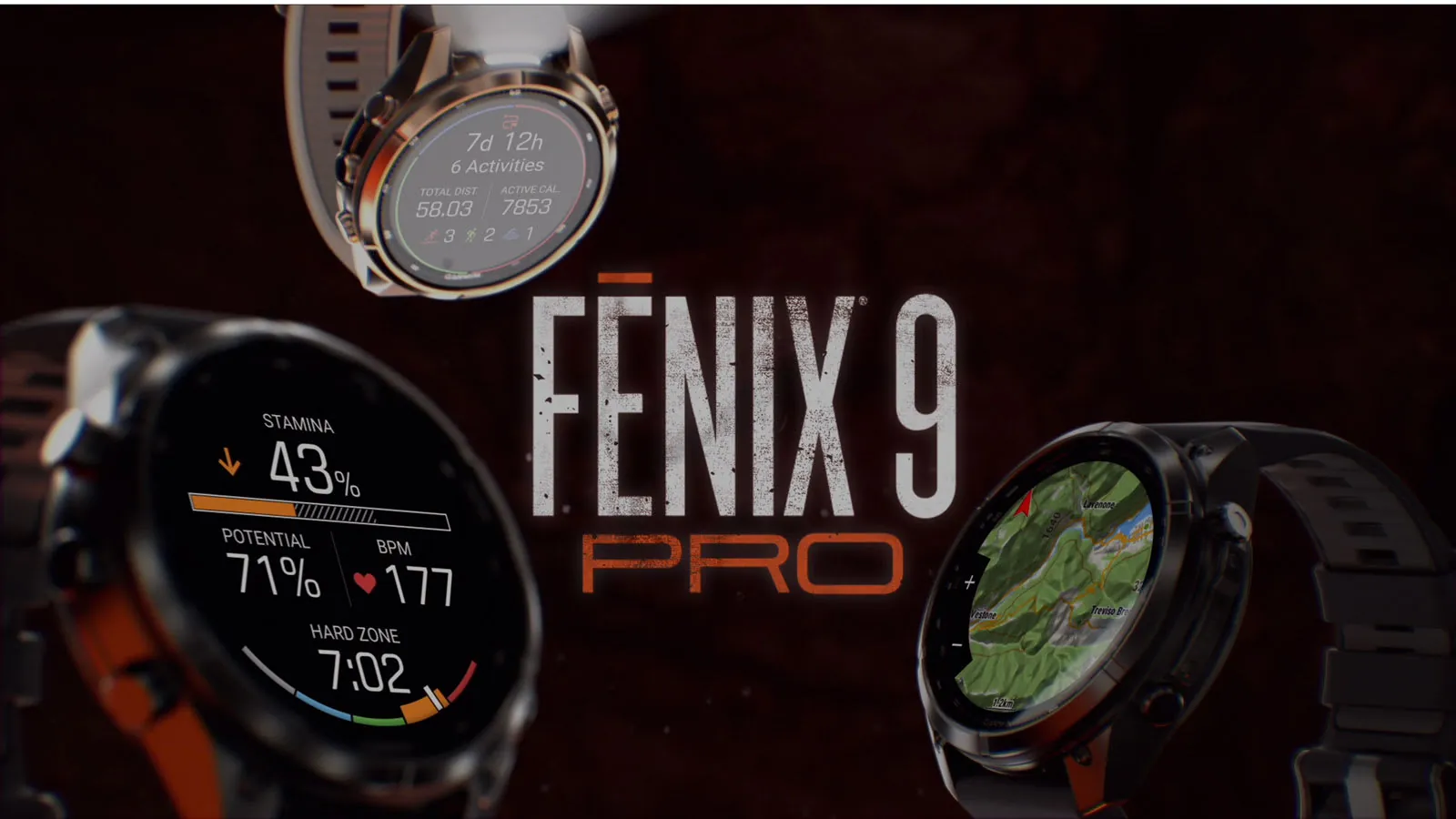
The Fenix 9 Pro may be a flagship sports watch, but smart-home compatibility is not decided by price tier. It is decided by command travel. Launch-day coverage describes a rugged multisport watch with the expected Garmin fitness and outdoor stack, plus Bluetooth, ANT+, Wi-Fi, and optional LTE on inReach variants.[1][2][3] Those radios are useful for wearables, sensors, syncing, headphones, phone pairing, and connected services. They are not a substitute for Matter over Thread, Zigbee, Z-Wave, or HomeKit certification.
Optional LTE on inReach variants is also easy to misread. LTE does not turn the watch into a home hub. Unless Garmin documents a smart-home service path that uses that connection independently, the presence of cellular connectivity should not be treated as proof that the watch can operate your lights, locks, or scenes without the phone-assistant or Connect IQ bridge assumptions.
The same caution applies to Matter. A Garmin forum thread asking whether Garmin would support Matter home automation received a deflection toward Garmin’s Share Ideas process rather than a roadmap, and the Fenix 9 launch material reviewed here does not mention Matter, Thread, or HomeKit.[12][1][2][3] That supports a conservative conclusion: there is no documented Fenix 9 Pro Matter path to plan around today.
A pre-purchase check that avoids the usual mistake
Before buying the Fenix 9 Pro for smart-home control, test the relay you actually intend to use. Do it from the phone first, then from the watch if you can get store or return-window access.
- Name the system that owns the automation: Apple Home, Google Home, Alexa, SmartThings, Home Assistant, Tuya, eWeLink, or something else.
- Confirm that the paired phone’s assistant can run the exact action by voice or assistant shortcut. Do not substitute a similar light, room, or routine.
- If using Connect IQ, check the exact app listing for Fenix 9 Pro compatibility, recent updates, ratings, and support notes.
- For Home Assistant, confirm HTTPS reachability, token setup, and the JSON menu structure before treating the watch as a household remote.
- For SmartThings, treat current availability as unverified until the app is visible and working on the Fenix 9 Pro generation.
This is especially important for households that already have several controller layers. A watch command might travel from the Fenix 9 Pro to the phone, from the phone assistant to a cloud account, from that account to a smart-home platform, and then from the platform to a hub or device. Every handoff is a place where account linking, latency, permissions, or app abandonment can decide whether the command works.
If your household already works well through the phone assistant, the Fenix 9 Pro may be a useful wrist remote for low-risk actions: lights, scenes, fans, noncritical plugs, and routines that already behave reliably. If your reason for buying is native local smart-home control, certified Matter or HomeKit behavior, or dependable SmartThings support on day one, the current evidence does not support buying the Fenix 9 Pro for that job.
References
- Garmin expands its flagship performance smartwatch lineup with fēnix 9 and fēnix 9 Pro, PRNewswire, August 25, 2026
- Garmin Fenix 9 Pro Specs, the5krunner
- Garmin Fenix 9 Pro specs & features leak, Gadgets & Wearables, August 25, 2026
- Phone Assistant, Garmin Support
- Garmin announces SmartThings control via Connect IQ, DC Rainmaker
- Garmin adds SmartThings support to its GPS sports watches, ZDNet
- Samsung SmartThings still available?, Garmin Developer Forum
- GarminHomeAssistant, GitHub
- Tuya/SmartLife Control, Garmin Connect IQ Store
- eWeLink Smart Home Control, Garmin Connect IQ Store
- Assistant for Google Home, Garmin Connect IQ Store
- Will Garmin support Matter home automation?, Garmin Forum
Known issues with this device / protocol
Spec-version history
For active regressions on this protocol, see Update Watch.
No linked Update Watch entries yet.