
The Best Flood Warning Sensor Depends on Your Hub's Protocol
Choosing a smart water leak detector for flash flood warning? This guide explains why protocol compatibility with your existing hub is the most important factor—and which sensors work best for basements, sump pumps, and outdoor zones.
Last updated
Start with the hub you already own, not with a product name. The best smart water leak detectors for flash flood warning are not interchangeable pucks; they are radios that have to reach a wet, awkward part of the property and still get a message back to the system you use. A basement sump-pit sensor on Z-Wave, a Matter-over-Thread detector tied to a real Thread border router, a LoRa sensor on the far side of a detached garage, and a Wi-Fi sensor near a water heater are solving different problems.
That distinction matters because water claims are not a tiny nuisance category. RubyHome’s 2026 compilation, citing Insurance Information Institute data, reports an average water damage claim payout of $13,954 and says 1 in 60 insured homes files a water or freezing claim annually.[1] The Basement Guide puts layered flood-prevention systems at $900 to $2,250, against average basement flooding claims exceeding $10,000 and severe FEMA/NFIP events reaching $52,000.[2] Those numbers do not prove any one sensor will prevent a claim. They do explain why a sensor that quietly drops offline during a storm is not a harmless compatibility mistake.
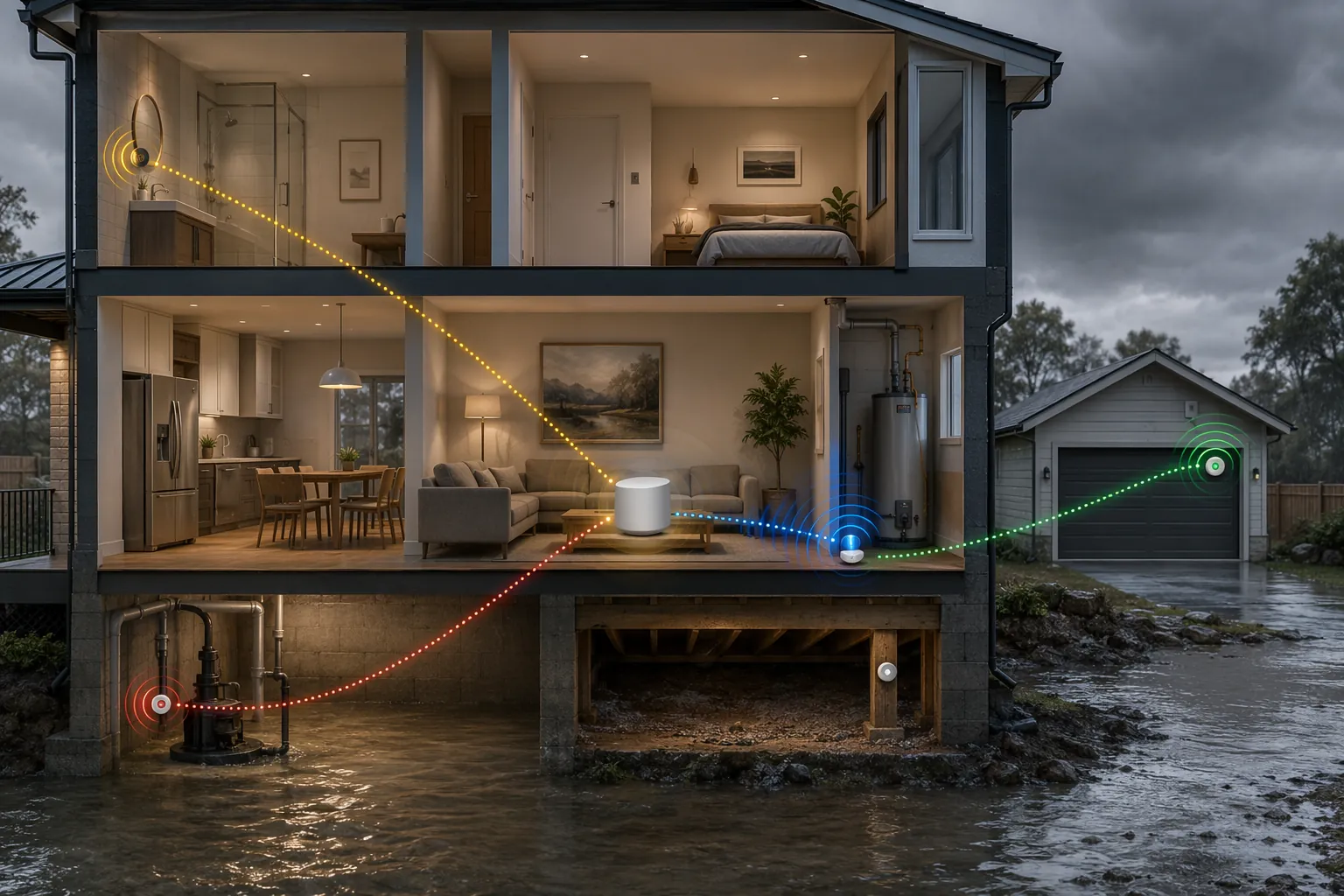
Pick the protocol before the sensor
If your hub supports Z-Wave and the sensor is going below grade, start there. If you already have Apple Home, Google Home, SmartThings, or another setup with a Thread border router, Matter over Thread is the cleaner local-control path. If the warning point is detached, outdoor, or too far for normal home networking, LoRa is the serious consumer option. If you want the fastest setup and the sensor is within good Wi-Fi range, Wi-Fi can work, but it should be treated as network-dependent unless the router and related gear have backup power.
| Deployment problem | Best protocol path | Why it fits | Example detectors to verify |
|---|---|---|---|
| Basement sump pit, below-grade perimeter, crawlspace edge | Z-Wave | Sub-GHz Z-Wave is better suited to basement walls and concrete than 2.4 GHz Wi-Fi or Zigbee. | Zooz Z-Wave Plus Flood Prevention Kit Pro; Aeotec SmartThings Water Leak Sensor; Fibaro Flood Sensor |
| Indoor or covered area where local alerts during internet outages matter | Matter over Thread | Thread can keep local mesh communication working when internet service is down, if a powered Thread border router is present. | Shelly Flood Gen4; Eve Water Guard 2nd Gen |
| Detached garage, outdoor/perimeter point, large-property edge | LoRa | LoRa trades smart-home universality for much longer range; YoLink advertises up to 1/4 mile and IP66-rated sensors. | YoLink LoRa water leak sensors |
| Simple indoor placement near an appliance or utility area | Wi-Fi | Direct app setup is easy, but phone alerts depend on powered networking unless you add backup power. | Moen Flo; First Alert L1; Phyn |
| Low-cost Zigbee sensor exposed to Matter through a hub | Zigbee bridged to Matter | Matter compatibility comes through the vendor bridge, not from the sensor itself. | Aqara T1 with Aqara hub; THIRDREALITY with Smart Bridge MZ1 |
For basements and sump pumps, Z-Wave is still the practical starting point
A flood-warning sensor near a sump pump usually has to work from the least radio-friendly part of the house: below grade, near concrete, near metal equipment, sometimes behind stored boxes, and often at the edge of hub coverage. Z-Wave’s advantage is not that every Z-Wave product is magically better. It is that Z-Wave uses sub-GHz frequencies, which are generally better at penetrating basement walls and concrete than 2.4 GHz Zigbee or Wi-Fi signals.[3][4]
That makes Z-Wave a sensible first filter for SmartThings, Hubitat, Home Assistant with a Z-Wave radio, and other systems that already have a stable Z-Wave mesh. Zooz, Aeotec, and Fibaro all make Z-Wave water sensors that fit this role. Zooz also sells the Z-Wave Plus Flood Prevention Kit Pro, and The Smartest House lists the Zooz Titan Valve Actuator at about $80 with a 2-minute installation on an existing ball valve, allowing Z-Wave leak sensors to trigger automatic shutoff rather than only send an alert.[5]
Automatic shutoff is not the same thing as flash-flood protection. A valve actuator can help with plumbing leaks, failed appliances, or some interior water events, but it will not stop groundwater from entering a basement. For sump and perimeter warning, the more important Z-Wave question is whether the sensor reliably reports from the exact spot where water will appear first. Pair it at the hub if required, then test it at the final location with the basement door closed, the sensor near the floor, and the hub in its normal place.
Battery claims also need a basement discount. Device-category estimates put Z-Wave water sensors at roughly 1 to 3 years, Zigbee at 2 to 3 years, Thread at 2 to 5 years on AAA batteries, and Wi-Fi at 6 to 12 months, but these are manufacturer-style expectations under favorable conditions rather than guarantees.[6] Cold utility spaces, weak signal paths, and frequent alerts can shorten that window.
Matter helps only after you identify what kind of Matter you are buying
“Matter compatible” is not enough information for flood-warning placement. A native Matter-over-Thread detector and a Zigbee detector bridged into Matter through a vendor hub may both appear in Apple Home or Google Home, but their failure paths are different.
For native Matter over Thread, the sensor needs a Thread border router to send alerts beyond its local alarm. Matter Alpha and manufacturer documentation identify devices such as Apple TV 4K, HomePod mini, Google Nest Hub Max, and SmartThings Station as Thread border-router examples for products such as Eve Water Guard 2nd Gen.[7] Without that border router, a water detector may still make noise locally, but it is not doing the job most buyers expect from a smart flood-warning device: pushing an alert to a phone through the home platform.
Shelly Flood Gen4 is notable because PCMag and other 2026 coverage list it around $34 and describe an unusually broad radio stack: Matter, Zigbee, Bluetooth, and dual-band Wi-Fi in the same device.[4] That can be useful if you are still deciding whether the final path should be Matter integration, Zigbee, or Wi-Fi. It also means buyers should slow down and check the exact pairing mode they intend to use, because the same plastic sensor can behave differently depending on which radio path is active.
Eve Water Guard 2nd Gen is the cleaner Apple Home-style example when the requirement is Matter over Thread and the home already has a suitable Apple or multi-platform Thread border router. The usual caveat is placement: Thread is local and efficient, but it is still not a license to bury a sensor at the far corner of a wet crawlspace without checking signal quality.
Bridged Zigbee-to-Matter is useful, but it is not native Matter
Aqara T1 and THIRDREALITY sensors are good examples of the caveat. Matter Alpha and manufacturer specifications describe Aqara T1, around $19, and THIRDREALITY, around $20, as Zigbee sensors that reach Matter through their respective bridges, such as Aqara M3 or M100 and THIRDREALITY Smart Bridge MZ1.[7] If that bridge loses power, drops off the network, or is not supported the way you assumed inside your preferred platform, the word “Matter” on the shopping page will not rescue the installation.
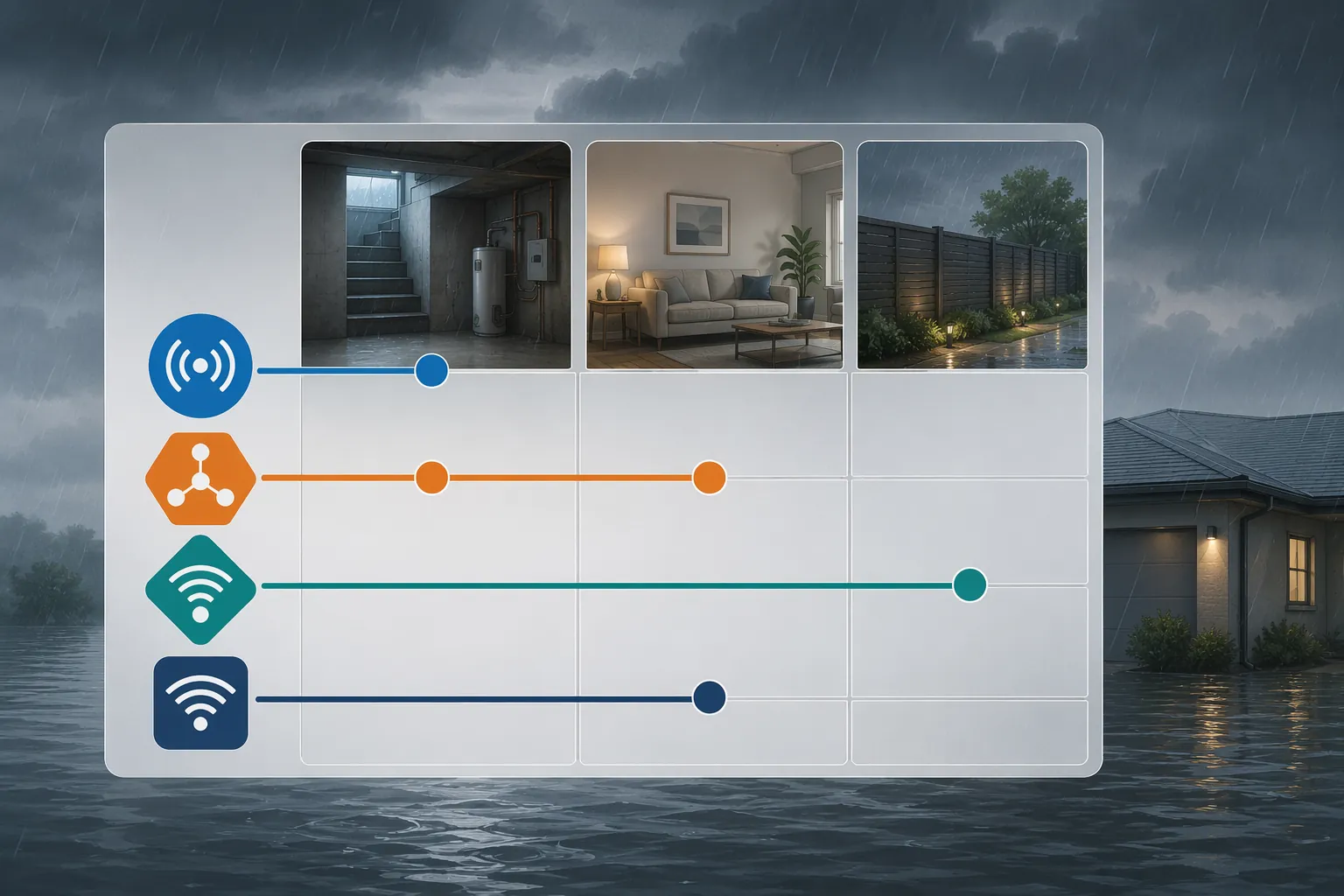
For detached and perimeter zones, LoRa is the outlier worth taking seriously
Most consumer water leak detectors are indoor leak sensors being pressed into early-warning duty. That can be reasonable at a sump pump, basement perimeter, crawlspace edge, water heater, or under a utility sink. It is a different question at a detached garage, a drainage low point, a gate-side outbuilding, or a covered outdoor perimeter where normal Wi-Fi and mesh networks fade.
YoLink’s LoRa-based sensors stand apart here. PCMag and WIRED coverage note YoLink’s long-range LoRa approach, and YoLink water sensors advertise up to 1/4 mile range with IP66-rated options.[4][6] That does not turn them into municipal flash-flood gauges or make every outdoor placement safe. It does make LoRa the more credible consumer path when the warning point is distant from the house or outside the normal smart-home radio envelope.
The compatibility tradeoff is that LoRa usually means committing to the vendor’s hub path rather than expecting native Apple Home, Google Home, or SmartThings behavior. For a far detached structure, that may be a good trade. For a sensor 10 feet from a SmartThings hub in a finished basement, it is probably unnecessary complexity.
Wi-Fi is easy until the network is part of the emergency
Wi-Fi water detectors such as Moen Flo, First Alert L1, and Phyn are often the simplest to install because they do not require a separate smart-home radio. For a water heater closet, laundry room, or kitchen cabinet, that simplicity is attractive. The problem is not setup. The problem is that storm conditions are exactly when routers, modems, mesh nodes, and internet service become less trustworthy.
A Wi-Fi detector can only send smart alerts if the network path needed for those alerts is alive. If the router has no UPS, the modem is down, or the access point serving the basement has lost power, the sensor may still beep locally while your phone remains silent. That is acceptable for some indoor leak placements. It is a weak default for flash-flood warning unless you have backed up the networking gear that carries the alert.
Offline detection is not a theoretical footnote. Wirecutter’s 2026 testing found that the D-Link SW-A11KT took 36 minutes to report an offline sensor pod.[8] That result is one product in one test, not a universal Wi-Fi failure rate. It is still a useful warning: a system can look smart during a sink test and leave a long blind spot when a battery, pod, bridge, or network link fails.
How to map your hub to a flood-warning choice
The fastest safe buying path is to reduce the choices before reading individual reviews. Start with the platform you actually use every day, then check which radios it supports directly and which ones require a bridge.
- Apple Home: favor native Matter over Thread if you have an Apple TV 4K or HomePod mini acting as a Thread border router; treat Zigbee-to-Matter devices as bridge-dependent.
- Google Home: consider Matter over Thread if you have a compatible Nest hub with Thread border-router support; verify the exact detector pairing path before buying.
- SmartThings: Z-Wave is a strong basement path when your hub supports it; Matter/Thread can also work when a Thread border router is present.
- Hubitat: Z-Wave remains the practical choice for below-grade leak and sump monitoring, especially where local automation matters.
- Home Assistant: choose based on the radios you have installed and maintained well; Z-Wave, Zigbee, Thread, Wi-Fi, and LoRa can all be viable, but only if the integration path is stable.
- Alexa-only homes: verify whether the specific Echo hardware provides the radio or bridge behavior you need; do not assume every Alexa setup can directly host Thread, Zigbee, or Matter sensors.
Once the hub path is clear, place the environment filter on top of it. Below grade points toward Z-Wave first. Covered indoor areas with a reliable Thread border router can point toward Matter over Thread. Detached and perimeter locations point toward LoRa. Ordinary indoor appliance leak detection can tolerate Wi-Fi more easily, especially if the router and access point are on backup power.
If you are building beyond sensors into shutoff valves, pump alerts, and backup power, the sensor choice is only the first layer. Once you have selected sensors by protocol, see our complete setup guide for building a layered storm and flood preparedness system.
What to verify before buying
The product page should answer more than “Does it work with my app?” For flood-warning use, compatibility has to survive placement, power loss, and maintenance.
- Hub support: confirm the sensor’s actual protocol and whether your hub supports that protocol directly.
- Thread border router: for Matter over Thread, confirm you own a powered border router, not just a phone app that supports Matter setup.
- Bridge dependency: for Aqara, THIRDREALITY, and similar Zigbee-to-Matter devices, verify the required vendor hub and how it behaves in your platform.
- Placement rating: check whether the sensor is indoor-only, suitable for covered damp areas, or IP-rated for outdoor exposure.
- Battery expectation: treat battery-life claims as estimates under ideal conditions, then test low-battery and offline alerts.
- Network backup: if using Wi-Fi, put the router, modem, and any needed access point on UPS backup if storm-time phone alerts matter.
Insurance discounts fall into the same verification bucket. The Z-Wave Alliance has cited possible water-damage-prevention insurance discounts in the 2% to 10% range, but those figures are manufacturer- and industry-sourced and vary by insurer, state, and policy.[9] Ask your own agent what qualifies before buying extra hardware for a discount.
For Q3 2026, the clean answer is this: choose Z-Wave for the ugly below-grade placements, Matter over Thread when you have the right border router and want local smart-home integration, LoRa when distance or outdoor/perimeter coverage is the real problem, and Wi-Fi when simplicity matters more than storm-resilient alerting. The best detector is the one whose radio path, hub dependency, and physical placement still make sense on the day the water shows up.
References
- Water Damage Statistics, RubyHome, 2026.
- Basement Flooding Statistics, The Basement Guide.
- Z-Wave vs. Wi-Fi: Which Is Better for Your Smart Home?, Z-Wave Alliance.
- The Best Smart Water Leak Detectors for 2026, PCMag.
- Zooz Titan Water Valve Actuator ZAC36, The Smartest House.
- Best Smart Water Leak Detectors, WIRED.
- Matter Smart Water Leak Detectors, Matter Alpha.
- The Best Smart Water-Leak Detector, Wirecutter, The New York Times, 2026.
- Smart Leak Detection and Insurance Discounts, Z-Wave Alliance, July 2025.
Known issues with this device / protocol
Spec-version history
For active regressions on this protocol, see Update Watch.
No linked Update Watch entries yet.