
Will Amazon Satellite Internet Work With Your Smart Home?
Switching to Amazon Leo satellite broadband changes how your smart home performs — but only for cloud-dependent features. Learn which devices and automations work the same as before and which ones may need adjustments.
Last updated
If you switch your home internet to Amazon Leo, most existing smart-home devices should still connect to the same Wi-Fi network, hub, and apps. The part that changes is not the bulb, lock, or sensor itself. It is the path that device uses after you tap a button, ask Alexa, open a camera feed, or run an automation.
The clean split is this: local devices and automations should behave the same, while cloud-dependent features should work far better than they did on older satellite internet but still depend on Leo’s real-world latency, uptime, data policy, and rollout. Zigbee, Thread, Z-Wave, and Matter-over-Thread devices controlled by a local hub do not need a low-latency internet connection to turn on a light, unlock a door, or run a motion-triggered routine inside the house. Alexa requests, remote camera viewing, cloud routines, app control from town, and firmware updates do.
That makes Amazon Leo’s satellite internet approval relevant to smart-home connectivity in a practical way, not just a regulatory one. In June 2026, the FCC lifted looming deployment deadlines for Amazon Leo, giving the constellation more room to move toward service instead of being boxed in by the earlier schedule.[1] That does not make Leo available in every rural driveway today. It does mean homeowners who have been stuck choosing between weak DSL, cellular hotspots, and high-latency satellite can start asking the right compatibility questions before the installer, terminal, and router arrive.

The Smart Home Does Not All Use the Internet the Same Way
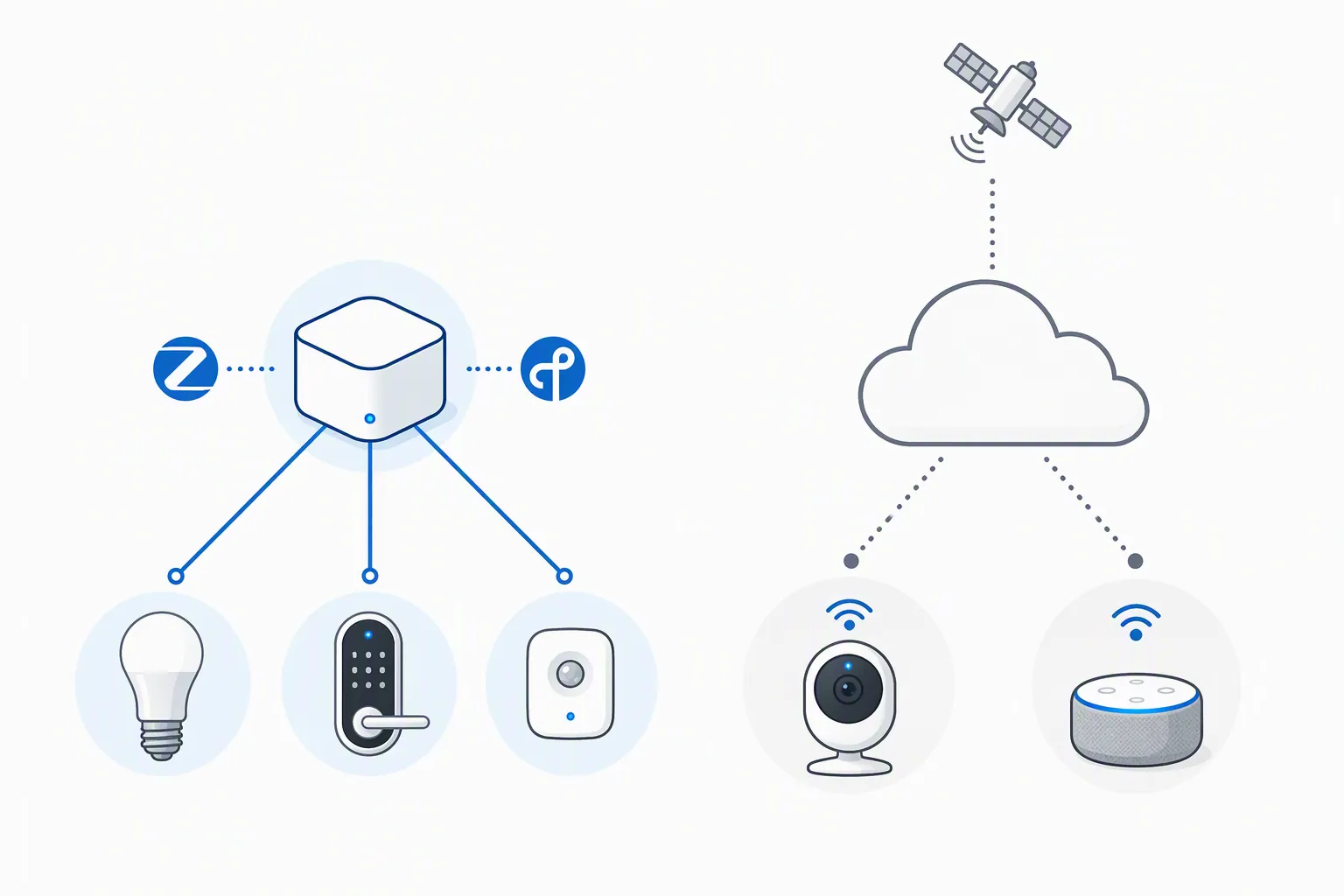
A smart home usually has at least two networks layered on top of each other. One is the home network: Wi-Fi, Ethernet, Zigbee, Thread, Z-Wave, or a mix of them. The other is the internet connection: cable, fiber, DSL, cellular, satellite, or whatever brings the outside world to the router. Changing the second layer does not automatically break the first.
A motion sensor that talks to a hub over Zigbee can still tell that hub to turn on a hallway light. A Thread contact sensor can still report that a door opened. A Z-Wave lock can still respond to a local hub command if the hub, radio mesh, and lock are powered and paired. In those cases, Leo is simply the WAN connection sitting beyond the router. If the automation is executed locally, it should not care whether the household’s internet comes from fiber, fixed wireless, or a low-Earth-orbit terminal.
The trouble starts when an action leaves the house. A voice assistant normally sends audio to the cloud for processing. Many cameras send clips, thumbnails, notifications, or live viewing sessions through a vendor cloud. Some app controls go from the phone to a cloud service and then back down to the device, even when the phone is physically inside the home. Firmware updates, account login, device setup, and vendor routines also depend on the outside connection.
What Should Keep Working the Same
The safest devices under a Leo switch are the ones with a local control path. That usually means the device talks to a hub, controller, or border router inside the home, and the automation logic also lives there. These are the devices that keep working during a normal broadband outage, assuming the router, hub, and devices still have power.
| Device or function | Likely effect when switching to Amazon Leo | What to verify |
|---|---|---|
| Zigbee bulbs, plugs, sensors, and switches | Local control should be unchanged when paired to a compatible hub. | Confirm the hub or eero model has the needed Zigbee radio and supports the device. |
| Thread and Matter-over-Thread devices | Local Thread mesh behavior should be unchanged; cloud features still need internet. | Confirm there is a Thread border router and Matter controller where required. |
| Z-Wave locks, sensors, and switches | Local hub automations should be unchanged. | Confirm the Z-Wave hub is local-capable and still connected to the LAN. |
| Wi-Fi smart plugs and bulbs | Depends heavily on the vendor. Some respond locally; many route commands through the cloud. | Test whether app control works when the WAN is down but Wi-Fi remains on. |
| Cameras and video doorbells | Local recording may continue if supported; remote viewing and cloud clips depend on Leo. | Check upload needs, data use, and whether the camera requires vendor cloud access. |
| Alexa and other voice assistants | Should feel much more usable than on older GEO satellite if Leo meets latency targets. | Remember that voice processing still depends on cloud availability and WAN performance. |
The phrase “compatible with Amazon Leo” can be misleading here. A Zigbee lock is not compatible with Leo in the way a phone is compatible with a carrier. It is compatible with a Zigbee coordinator or hub. Leo only matters when that hub needs the internet for account services, remote access, cloud automations, or updates.
That is why an older but well-built hub can be more resilient than a newer Wi-Fi-only device that sends every command through a vendor server. If the front-door lock has a local Z-Wave automation that turns on the entry light, Leo’s latency is irrelevant to that routine. If the same lock depends on a cloud routine that waits for a vendor app, an account service, and a voice assistant before the light turns on, Leo matters a lot.
Why Leo Is Different From Older Satellite Internet
Older geostationary satellite broadband had one smart-home problem that no app update could hide: latency. HughesNet- and Viasat-style GEO service commonly sat above 600 ms because the signal had to travel to a satellite parked far above Earth and back again. Amazon Leo’s low-Earth-orbit design targets 20–40 ms latency, a completely different class of responsiveness if it holds in real homes.[2]
That gap is not just for speed tests. Voice assistants expose latency immediately. On a high-latency connection, an Alexa command can feel like using a delayed walkie-talkie: speak, wait, then hope the light responds. Remote camera access exposes it too. A live view that takes several seconds to wake up may be technically working but practically frustrating when someone is at the gate or a package is sitting in rain.
The closest real-world benchmark is Starlink, not because Leo and Starlink should be treated as identical, but because both use low-Earth-orbit networks for consumer broadband. Starlink user reports commonly fall around 25–50 ms latency, which is close enough to cable-like responsiveness for many cloud smart-home actions.[2] Leo’s 20–40 ms figure, however, is still Amazon’s target. As of July 2026, there are no independent hands-on smart-home latency tests for Leo.
That distinction matters. Leo’s architecture makes cloud-dependent smart-home features plausible on satellite in a way GEO service never did. It does not prove that every camera, speaker, app, or routine will feel good on launch day. Congestion, weather behavior, router placement, upload performance, data management, and the maturity of the constellation will decide the day-to-day experience.
Where Cloud Dependence Will Still Show Up
Voice assistants
Alexa, Google Assistant, and Siri-style commands are among the features most likely to benefit from Leo compared with older satellite. A 20–40 ms connection target is in the range where “turn on the kitchen lights” can feel normal instead of delayed.[2] But the local device is only one part of the trip. The command still has to be uploaded, processed, matched to the right service, and sent back down to the home.
If the voice assistant controls a local-capable hub, the final device action may be quick once the command is interpreted. If the routine depends on several cloud services chained together, each service adds a point of failure. Leo can reduce the satellite delay; it cannot make a cloud-only routine local.
Cameras and video doorbells
Cameras are less about simple compatibility and more about bandwidth, upload stability, and data policy. A camera can be perfectly compatible with a Leo-connected router and still be unpleasant if live view takes too long to start, upload bandwidth is inconsistent, or continuous cloud recording burns through a future data cap. Amazon has not announced final Leo pricing or data caps, so camera-heavy homes should treat that as an open issue rather than a footnote.
Local recording changes the risk. A camera that records to a local hub, NVR, or SD card may keep capturing events even during a WAN outage. Remote viewing from town, cloud clip storage, rich notifications, and AI detection features may still need the vendor cloud. The camera may be “working” in both cases, but the person waiting to see who is at the barn door will experience those two designs very differently.
App control and remote access
App control is often misunderstood because the phone and device may be in the same room while the command still leaves the house. Some systems detect local presence and talk directly over the LAN. Others send the command from the phone to a cloud service and then back to the device. Leo should improve the second path compared with GEO satellite, but it does not change which path the vendor chose.
Remote access is always WAN-sensitive. Checking a thermostat from work, unlocking a door for a neighbor, viewing a driveway camera from town, or receiving leak alerts while traveling all require the house to be reachable through the internet. Low latency helps, but uptime and account-service reliability matter just as much.
Firmware updates and setup
Firmware updates do not usually need gaming-grade latency, but they do need a stable connection and enough allowance for downloads. Device setup can be more sensitive because many products require account login, cloud registration, Bluetooth handoff, Wi-Fi credential exchange, and an update before the device is fully usable. If Leo has launch-period outages or if a future plan includes strict data limits, setup days could be more annoying than daily local control.
The Router and eero Details Matter More Than the Satellite Count
For smart-home setup, the terminal and router details are more useful than constellation trivia. Current Leo information points to consumer terminals including a Leo Nano class around 100 Mbps and a Leo Pro class around 400 Mbps, with hardware priced under $400 in reported materials; setup is described as DIY self-install, and the compact router is described as roughly 6 inches by 6 inches with two Ethernet ports.[2] Those numbers are enough to say that normal smart-home command traffic is not the hard part. Camera uploads, multiple streams, work-from-home traffic, and household video use are where capacity and policy will matter.
Two Ethernet ports are worth noticing. A smart home with a dedicated hub, network video recorder, or wired backhaul may need a small switch. That is not a compatibility blocker, but it is the kind of small setup gap that turns into a Saturday afternoon problem if nobody plans for it.
The eero side needs a model check, not an assumption. eero support documentation says certain eero 6, Pro, 7, and Max 7 models include Zigbee smart-home hub support and Thread border router support, and Amazon Connected Home can sync network and device management across supported Amazon devices.[3] That does not mean every eero ever sold can replace a Zigbee hub, and it does not mean Zigbee, Thread, Matter, Alexa, and Leo are the same compatibility layer.
Before retiring an existing hub, check the exact eero model, the device protocol, and whether your automations run locally or in the cloud. A household with a stable Zigbee or Z-Wave hub may be better off leaving that hub in place and treating Leo as the new internet pipe. Rebuilding the smart home just because the broadband connection changed is usually the expensive way to solve the wrong problem.
What Is Still Unsettled in Q3 2026
Leo’s buildout is real, but compatibility analysis still has to stay inside the evidence. Amazon says more than 375 satellites are now in orbit as part of its mission updates.[4] That supports the idea that deployment is underway. It does not answer whether a specific rural address will get service this year, whether evening congestion will affect camera feeds, or how the router behaves after a storm-related interruption.
Availability is also still a moving target. Current rollout reporting points to late 2026 or early 2027 service expectations for an initial group of countries including the United States, Canada, Australia, New Zealand, and South Africa, but those dates have shifted before.[5] A smart-home plan should not depend on Leo being live at a particular address until Amazon confirms service availability for that location.
Pricing and data caps are the other missing pieces. Competitor prices can help frame expectations, but they are not Leo terms. A home with a few lights, locks, sensors, and voice assistants will not move much data. A home with several cloud cameras, continuous recording, smart displays, and remote live viewing can. Until Amazon publishes plan details, camera-heavy smart homes should be cautious about assuming unlimited behavior.
There is also no independent hands-on smart-home test set for Leo as of July 2026. No one has yet published a credible field comparison showing the same Alexa command, camera stream, hub automation, and firmware update running on Leo versus fiber, cellular, Starlink, and GEO satellite. So the honest conclusion is architectural: the design looks compatible with modern smart homes, especially local-first ones, but it is not yet field-verified across real houses.
The One Check to Do Before Switching
Do not start by asking whether every device “works with satellite.” Start by listing which functions are local and which functions are cloud-dependent.
- Mark local functions: hub-run lighting routines, local lock automations, sensor-triggered scenes, local camera recording, and controls that still work when the WAN is disconnected.
- Mark cloud functions: voice commands, remote app control, cloud camera clips, AI detection, push notifications, firmware updates, account login, and vendor-hosted routines.
- Check the controller: identify whether each device uses Zigbee, Thread, Z-Wave, Matter-over-Thread, Wi-Fi, Bluetooth, or a vendor bridge.
- Check the network hardware: confirm the exact eero or hub model before assuming Zigbee or Thread support.
- Check camera behavior separately: note upload use, local recording options, and whether remote viewing is essential.
For a local-first smart home, Amazon Leo should look like a broadband replacement, not a device replacement project. For a cloud-heavy home, Leo’s low-Earth-orbit latency target makes satellite broadband far more plausible than older GEO service, especially for voice assistants and remote access. The remaining caution is simple: until independent Leo smart-home testing exists, treat this as compatibility analysis, not confirmed field verification.
References
- FCC lifts looming deadline for Amazon Leo satellite broadband constellation — Ars Technica, June 2026
- Amazon Leo vs Starlink: Amazon's New LEO Constellation — 5Gstore Blog
- What is Amazon Connected Home? — eero Support
- Amazon Leo mission updates: 375+ satellites now in orbit — About Amazon
- Amazon Kuiper Availability: Where & When 2026 — Orbital Radar
Known issues with this device / protocol
Spec-version history
For active regressions on this protocol, see Update Watch.
No linked Update Watch entries yet.